System Administrator
This document describes all the tasks that an ECCAIRS2 System Administrator can perform through the ECCAIRS2 Web Application.
- Version History
- Terms and abbreviations
- Table of Contents
- 1. Introduction
- 2. Home (Landing page)
- 3. Safety Data Management
- 4. Safety Recommendations
- 5. Data Management
- 6. Views Management
Version History
| Version | Date | Description | E2 release |
| 0.3 | 30/09/24 | ECCAIRS2 National Security Administrator’s task.pdf .pdf | v2.40 |
| 0.4 | 20/11/2025 | Migrated ECCAIRS2 National Security Administrator’s task.pdf to BookStack, incorporating structural adjustments for web-native documentation. Reviewed and updated introduction section. | v2.40 |
Terms and abbreviations
| Term/Abbreviation | Description |
| API | Application Programming Interface |
| BO | Batch Operation |
| CSV | Comma-separated values |
| ECCAIRS | European Co-ordination Centre for Aircraft Incident Reporting Systems |
| E2 | ECCAIRS 2 |
| ECR | European Central Repository |
| ERCS | European Risk Classification Scheme |
| NAA | National Aviation Authority |
| M2M | Machine-to-Machine, automated exchange of data between systems without human intervention |
| OC | Occurrence |
| OR | Original Report |
| Portable Document Format | |
| SIA | Safety Investigation Authority |
| SR | Safety Recommendation |
| VR | Validated Report |
| WT | Word Template |
| XLS | Excel Spreadsheet |
| XML | Extensible Markup Language |
| XSD | XML Schema Definition |
For each entity or attribute in the taxonomy, you can find its definition with detailed information, an explanation, and possible values in the Taxonomy Browser.
Table of Contents
Table of Contents
Version History
Terms and abbreviations
1. Introduction & Accessing
1.1. Introduction
1.2. Accessing ECCAIRS 2
1.3. Sign in
1.4. Reset Password
2. Home
3. Data Management
3.1. Queries
3.2.Libraries
3.3 Batch operations
3.4. Batch operations groups
3.5. Word Templates
4. Taxonomy Browser
4.1. Introducion
4.2. View a Taxonomy
4.3. View Release Notes
4.4. Download XML
4.5. Download CSV and XSD files
4.6. Taxonomy Management
4.7. Set Custom Taxonomy properties
4.8. Delete a Custom Taxonomy
4.9. Taxonomy version number and name
5. Views Management
5.1. Introduction
5.2. Sections
5.3. Views
5.4 Webforms
6. Administration
6.1. Administration menu
6.2. General Settings
6.3. Roles and Permissions
6.4. Content Management
6.5. Others
7. My account
7.2. Personal Details
7.3. Query-based notifications
7.4. Object-base notifications
7.5. Favourite View
7.6 Custom Column
7.7. Export by Atributte
7.8. Default Queries
8. ECCAIRS 2 Help
1. Introduction
This document describes all the tasks that an ECCAIRS2 System Administrator can perform through the ECCAIRS2 Web Application once registered on it.
2. Home (Landing page)
When the E2 System Administrator accesses the ECCAIRS2 Web Application or when navigating its sections and clicks on ‘Home’, the system displays the landing page:
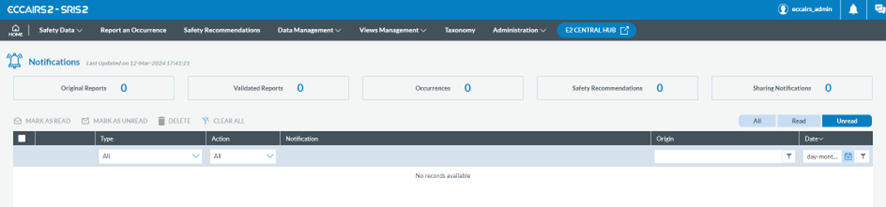
Users with this role have the notifications table empty as they don’t receive query-based or object-based notifications.
3. Safety Data Management
E2 System Administrators have access to Safety Data management menus; however, it is not their core activity. They don’t perform the tasks of the Officer concerning Safety Data management. See the ‘Occurrence Officers´ tasks’ document for further detail.
4. Safety Recommendations
E2 System Administrators have access to Safety Recommendations menus; however, it is not their core activity. They don’t perform the tasks of the Officer concerning Safety Recommendations. See the ‘ECCAIRS2 - Safety Recommendation Officers´ tasks’ document for further detail.
5. Data Management
Although available, E2 System Administrators don’t create and manage Queries. The functionality is for the Officers. See the ‘ECCAIRS2 - Occurrence Officer’s tasks’ document for further detail.
6. Views Management
E2 System Administrators can create and manage Views, Sections and Webforms that are available for the Authorities when stored in the Central Common Library. The functionality for the National Security Administrators is applicable to E2 System Administrators. See the ‘ECCAIRS2 - National Security Administrator tasks’ document for further detail.