# 5.2. Search

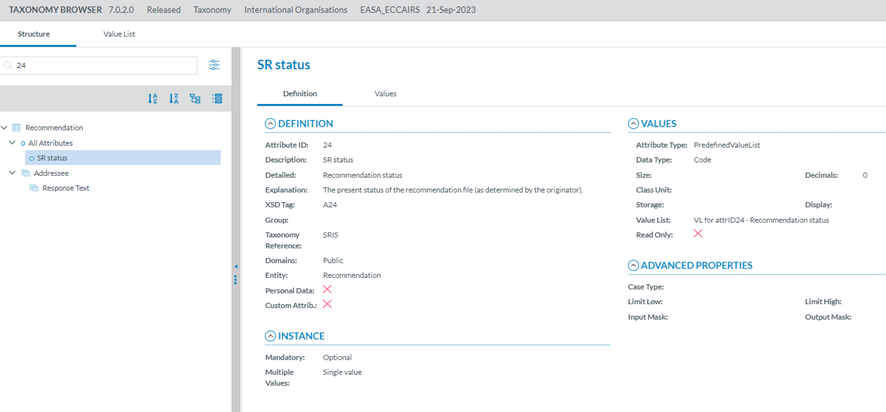
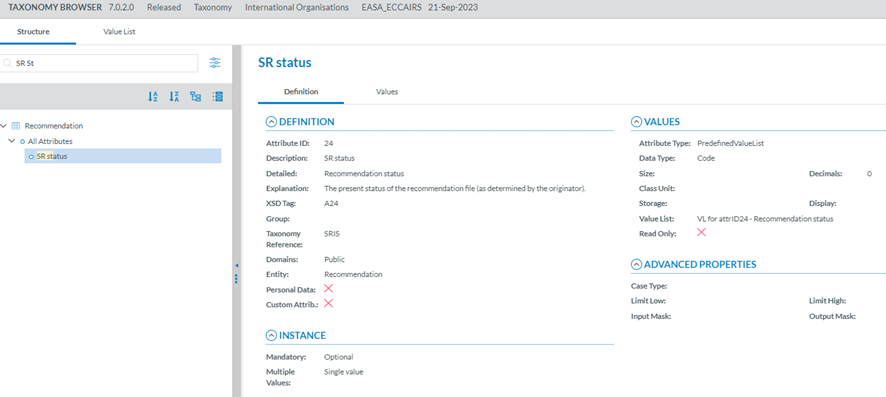
Entities and Attributes can be found by typing the Taxonomy Code or the Description in the Search box.

<span style="mso-ansi-language: EN-US;">By Taxonomy code:</span>

[![image.png](https://help.ci-aviationreporting.eu/uploads/images/gallery/2025-11/scaled-1680-/sstimage.png)](https://help.ci-aviationreporting.eu/uploads/images/gallery/2025-11/sstimage.png)

<span style="mso-ansi-language: EN-US;">By Description:</span>

[![image.png](https://help.ci-aviationreporting.eu/uploads/images/gallery/2025-11/scaled-1680-/r7gimage.png)](https://help.ci-aviationreporting.eu/uploads/images/gallery/2025-11/r7gimage.png)

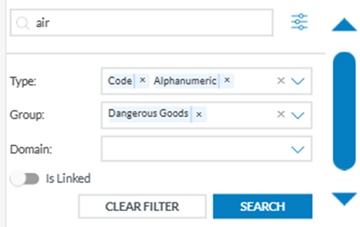
<span style="mso-ansi-language: EN-US;">A layer with more filters will be displayed if the Officer clicks the 'Advanced search' button.<span style="mso-spacerun: yes;"> </span></span>

<span style="mso-ansi-language: EN-US;"><span style="mso-spacerun: yes;"> </span></span>[![image.png](https://help.ci-aviationreporting.eu/uploads/images/gallery/2025-11/scaled-1680-/TU0pNcimage.png)](https://help.ci-aviationreporting.eu/uploads/images/gallery/2025-11/TU0pNcimage.png)

<span lang="EN-GB" style="mso-ansi-language: EN-GB; mso-fareast-language: EN-GB;"> </span>

<span style="mso-ansi-language: EN-US;">The Officer can search attributes by:</span>

<span style="font-family: Symbol; mso-fareast-font-family: Symbol; mso-bidi-font-family: Symbol; color: #1b3891; mso-themecolor: text1; mso-ansi-language: EN-US;"><span style="mso-list: Ignore;">·<span style="font: 7.0pt 'Times New Roman';"> </span></span></span><span style="mso-ansi-language: EN-US;">Type: attribute data type</span>

<span style="font-family: Symbol; mso-fareast-font-family: Symbol; mso-bidi-font-family: Symbol; color: #1b3891; mso-themecolor: text1; mso-ansi-language: EN-US;"><span style="mso-list: Ignore;">·<span style="font: 7.0pt 'Times New Roman';"> </span></span></span><span style="mso-ansi-language: EN-US;">Group: the attributes are grouped by specific criteria defined by the taxonomy administrators, i.e. Maintenance, Management, etc</span><span lang="EN-GB">.</span>

<span style="font-family: Symbol; mso-fareast-font-family: Symbol; mso-bidi-font-family: Symbol; color: #1b3891; mso-themecolor: text1; mso-ansi-language: EN-US;"><span style="mso-list: Ignore;">·<span style="font: 7.0pt 'Times New Roman';"> </span></span></span><span style="mso-ansi-language: EN-US;">Domain: Attributes belonging to a certain domain, i.e., RIT, a subset of the ECCAIRS aviation taxonomy.</span>

<span style="font-family: Symbol; mso-fareast-font-family: Symbol; mso-bidi-font-family: Symbol; color: #1b3891; mso-themecolor: text1; mso-ansi-language: EN-US;"><span style="mso-list: Ignore;">·<span style="font: 7.0pt 'Times New Roman';"> </span></span></span><span style="mso-ansi-language: EN-US;">For each filter, the Officer can select as many values as needed. Then, the Officer must click the 'Search' button to refresh the tree with the introduced filters.</span>

[![image.png](https://help.ci-aviationreporting.eu/uploads/images/gallery/2025-11/scaled-1680-/fNNimage.png)](https://help.ci-aviationreporting.eu/uploads/images/gallery/2025-11/fNNimage.png)

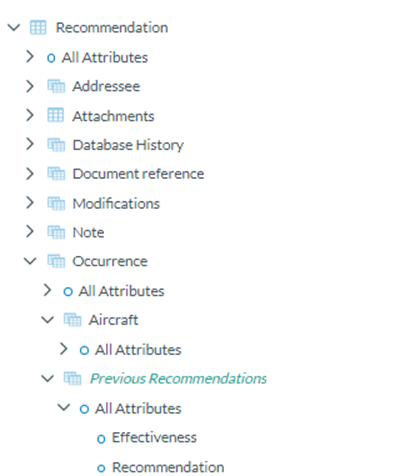
<span style="mso-ansi-language: EN-US;">Additionally, the Officer can indicate if they want the linked entities shown in the Taxonomy tree. They are shown in green and cursive letters.</span>

[![image.png](https://help.ci-aviationreporting.eu/uploads/images/gallery/2025-11/scaled-1680-/3Vvimage.png)](https://help.ci-aviationreporting.eu/uploads/images/gallery/2025-11/3Vvimage.png)

The Taxonomy Tree can be ordered alphabetically by clicking on the 'A-Z' icon or 'Z-A' icon : [![image.png](https://help.ci-aviationreporting.eu/uploads/images/gallery/2025-11/scaled-1680-/GzSimage.png)](https://help.ci-aviationreporting.eu/uploads/images/gallery/2025-11/GzSimage.png)

You can collapse or expand all item of the Taxonomy Tree with the following buttons:

- Expand all [![image.png](https://help.ci-aviationreporting.eu/uploads/images/gallery/2025-10/scaled-1680-/xRoimage.png)](https://help.ci-aviationreporting.eu/uploads/images/gallery/2025-10/xRoimage.png)
- Collapse all ![](https://help.aviationreporting.eu/E2-Reporting/img7.png)[![image.png](https://help.ci-aviationreporting.eu/uploads/images/gallery/2025-10/scaled-1680-/KGiimage.png)](https://help.ci-aviationreporting.eu/uploads/images/gallery/2025-10/KGiimage.png)

<span lang="EN-GB"></span>