# 4.2. Libraries
All information presented in this section concerning the creation and management of libraries also applies to Word-templates.
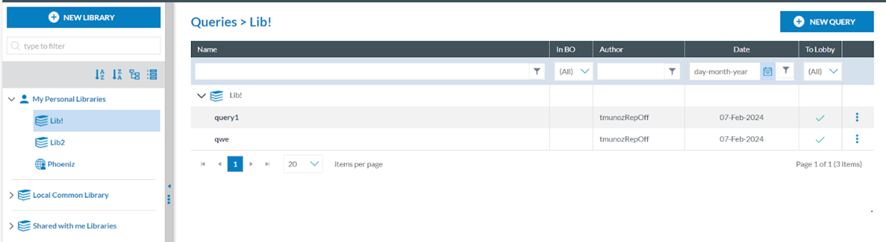
The system provides the libraries available to the Officer on the left panel of the Queries menu:
[](https://help.ci-aviationreporting.eu/uploads/images/gallery/2025-11/JC0image.png)
#### 4.2.1. My Personal Libraries
The queries stored in personal libraries are only available to the owner of the libraries. The owner can decide to share a particular query from the Personal Libraries or share the complete Library with other Authority users. Only users with permission to execute queries will be eligible.
#### 4.2.2. Local Common Library
The queries stored in the Local Common Library are available for all Authority users with per-missions to queries. Officers cannot create, edit or delete queries in the Local Common Library. They can execute the queries or copy them to their Personal Libraries.
#### 4.2.3. Shared with me libraries
When the library owner or query has shared it with the Officer, it will appear under these users' ‘Shared with me libraries’. They can execute the queries or copy them to their Personal Libraries.
#### 4.2.4. Creation of a library
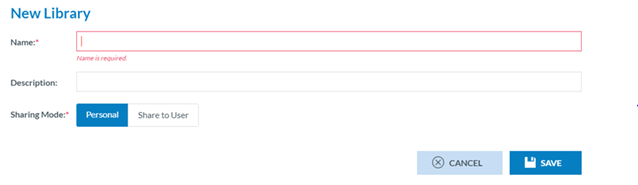
Once in the ‘Data management’ ‘Queries’ menu, the Officer has to click on ‘New Library’, and the system will display a modal window to create the Library:
[](https://help.ci-aviationreporting.eu/uploads/images/gallery/2025-11/sTLimage.png)
The Officer has to fill in the mandatory Name field, provide a description (if needed), and specify the Sharing mode, which can be ‘Personal’ or ‘Share to User’.
If ‘Share to User’ is selected, the system will display a section to choose the user/s:
[](https://help.ci-aviationreporting.eu/uploads/images/gallery/2025-11/UVlimage.png)
Therein, the Officer has to select the specific users through the check box and click the ‘ADD’ button, which will be activated. The selected users will be available on the ‘Selected Users’ tab.
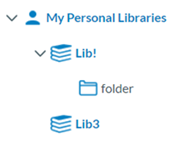
The Officer has to click on ‘Save’ for both Personal or Shared to User, and the Library will be saved accordingly and will appear in the left pane under ‘My Personal Libraries’:
[](https://help.ci-aviationreporting.eu/uploads/images/gallery/2025-11/xznimage.png)
If the created Library is ‘Shared to user’, it will show the ‘Shared’ icon [](https://help.ci-aviationreporting.eu/uploads/images/gallery/2025-11/EGDimage.png)
#### 4.2.4. Management of My Personal Libraries
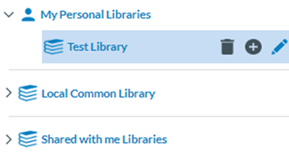
Next to each Library under My Personal Libraries of the Officer, the system provides the deleting, adding category and editing buttons.
[](https://help.ci-aviationreporting.eu/uploads/images/gallery/2025-11/54cimage.png)
##### 4.2.4.1. Deleting a Library
The Officer has to click on the Delete icon (rubbish) next to the specific Library, and the system will delete the Library from the My Personal Libraries tree as long as it has no more queries. Otherwise, the system will display a warning message and will not delete the Library. The library tree will be updated accordingly.
##### 4.2.4.2. Adding a category or folder to a Library
The Officer has to click on the ‘+’ button next to the specific Library, and the system will display a folder below the Library:
[](https://help.ci-aviationreporting.eu/uploads/images/gallery/2025-11/4Tgimage.png)
The Officer has to type a Name and click on ‘Intro’. The folder or category will be added to the tree and will be available to store queries of the Officer:
[](https://help.ci-aviationreporting.eu/uploads/images/gallery/2025-11/W9Uimage.png)
Next to the folder or category, the management buttons will appear as follows:
[](https://help.ci-aviationreporting.eu/uploads/images/gallery/2025-11/3W1image.png)
The category can only be deleted if it does not include queries.
The ‘+’ button is to add subcategories. It works the same way as adding categories to the Library.
The edit button only updates the Name, not the location of the category.
##### 4.2.4.3. Editing a Library
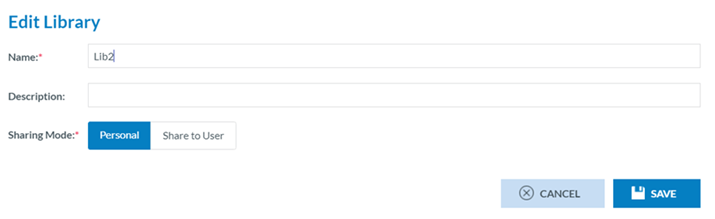
The Officer has to click on the editing (pencil) icon next to the specific Library, and the system will display the editing window:
[](https://help.ci-aviationreporting.eu/uploads/images/gallery/2025-11/s3eimage.png)
This page is the same as the library creation window of the previous section. The Officer must update the corresponding fields and click ‘Save’. The changes will be saved in the database and Library tree.
[](https://help.ci-aviationreporting.eu/uploads/images/gallery/2025-11/KIGimage.png)