# 5. Taxonomy Browser

# 5.1. Taxonomy

<span lang="EN-GB">The E2 system is built around the ECCAIRS taxonomy, constituted by ADREP taxonomy + ECCAIRS/EU specific taxonomy.<span style="mso-spacerun: yes;"> </span>While most of it is centrally maintained, in accordance with specific governance through the NA’s established Data and Quality Working Group, there is also the possibility for Authorities to maintain their own custom taxonomy, which allows them to adapt their usage of E2 to their own processes.</span>

<span lang="EN-GB">The taxonomy browser is a portal of the E2 System that provides detailed information of all the ECCAIRS taxonomy structures, entities, attributes and value lists in an easy-to-use UI.</span>

<span lang="EN-GB">The taxonomy browser is only for consulting purposes.</span>

<span lang="EN-GB">The Officer has to access the taxonomy menu to access the central or custom taxonomy for the Officer’s Authority. See the List of taxonomies section for further details.</span>

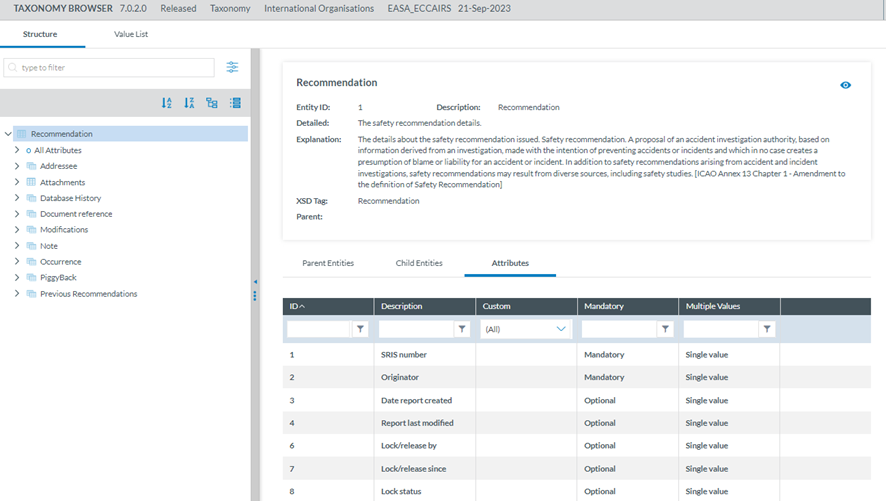
<span lang="EN-GB">The Taxonomy tree and the search bar are displayed on the left side of the screen. They can be hidden by clicking on the 'arrow' icon. The left panel is resizable by clicking on the 3-dot menu and moving it to the left or the right. </span>

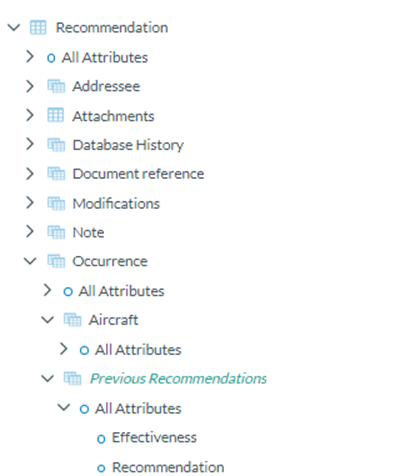
<span lang="EN-GB">The Officer can navigate the tree by unfolding the arrows and clicking the displayed elements. The information on the selected element will be displayed on the right side.</span>

[![image.png](https://help.ci-aviationreporting.eu/uploads/images/gallery/2025-11/scaled-1680-/4VKimage.png)](https://help.ci-aviationreporting.eu/uploads/images/gallery/2025-11/4VKimage.png)

<span lang="EN-GB" style="mso-ansi-language: EN-GB; mso-fareast-language: EN-GB;">  
</span>

# 5.2. Search

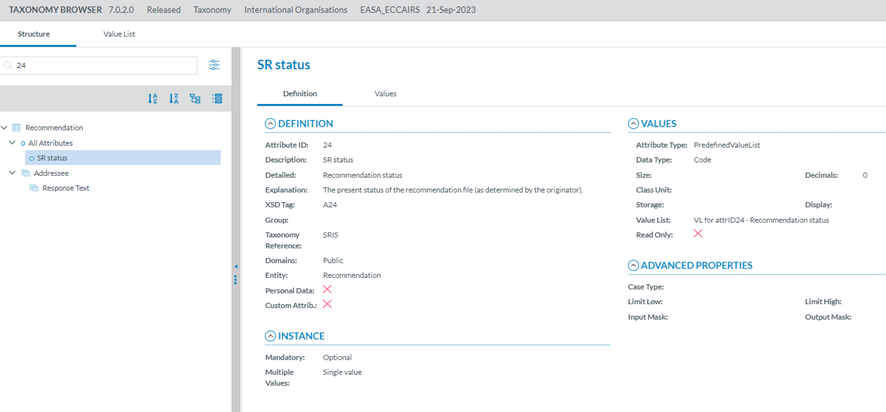
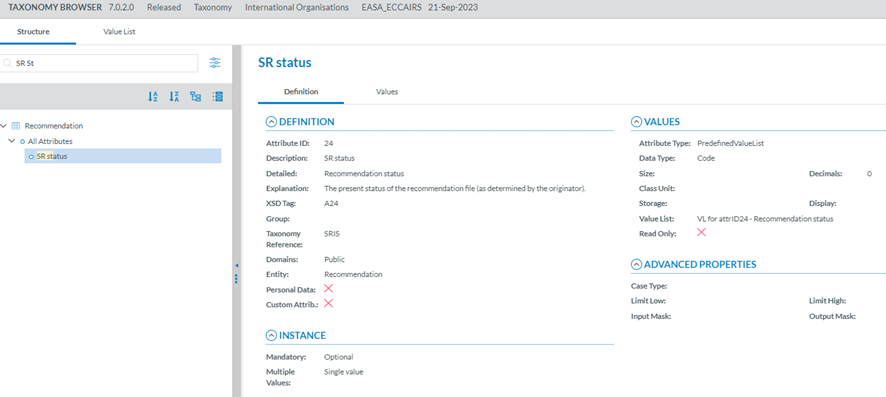
Entities and Attributes can be found by typing the Taxonomy Code or the Description in the Search box.

<span style="mso-ansi-language: EN-US;">By Taxonomy code:</span>

[![image.png](https://help.ci-aviationreporting.eu/uploads/images/gallery/2025-11/scaled-1680-/sstimage.png)](https://help.ci-aviationreporting.eu/uploads/images/gallery/2025-11/sstimage.png)

<span style="mso-ansi-language: EN-US;">By Description:</span>

[![image.png](https://help.ci-aviationreporting.eu/uploads/images/gallery/2025-11/scaled-1680-/r7gimage.png)](https://help.ci-aviationreporting.eu/uploads/images/gallery/2025-11/r7gimage.png)

<span style="mso-ansi-language: EN-US;">A layer with more filters will be displayed if the Officer clicks the 'Advanced search' button.<span style="mso-spacerun: yes;"> </span></span>

<span style="mso-ansi-language: EN-US;"><span style="mso-spacerun: yes;"> </span></span>[![image.png](https://help.ci-aviationreporting.eu/uploads/images/gallery/2025-11/scaled-1680-/TU0pNcimage.png)](https://help.ci-aviationreporting.eu/uploads/images/gallery/2025-11/TU0pNcimage.png)

<span lang="EN-GB" style="mso-ansi-language: EN-GB; mso-fareast-language: EN-GB;"> </span>

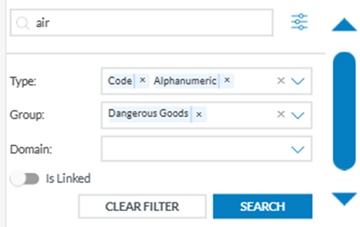
<span style="mso-ansi-language: EN-US;">The Officer can search attributes by:</span>

<span style="font-family: Symbol; mso-fareast-font-family: Symbol; mso-bidi-font-family: Symbol; color: #1b3891; mso-themecolor: text1; mso-ansi-language: EN-US;"><span style="mso-list: Ignore;">·<span style="font: 7.0pt 'Times New Roman';"> </span></span></span><span style="mso-ansi-language: EN-US;">Type: attribute data type</span>

<span style="font-family: Symbol; mso-fareast-font-family: Symbol; mso-bidi-font-family: Symbol; color: #1b3891; mso-themecolor: text1; mso-ansi-language: EN-US;"><span style="mso-list: Ignore;">·<span style="font: 7.0pt 'Times New Roman';"> </span></span></span><span style="mso-ansi-language: EN-US;">Group: the attributes are grouped by specific criteria defined by the taxonomy administrators, i.e. Maintenance, Management, etc</span><span lang="EN-GB">.</span>

<span style="font-family: Symbol; mso-fareast-font-family: Symbol; mso-bidi-font-family: Symbol; color: #1b3891; mso-themecolor: text1; mso-ansi-language: EN-US;"><span style="mso-list: Ignore;">·<span style="font: 7.0pt 'Times New Roman';"> </span></span></span><span style="mso-ansi-language: EN-US;">Domain: Attributes belonging to a certain domain, i.e., RIT, a subset of the ECCAIRS aviation taxonomy.</span>

<span style="font-family: Symbol; mso-fareast-font-family: Symbol; mso-bidi-font-family: Symbol; color: #1b3891; mso-themecolor: text1; mso-ansi-language: EN-US;"><span style="mso-list: Ignore;">·<span style="font: 7.0pt 'Times New Roman';"> </span></span></span><span style="mso-ansi-language: EN-US;">For each filter, the Officer can select as many values as needed. Then, the Officer must click the 'Search' button to refresh the tree with the introduced filters.</span>

[![image.png](https://help.ci-aviationreporting.eu/uploads/images/gallery/2025-11/scaled-1680-/fNNimage.png)](https://help.ci-aviationreporting.eu/uploads/images/gallery/2025-11/fNNimage.png)

<span style="mso-ansi-language: EN-US;">Additionally, the Officer can indicate if they want the linked entities shown in the Taxonomy tree. They are shown in green and cursive letters.</span>

[![image.png](https://help.ci-aviationreporting.eu/uploads/images/gallery/2025-11/scaled-1680-/3Vvimage.png)](https://help.ci-aviationreporting.eu/uploads/images/gallery/2025-11/3Vvimage.png)

The Taxonomy Tree can be ordered alphabetically by clicking on the 'A-Z' icon or 'Z-A' icon : [![image.png](https://help.ci-aviationreporting.eu/uploads/images/gallery/2025-11/scaled-1680-/GzSimage.png)](https://help.ci-aviationreporting.eu/uploads/images/gallery/2025-11/GzSimage.png)

You can collapse or expand all item of the Taxonomy Tree with the following buttons:

- Expand all [![image.png](https://help.ci-aviationreporting.eu/uploads/images/gallery/2025-10/scaled-1680-/xRoimage.png)](https://help.ci-aviationreporting.eu/uploads/images/gallery/2025-10/xRoimage.png)
- Collapse all ![](https://help.aviationreporting.eu/E2-Reporting/img7.png)[![image.png](https://help.ci-aviationreporting.eu/uploads/images/gallery/2025-10/scaled-1680-/KGiimage.png)](https://help.ci-aviationreporting.eu/uploads/images/gallery/2025-10/KGiimage.png)

<span lang="EN-GB"></span>

# 5.3. Taxonomy structure

<span style="mso-ansi-language: EN-US;">ECCAIRS and SRIS taxonomies have the same structure in 4 levels:</span>

- Entities
- Attributes
- Value Lists
- Values

### 5.3.1 Entities

<span style="mso-ansi-language: EN-US;">Entities represent objects to which attributes are assigned.</span>

<span style="mso-ansi-language: EN-US;">An entity could be, for example, the "Aircraft" involved in an incident or the "Events" describing the incident.</span>

<span style="mso-ansi-language: EN-US;">Multiple instances of an entity can exist if several such objects are involved in an event.</span>

<span style="mso-ansi-language: EN-US;">Entities can have child entities, e.g. "Engine" is a child entity of "Aircraft". Entities can also be linked to other entities. </span>

#### 5.3.1.1 Entities information

<span style="mso-ansi-language: EN-US;">Entities in the Taxonomy tree are marked with </span><span lang="EN-GB" style="mso-fareast-language: EN-GB; mso-no-proof: yes;"> </span><span style="mso-ansi-language: EN-US;"><span style="mso-spacerun: yes;"> </span>icon </span>[![image.png](https://help.ci-aviationreporting.eu/uploads/images/gallery/2025-11/scaled-1680-/FjNimage.png) ](https://help.ci-aviationreporting.eu/uploads/images/gallery/2025-11/FjNimage.png)<span style="mso-ansi-language: EN-US;">. When the Entity is a Linked Entity, it is also marked in green colour.</span>

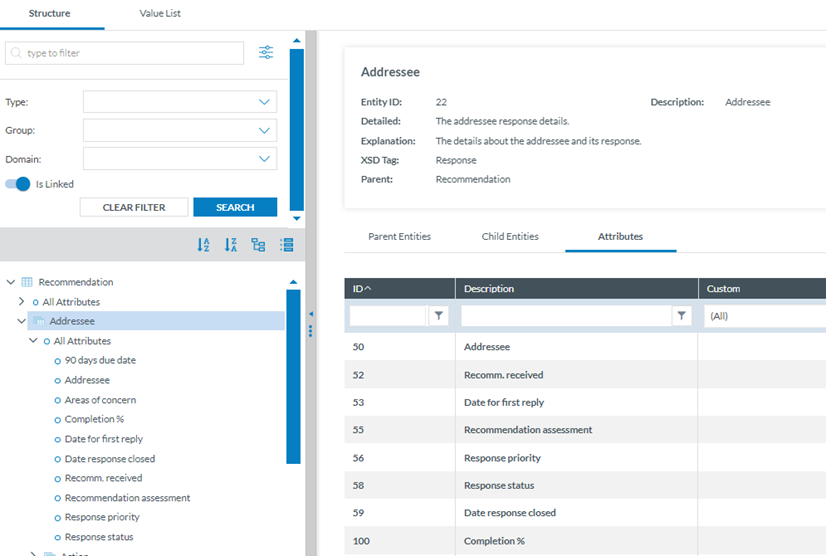
<span style="mso-ansi-language: EN-US;">The following information will be displayed on the right side of the screen when the Officer clicks on an Entity in the Taxonomy tree:</span>

<span style="font-family: Symbol; mso-fareast-font-family: Symbol; mso-bidi-font-family: Symbol; color: #1b3891; mso-themecolor: text1; mso-ansi-language: EN-US;"><span style="mso-list: Ignore;">·<span style="font: 7.0pt 'Times New Roman';"> </span></span></span><span style="mso-ansi-language: EN-US;">Entity information: A summary of the selected Entity.</span>

<span style="font-family: Symbol; mso-fareast-font-family: Symbol; mso-bidi-font-family: Symbol; color: #1b3891; mso-themecolor: text1; mso-ansi-language: EN-US;"><span style="mso-list: Ignore;">·<span style="font: 7.0pt 'Times New Roman';"> </span></span></span><span style="mso-ansi-language: EN-US;">Parent Entities: The list of its parent Entities</span>

<span style="font-family: Symbol; mso-fareast-font-family: Symbol; mso-bidi-font-family: Symbol; color: #1b3891; mso-themecolor: text1; mso-ansi-language: EN-US;"><span style="mso-list: Ignore;">·<span style="font: 7.0pt 'Times New Roman';"> </span></span></span><span style="mso-ansi-language: EN-US;">Child Entities: The list of its children Entities</span>

<span style="font-family: Symbol; mso-fareast-font-family: Symbol; mso-bidi-font-family: Symbol; color: #1b3891; mso-themecolor: text1; mso-ansi-language: EN-US;"><span style="mso-list: Ignore;">·<span style="font: 7.0pt 'Times New Roman';"> </span></span></span><span style="mso-ansi-language: EN-US;">Attributes. The list of its Attributes</span>

<span style="mso-ansi-language: EN-US;">Click on each tab (Parent Entities, Child Entities, Attributes) to view the relevant information:</span>

[![image.png](https://help.ci-aviationreporting.eu/uploads/images/gallery/2025-11/scaled-1680-/afkimage.png)](https://help.ci-aviationreporting.eu/uploads/images/gallery/2025-11/afkimage.png)

### 5.3.2 Attributes

<span style="mso-ansi-language: EN-US;">Attributes describe properties/values associated with an entity. An attribute of the “Aircraft” entity is, for instance, its "manufacturer/model". Attributes can have single or multiple values.</span>

- Number
- Decimals
- Text
- Alphanumeric
- Date
- Time
- DateTime
- Longitude
- Latitude
- Code
- Code and Additional Text
- Code or Alternative Text
- ECCAIRS Resource Locator
- ECCAIRS Data Link
- ECCAIRS Embedded Data

#### 5.3.2.1 Attributes inform<span lang="EN-GB">ation</span>

<span style="mso-ansi-language: EN-US;">The Attributes are marked with </span>[![image.png](https://help.ci-aviationreporting.eu/uploads/images/gallery/2025-11/scaled-1680-/WK1image.png) ](https://help.ci-aviationreporting.eu/uploads/images/gallery/2025-11/WK1image.png)<span lang="EN-GB" style="mso-fareast-language: EN-GB; mso-no-proof: yes;"> </span><span style="mso-ansi-language: EN-US;">icon in the Taxonomy Tree.</span>

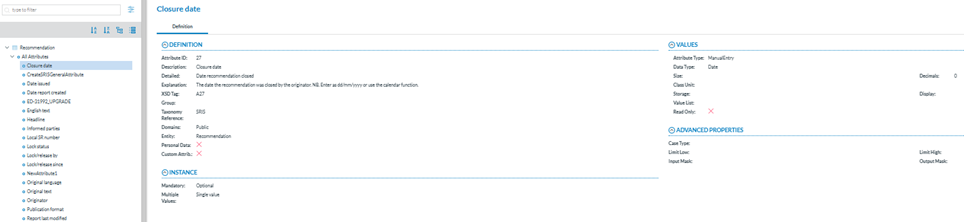
<span style="mso-ansi-language: EN-US;">The Officer can view the information of an Attribute from two places in the Taxonomy Browser:</span>

<span style="mso-bidi-font-family: Calibri; color: #0b4d6f; mso-ansi-language: EN-US;"><span style="mso-list: Ignore;">a.<span style="font: 7.0pt 'Times New Roman';"> </span></span></span><span style="mso-ansi-language: EN-US;">Find an attribute in the Taxonomy Tree and click it: </span>

[![image.png](https://help.ci-aviationreporting.eu/uploads/images/gallery/2025-11/scaled-1680-/jUNimage.png)](https://help.ci-aviationreporting.eu/uploads/images/gallery/2025-11/jUNimage.png)

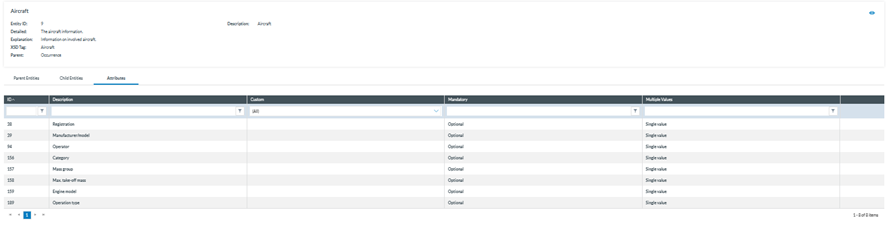
<span style="mso-bidi-font-family: Calibri; color: #0b4d6f; mso-ansi-language: EN-US;"><span style="mso-list: Ignore;">b.<span style="font: 7.0pt 'Times New Roman';"> </span></span></span><span style="mso-ansi-language: EN-US;">Select the Entity to which the Attribute belongs and click on the 'Attribute' tab. The Officer will see all the Attributes of the selected Entity.</span>

[![image.png](https://help.ci-aviationreporting.eu/uploads/images/gallery/2025-11/scaled-1680-/Fd5image.png)](https://help.ci-aviationreporting.eu/uploads/images/gallery/2025-11/Fd5image.png)

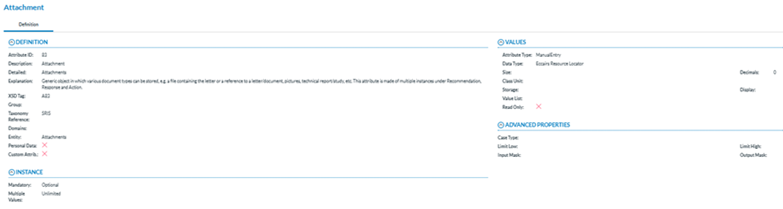
<span style="mso-ansi-language: EN-US;">Click on the 'Eye' icon to view the detailed information.</span>

**<span lang="EN-GB" style="font-family: Symbol; mso-fareast-font-family: Symbol; mso-bidi-font-family: Symbol; color: #1b3891; mso-themecolor: text1; font-weight: normal; mso-bidi-font-weight: bold;"><span style="mso-list: Ignore;">·<span style="font: 7.0pt 'Times New Roman';"> </span></span></span>****<span lang="EN-GB" style="mso-bidi-font-family: 'Times New Roman';">Definition</span>**

[![image.png](https://help.ci-aviationreporting.eu/uploads/images/gallery/2025-11/scaled-1680-/P7yimage.png)](https://help.ci-aviationreporting.eu/uploads/images/gallery/2025-11/P7yimage.png)

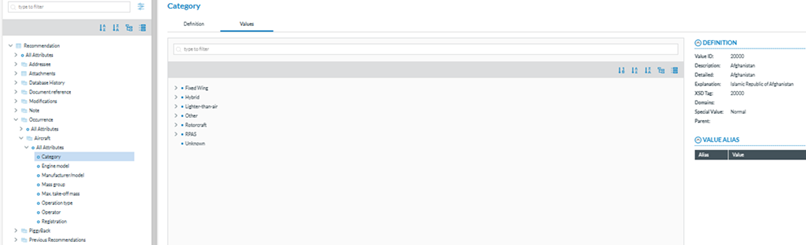
- <span lang="EN-GB">**Values:** I</span><span>f the Attribute has a predefined value List.<span> </span>In the Values tree, the Officer can navigate the values by clicking on each element. The selected value will display its definition, and the Values can be searched by Taxonomy code or description and ordered alphabetically.</span>

[![image.png](https://help.ci-aviationreporting.eu/uploads/images/gallery/2025-11/scaled-1680-/958image.png)](https://help.ci-aviationreporting.eu/uploads/images/gallery/2025-11/958image.png)

### 5.3.3 Value Lists

<span style="mso-ansi-language: EN-US;">The list of values an attribute can have is defined in a Value List. The Value List can have multiple levels where values are organised in a tree mode. Each Value List can have Aliases.</span>

### 5.3.4. Values

<span style="mso-ansi-language: EN-US;">Values assigned to an attribute depend on the type of the Attribute. These can be manually inputted or selected from a predefined list of values (Value List). </span>

### 5.3.5. Filter the information

<span style="mso-ansi-language: EN-US;">The Officer can filter the Parent Entities, Child Entities and Attributes table by typing the term to be searched in the filter row. The Officer can restrict the results by clicking the </span>[![image.png](https://help.ci-aviationreporting.eu/uploads/images/gallery/2025-11/scaled-1680-/YTrimage.png) ](https://help.ci-aviationreporting.eu/uploads/images/gallery/2025-11/YTrimage.png)<span style="mso-ansi-language: EN-US;"> '</span><span lang="EN-GB" style="mso-fareast-language: EN-GB; mso-no-proof: yes;"> </span><span style="mso-ansi-language: EN-US;"> filter' button. By default, the 'contains' condition is selected. </span>

<span style="mso-ansi-language: EN-US;">To delete the filter, the Officer must click the ' </span>[![image.png](https://help.ci-aviationreporting.eu/uploads/images/gallery/2025-11/scaled-1680-/GY7image.png) ](https://help.ci-aviationreporting.eu/uploads/images/gallery/2025-11/GY7image.png)<span style="mso-ansi-language: EN-US;">clear filter' icon.</span>

[![image.png](https://help.ci-aviationreporting.eu/uploads/images/gallery/2025-11/scaled-1680-/EtLimage.png)](https://help.ci-aviationreporting.eu/uploads/images/gallery/2025-11/EtLimage.png)

### 5.3.6. View detailed information

<span style="mso-ansi-language: EN-US;">To view more information about the select Entity, the Officer must click the 'eye' icon.</span>

[![image.png](https://help.ci-aviationreporting.eu/uploads/images/gallery/2025-11/scaled-1680-/IzKimage.png)](https://help.ci-aviationreporting.eu/uploads/images/gallery/2025-11/IzKimage.png)

<span lang="EN-GB" style="mso-ansi-language: EN-GB; mso-fareast-language: EN-GB;"> </span>

<span style="mso-ansi-language: EN-US;">To view more information about the Parent Entities, Child Entities or Attributes, the Officer can click the 'eye' icon that appears while moving the mouse over the row.</span>

[![image.png](https://help.ci-aviationreporting.eu/uploads/images/gallery/2025-11/scaled-1680-/ct3image.png)](https://help.ci-aviationreporting.eu/uploads/images/gallery/2025-11/ct3image.png)

<span lang="EN-GB" style="mso-ansi-language: EN-GB; mso-fareast-language: EN-GB;"> </span>

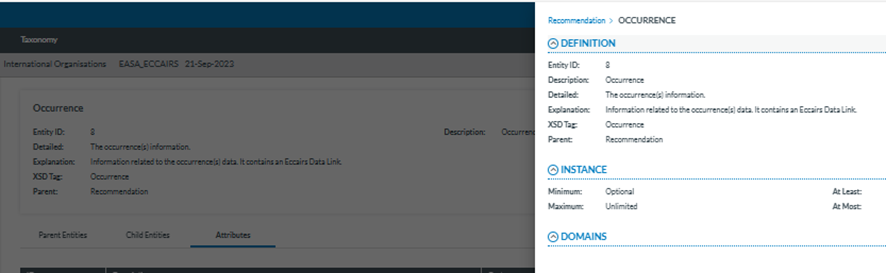
<span style="mso-ansi-language: EN-US;">A slide-in panel with the element information will be displayed when clicking on the' eye' icon. The Officer can click outside the panel to close it and return to the previous screen.</span>

[![image.png](https://help.ci-aviationreporting.eu/uploads/images/gallery/2025-11/scaled-1680-/ALPimage.png)](https://help.ci-aviationreporting.eu/uploads/images/gallery/2025-11/ALPimage.png)

# 5.4. List of Taxonomies

<span style="mso-ansi-language: EN-US;">The Officer can access the list of taxonomies through the ‘Taxonomy’ menu displayed in the top menu:</span>

[![image.png](https://help.ci-aviationreporting.eu/uploads/images/gallery/2025-11/scaled-1680-/Pu3image.png)](https://help.ci-aviationreporting.eu/uploads/images/gallery/2025-11/Pu3image.png)

<span style="mso-ansi-language: EN-US;">If there is one, the last SRIS-released taxonomy and the custom taxonomy for the Authority of the Officer will be listed.</span>

<span style="mso-ansi-language: EN-US;">It includes the SRIS last released taxonomy:</span>

[![image.png](https://help.ci-aviationreporting.eu/uploads/images/gallery/2025-11/scaled-1680-/UvJimage.png)](https://help.ci-aviationreporting.eu/uploads/images/gallery/2025-11/UvJimage.png)

<span lang="EN-GB" style="mso-ansi-language: EN-GB; mso-fareast-language: EN-GB;"> </span>

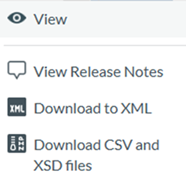
<span style="mso-ansi-language: EN-US;">If the Officer clicks on any of them, the system will display the taxonomy browser of that taxonomy. Click on the 3-dot button of each taxonomy of the list, and the system will display the following menu:</span>

[![image.png](https://help.ci-aviationreporting.eu/uploads/images/gallery/2025-11/scaled-1680-/aMzimage.png)](https://help.ci-aviationreporting.eu/uploads/images/gallery/2025-11/aMzimage.png)

<span lang="EN-GB" style="mso-ansi-language: EN-US;"><span style="mso-spacerun: yes;"> </span></span>Download an XML with the taxonomy or CSV and XSD files with the taxonomy to view the taxonomy browser and release notes.

<span style="mso-ansi-language: EN-US;">The View option accesses the Taxonomy browser of the selected taxonomy. See the section </span><span lang="EN-GB"><span lang="EN-US" style="mso-ansi-language: EN-US;">Taxonomy browser</span></span><span style="mso-ansi-language: EN-US;"> for further details.</span>

### <span style="mso-fareast-font-family: Calibri; mso-bidi-font-family: Calibri;"><span style="mso-list: Ignore;">5.4.1<span style="font: 7.0pt 'Times New Roman';"> </span></span></span>View Release Notes

<span style="mso-ansi-language: EN-US;">Release Notes are generated automatically when a new taxonomy version is released. It includes all the changes the new Taxonomy reflects: attributes, value lists and values that have been added, edited or deleted.<span style="mso-spacerun: yes;"> </span></span>

<span style="mso-ansi-language: EN-US;">The Taxonomy version has four digits and consists of the following fields:</span>

<span style="font-family: Symbol; mso-fareast-font-family: Symbol; mso-bidi-font-family: Symbol; color: #1b3891; mso-themecolor: text1; mso-ansi-language: EN-US;"><span style="mso-list: Ignore;">·<span style="font: 7.0pt 'Times New Roman';"> </span></span></span><span style="mso-ansi-language: EN-US;">Major</span>

<span style="font-family: Symbol; mso-fareast-font-family: Symbol; mso-bidi-font-family: Symbol; color: #1b3891; mso-themecolor: text1; mso-ansi-language: EN-US;"><span style="mso-list: Ignore;">·<span style="font: 7.0pt 'Times New Roman';"> </span></span></span><span style="mso-ansi-language: EN-US;">Minor</span>

<span style="font-family: Symbol; mso-fareast-font-family: Symbol; mso-bidi-font-family: Symbol; color: #1b3891; mso-themecolor: text1; mso-ansi-language: EN-US;"><span style="mso-list: Ignore;">·<span style="font: 7.0pt 'Times New Roman';"> </span></span></span><span style="mso-ansi-language: EN-US;">Revision</span>

<span style="font-family: Symbol; mso-fareast-font-family: Symbol; mso-bidi-font-family: Symbol; color: #1b3891; mso-themecolor: text1; mso-ansi-language: EN-US;"><span style="mso-list: Ignore;">·<span style="font: 7.0pt 'Times New Roman';"> </span></span></span><span style="mso-ansi-language: EN-US;">Build</span>

<span style="mso-ansi-language: EN-US;">When a new Taxonomy is released, depending on the changes in its items, the version is auto-matically populated based on these rules:</span>

<span style="font-family: Symbol; mso-fareast-font-family: Symbol; mso-bidi-font-family: Symbol; color: #1b3891; mso-themecolor: text1; mso-ansi-language: EN-US;"><span style="mso-list: Ignore;">·<span style="font: 7.0pt 'Times New Roman';"> </span></span></span>**<span lang="EN-GB" style="mso-bidi-font-family: 'Times New Roman';">Major</span>**<span style="mso-ansi-language: EN-US;">: It will be increased if any of these changes have been applied:</span>

<span style="font-family: Wingdings; mso-fareast-font-family: Wingdings; mso-bidi-font-family: Wingdings; color: #1b3891; mso-themecolor: text1; mso-ansi-language: EN-US;"><span style="mso-list: Ignore;">ü<span style="font: 7.0pt 'Times New Roman';"> </span></span></span><span style="mso-ansi-language: EN-US;">Entity related:</span>

<span style="mso-bidi-font-family: Calibri; color: #1b3891; mso-themecolor: text1; mso-ansi-language: EN-US;"><span style="mso-list: Ignore;">o<span style="font: 7.0pt 'Times New Roman';"> </span></span></span><span style="mso-ansi-language: EN-US;">Add Entity</span>

<span style="mso-bidi-font-family: Calibri; color: #1b3891; mso-themecolor: text1; mso-ansi-language: EN-US;"><span style="mso-list: Ignore;">o<span style="font: 7.0pt 'Times New Roman';"> </span></span></span><span style="mso-ansi-language: EN-US;">Delete Entity</span>

<span style="mso-bidi-font-family: Calibri; color: #1b3891; mso-themecolor: text1; mso-ansi-language: EN-US;"><span style="mso-list: Ignore;">o<span style="font: 7.0pt 'Times New Roman';"> </span></span></span><span style="mso-ansi-language: EN-US;">Add entity relation</span>

<span style="mso-bidi-font-family: Calibri; color: #1b3891; mso-themecolor: text1; mso-ansi-language: EN-US;"><span style="mso-list: Ignore;">o<span style="font: 7.0pt 'Times New Roman';"> </span></span></span><span style="mso-ansi-language: EN-US;">Delete entity relation</span>

<span style="mso-bidi-font-family: Calibri; color: #1b3891; mso-themecolor: text1; mso-ansi-language: EN-US;"><span style="mso-list: Ignore;">o<span style="font: 7.0pt 'Times New Roman';"> </span></span></span><span style="mso-ansi-language: EN-US;">Change Entity (only allowed changes)</span>

<span style="font-family: Symbol; mso-fareast-font-family: Symbol; mso-bidi-font-family: Symbol; color: #1b3891; mso-themecolor: text1; mso-ansi-language: EN-US;"><span style="mso-list: Ignore;">·<span style="font: 7.0pt 'Times New Roman';"> </span></span></span>**<span lang="EN-GB" style="mso-bidi-font-family: 'Times New Roman';">Minor</span>**<span style="mso-ansi-language: EN-US;">: It will be increased if any of these changes have been applied:</span>

<span style="font-family: Wingdings; mso-fareast-font-family: Wingdings; mso-bidi-font-family: Wingdings; color: #1b3891; mso-themecolor: text1; mso-ansi-language: EN-US;"><span style="mso-list: Ignore;">ü<span style="font: 7.0pt 'Times New Roman';"> </span></span></span><span style="mso-ansi-language: EN-US;">Attribute related:</span>

<span style="mso-bidi-font-family: Calibri; color: #1b3891; mso-themecolor: text1; mso-ansi-language: EN-US;"><span style="mso-list: Ignore;">o<span style="font: 7.0pt 'Times New Roman';"> </span></span></span><span style="mso-ansi-language: EN-US;">Delete Attribute</span>

<span style="font-family: Symbol; mso-fareast-font-family: Symbol; mso-bidi-font-family: Symbol; color: #1b3891; mso-themecolor: text1; mso-ansi-language: EN-US;"><span style="mso-list: Ignore;">·<span style="font: 7.0pt 'Times New Roman';"> </span></span></span>**<span lang="EN-GB" style="mso-bidi-font-family: 'Times New Roman';">Revision</span>**<span style="mso-ansi-language: EN-US;">:<span style="mso-spacerun: yes;"> </span>It will be increased if any of these changes have been applied:</span>

<span style="font-family: Wingdings; mso-fareast-font-family: Wingdings; mso-bidi-font-family: Wingdings; color: #1b3891; mso-themecolor: text1; mso-ansi-language: EN-US;"><span style="mso-list: Ignore;">ü<span style="font: 7.0pt 'Times New Roman';"> </span></span></span><span lang="EN-GB">A</span><span style="mso-ansi-language: EN-US;">ttribute related:</span>

<span style="mso-bidi-font-family: Calibri; color: #1b3891; mso-themecolor: text1; mso-ansi-language: EN-US;"><span style="mso-list: Ignore;">o<span style="font: 7.0pt 'Times New Roman';"> </span></span></span><span style="mso-ansi-language: EN-US;">Add Attribute</span>

<span style="mso-bidi-font-family: Calibri; color: #1b3891; mso-themecolor: text1; mso-ansi-language: EN-US;"><span style="mso-list: Ignore;">o<span style="font: 7.0pt 'Times New Roman';"> </span></span></span><span style="mso-ansi-language: EN-US;">Change attribute (only allowed changes)</span>

<span style="font-family: Wingdings; mso-fareast-font-family: Wingdings; mso-bidi-font-family: Wingdings; color: #1b3891; mso-themecolor: text1; mso-ansi-language: EN-US;"><span style="mso-list: Ignore;">ü<span style="font: 7.0pt 'Times New Roman';"> </span></span></span><span style="mso-ansi-language: EN-US;">Attribute values related:</span>

<span style="mso-bidi-font-family: Calibri; color: #1b3891; mso-themecolor: text1; mso-ansi-language: EN-US;"><span style="mso-list: Ignore;">o<span style="font: 7.0pt 'Times New Roman';"> </span></span></span><span style="mso-ansi-language: EN-US;">Change value limits</span>

<span style="font-family: Symbol; mso-fareast-font-family: Symbol; mso-bidi-font-family: Symbol; color: #1b3891; mso-themecolor: text1; mso-ansi-language: EN-US;"><span style="mso-list: Ignore;">·<span style="font: 7.0pt 'Times New Roman';"> </span></span></span>**<span lang="EN-GB" style="mso-bidi-font-family: 'Times New Roman';">Build</span>**<span style="mso-ansi-language: EN-US;">: it will be increased if any of these changes have been applied:</span>

<span style="font-family: Wingdings; mso-fareast-font-family: Wingdings; mso-bidi-font-family: Wingdings; color: #1b3891; mso-themecolor: text1; mso-ansi-language: EN-US;"><span style="mso-list: Ignore;">ü<span style="font: 7.0pt 'Times New Roman';"> </span></span></span><span style="mso-ansi-language: EN-US;">Attribute values related:</span>

<span style="mso-bidi-font-family: Calibri; color: #1b3891; mso-themecolor: text1; mso-ansi-language: EN-US;"><span style="mso-list: Ignore;">o<span style="font: 7.0pt 'Times New Roman';"> </span></span></span><span style="mso-ansi-language: EN-US;">Add values</span>

<span style="mso-bidi-font-family: Calibri; color: #1b3891; mso-themecolor: text1; mso-ansi-language: EN-US;"><span style="mso-list: Ignore;">o<span style="font: 7.0pt 'Times New Roman';"> </span></span></span><span style="mso-ansi-language: EN-US;">Delete values</span>

<span style="mso-bidi-font-family: Calibri; color: #1b3891; mso-themecolor: text1; mso-ansi-language: EN-US;"><span style="mso-list: Ignore;">o<span style="font: 7.0pt 'Times New Roman';"> </span></span></span><span style="mso-ansi-language: EN-US;">Move values</span>

<span style="mso-bidi-font-family: Calibri; color: #1b3891; mso-themecolor: text1; mso-ansi-language: EN-US;"><span style="mso-list: Ignore;">o<span style="font: 7.0pt 'Times New Roman';"> </span></span></span><span style="mso-ansi-language: EN-US;">Change values (only allowed changes)</span>

<span style="mso-bidi-font-family: Calibri; color: #1b3891; mso-themecolor: text1; mso-ansi-language: EN-US;"><span style="mso-list: Ignore;">o<span style="font: 7.0pt 'Times New Roman';"> </span></span></span><span style="mso-ansi-language: EN-US;">Change value lists (only allowed changes)</span>

<span style="mso-ansi-language: EN-US;">The Name of the SRIS central taxonomy is ‘SRIS’ concatenated with the four-digit version code. e.g.: SRIS '6.3.0.1'. If a Custom Taxonomy exists for the Officer’s Authority, the Name will be SRIS\_DE\_ '6.3.0.1' (C#), where the # is the number of the custom taxonomy starting from cero (0).</span>

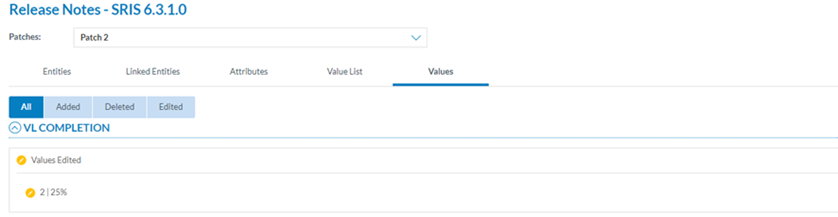
<span style="mso-ansi-language: EN-US;">When the Officer selects ‘View Release Notes', the system opens the Release Notes of the specific taxonomy:</span>

[![image.png](https://help.ci-aviationreporting.eu/uploads/images/gallery/2025-11/scaled-1680-/PxPimage.png)](https://help.ci-aviationreporting.eu/uploads/images/gallery/2025-11/PxPimage.png)

<span lang="EN-GB" style="mso-ansi-language: EN-GB; mso-fareast-language: EN-GB;"> </span>

<span style="mso-ansi-language: EN-US;">The page provides the following tabs with the corresponding release notes:</span>

<span style="font-family: Symbol; mso-fareast-font-family: Symbol; mso-bidi-font-family: Symbol; color: #1b3891; mso-themecolor: text1; mso-ansi-language: EN-US;"><span style="mso-list: Ignore;">·<span style="font: 7.0pt 'Times New Roman';"> </span></span></span><span style="mso-ansi-language: EN-US;">Entities</span>

<span style="font-family: Symbol; mso-fareast-font-family: Symbol; mso-bidi-font-family: Symbol; color: #1b3891; mso-themecolor: text1; mso-ansi-language: EN-US;"><span style="mso-list: Ignore;">·<span style="font: 7.0pt 'Times New Roman';"> </span></span></span><span style="mso-ansi-language: EN-US;">Linked entities</span>

<span style="font-family: Symbol; mso-fareast-font-family: Symbol; mso-bidi-font-family: Symbol; color: #1b3891; mso-themecolor: text1; mso-ansi-language: EN-US;"><span style="mso-list: Ignore;">·<span style="font: 7.0pt 'Times New Roman';"> </span></span></span><span style="mso-ansi-language: EN-US;">Attributes</span>

<span style="font-family: Symbol; mso-fareast-font-family: Symbol; mso-bidi-font-family: Symbol; color: #1b3891; mso-themecolor: text1; mso-ansi-language: EN-US;"><span style="mso-list: Ignore;">·<span style="font: 7.0pt 'Times New Roman';"> </span></span></span><span style="mso-ansi-language: EN-US;">Value List</span>

<span style="font-family: Symbol; mso-fareast-font-family: Symbol; mso-bidi-font-family: Symbol; color: #1b3891; mso-themecolor: text1; mso-ansi-language: EN-US;"><span style="mso-list: Ignore;">·<span style="font: 7.0pt 'Times New Roman';"> </span></span></span><span style="mso-ansi-language: EN-US;">Values</span>

<span style="mso-ansi-language: EN-US;"> </span>

<span style="mso-ansi-language: EN-US;">Download XML: it downloads the released taxonomy in XML format.</span>

Download CSV and XSD files: It downloads a zip file of the released taxonomy with the CSV and XSD files.