# How to set up notifications

###  <span style="mso-ansi-language: EN-US;">Some background</span>

#### <span style="mso-ansi-language: EN-US;">What are notifications?</span>

<span style="mso-ansi-language: EN-US;">Notifications in ECCAIRS 2 refer to the email messages or dashboard alerts generated by the system to inform users about specific events or actions. These notifications serve as a means of communication and provide important information related to Original Reports, Validate Reports and Occurrences being created, modified, or deleted.</span>

### <span style="mso-ansi-language: EN-US;">Means of notifications</span>

<span style="mso-ansi-language: EN-US;">There are 3 means if notifications that can be used in combination.</span>

#### <span style="mso-ansi-language: EN-US;">Email Notification</span>

<span style="mso-ansi-language: EN-US;">When an event occurs that triggers a notification, an email is sent by the system to the users informing him about the event. The email contains a hyperlink to the Original Report, the Validated Report or the Occurrence that triggered the notification</span>

#### <span style="mso-ansi-language: EN-US;">Dashboard notification</span>

<span style="mso-ansi-language: EN-US;">When an event occurs that triggers a notification, the user’s dashboard will be modified. It will display the nature of the notification, whether it is an Original Report, a Validate Report, an Occurrence, or a Safety recommendation  
The dashboard will also show system notifications such as when a query or a view or other was shared with the users; These notifications are system generated and fall outside the scope of this document</span>

[![image.png](https://help.ci-aviationreporting.eu/uploads/images/gallery/2025-11/scaled-1680-/EQrimage.png)](https://help.ci-aviationreporting.eu/uploads/images/gallery/2025-11/EQrimage.png)

##### <span style="mso-ansi-language: EN-US;">Setting up a notification</span>

<span style="mso-ansi-language: EN-US;">There are 2 levels where notifications can be setup</span>

#### <span style="mso-ansi-language: EN-US;">Setup by the authority</span>

<span style="mso-ansi-language: EN-US;">The National Authority Administrator(s) can setup a notification schemes within the Authority. Each user that is targeted in the scheme will be notified based on certain criteria</span>

#### <span style="mso-ansi-language: EN-US;">Accessing the Notification manager</span>

<span style="mso-ansi-language: EN-US;">Depending on the permissions the option to manage notifications becomes available on the home page.  
<span style="mso-spacerun: yes;"> </span>  
</span>

[![image.png](https://help.ci-aviationreporting.eu/uploads/images/gallery/2025-11/scaled-1680-/HG8image.png)](https://help.ci-aviationreporting.eu/uploads/images/gallery/2025-11/HG8image.png)

##### <span style="mso-ansi-language: EN-US;">The notification manager</span>

[![image.png](https://help.ci-aviationreporting.eu/uploads/images/gallery/2025-11/scaled-1680-/2j3image.png)](https://help.ci-aviationreporting.eu/uploads/images/gallery/2025-11/2j3image.png)

##### <span style="mso-ansi-language: EN-US;">Creating a new or updating an existing notification</span>

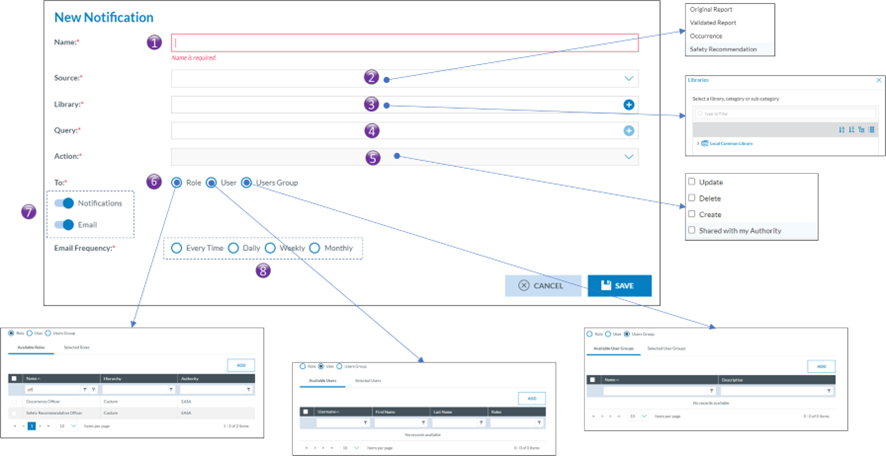
<span style="mso-ansi-language: EN-US;">Clicking on either an existing notification or clicking on new notification will open the notification setup page</span>

[![image.png](https://help.ci-aviationreporting.eu/uploads/images/gallery/2025-11/scaled-1680-/7Tzimage.png)](https://help.ci-aviationreporting.eu/uploads/images/gallery/2025-11/7Tzimage.png)

<span style="mso-bidi-font-family: Calibri; mso-bidi-theme-font: minor-latin; mso-ansi-language: EN-US;"><span style="mso-list: Ignore;">1.<span style="font: 7.0pt 'Times New Roman';"> </span></span></span><span style="mso-ansi-language: EN-US;">Name of the notification.   
Every notification is to have a name</span>

<span style="mso-bidi-font-family: Calibri; mso-bidi-theme-font: minor-latin; mso-ansi-language: EN-US;"><span style="mso-list: Ignore;">2.<span style="font: 7.0pt 'Times New Roman';"> </span></span></span><span style="mso-ansi-language: EN-US;">Source</span>

<span style="mso-bidi-font-family: Calibri; mso-bidi-theme-font: minor-latin; mso-ansi-language: EN-US;"><span style="mso-list: Ignore;">a.<span style="font: 7.0pt 'Times New Roman';"> </span></span></span><span style="mso-ansi-language: EN-US;">Occurrence Report</span>

<span style="mso-bidi-font-family: Calibri; mso-bidi-theme-font: minor-latin; mso-ansi-language: EN-US;"><span style="mso-list: Ignore;">b.<span style="font: 7.0pt 'Times New Roman';"> </span></span></span><span style="mso-ansi-language: EN-US;">Validated Report</span>

<span style="mso-bidi-font-family: Calibri; mso-bidi-theme-font: minor-latin; mso-ansi-language: EN-US;"><span style="mso-list: Ignore;">c.<span style="font: 7.0pt 'Times New Roman';"> </span></span></span><span style="mso-ansi-language: EN-US;">Occurrence</span>

<span style="mso-bidi-font-family: Calibri; mso-bidi-theme-font: minor-latin; mso-ansi-language: EN-US;"><span style="mso-list: Ignore;">d.<span style="font: 7.0pt 'Times New Roman';"> </span></span></span><span style="mso-ansi-language: EN-US;">Safety Recommendation</span>

<span style="mso-bidi-font-family: Calibri; mso-bidi-theme-font: minor-latin; mso-ansi-language: EN-US;"><span style="mso-list: Ignore;">3.<span style="font: 7.0pt 'Times New Roman';"> </span></span></span><span style="mso-ansi-language: EN-US;">Library</span>

<span style="mso-ansi-language: EN-US;">Just like queries, notifications are stored in libraries. </span>

<span style="mso-bidi-font-family: Calibri; mso-bidi-theme-font: minor-latin; mso-ansi-language: EN-US;"><span style="mso-list: Ignore;">4.<span style="font: 7.0pt 'Times New Roman';"> </span></span></span><span style="mso-ansi-language: EN-US;">Query  
A query can be used to filter out those Occurrence Reports, Validated Reports, Occurrences or, Safety Recommendations for which the notification is to be triggered. Any query form the Local Common Library can be used</span>

<span style="mso-bidi-font-family: Calibri; mso-bidi-theme-font: minor-latin; mso-ansi-language: EN-US;"><span style="mso-list: Ignore;">5.<span style="font: 7.0pt 'Times New Roman';"> </span></span></span><span style="mso-ansi-language: EN-US;">Action</span>

<span style="mso-bidi-font-family: Calibri; mso-bidi-theme-font: minor-latin; mso-ansi-language: EN-US;"><span style="mso-list: Ignore;">a.<span style="font: 7.0pt 'Times New Roman';"> </span></span></span><span style="mso-ansi-language: EN-US;">Update</span>

<span style="mso-bidi-font-family: Calibri; mso-bidi-theme-font: minor-latin; mso-ansi-language: EN-US;"><span style="mso-list: Ignore;">b.<span style="font: 7.0pt 'Times New Roman';"> </span></span></span><span style="mso-ansi-language: EN-US;">Delete</span>

<span style="mso-bidi-font-family: Calibri; mso-bidi-theme-font: minor-latin; mso-ansi-language: EN-US;"><span style="mso-list: Ignore;">c.<span style="font: 7.0pt 'Times New Roman';"> </span></span></span><span style="mso-ansi-language: EN-US;">Create</span>

<span style="mso-bidi-font-family: Calibri; mso-bidi-theme-font: minor-latin; mso-ansi-language: EN-US;"><span style="mso-list: Ignore;">d.<span style="font: 7.0pt 'Times New Roman';"> </span></span></span><span style="mso-ansi-language: EN-US;">Share with my authority</span>

<span style="mso-bidi-font-family: Calibri; mso-bidi-theme-font: minor-latin; mso-ansi-language: EN-US;"><span style="mso-list: Ignore;">6.<span style="font: 7.0pt 'Times New Roman';"> </span></span></span><span style="mso-ansi-language: EN-US;">Whom to notify</span>

<span style="mso-ansi-language: EN-US;">The target audience is set up in the whom to notify, Eccairs2 allows for three types of audiences.  
Only users that have the permission Notification in one of their roles can be targeted. Users also having the “Reporter Role” will be exempt of being notified</span>

<span style="mso-bidi-font-family: Calibri; mso-bidi-theme-font: minor-latin; mso-ansi-language: EN-US;"><span style="mso-list: Ignore;">a.<span style="font: 7.0pt 'Times New Roman';"> </span></span></span><span style="mso-ansi-language: EN-US;">Based on role(s)  
users that have a certain role will be notified. Example all users that have the Occurrence Officer role</span>

<span style="mso-bidi-font-family: Calibri; mso-bidi-theme-font: minor-latin; mso-ansi-language: EN-US;"><span style="mso-list: Ignore;">b.<span style="font: 7.0pt 'Times New Roman';"> </span></span></span><span style="mso-ansi-language: EN-US;">Based on user(s)</span>

<span style="mso-ansi-language: EN-US;">When using based on users, Eccairs 2 allows you to target certain users that need to get notified.</span>

<span style="mso-bidi-font-family: Calibri; mso-bidi-theme-font: minor-latin; mso-ansi-language: EN-US;"><span style="mso-list: Ignore;">c.<span style="font: 7.0pt 'Times New Roman';"> </span></span></span><span style="mso-ansi-language: EN-US;">Based on user groups(s)  
beside the two previous options, if user groups have been setup, then the notification can also be set up so that all users in a certain user group will receive a notification</span>

<span style="mso-bidi-font-family: Calibri; mso-bidi-theme-font: minor-latin; mso-ansi-language: EN-US;"><span style="mso-list: Ignore;">7.<span style="font: 7.0pt 'Times New Roman';"> </span></span></span><span style="mso-ansi-language: EN-US;">Type of notification  
Eccairs 2 allows for two types of notification, either by email or as a notification in the dashboard. Both can be used together</span>

<span style="mso-bidi-font-family: Calibri; mso-bidi-theme-font: minor-latin; mso-ansi-language: EN-US;"><span style="mso-list: Ignore;">8.<span style="font: 7.0pt 'Times New Roman';"> </span></span></span><span style="mso-ansi-language: EN-US;">Frequency</span>

<span style="mso-bidi-font-family: Calibri; mso-bidi-theme-font: minor-latin; mso-ansi-language: EN-US;"><span style="mso-list: Ignore;">a.<span style="font: 7.0pt 'Times New Roman';"> </span></span></span><span style="mso-ansi-language: EN-US;">Every time  
Each time a notification is triggered, the notification will be sent to the users, either as an email or via a dashboard update, or combination thereof.</span>

<span style="mso-bidi-font-family: Calibri; mso-bidi-theme-font: minor-latin; mso-ansi-language: EN-US;"><span style="mso-list: Ignore;">b.<span style="font: 7.0pt 'Times New Roman';"> </span></span></span><span style="mso-ansi-language: EN-US;">Daily  
Each night a summary of all notifications is made, subsequently the dashboard is updated and/or email a summary email is sent. It is mostly used with the type of notification set to email.</span>

<span style="mso-bidi-font-family: Calibri; mso-bidi-theme-font: minor-latin; mso-ansi-language: EN-US;"><span style="mso-list: Ignore;">c.<span style="font: 7.0pt 'Times New Roman';"> </span></span></span><span style="mso-ansi-language: EN-US;">Weekly  
Each week a summary of all notifications is made, subsequently the dashboard is updated and/or email a summary email is sent. It is mostly used with the type of notification set to email.</span>

<span style="mso-bidi-font-family: Calibri; mso-bidi-theme-font: minor-latin; mso-ansi-language: EN-US;"><span style="mso-list: Ignore;">d.<span style="font: 7.0pt 'Times New Roman';"> </span></span></span><span style="mso-ansi-language: EN-US;">Monthly  
Each month a summary of all notifications is made, subsequently the dashboard is updated and/or email a summary email is sent. It is mostly used with the type of notification set to email.</span>

#### <span style="mso-ansi-language: EN-US;">Setup by the user</span>

<span style="mso-ansi-language: EN-US;">Besides the Notifications setup by the Authority, each user having the notification permission in one of his roles can also set up their own notifications.</span>

##### <span class="Heading4Char"><span lang="EN-GB">Accessing the user notifications</span></span>

<span class="Heading4Char"><span lang="EN-GB"> </span></span><span style="mso-ansi-language: EN-US;">Via the My account the user gains access to his account settings:  
</span>

[![image.png](https://help.ci-aviationreporting.eu/uploads/images/gallery/2025-11/scaled-1680-/2Cpimage.png)](https://help.ci-aviationreporting.eu/uploads/images/gallery/2025-11/2Cpimage.png)

#### <span style="mso-ansi-language: EN-US;">The notification list view</span>

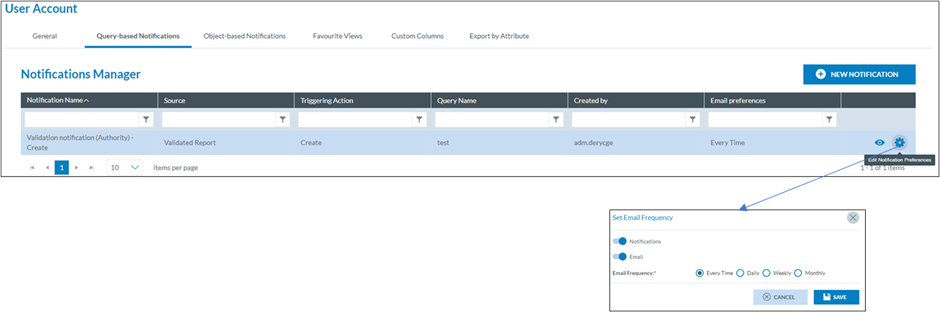
<span style="mso-ansi-language: EN-US;">In the user account, in the query-based Notifications, an overview is given of all notifications that a user has been enrolled in. This list also includes the notifications that have been setup by his Authority. Via this interface a user can select not to get notified by the notification that was setup by the Authority.</span>

[![image.png](https://help.ci-aviationreporting.eu/uploads/images/gallery/2025-11/scaled-1680-/rTLimage.png)](https://help.ci-aviationreporting.eu/uploads/images/gallery/2025-11/rTLimage.png)

<span lang="EN-GB" style="mso-no-proof: yes;">  
</span>

#### <span style="mso-ansi-language: EN-US;">Creating a new notification at user level</span>

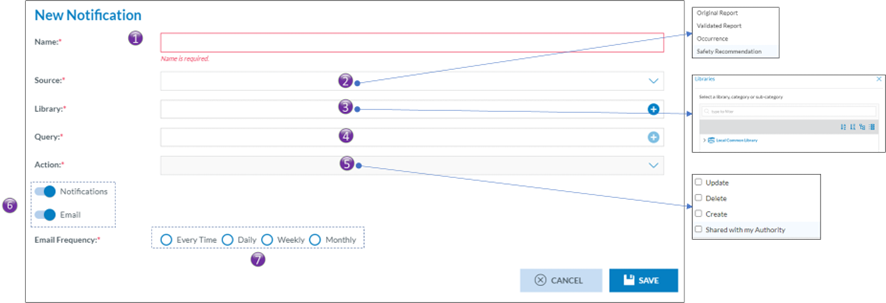
<span style="mso-ansi-language: EN-US;">By clicking on New Notification, the user gains access to the notification configuration interface:</span>

[![image.png](https://help.ci-aviationreporting.eu/uploads/images/gallery/2025-11/scaled-1680-/hDXimage.png)](https://help.ci-aviationreporting.eu/uploads/images/gallery/2025-11/hDXimage.png)

<span style="mso-bidi-font-family: Calibri; mso-bidi-theme-font: minor-latin; mso-ansi-language: EN-US;"><span style="mso-list: Ignore;">1.<span style="font: 7.0pt 'Times New Roman';"> </span></span></span><span style="mso-ansi-language: EN-US;">Name of the notification.   
Every notification is to have a name</span>

<span style="mso-bidi-font-family: Calibri; mso-bidi-theme-font: minor-latin; mso-ansi-language: EN-US;"><span style="mso-list: Ignore;">2.<span style="font: 7.0pt 'Times New Roman';"> </span></span></span><span style="mso-ansi-language: EN-US;">Source</span>

<span style="mso-bidi-font-family: Calibri; mso-bidi-theme-font: minor-latin; mso-ansi-language: EN-US;"><span style="mso-list: Ignore;">a.<span style="font: 7.0pt 'Times New Roman';"> </span></span></span><span style="mso-ansi-language: EN-US;">Occurrence Report</span>

<span style="mso-bidi-font-family: Calibri; mso-bidi-theme-font: minor-latin; mso-ansi-language: EN-US;"><span style="mso-list: Ignore;">b.<span style="font: 7.0pt 'Times New Roman';"> </span></span></span><span style="mso-ansi-language: EN-US;">Validated Report</span>

<span style="mso-bidi-font-family: Calibri; mso-bidi-theme-font: minor-latin; mso-ansi-language: EN-US;"><span style="mso-list: Ignore;">c.<span style="font: 7.0pt 'Times New Roman';"> </span></span></span><span style="mso-ansi-language: EN-US;">Occurrence</span>

<span style="mso-bidi-font-family: Calibri; mso-bidi-theme-font: minor-latin; mso-ansi-language: EN-US;"><span style="mso-list: Ignore;">d.<span style="font: 7.0pt 'Times New Roman';"> </span></span></span><span style="mso-ansi-language: EN-US;">Safety Recommendation</span>

<span style="mso-bidi-font-family: Calibri; mso-bidi-theme-font: minor-latin; mso-ansi-language: EN-US;"><span style="mso-list: Ignore;">3.<span style="font: 7.0pt 'Times New Roman';"> </span></span></span><span style="mso-ansi-language: EN-US;">Library</span>

<span style="mso-ansi-language: EN-US;">Just like queries, notifications are stored in libraries. </span>

<span style="mso-bidi-font-family: Calibri; mso-bidi-theme-font: minor-latin; mso-ansi-language: EN-US;"><span style="mso-list: Ignore;">4.<span style="font: 7.0pt 'Times New Roman';"> </span></span></span><span style="mso-ansi-language: EN-US;">Query  
A query can be used to filter out those Occurrence Reports, Validated Reports, Occurrences or, Safety Recommendations for which the notification is to be triggered. Any query form the Local Common Library can be used</span>

<span style="mso-bidi-font-family: Calibri; mso-bidi-theme-font: minor-latin; mso-ansi-language: EN-US;"><span style="mso-list: Ignore;">5.<span style="font: 7.0pt 'Times New Roman';"> </span></span></span><span style="mso-ansi-language: EN-US;">Action</span>

<span style="mso-bidi-font-family: Calibri; mso-bidi-theme-font: minor-latin; mso-ansi-language: EN-US;"><span style="mso-list: Ignore;">a.<span style="font: 7.0pt 'Times New Roman';"> </span></span></span><span style="mso-ansi-language: EN-US;">Update</span>

<span style="mso-bidi-font-family: Calibri; mso-bidi-theme-font: minor-latin; mso-ansi-language: EN-US;"><span style="mso-list: Ignore;">b.<span style="font: 7.0pt 'Times New Roman';"> </span></span></span><span style="mso-ansi-language: EN-US;">Delete</span>

<span style="mso-bidi-font-family: Calibri; mso-bidi-theme-font: minor-latin; mso-ansi-language: EN-US;"><span style="mso-list: Ignore;">c.<span style="font: 7.0pt 'Times New Roman';"> </span></span></span><span style="mso-ansi-language: EN-US;">Create</span>

<span style="mso-bidi-font-family: Calibri; mso-bidi-theme-font: minor-latin; mso-ansi-language: EN-US;"><span style="mso-list: Ignore;">d.<span style="font: 7.0pt 'Times New Roman';"> </span></span></span><span style="mso-ansi-language: EN-US;">Share with my authority</span>

<span style="mso-bidi-font-family: Calibri; mso-bidi-theme-font: minor-latin; mso-ansi-language: EN-US;"><span style="mso-list: Ignore;">6.<span style="font: 7.0pt 'Times New Roman';"> </span></span></span><span style="mso-ansi-language: EN-US;">Type of notification  
Eccairs 2 allows for two types of notification, either by email or as a notification in the dashboard. Both can be used together</span>

<span style="mso-bidi-font-family: Calibri; mso-bidi-theme-font: minor-latin; mso-ansi-language: EN-US;"><span style="mso-list: Ignore;">7.<span style="font: 7.0pt 'Times New Roman';"> </span></span></span><span style="mso-ansi-language: EN-US;">Frequency</span>

<span style="mso-bidi-font-family: Calibri; mso-bidi-theme-font: minor-latin; mso-ansi-language: EN-US;"><span style="mso-list: Ignore;">a.<span style="font: 7.0pt 'Times New Roman';"> </span></span></span><span style="mso-ansi-language: EN-US;">Every time  
Each time a notification is triggered, the notification will be sent to the users, either as an email or via a dashboard update, or combination thereof.</span>

<span style="mso-bidi-font-family: Calibri; mso-bidi-theme-font: minor-latin; mso-ansi-language: EN-US;"><span style="mso-list: Ignore;">b.<span style="font: 7.0pt 'Times New Roman';"> </span></span></span><span style="mso-ansi-language: EN-US;">Daily  
Each night a summary of all notifications is made, subsequently the dashboard is updated and/or email a summary email is sent. It is mostly used with the type of notification set to email.</span>

<span style="mso-bidi-font-family: Calibri; mso-bidi-theme-font: minor-latin; mso-ansi-language: EN-US;"><span style="mso-list: Ignore;">c.<span style="font: 7.0pt 'Times New Roman';"> </span></span></span><span style="mso-ansi-language: EN-US;">Weekly  
Each week a summary of all notifications is made, subsequently the dashboard is updated and/or email a summary email is sent. It is mostly used with the type of notification set to email.</span>

<span style="mso-bidi-font-family: Calibri; mso-bidi-theme-font: minor-latin; mso-ansi-language: EN-US;"><span style="mso-list: Ignore;">d.<span style="font: 7.0pt 'Times New Roman';"> </span></span></span><span style="mso-ansi-language: EN-US;">Monthly  
Each month a summary of all notifications is made, subsequently the dashboard is updated and/or email a summary email is sent. It is mostly used with the type of notification set to email.</span>

#### <span style="mso-ansi-language: EN-US;">Other type of notifications</span>

<span style="mso-ansi-language: EN-US;">Besides the notifications that are setup at Authority or user level, Eccairs2 also sends out other notifications, making the user aware of certain events. As these are system driven, the user cannot modify them</span>

#### <span style="mso-ansi-language: EN-US;">Types of other notifications</span>

<span style="font-family: Symbol; mso-fareast-font-family: Symbol; mso-bidi-font-family: Symbol; mso-ansi-language: EN-US;"><span style="mso-list: Ignore;">·<span style="font: 7.0pt 'Times New Roman';"> </span></span></span><span style="mso-ansi-language: EN-US;">Query sharing, an email will be sent, and a dashboard update will be performed when a query was shared to the user from another user.</span>

<span style="font-family: Symbol; mso-fareast-font-family: Symbol; mso-bidi-font-family: Symbol; mso-ansi-language: EN-US;"><span style="mso-list: Ignore;">·<span style="font: 7.0pt 'Times New Roman';"> </span></span></span><span style="mso-ansi-language: EN-US;">View Sharing, an email will be sent, and a dashboard update will be performed when a query was shared to the user from another user.</span>

<span style="font-family: Symbol; mso-fareast-font-family: Symbol; mso-bidi-font-family: Symbol; mso-ansi-language: EN-US;"><span style="mso-list: Ignore;">·<span style="font: 7.0pt 'Times New Roman';"> </span></span></span><span style="mso-ansi-language: EN-US;">User account inactivity. An email will be sent to the user when his account was inactive for 90 days.</span>

<span style="font-family: Symbol; mso-fareast-font-family: Symbol; mso-bidi-font-family: Symbol; mso-ansi-language: EN-US;"><span style="mso-list: Ignore;">·<span style="font: 7.0pt 'Times New Roman';"> </span></span></span><span style="mso-ansi-language: EN-US;">Delete user, an email is sent to an administrator in case a user requests that his account is to be deleted.</span>