# OO  How-To's

Here you will find supplementary content for Occurrence Officers, including step-by-step instructions and examples for relevant topics.

# Version History

<table id="bkmrk-version-date-documen" style="width:777px;border-collapse:collapse;line-height:inherit;border-spacing:0px;min-width:100px;max-width:100%;text-decoration-thickness:initial;text-decoration-style:initial;text-decoration-color:initial;"><colgroup><col style="width:63px;"></col><col style="width:95px;"></col><col style="width:318px;"></col><col style="width:257px;"></col><col style="width:79px;"></col></colgroup><tbody><tr style="height:12.9pt;"><td class="xl65" style="width:47pt;height:12.9pt;font-size:inherit;color:#007fc2;font-weight:inherit;text-decoration:none;font-family:Calibri, sans-serif;border:0.5pt dotted #007FC2;font-style:inherit;font-variant:inherit;min-width:10px;">**Version**</td><td class="xl66" style="width:71pt;font-size:inherit;color:#007fc2;font-weight:inherit;text-decoration:none;font-family:Calibri, sans-serif;border:0.5pt dotted #007FC2;font-style:inherit;font-variant:inherit;min-width:10px;">**Date**</td><td class="xl67" style="width:131pt;font-size:inherit;color:#007fc2;font-weight:inherit;text-decoration:none;font-family:Calibri, sans-serif;border:0.5pt dotted #007FC2;font-style:inherit;font-variant:inherit;min-width:10px;">**Document**</td><td class="xl67" style="width:111pt;font-size:inherit;color:#007fc2;font-weight:inherit;text-decoration:none;font-family:Calibri, sans-serif;border:0.5pt dotted #007FC2;font-style:inherit;font-variant:inherit;min-width:10px;">**Description**</td><td class="xl68" style="width:57pt;font-size:inherit;color:#007fc2;font-weight:inherit;text-decoration:none;font-family:Calibri, sans-serif;border:0.5pt dotted #007FC2;font-style:inherit;font-variant:inherit;min-width:10px;">**E2 release**</td></tr><tr style="height:25.8pt;"><td class="xl65" style="height:25.8pt;border:0.5pt dotted #007FC2;font-style:inherit;font-variant:inherit;font-weight:inherit;font-size:inherit;min-width:10px;">0.1</td><td class="xl66" style="border:0.5pt dotted #007FC2;">04/04/2025</td><td class="xl67" style="width:131pt;border:0.5pt dotted #007FC2;">How to create an Export by Attribute list.docx</td><td class="xl67" style="width:111pt;border:0.5pt dotted #007FC2;">Initial version</td><td class="xl68" style="border:0.5pt dotted #007FC2;">2.36</td></tr><tr style="height:12.9pt;"><td class="xl65" style="height:12.9pt;border:0.5pt dotted #007FC2;">0.1</td><td class="xl66" style="border:0.5pt dotted #007FC2;">06/11/2024</td><td class="xl67" style="width:131pt;border:0.5pt dotted #007FC2;">How to link entities.docx</td><td class="xl67" style="width:111pt;border:0.5pt dotted #007FC2;">Initial version</td><td class="xl68" style="border:0.5pt dotted #007FC2;">2.41</td></tr><tr><td style="border:0.5pt dotted rgb(0,127,194);height:29.7969px;">0.1</td><td style="border:0.5pt dotted rgb(0,127,194);height:29.7969px;">17/06/2024</td><td style="height:29.7969px;">How to validate an E5X-file.docx

</td><td style="width:111pt;border:0.5pt dotted rgb(0,127,194);height:29.7969px;">Initial version</td><td style="border:0.5pt dotted rgb(0,127,194);height:29.7969px;">2.35</td></tr><tr style="height:25.8pt;"><td class="xl65" style="height:25.8pt;border:0.5pt dotted #007FC2;">0.1</td><td class="xl66" style="border:0.5pt dotted #007FC2;">06/02/2024</td><td class="xl67" style="width:131pt;border:0.5pt dotted #007FC2;">How to set up notifications.docx</td><td class="xl67" style="width:111pt;border:0.5pt dotted #007FC2;">Initial version</td><td class="xl68" style="border:0.5pt dotted #007FC2;">2.32</td></tr><tr style="height:25.8pt;"><td class="xl65" style="height:25.8pt;border:0.5pt dotted #007FC2;">0.1</td><td class="xl66" style="border:0.5pt dotted #007FC2;">21/07/2023</td><td class="xl67" style="width:131pt;border:0.5pt dotted #007FC2;">How to setup custom columns.docx</td><td class="xl67" style="width:111pt;border:0.5pt dotted #007FC2;">Initial version</td><td class="xl68" style="border:0.5pt dotted #007FC2;">2.27</td></tr><tr style="height:25.8pt;"><td>0.2</td><td>20/11/2025</td><td>How to create an Export by Attribute list</td><td>Migration to BookStack platform.</td><td>2.36</td></tr><tr style="height:25.8pt;"><td>0.2</td><td>20/11/2025</td><td>How to link entities</td><td>Migration to BookStack platform.</td><td>2.41</td></tr><tr><td style="border:0.5pt dotted rgb(0,127,194);height:29.7969px;">0.2</td><td style="border:0.5pt dotted rgb(0,127,194);height:29.7969px;">20/11/2025</td><td style="height:29.7969px;">How to validate an E5X-file

</td><td style="width:111pt;border:0.5pt dotted rgb(0,127,194);height:29.7969px;">Migration to BookStack platform.</td><td style="border:0.5pt dotted rgb(0,127,194);height:29.7969px;">2.35</td></tr><tr style="height:25.8pt;"><td>0.2</td><td>20/11/2025</td><td>How to set up notifications</td><td>Migration to BookStack platform.</td><td>2.32</td></tr><tr style="height:25.8pt;"><td>0.2</td><td>20/11/2025</td><td>How to setup custom columns</td><td>Migration to BookStack platform.</td><td>2.27</td></tr></tbody></table>

# How to link entities

### Some background

#### What is understood with linking entities?

Linking entities is a fundamental aspect to ensure the accuracy, traceability, and quality of data in accident and incident reports. Linking entities helps create a cohesive view of complex events by connecting various elements such as separation, aircraft, events… Linking entities involves creating relationships between different data elements within an accident or incident report.

#### Why link entities?

- Improved Data Relationships and Context
- Enhanced Data Consistency and Accuracy
- Easier Data Analysis and Reporting
- Supports Comprehensive Investigations
- Facilitates Data Sharing and Interoperability

#### How to identify linkable entities?

  
From within the Taxonomy browser, it can be identified for which entities relationships can be  
created.

1. Open the taxonomy browser

[![image.png](https://help.ci-aviationreporting.eu/uploads/images/gallery/2025-11/scaled-1680-/cTrimage.png)](https://help.ci-aviationreporting.eu/uploads/images/gallery/2025-11/cTrimage.png)
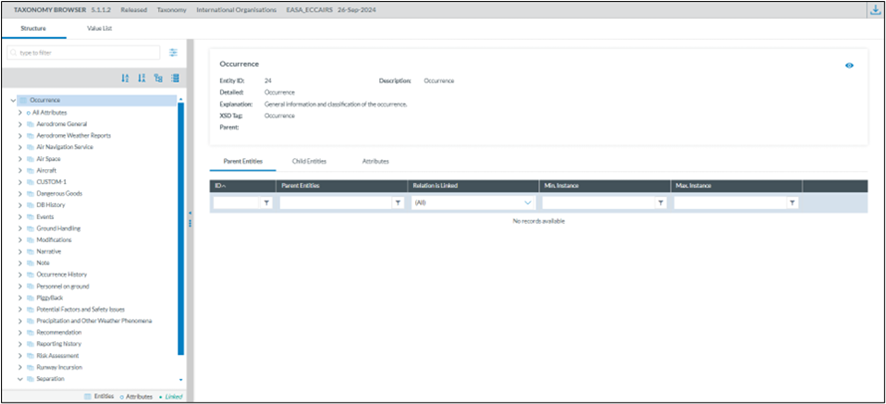
2\. Select an entity and open the “Child Entities” tab and filter on “Relation is Linked”

Example 1

[![image.png](https://help.ci-aviationreporting.eu/uploads/images/gallery/2025-11/scaled-1680-/u8Zimage.png)](https://help.ci-aviationreporting.eu/uploads/images/gallery/2025-11/u8Zimage.png)
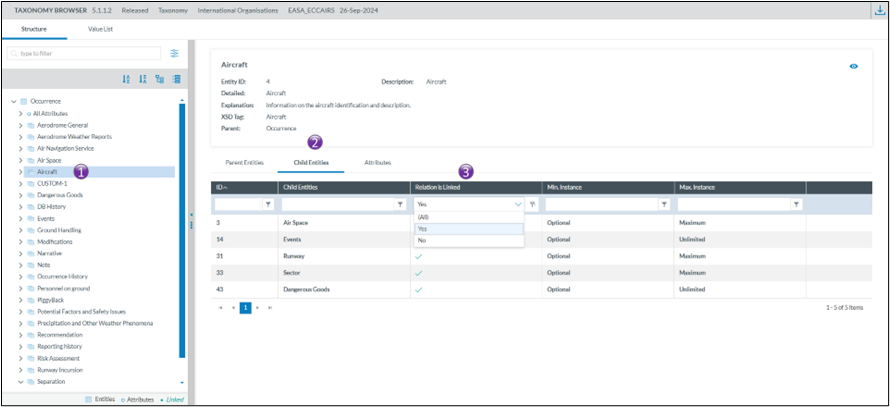
In the first example, Aircraft can be liked to

- Airspace
- Events
- Runway
- Sector
- Dangerous Goods

  
Example 2

[![image.png](https://help.ci-aviationreporting.eu/uploads/images/gallery/2025-11/scaled-1680-/mSiimage.png)](https://help.ci-aviationreporting.eu/uploads/images/gallery/2025-11/mSiimage.png)
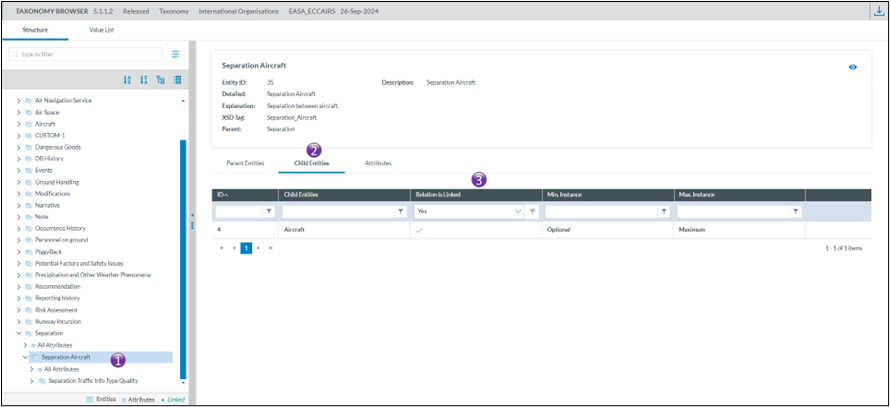
In the second example, Separation Aircraft can be linked to

- Aircraft

#### How to create relationships between entities

<span>Creating relationships or links between entities is done when a document is in edit mode. </span>

*<span>There is a prerequisite, the entities for which a relationship is to be created need to be on the view used for editing the document. </span>*

When a link between entities is possible, then the link option becomes visible

[![image.png](https://help.ci-aviationreporting.eu/uploads/images/gallery/2025-11/scaled-1680-/RAWimage.png)](https://help.ci-aviationreporting.eu/uploads/images/gallery/2025-11/RAWimage.png)
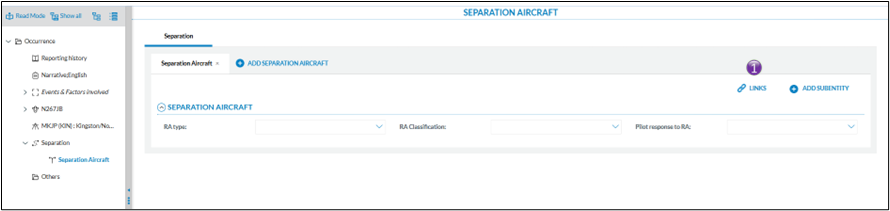
Clicking on the link will show which relationships are possible

[![image.png](https://help.ci-aviationreporting.eu/uploads/images/gallery/2025-11/scaled-1680-/dOPimage.png)](https://help.ci-aviationreporting.eu/uploads/images/gallery/2025-11/dOPimage.png)
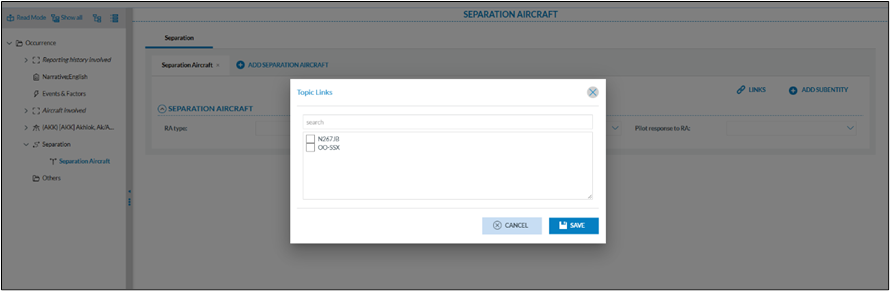
In the example above, the Separation Aircraft entity can be linked to the aircraft as defined in the  
occurrence. It is possible to have both aircraft selected.

  
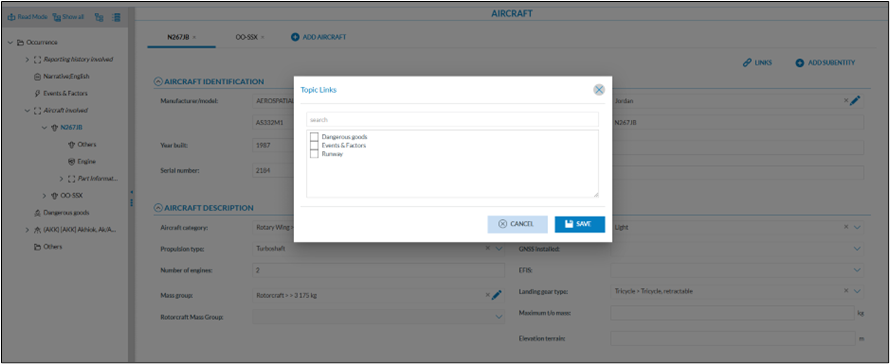
In the example below, the aircraft N267JB can be linked to different entities

[![image.png](https://help.ci-aviationreporting.eu/uploads/images/gallery/2025-11/scaled-1680-/KjKimage.png)](https://help.ci-aviationreporting.eu/uploads/images/gallery/2025-11/KjKimage.png)
#### Good practice

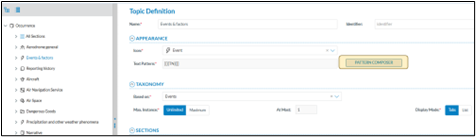
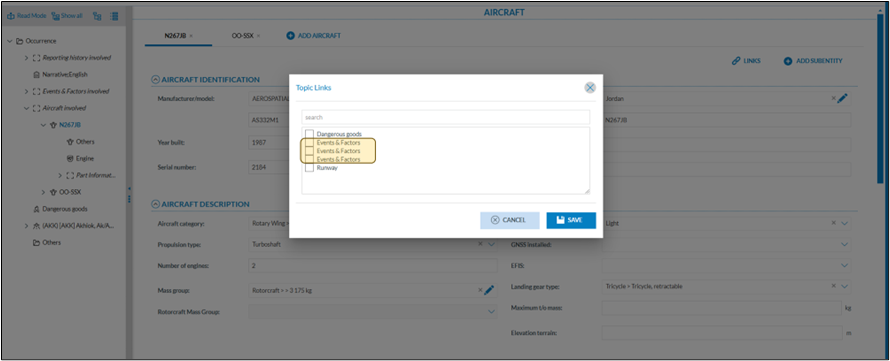
<span lang="en-gb">When linking entities, it’s essential to use clear and consistent naming conventions. This can be effectively achieved with the “pattern composer” when creating views, as it enables systematic and meaningful naming. A well-designed naming pattern makes entities easier to identify, enhances readability, and simplifies future maintenance across systems.  
</span>

[![image.png](https://help.ci-aviationreporting.eu/uploads/images/gallery/2025-11/scaled-1680-/k3Jimage.png)](https://help.ci-aviationreporting.eu/uploads/images/gallery/2025-11/k3Jimage.png)

This to avoid having difficulties to what entity another entity is linked as seen below

[![image.png](https://help.ci-aviationreporting.eu/uploads/images/gallery/2025-11/scaled-1680-/K9Pimage.png)](https://help.ci-aviationreporting.eu/uploads/images/gallery/2025-11/K9Pimage.png)
#### How to see which relationships, or links exist on an entity?

When a link is established, the related entity appears in the tree view in a slightly different color

[![image.png](https://help.ci-aviationreporting.eu/uploads/images/gallery/2025-11/scaled-1680-/Kziimage.png)](https://help.ci-aviationreporting.eu/uploads/images/gallery/2025-11/Kziimage.png)
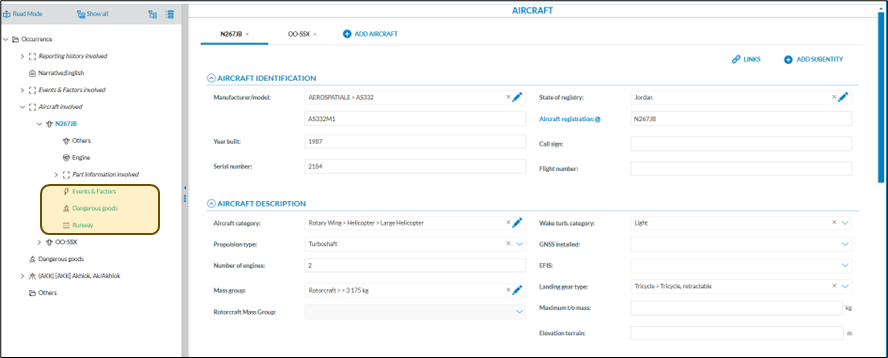
When clicking on the related link in the tree view, E2 navigates to the appropriate entity

# How to create an Export by Attribute list

### <span lang="en-gb">Introduction</span>

<span lang="en-gb">Depending on how users intend to utilise the data from E2, they may require different data fields. E2 offers a functionality that allows users to create custom export attribute lists tailored to their specific needs.</span>

<span lang="en-gb">Export attribute lists are user bound, that is they cannot be shared amongst other users. Every Authority user has access to this feature.</span>

### <span lang="en-gb">Accessing the export by attribute list functionality</span>

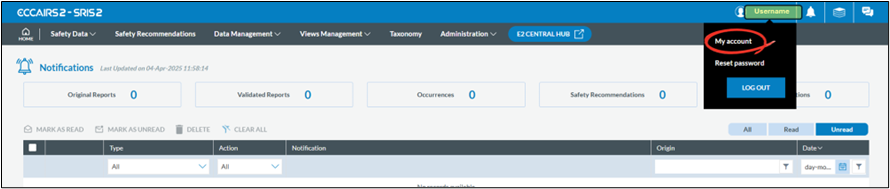
<span lang="en-gb">To gain access to click on your username and select My Account:</span>

[![image.png](https://help.ci-aviationreporting.eu/uploads/images/gallery/2025-11/scaled-1680-/Dxgimage.png)](https://help.ci-aviationreporting.eu/uploads/images/gallery/2025-11/Dxgimage.png)

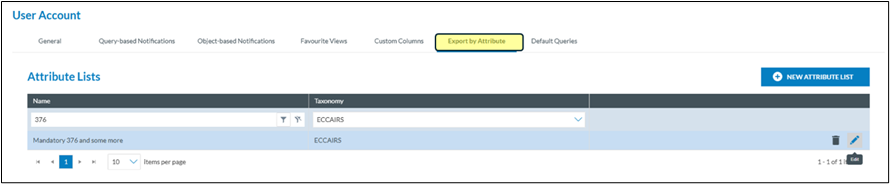
<span lang="en-gb">Click on the Export by attribute</span>

[![image.png](https://help.ci-aviationreporting.eu/uploads/images/gallery/2025-11/scaled-1680-/4bcimage.png)](https://help.ci-aviationreporting.eu/uploads/images/gallery/2025-11/4bcimage.png)

### <span lang="en-gb">Add an export by attribute list</span>

[![image.png](https://help.ci-aviationreporting.eu/uploads/images/gallery/2025-11/scaled-1680-/hdlimage.png)](https://help.ci-aviationreporting.eu/uploads/images/gallery/2025-11/hdlimage.png)

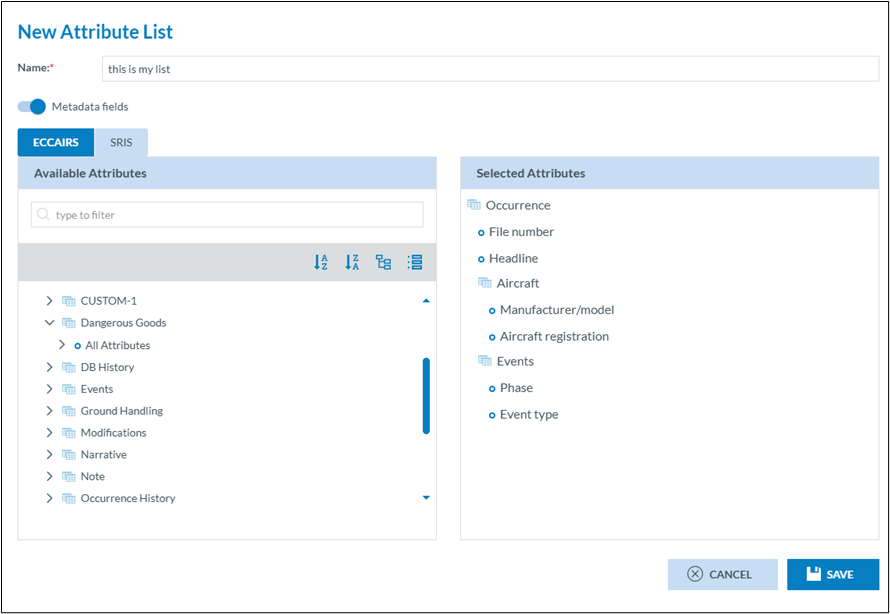
<span lang="en-gb">Click on new attribute list</span>

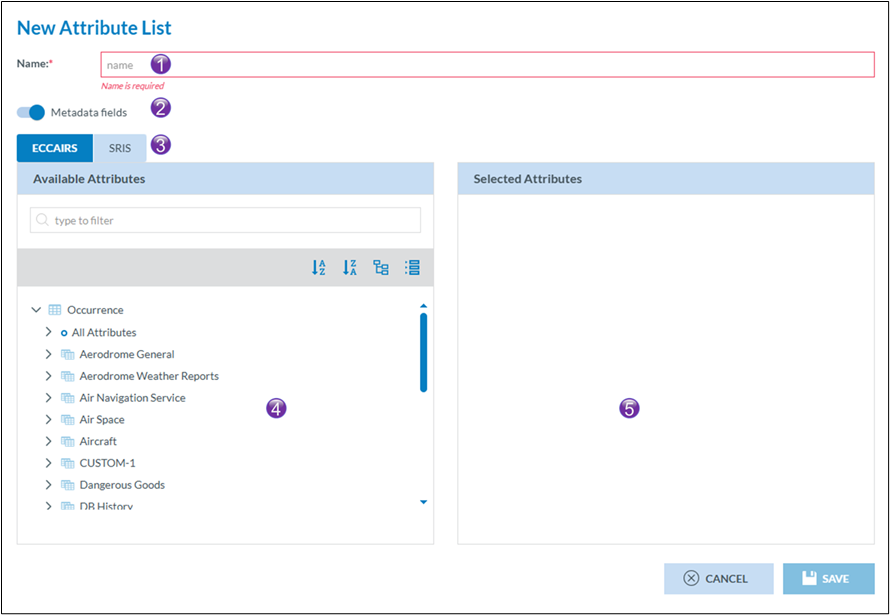
[![image.png](https://help.ci-aviationreporting.eu/uploads/images/gallery/2025-11/scaled-1680-/KJjimage.png)](https://help.ci-aviationreporting.eu/uploads/images/gallery/2025-11/KJjimage.png)

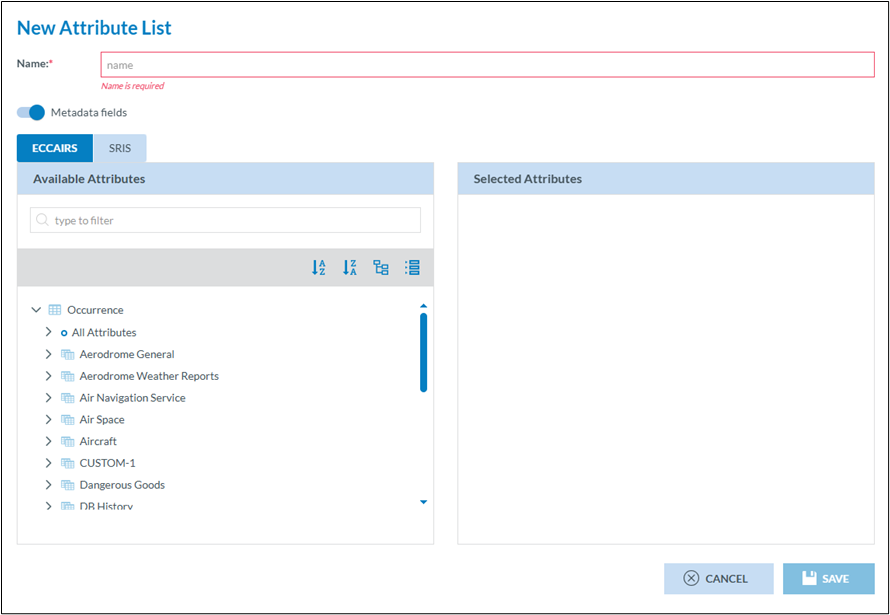
<span lang="en-gb"><span>1.<span style="font:7pt 'Times New Roman';"> </span></span></span><span lang="en-gb">Each export by attribute list needs to have a meaningful name</span>

<span lang="en-gb"><span>2.<span style="font:7pt 'Times New Roman';"> </span></span></span><span lang="en-gb">When exporting, E2 allows that ALL meta data fields are exported too. This switch, which is set by default to true, can be turned off if this is not required</span>

<span lang="en-gb"><span>3.<span style="font:7pt 'Times New Roman';"> </span></span></span><span lang="en-gb">And export list is based on a certain taxonomy. Depending on how your Authority is setup you can chose between ECCAIRS and SRIS. This chose will define what attributes van be selected in (4)</span>

<span lang="en-gb"><span>4.<span style="font:7pt 'Times New Roman';"> </span></span></span><span lang="en-gb">This list contains ALL attributes you have access to</span>

<span lang="en-gb"><span>5.<span style="font:7pt 'Times New Roman';"> </span></span></span><span lang="en-gb">This list contains your selected attributes </span>

[![image.png](https://help.ci-aviationreporting.eu/uploads/images/gallery/2025-11/scaled-1680-/qKaimage.png)](https://help.ci-aviationreporting.eu/uploads/images/gallery/2025-11/qKaimage.png)

<span lang="en-gb">Click Save, and the list will be instantly available for use.</span>

### <span lang="en-gb">Editing an export by attribute list</span>

[![image.png](https://help.ci-aviationreporting.eu/uploads/images/gallery/2025-11/scaled-1680-/NQfimage.png)](https://help.ci-aviationreporting.eu/uploads/images/gallery/2025-11/NQfimage.png)

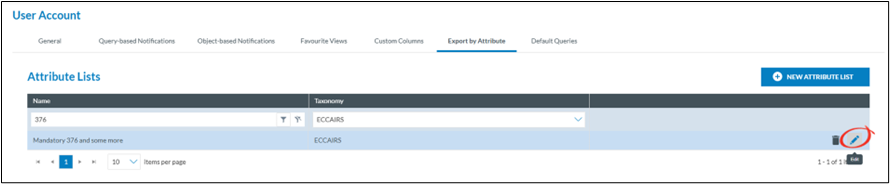
<span lang="en-gb">Export by attribute lists can always be modified, even if they have been used before.  
Click on the pencil of the export by attribute lists you want to change and the same interface as creatin a new export by attribute lists is shown.</span>

### <span lang="en-gb">Deleting an export by attribute list</span>

[![image.png](https://help.ci-aviationreporting.eu/uploads/images/gallery/2025-11/scaled-1680-/qtGhKEimage.png)](https://help.ci-aviationreporting.eu/uploads/images/gallery/2025-11/qtGhKEimage.png)

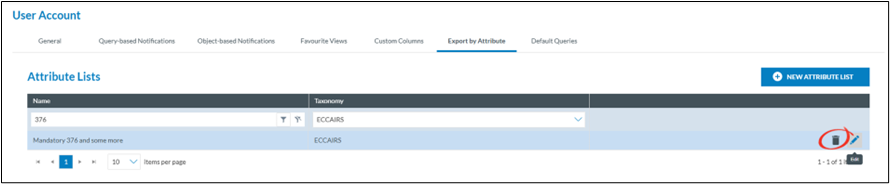
<span lang="en-gb">Export by attribute lists can always be deleted, regardless of they have been used before.  
Click on the trash can of the export by attribute lists you want to delete.</span>

### <span lang="en-gb">Creating an export by attribute list in the fly</span>

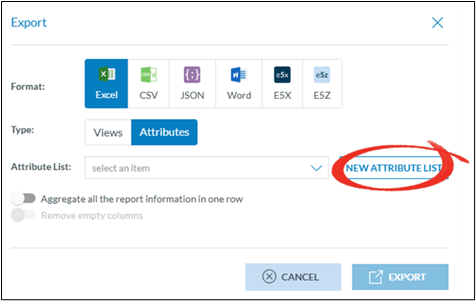
<span lang="en-gb">In many cases, when exporting data, users may find that the existing attribute lists are not suitable. To avoid leaving the list view with selected documents, they can create an export attribute list on the fly.</span>

[![image.png](https://help.ci-aviationreporting.eu/uploads/images/gallery/2025-11/scaled-1680-/hbTimage.png)](https://help.ci-aviationreporting.eu/uploads/images/gallery/2025-11/hbTimage.png)

<span lang="en-gb" style="font-family:Symbol;"><span>·<span style="font:7pt 'Times New Roman';"> </span></span></span><span lang="en-gb">Select the documents you want to export</span>

<span lang="en-gb" style="font-family:Symbol;"><span>·<span style="font:7pt 'Times New Roman';"> </span></span></span><span lang="en-gb">Click on file</span>

<span lang="en-gb" style="font-family:Symbol;"><span>·<span style="font:7pt 'Times New Roman';"> </span></span></span><span lang="en-gb">Click on export</span>

<span lang="en-gb" style="font-family:Symbol;"><span>·<span style="font:7pt 'Times New Roman';"> </span></span></span><span lang="en-gb">Select attributes</span>

<span lang="en-gb" style="font-family:Symbol;"><span>·<span style="font:7pt 'Times New Roman';"> </span></span></span><span lang="en-gb">Select new attribute list</span>

[![image.png](https://help.ci-aviationreporting.eu/uploads/images/gallery/2025-11/scaled-1680-/wWDimage.png)](https://help.ci-aviationreporting.eu/uploads/images/gallery/2025-11/wWDimage.png)

<span lang="en-gb">The new attribute creation window will be shown </span>

[![image.png](https://help.ci-aviationreporting.eu/uploads/images/gallery/2025-11/scaled-1680-/xdiimage.png)](https://help.ci-aviationreporting.eu/uploads/images/gallery/2025-11/xdiimage.png)

# How to set up notifications

###  <span>Some background</span>

#### <span>What are notifications?</span>

<span>Notifications in ECCAIRS 2 refer to the email messages or dashboard alerts generated by the system to inform users about specific events or actions. These notifications serve as a means of communication and provide important information related to Original Reports, Validate Reports and Occurrences being created, modified, or deleted.</span>

### <span>Means of notifications</span>

<span>There are 3 means if notifications that can be used in combination.</span>

#### <span>Email Notification</span>

<span>When an event occurs that triggers a notification, an email is sent by the system to the users informing him about the event. The email contains a hyperlink to the Original Report, the Validated Report or the Occurrence that triggered the notification</span>

#### <span>Dashboard notification</span>

<span>When an event occurs that triggers a notification, the user’s dashboard will be modified. It will display the nature of the notification, whether it is an Original Report, a Validate Report, an Occurrence, or a Safety recommendation  
The dashboard will also show system notifications such as when a query or a view or other was shared with the users; These notifications are system generated and fall outside the scope of this document</span>

[![image.png](https://help.ci-aviationreporting.eu/uploads/images/gallery/2025-11/scaled-1680-/EQrimage.png)](https://help.ci-aviationreporting.eu/uploads/images/gallery/2025-11/EQrimage.png)

##### <span>Setting up a notification</span>

<span>There are 2 levels where notifications can be setup</span>

#### <span>Setup by the authority</span>

<span>The National Authority Administrator(s) can setup a notification schemes within the Authority. Each user that is targeted in the scheme will be notified based on certain criteria</span>

#### <span>Accessing the Notification manager</span>

<span>Depending on the permissions the option to manage notifications becomes available on the home page.  
<span> </span>  
</span>

[![image.png](https://help.ci-aviationreporting.eu/uploads/images/gallery/2025-11/scaled-1680-/HG8image.png)](https://help.ci-aviationreporting.eu/uploads/images/gallery/2025-11/HG8image.png)

##### <span>The notification manager</span>

[![image.png](https://help.ci-aviationreporting.eu/uploads/images/gallery/2025-11/scaled-1680-/2j3image.png)](https://help.ci-aviationreporting.eu/uploads/images/gallery/2025-11/2j3image.png)

##### <span>Creating a new or updating an existing notification</span>

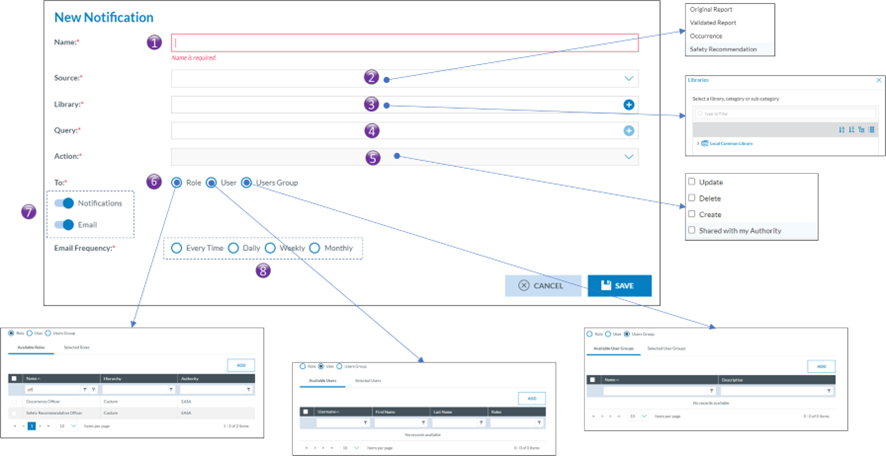
<span>Clicking on either an existing notification or clicking on new notification will open the notification setup page</span>

[![image.png](https://help.ci-aviationreporting.eu/uploads/images/gallery/2025-11/scaled-1680-/7Tzimage.png)](https://help.ci-aviationreporting.eu/uploads/images/gallery/2025-11/7Tzimage.png)

<span><span>1.<span style="font:7pt 'Times New Roman';"> </span></span></span><span>Name of the notification.   
Every notification is to have a name</span>

<span><span>2.<span style="font:7pt 'Times New Roman';"> </span></span></span><span>Source</span>

<span><span>a.<span style="font:7pt 'Times New Roman';"> </span></span></span><span>Occurrence Report</span>

<span><span>b.<span style="font:7pt 'Times New Roman';"> </span></span></span><span>Validated Report</span>

<span><span>c.<span style="font:7pt 'Times New Roman';"> </span></span></span><span>Occurrence</span>

<span><span>d.<span style="font:7pt 'Times New Roman';"> </span></span></span><span>Safety Recommendation</span>

<span><span>3.<span style="font:7pt 'Times New Roman';"> </span></span></span><span>Library</span>

<span>Just like queries, notifications are stored in libraries. </span>

<span><span>4.<span style="font:7pt 'Times New Roman';"> </span></span></span><span>Query  
A query can be used to filter out those Occurrence Reports, Validated Reports, Occurrences or, Safety Recommendations for which the notification is to be triggered. Any query form the Local Common Library can be used</span>

<span><span>5.<span style="font:7pt 'Times New Roman';"> </span></span></span><span>Action</span>

<span><span>a.<span style="font:7pt 'Times New Roman';"> </span></span></span><span>Update</span>

<span><span>b.<span style="font:7pt 'Times New Roman';"> </span></span></span><span>Delete</span>

<span><span>c.<span style="font:7pt 'Times New Roman';"> </span></span></span><span>Create</span>

<span><span>d.<span style="font:7pt 'Times New Roman';"> </span></span></span><span>Share with my authority</span>

<span><span>6.<span style="font:7pt 'Times New Roman';"> </span></span></span><span>Whom to notify</span>

<span>The target audience is set up in the whom to notify, Eccairs2 allows for three types of audiences.  
Only users that have the permission Notification in one of their roles can be targeted. Users also having the “Reporter Role” will be exempt of being notified</span>

<span><span>a.<span style="font:7pt 'Times New Roman';"> </span></span></span><span>Based on role(s)  
users that have a certain role will be notified. Example all users that have the Occurrence Officer role</span>

<span><span>b.<span style="font:7pt 'Times New Roman';"> </span></span></span><span>Based on user(s)</span>

<span>When using based on users, Eccairs 2 allows you to target certain users that need to get notified.</span>

<span><span>c.<span style="font:7pt 'Times New Roman';"> </span></span></span><span>Based on user groups(s)  
beside the two previous options, if user groups have been setup, then the notification can also be set up so that all users in a certain user group will receive a notification</span>

<span><span>7.<span style="font:7pt 'Times New Roman';"> </span></span></span><span>Type of notification  
Eccairs 2 allows for two types of notification, either by email or as a notification in the dashboard. Both can be used together</span>

<span><span>8.<span style="font:7pt 'Times New Roman';"> </span></span></span><span>Frequency</span>

<span><span>a.<span style="font:7pt 'Times New Roman';"> </span></span></span><span>Every time  
Each time a notification is triggered, the notification will be sent to the users, either as an email or via a dashboard update, or combination thereof.</span>

<span><span>b.<span style="font:7pt 'Times New Roman';"> </span></span></span><span>Daily  
Each night a summary of all notifications is made, subsequently the dashboard is updated and/or email a summary email is sent. It is mostly used with the type of notification set to email.</span>

<span><span>c.<span style="font:7pt 'Times New Roman';"> </span></span></span><span>Weekly  
Each week a summary of all notifications is made, subsequently the dashboard is updated and/or email a summary email is sent. It is mostly used with the type of notification set to email.</span>

<span><span>d.<span style="font:7pt 'Times New Roman';"> </span></span></span><span>Monthly  
Each month a summary of all notifications is made, subsequently the dashboard is updated and/or email a summary email is sent. It is mostly used with the type of notification set to email.</span>

#### <span>Setup by the user</span>

<span>Besides the Notifications setup by the Authority, each user having the notification permission in one of his roles can also set up their own notifications.</span>

##### <span class="Heading4Char"><span lang="en-gb">Accessing the user notifications</span></span>

<span class="Heading4Char"><span lang="en-gb"> </span></span><span>Via the My account the user gains access to his account settings:  
</span>

[![image.png](https://help.ci-aviationreporting.eu/uploads/images/gallery/2025-11/scaled-1680-/2Cpimage.png)](https://help.ci-aviationreporting.eu/uploads/images/gallery/2025-11/2Cpimage.png)

#### <span>The notification list view</span>

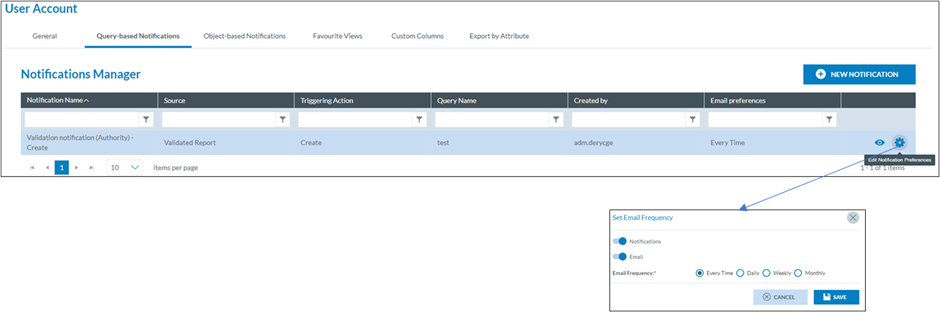
<span>In the user account, in the query-based Notifications, an overview is given of all notifications that a user has been enrolled in. This list also includes the notifications that have been setup by his Authority. Via this interface a user can select not to get notified by the notification that was setup by the Authority.</span>

[![image.png](https://help.ci-aviationreporting.eu/uploads/images/gallery/2025-11/scaled-1680-/rTLimage.png)](https://help.ci-aviationreporting.eu/uploads/images/gallery/2025-11/rTLimage.png)

<span lang="en-gb">  
</span>

#### <span>Creating a new notification at user level</span>

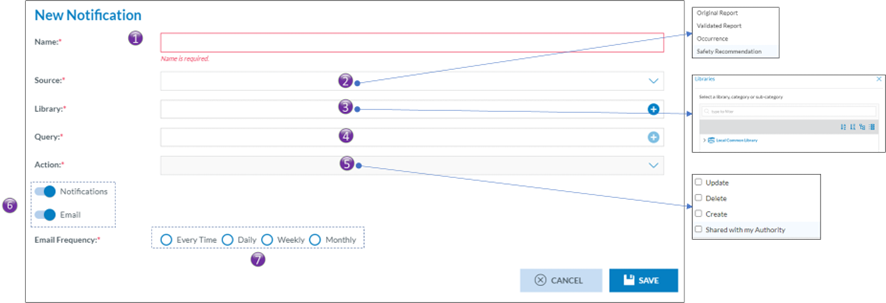
<span>By clicking on New Notification, the user gains access to the notification configuration interface:</span>

[![image.png](https://help.ci-aviationreporting.eu/uploads/images/gallery/2025-11/scaled-1680-/hDXimage.png)](https://help.ci-aviationreporting.eu/uploads/images/gallery/2025-11/hDXimage.png)

<span><span>1.<span style="font:7pt 'Times New Roman';"> </span></span></span><span>Name of the notification.   
Every notification is to have a name</span>

<span><span>2.<span style="font:7pt 'Times New Roman';"> </span></span></span><span>Source</span>

<span><span>a.<span style="font:7pt 'Times New Roman';"> </span></span></span><span>Occurrence Report</span>

<span><span>b.<span style="font:7pt 'Times New Roman';"> </span></span></span><span>Validated Report</span>

<span><span>c.<span style="font:7pt 'Times New Roman';"> </span></span></span><span>Occurrence</span>

<span><span>d.<span style="font:7pt 'Times New Roman';"> </span></span></span><span>Safety Recommendation</span>

<span><span>3.<span style="font:7pt 'Times New Roman';"> </span></span></span><span>Library</span>

<span>Just like queries, notifications are stored in libraries. </span>

<span><span>4.<span style="font:7pt 'Times New Roman';"> </span></span></span><span>Query  
A query can be used to filter out those Occurrence Reports, Validated Reports, Occurrences or, Safety Recommendations for which the notification is to be triggered. Any query form the Local Common Library can be used</span>

<span><span>5.<span style="font:7pt 'Times New Roman';"> </span></span></span><span>Action</span>

<span><span>a.<span style="font:7pt 'Times New Roman';"> </span></span></span><span>Update</span>

<span><span>b.<span style="font:7pt 'Times New Roman';"> </span></span></span><span>Delete</span>

<span><span>c.<span style="font:7pt 'Times New Roman';"> </span></span></span><span>Create</span>

<span><span>d.<span style="font:7pt 'Times New Roman';"> </span></span></span><span>Share with my authority</span>

<span><span>6.<span style="font:7pt 'Times New Roman';"> </span></span></span><span>Type of notification  
Eccairs 2 allows for two types of notification, either by email or as a notification in the dashboard. Both can be used together</span>

<span><span>7.<span style="font:7pt 'Times New Roman';"> </span></span></span><span>Frequency</span>

<span><span>a.<span style="font:7pt 'Times New Roman';"> </span></span></span><span>Every time  
Each time a notification is triggered, the notification will be sent to the users, either as an email or via a dashboard update, or combination thereof.</span>

<span><span>b.<span style="font:7pt 'Times New Roman';"> </span></span></span><span>Daily  
Each night a summary of all notifications is made, subsequently the dashboard is updated and/or email a summary email is sent. It is mostly used with the type of notification set to email.</span>

<span><span>c.<span style="font:7pt 'Times New Roman';"> </span></span></span><span>Weekly  
Each week a summary of all notifications is made, subsequently the dashboard is updated and/or email a summary email is sent. It is mostly used with the type of notification set to email.</span>

<span><span>d.<span style="font:7pt 'Times New Roman';"> </span></span></span><span>Monthly  
Each month a summary of all notifications is made, subsequently the dashboard is updated and/or email a summary email is sent. It is mostly used with the type of notification set to email.</span>

#### <span>Other type of notifications</span>

<span>Besides the notifications that are setup at Authority or user level, Eccairs2 also sends out other notifications, making the user aware of certain events. As these are system driven, the user cannot modify them</span>

#### <span>Types of other notifications</span>

<span style="font-family:Symbol;"><span>·<span style="font:7pt 'Times New Roman';"> </span></span></span><span>Query sharing, an email will be sent, and a dashboard update will be performed when a query was shared to the user from another user.</span>

<span style="font-family:Symbol;"><span>·<span style="font:7pt 'Times New Roman';"> </span></span></span><span>View Sharing, an email will be sent, and a dashboard update will be performed when a query was shared to the user from another user.</span>

<span style="font-family:Symbol;"><span>·<span style="font:7pt 'Times New Roman';"> </span></span></span><span>User account inactivity. An email will be sent to the user when his account was inactive for 90 days.</span>

<span style="font-family:Symbol;"><span>·<span style="font:7pt 'Times New Roman';"> </span></span></span><span>Delete user, an email is sent to an administrator in case a user requests that his account is to be deleted.</span>

# How to set up custom columns

### <span>Some background</span>

#### <span>What are custom columns?</span>

<span>The Original Report, Validated Reports, Occurrences and Safety recommendation list views allow users to see specific data fields in a tabular format, enabling them to browse, sort, filter, and export data efficiently. ECCAIRS2 offers the possibility to set up per document type which attributes can be shown in the list view. Up to 30 attributes and Custom Attributes can be added to a list view, and this per document type.</span>

<span style="font-family:Symbol;"><span>·<span style="font:7pt 'Times New Roman';"> </span></span></span><span>Original Reports</span>

<span style="font-family:Symbol;"><span>·<span style="font:7pt 'Times New Roman';"> </span></span></span><span>Validated Reports</span>

<span style="font-family:Symbol;"><span>·<span style="font:7pt 'Times New Roman';"> </span></span></span><span>Occurrences</span>

<span style="font-family:Symbol;"><span>·<span style="font:7pt 'Times New Roman';"> </span></span></span><span>Safety Recommendations</span>

<p class="callout info">*<span>Although list views are widely used throughout ECCAIRS2, it is only the above list views that are concerned. Furthermore, the setup of custom columns is only available for Authority users, not for reporters that submit their reports.</span>*</p>

### <span>Setting up custom columns</span>

<span>ECCAIRS2 has been developed so the user can setup a different list view per document type.</span>

#### Defaults columns per document type

<span>ECCAIRS2 has setup a series of default attributes in the custom column templates for each document type. These attributes will be shown in the respective list views.</span>

<table class="MsoTable15Grid4Accent1" id="bkmrk-%23-original-reports-v" style="width:481.7pt;border-collapse:collapse;border:none;height:592px;"><tbody><tr style="height:35px;"><td class="xl66" style="width:67.7969px;height:15pt;font-size:11pt;color:rgb(0,127,194);font-weight:bold;text-decoration:none;font-family:Calibri, sans-serif;border:0.5pt dotted rgb(0,127,194);"><span>\#</span></td><td class="xl66" style="width:129.938px;font-size:11pt;color:rgb(0,127,194);font-weight:bold;text-decoration:none;font-family:Calibri, sans-serif;border:0.5pt dotted rgb(0,127,194);"><span>Original Reports</span></td><td class="xl66" style="width:141.25px;font-size:11pt;color:rgb(0,127,194);font-weight:bold;text-decoration:none;font-family:Calibri, sans-serif;border:0.5pt dotted rgb(0,127,194);"><span>Validated Reports</span></td><td class="xl66" style="width:104.516px;font-size:11pt;color:rgb(0,127,194);font-weight:bold;text-decoration:none;font-family:Calibri, sans-serif;border:0.5pt dotted rgb(0,127,194);"><span>Occurrences</span></td><td class="xl66" style="width:197.766px;font-size:11pt;color:rgb(0,127,194);font-weight:bold;text-decoration:none;font-family:Calibri, sans-serif;border:0.5pt dotted rgb(0,127,194);"><span>\*Safety Recommendations</span></td></tr><tr style="height:18px;"><td class="xl63" style="width:67.7969px;height:15pt;font-size:11pt;font-weight:400;text-decoration:none;font-family:Calibri, sans-serif;border:0.5pt dotted rgb(0,127,194);"><span lang="en-gb">1</span></td><td class="xl64" style="width:129.938px;font-size:11pt;font-weight:400;text-decoration:none;font-family:Calibri, sans-serif;border:0.5pt dotted rgb(0,127,194);"><span lang="en-gb">Notify</span></td><td class="xl64" style="width:141.25px;font-size:11pt;font-weight:400;text-decoration:none;font-family:Calibri, sans-serif;border:0.5pt dotted rgb(0,127,194);"><span lang="en-gb">Notify</span></td><td class="xl64" style="width:104.516px;font-size:11pt;font-weight:400;text-decoration:none;font-family:Calibri, sans-serif;border:0.5pt dotted rgb(0,127,194);"><span lang="en-gb">Notify</span></td><td class="xl64" style="width:197.766px;font-size:11pt;font-weight:400;text-decoration:none;font-family:Calibri, sans-serif;border:0.5pt dotted rgb(0,127,194);"><span lang="en-gb">Notify</span></td></tr><tr style="height:18px;"><td class="xl63" style="width:67.7969px;height:15pt;font-size:11pt;font-weight:400;text-decoration:none;font-family:Calibri, sans-serif;border:0.5pt dotted rgb(0,127,194);"><span lang="en-gb">2</span></td><td class="xl64" style="width:129.938px;font-size:11pt;font-weight:400;text-decoration:none;font-family:Calibri, sans-serif;border:0.5pt dotted rgb(0,127,194);"><span lang="en-gb">E2ID</span></td><td class="xl64" style="width:141.25px;font-size:11pt;font-weight:400;text-decoration:none;font-family:Calibri, sans-serif;border:0.5pt dotted rgb(0,127,194);"><span lang="en-gb">E2ID</span></td><td class="xl64" style="width:104.516px;font-size:11pt;font-weight:400;text-decoration:none;font-family:Calibri, sans-serif;border:0.5pt dotted rgb(0,127,194);"><span lang="en-gb">E2ID</span></td><td class="xl64" style="width:197.766px;font-size:11pt;font-weight:400;text-decoration:none;font-family:Calibri, sans-serif;border:0.5pt dotted rgb(0,127,194);"><span lang="en-gb">E2ID</span></td></tr><tr style="height:18px;"><td class="xl63" style="width:67.7969px;height:30pt;font-size:11pt;font-weight:400;text-decoration:none;font-family:Calibri, sans-serif;border:0.5pt dotted rgb(0,127,194);"><span lang="en-gb">3</span></td><td class="xl64" style="width:129.938px;font-size:11pt;font-weight:400;text-decoration:none;font-family:Calibri, sans-serif;border:0.5pt dotted rgb(0,127,194);"><span lang="en-gb">Reporting entity</span></td><td class="xl64" style="width:141.25px;font-size:11pt;font-weight:400;text-decoration:none;font-family:Calibri, sans-serif;border:0.5pt dotted rgb(0,127,194);"><span lang="en-gb">Reporting entity</span></td><td class="xl64" style="width:104.516px;font-size:11pt;font-weight:400;text-decoration:none;font-family:Calibri, sans-serif;border:0.5pt dotted rgb(0,127,194);"><span lang="en-gb">Reporting entity</span></td><td class="xl64" style="width:197.766px;font-size:11pt;font-weight:400;text-decoration:none;font-family:Calibri, sans-serif;border:0.5pt dotted rgb(0,127,194);"><span lang="en-gb">SRIS number</span></td></tr><tr style="height:18px;"><td class="xl63" style="width:67.7969px;height:15pt;font-size:11pt;font-weight:400;text-decoration:none;font-family:Calibri, sans-serif;border:0.5pt dotted rgb(0,127,194);"><span lang="en-gb">4</span></td><td class="xl64" style="width:129.938px;font-size:11pt;font-weight:400;text-decoration:none;font-family:Calibri, sans-serif;border:0.5pt dotted rgb(0,127,194);"><span lang="en-gb">File number</span></td><td class="xl64" style="width:141.25px;font-size:11pt;font-weight:400;text-decoration:none;font-family:Calibri, sans-serif;border:0.5pt dotted rgb(0,127,194);"><span lang="en-gb">File number</span></td><td class="xl64" style="width:104.516px;font-size:11pt;font-weight:400;text-decoration:none;font-family:Calibri, sans-serif;border:0.5pt dotted rgb(0,127,194);"><span lang="en-gb">File number</span></td><td class="xl64" style="width:197.766px;font-size:11pt;font-weight:400;text-decoration:none;font-family:Calibri, sans-serif;border:0.5pt dotted rgb(0,127,194);"><span lang="en-gb">SR status</span></td></tr><tr style="height:18px;"><td class="xl63" style="width:67.7969px;height:30pt;font-size:11pt;font-weight:400;text-decoration:none;font-family:Calibri, sans-serif;border:0.5pt dotted rgb(0,127,194);"><span lang="en-gb">5</span></td><td class="xl64" style="width:129.938px;font-size:11pt;font-weight:400;text-decoration:none;font-family:Calibri, sans-serif;border:0.5pt dotted rgb(0,127,194);"><span lang="en-gb">Report identification</span></td><td class="xl64" style="width:141.25px;font-size:11pt;font-weight:400;text-decoration:none;font-family:Calibri, sans-serif;border:0.5pt dotted rgb(0,127,194);"><span lang="en-gb">Report identification</span></td><td class="xl64" style="width:104.516px;font-size:11pt;font-weight:400;text-decoration:none;font-family:Calibri, sans-serif;border:0.5pt dotted rgb(0,127,194);"><span lang="en-gb">Report identification</span></td><td class="xl64" style="width:197.766px;font-size:11pt;font-weight:400;text-decoration:none;font-family:Calibri, sans-serif;border:0.5pt dotted rgb(0,127,194);"><span lang="en-gb">Addressee</span></td></tr><tr style="height:18px;"><td class="xl63" style="width:67.7969px;height:15pt;font-size:11pt;font-weight:400;text-decoration:none;font-family:Calibri, sans-serif;border:0.5pt dotted rgb(0,127,194);"><span lang="en-gb">6</span></td><td class="xl64" style="width:129.938px;font-size:11pt;font-weight:400;text-decoration:none;font-family:Calibri, sans-serif;border:0.5pt dotted rgb(0,127,194);"><span lang="en-gb">Headline</span></td><td class="xl64" style="width:141.25px;font-size:11pt;font-weight:400;text-decoration:none;font-family:Calibri, sans-serif;border:0.5pt dotted rgb(0,127,194);"><span lang="en-gb">Headline</span></td><td class="xl64" style="width:104.516px;font-size:11pt;font-weight:400;text-decoration:none;font-family:Calibri, sans-serif;border:0.5pt dotted rgb(0,127,194);"><span lang="en-gb">Headline</span></td><td class="xl64" style="width:197.766px;font-size:11pt;font-weight:400;text-decoration:none;font-family:Calibri, sans-serif;border:0.5pt dotted rgb(0,127,194);"><span lang="en-gb">Local SR number</span></td></tr><tr style="height:18px;"><td class="xl63" style="width:67.7969px;height:30pt;font-size:11pt;font-weight:400;text-decoration:none;font-family:Calibri, sans-serif;border:0.5pt dotted rgb(0,127,194);"><span lang="en-gb">7</span></td><td class="xl64" style="width:129.938px;font-size:11pt;font-weight:400;text-decoration:none;font-family:Calibri, sans-serif;border:0.5pt dotted rgb(0,127,194);"><span lang="en-gb">Occurrence class</span></td><td class="xl64" style="width:141.25px;font-size:11pt;font-weight:400;text-decoration:none;font-family:Calibri, sans-serif;border:0.5pt dotted rgb(0,127,194);"><span lang="en-gb">Occurrence class</span></td><td class="xl64" style="width:104.516px;font-size:11pt;font-weight:400;text-decoration:none;font-family:Calibri, sans-serif;border:0.5pt dotted rgb(0,127,194);"><span lang="en-gb">Occurrence class</span></td><td class="xl64" style="width:197.766px;font-size:11pt;font-weight:400;text-decoration:none;font-family:Calibri, sans-serif;border:0.5pt dotted rgb(0,127,194);"><span lang="en-gb">Headline</span></td></tr><tr style="height:18px;"><td class="xl63" style="width:67.7969px;height:15pt;font-size:11pt;font-weight:400;text-decoration:none;font-family:Calibri, sans-serif;border:0.5pt dotted rgb(0,127,194);"><span lang="en-gb">8</span></td><td class="xl64" style="width:129.938px;font-size:11pt;font-weight:400;text-decoration:none;font-family:Calibri, sans-serif;border:0.5pt dotted rgb(0,127,194);"><span lang="en-gb">UTC date</span></td><td class="xl64" style="width:141.25px;font-size:11pt;font-weight:400;text-decoration:none;font-family:Calibri, sans-serif;border:0.5pt dotted rgb(0,127,194);"><span lang="en-gb">UTC date</span></td><td class="xl64" style="width:104.516px;font-size:11pt;font-weight:400;text-decoration:none;font-family:Calibri, sans-serif;border:0.5pt dotted rgb(0,127,194);"><span lang="en-gb">UTC date</span></td><td class="xl64" style="width:197.766px;font-size:11pt;font-weight:400;text-decoration:none;font-family:Calibri, sans-serif;border:0.5pt dotted rgb(0,127,194);"><span lang="en-gb">E2 Status</span></td></tr><tr style="height:18px;"><td class="xl63" style="width:67.7969px;height:30pt;font-size:11pt;font-weight:400;text-decoration:none;font-family:Calibri, sans-serif;border:0.5pt dotted rgb(0,127,194);"><span lang="en-gb">9</span></td><td class="xl64" style="width:129.938px;font-size:11pt;font-weight:400;text-decoration:none;font-family:Calibri, sans-serif;border:0.5pt dotted rgb(0,127,194);"><span lang="en-gb">Manufacturer/model</span></td><td class="xl64" style="width:141.25px;font-size:11pt;font-weight:400;text-decoration:none;font-family:Calibri, sans-serif;border:0.5pt dotted rgb(0,127,194);"><span lang="en-gb">Manufacturer/model</span></td><td class="xl64" style="width:104.516px;font-size:11pt;font-weight:400;text-decoration:none;font-family:Calibri, sans-serif;border:0.5pt dotted rgb(0,127,194);"><span lang="en-gb">Manufacturer/model</span></td><td class="xl64" style="width:197.766px;font-size:11pt;font-weight:400;text-decoration:none;font-family:Calibri, sans-serif;border:0.5pt dotted rgb(0,127,194);"><span lang="en-gb">Occurrence class</span></td></tr><tr style="height:18px;"><td class="xl63" style="width:67.7969px;height:30pt;font-size:11pt;font-weight:400;text-decoration:none;font-family:Calibri, sans-serif;border:0.5pt dotted rgb(0,127,194);"><span lang="en-gb">10</span></td><td class="xl64" style="width:129.938px;font-size:11pt;font-weight:400;text-decoration:none;font-family:Calibri, sans-serif;border:0.5pt dotted rgb(0,127,194);"><span lang="en-gb">Aircraft registration</span></td><td class="xl64" style="width:141.25px;font-size:11pt;font-weight:400;text-decoration:none;font-family:Calibri, sans-serif;border:0.5pt dotted rgb(0,127,194);"><span lang="en-gb">Aircraft registration</span></td><td class="xl64" style="width:104.516px;font-size:11pt;font-weight:400;text-decoration:none;font-family:Calibri, sans-serif;border:0.5pt dotted rgb(0,127,194);"><span lang="en-gb">Aircraft registration</span></td><td class="xl64" style="width:197.766px;font-size:11pt;font-weight:400;text-decoration:none;font-family:Calibri, sans-serif;border:0.5pt dotted rgb(0,127,194);"><span lang="en-gb">Date issued</span></td></tr><tr style="height:18px;"><td class="xl63" style="width:67.7969px;height:15pt;font-size:11pt;font-weight:400;text-decoration:none;font-family:Calibri, sans-serif;border:0.5pt dotted rgb(0,127,194);"><span lang="en-gb">11</span></td><td class="xl64" style="width:129.938px;font-size:11pt;font-weight:400;text-decoration:none;font-family:Calibri, sans-serif;border:0.5pt dotted rgb(0,127,194);"><span lang="en-gb">Location name</span></td><td class="xl64" style="width:141.25px;font-size:11pt;font-weight:400;text-decoration:none;font-family:Calibri, sans-serif;border:0.5pt dotted rgb(0,127,194);"><span lang="en-gb">Location name</span></td><td class="xl64" style="width:104.516px;font-size:11pt;font-weight:400;text-decoration:none;font-family:Calibri, sans-serif;border:0.5pt dotted rgb(0,127,194);"><span lang="en-gb">Location name</span></td><td class="xl64" style="width:197.766px;font-size:11pt;font-weight:400;text-decoration:none;font-family:Calibri, sans-serif;border:0.5pt dotted rgb(0,127,194);"><span lang="en-gb">Manufacturer/model</span></td></tr><tr style="height:18px;"><td class="xl63" style="width:67.7969px;height:30pt;font-size:11pt;font-weight:400;text-decoration:none;font-family:Calibri, sans-serif;border:0.5pt dotted rgb(0,127,194);"><span lang="en-gb">12</span></td><td class="xl64" style="width:129.938px;font-size:11pt;font-weight:400;text-decoration:none;font-family:Calibri, sans-serif;border:0.5pt dotted rgb(0,127,194);"><span lang="en-gb">Responsible entity</span></td><td class="xl64" style="width:141.25px;font-size:11pt;font-weight:400;text-decoration:none;font-family:Calibri, sans-serif;border:0.5pt dotted rgb(0,127,194);"><span lang="en-gb">Responsible entity</span></td><td class="xl64" style="width:104.516px;font-size:11pt;font-weight:400;text-decoration:none;font-family:Calibri, sans-serif;border:0.5pt dotted rgb(0,127,194);"><span lang="en-gb">Responsible entity</span></td><td class="xl64" style="width:197.766px;font-size:11pt;font-weight:400;text-decoration:none;font-family:Calibri, sans-serif;border:0.5pt dotted rgb(0,127,194);"><span lang="en-gb">Registration</span></td></tr><tr style="height:18px;"><td class="xl63" style="width:67.7969px;height:30pt;font-size:11pt;font-weight:400;text-decoration:none;font-family:Calibri, sans-serif;border:0.5pt dotted rgb(0,127,194);"><span lang="en-gb">13</span></td><td class="xl64" style="width:129.938px;font-size:11pt;font-weight:400;text-decoration:none;font-family:Calibri, sans-serif;border:0.5pt dotted rgb(0,127,194);"><span lang="en-gb">State/area of occ</span></td><td class="xl64" style="width:141.25px;font-size:11pt;font-weight:400;text-decoration:none;font-family:Calibri, sans-serif;border:0.5pt dotted rgb(0,127,194);"><span lang="en-gb">State/area of occ</span></td><td class="xl64" style="width:104.516px;font-size:11pt;font-weight:400;text-decoration:none;font-family:Calibri, sans-serif;border:0.5pt dotted rgb(0,127,194);"><span lang="en-gb">State/area of occ</span></td><td class="xl64" style="width:197.766px;font-size:11pt;font-weight:400;text-decoration:none;font-family:Calibri, sans-serif;border:0.5pt dotted rgb(0,127,194);"><span lang="en-gb">Location</span></td></tr><tr style="height:18px;"><td class="xl63" style="width:67.7969px;height:15pt;font-size:11pt;font-weight:400;text-decoration:none;font-family:Calibri, sans-serif;border:0.5pt dotted rgb(0,127,194);"><span lang="en-gb">14</span></td><td class="xl64" style="width:129.938px;font-size:11pt;font-weight:400;text-decoration:none;font-family:Calibri, sans-serif;border:0.5pt dotted rgb(0,127,194);"><span lang="en-gb">Local date</span></td><td class="xl64" style="width:141.25px;font-size:11pt;font-weight:400;text-decoration:none;font-family:Calibri, sans-serif;border:0.5pt dotted rgb(0,127,194);"><span lang="en-gb">Local date</span></td><td class="xl64" style="width:104.516px;font-size:11pt;font-weight:400;text-decoration:none;font-family:Calibri, sans-serif;border:0.5pt dotted rgb(0,127,194);"><span lang="en-gb">Local date</span></td><td class="xl64" style="width:197.766px;font-size:11pt;font-weight:400;text-decoration:none;font-family:Calibri, sans-serif;border:0.5pt dotted rgb(0,127,194);"><span lang="en-gb">Version</span></td></tr><tr style="height:18px;"><td class="xl63" style="width:67.7969px;height:15pt;font-size:11pt;font-weight:400;text-decoration:none;font-family:Calibri, sans-serif;border:0.5pt dotted rgb(0,127,194);"><span lang="en-gb">15</span></td><td class="xl64" style="width:129.938px;font-size:11pt;font-weight:400;text-decoration:none;font-family:Calibri, sans-serif;border:0.5pt dotted rgb(0,127,194);"><span lang="en-gb">Operator</span></td><td class="xl64" style="width:141.25px;font-size:11pt;font-weight:400;text-decoration:none;font-family:Calibri, sans-serif;border:0.5pt dotted rgb(0,127,194);"><span lang="en-gb">Operator</span></td><td class="xl64" style="width:104.516px;font-size:11pt;font-weight:400;text-decoration:none;font-family:Calibri, sans-serif;border:0.5pt dotted rgb(0,127,194);"><span lang="en-gb">Operator</span></td><td class="xl64" style="width:197.766px;font-size:11pt;font-weight:400;text-decoration:none;font-family:Calibri, sans-serif;border:0.5pt dotted rgb(0,127,194);"><span lang="en-gb">Report link</span></td></tr><tr style="height:18px;"><td class="xl63" style="width:67.7969px;height:30pt;font-size:11pt;font-weight:400;text-decoration:none;font-family:Calibri, sans-serif;border:0.5pt dotted rgb(0,127,194);"><span lang="en-gb">16</span></td><td class="xl64" style="width:129.938px;font-size:11pt;font-weight:400;text-decoration:none;font-family:Calibri, sans-serif;border:0.5pt dotted rgb(0,127,194);"><span lang="en-gb">Operation type</span></td><td class="xl64" style="width:141.25px;font-size:11pt;font-weight:400;text-decoration:none;font-family:Calibri, sans-serif;border:0.5pt dotted rgb(0,127,194);"><span lang="en-gb">Operation type</span></td><td class="xl64" style="width:104.516px;font-size:11pt;font-weight:400;text-decoration:none;font-family:Calibri, sans-serif;border:0.5pt dotted rgb(0,127,194);"><span lang="en-gb">Operation type</span></td><td class="xl64" style="width:197.766px;font-size:11pt;font-weight:400;text-decoration:none;font-family:Calibri, sans-serif;border:0.5pt dotted rgb(0,127,194);"><span lang="en-gb">State/area</span></td></tr><tr style="height:18px;"><td class="xl63" style="width:67.7969px;height:15pt;font-size:11pt;font-weight:400;text-decoration:none;font-family:Calibri, sans-serif;border:0.5pt dotted rgb(0,127,194);"><span lang="en-gb">17</span></td><td class="xl64" style="width:129.938px;font-size:11pt;font-weight:400;text-decoration:none;font-family:Calibri, sans-serif;border:0.5pt dotted rgb(0,127,194);"><span lang="en-gb">Call sign</span></td><td class="xl64" style="width:141.25px;font-size:11pt;font-weight:400;text-decoration:none;font-family:Calibri, sans-serif;border:0.5pt dotted rgb(0,127,194);"><span lang="en-gb">Call sign</span></td><td class="xl64" style="width:104.516px;font-size:11pt;font-weight:400;text-decoration:none;font-family:Calibri, sans-serif;border:0.5pt dotted rgb(0,127,194);"><span lang="en-gb">Call sign</span></td><td class="xl64" style="width:197.766px;font-size:11pt;font-weight:400;text-decoration:none;font-family:Calibri, sans-serif;border:0.5pt dotted rgb(0,127,194);"><span lang="en-gb">Local date</span></td></tr><tr style="height:18px;"><td class="xl63" style="width:67.7969px;height:15pt;font-size:11pt;font-weight:400;text-decoration:none;font-family:Calibri, sans-serif;border:0.5pt dotted rgb(0,127,194);"><span lang="en-gb">18</span></td><td class="xl64" style="width:129.938px;font-size:11pt;font-weight:400;text-decoration:none;font-family:Calibri, sans-serif;border:0.5pt dotted rgb(0,127,194);"><span lang="en-gb">Injury level</span></td><td class="xl64" style="width:141.25px;font-size:11pt;font-weight:400;text-decoration:none;font-family:Calibri, sans-serif;border:0.5pt dotted rgb(0,127,194);"><span lang="en-gb">Injury level</span></td><td class="xl64" style="width:104.516px;font-size:11pt;font-weight:400;text-decoration:none;font-family:Calibri, sans-serif;border:0.5pt dotted rgb(0,127,194);"><span lang="en-gb">Injury level</span></td><td class="xl64" style="width:197.766px;font-size:11pt;font-weight:400;text-decoration:none;font-family:Calibri, sans-serif;border:0.5pt dotted rgb(0,127,194);"><span lang="en-gb">Operator</span></td></tr><tr style="height:18px;"><td class="xl63" style="width:67.7969px;height:30pt;font-size:11pt;font-weight:400;text-decoration:none;font-family:Calibri, sans-serif;border:0.5pt dotted rgb(0,127,194);"><span lang="en-gb">19</span></td><td class="xl64" style="width:129.938px;font-size:11pt;font-weight:400;text-decoration:none;font-family:Calibri, sans-serif;border:0.5pt dotted rgb(0,127,194);"><span lang="en-gb">Fatal, passengers</span></td><td class="xl64" style="width:141.25px;font-size:11pt;font-weight:400;text-decoration:none;font-family:Calibri, sans-serif;border:0.5pt dotted rgb(0,127,194);"><span lang="en-gb">Fatal, passengers</span></td><td class="xl64" style="width:104.516px;font-size:11pt;font-weight:400;text-decoration:none;font-family:Calibri, sans-serif;border:0.5pt dotted rgb(0,127,194);"><span lang="en-gb">Fatal, passengers</span></td><td class="xl64" style="width:197.766px;font-size:11pt;font-weight:400;text-decoration:none;font-family:Calibri, sans-serif;border:0.5pt dotted rgb(0,127,194);"><span lang="en-gb">Operation type</span></td></tr><tr style="height:18px;"><td class="xl63" style="width:67.7969px;height:30pt;font-size:11pt;font-weight:400;text-decoration:none;font-family:Calibri, sans-serif;border:0.5pt dotted rgb(0,127,194);"><span lang="en-gb">20</span></td><td class="xl64" style="width:129.938px;font-size:11pt;font-weight:400;text-decoration:none;font-family:Calibri, sans-serif;border:0.5pt dotted rgb(0,127,194);"><span lang="en-gb">Fatal, crew total</span></td><td class="xl64" style="width:141.25px;font-size:11pt;font-weight:400;text-decoration:none;font-family:Calibri, sans-serif;border:0.5pt dotted rgb(0,127,194);"><span lang="en-gb">Fatal, crew total</span></td><td class="xl64" style="width:104.516px;font-size:11pt;font-weight:400;text-decoration:none;font-family:Calibri, sans-serif;border:0.5pt dotted rgb(0,127,194);"><span lang="en-gb">Fatal, crew total</span></td><td class="xl64" style="width:197.766px;font-size:11pt;font-weight:400;text-decoration:none;font-family:Calibri, sans-serif;border:0.5pt dotted rgb(0,127,194);"><span lang="en-gb">Response status</span></td></tr><tr style="height:18px;"><td class="xl63" style="width:67.7969px;height:15pt;font-size:11pt;font-weight:400;text-decoration:none;font-family:Calibri, sans-serif;border:0.5pt dotted rgb(0,127,194);"><span lang="en-gb">21</span></td><td class="xl64" style="width:129.938px;font-size:11pt;font-weight:400;text-decoration:none;font-family:Calibri, sans-serif;border:0.5pt dotted rgb(0,127,194);"><span lang="en-gb">Total fatalities</span></td><td class="xl64" style="width:141.25px;font-size:11pt;font-weight:400;text-decoration:none;font-family:Calibri, sans-serif;border:0.5pt dotted rgb(0,127,194);"><span lang="en-gb">Total fatalities</span></td><td class="xl64" style="width:104.516px;font-size:11pt;font-weight:400;text-decoration:none;font-family:Calibri, sans-serif;border:0.5pt dotted rgb(0,127,194);"><span lang="en-gb">Total fatalities</span></td><td class="xl64" style="width:197.766px;font-size:11pt;font-weight:400;text-decoration:none;font-family:Calibri, sans-serif;border:0.5pt dotted rgb(0,127,194);"><span lang="en-gb">Last Shared ECR</span></td></tr><tr style="height:18px;"><td class="xl63" style="width:67.7969px;height:30pt;font-size:11pt;font-weight:400;text-decoration:none;font-family:Calibri, sans-serif;border:0.5pt dotted rgb(0,127,194);"><span lang="en-gb">22</span></td><td class="xl64" style="width:129.938px;font-size:11pt;font-weight:400;text-decoration:none;font-family:Calibri, sans-serif;border:0.5pt dotted rgb(0,127,194);"><span lang="en-gb">Aircraft damage</span></td><td class="xl64" style="width:141.25px;font-size:11pt;font-weight:400;text-decoration:none;font-family:Calibri, sans-serif;border:0.5pt dotted rgb(0,127,194);"><span lang="en-gb">Aircraft damage</span></td><td class="xl64" style="width:104.516px;font-size:11pt;font-weight:400;text-decoration:none;font-family:Calibri, sans-serif;border:0.5pt dotted rgb(0,127,194);"><span lang="en-gb">Aircraft damage</span></td><td class="xl64" style="width:197.766px;font-size:11pt;font-weight:400;text-decoration:none;font-family:Calibri, sans-serif;border:0.5pt dotted rgb(0,127,194);"><span lang="en-gb">Receiving Date</span></td></tr><tr style="height:18px;"><td class="xl63" style="width:67.7969px;height:15pt;font-size:11pt;font-weight:400;text-decoration:none;font-family:Calibri, sans-serif;border:0.5pt dotted rgb(0,127,194);"><span lang="en-gb">23</span></td><td class="xl64" style="width:129.938px;font-size:11pt;font-weight:400;text-decoration:none;font-family:Calibri, sans-serif;border:0.5pt dotted rgb(0,127,194);"><span lang="en-gb">E2 Status</span></td><td class="xl64" style="width:141.25px;font-size:11pt;font-weight:400;text-decoration:none;font-family:Calibri, sans-serif;border:0.5pt dotted rgb(0,127,194);"><span lang="en-gb">E2 Status</span></td><td class="xl64" style="width:104.516px;font-size:11pt;font-weight:400;text-decoration:none;font-family:Calibri, sans-serif;border:0.5pt dotted rgb(0,127,194);"><span lang="en-gb">E2 Status</span></td><td class="xl64" style="width:197.766px;font-size:11pt;font-weight:400;text-decoration:none;font-family:Calibri, sans-serif;border:0.5pt dotted rgb(0,127,194);"> </td></tr><tr style="height:18px;"><td class="xl63" style="width:67.7969px;height:15pt;font-size:11pt;font-weight:400;text-decoration:none;font-family:Calibri, sans-serif;border:0.5pt dotted rgb(0,127,194);"><span lang="en-gb">24</span></td><td class="xl64" style="width:129.938px;font-size:11pt;font-weight:400;text-decoration:none;font-family:Calibri, sans-serif;border:0.5pt dotted rgb(0,127,194);"><span lang="en-gb">Flight phase</span></td><td class="xl64" style="width:141.25px;font-size:11pt;font-weight:400;text-decoration:none;font-family:Calibri, sans-serif;border:0.5pt dotted rgb(0,127,194);"><span lang="en-gb">Flight phase</span></td><td class="xl64" style="width:104.516px;font-size:11pt;font-weight:400;text-decoration:none;font-family:Calibri, sans-serif;border:0.5pt dotted rgb(0,127,194);"><span lang="en-gb">Flight phase</span></td><td class="xl64" style="width:197.766px;font-size:11pt;font-weight:400;text-decoration:none;font-family:Calibri, sans-serif;border:0.5pt dotted rgb(0,127,194);"> </td></tr><tr style="height:35px;"><td class="xl63" style="width:67.7969px;height:30pt;font-size:11pt;font-weight:400;text-decoration:none;font-family:Calibri, sans-serif;border:0.5pt dotted rgb(0,127,194);"><span lang="en-gb">25</span></td><td class="xl64" style="width:129.938px;font-size:11pt;font-weight:400;text-decoration:none;font-family:Calibri, sans-serif;border:0.5pt dotted rgb(0,127,194);"><span lang="en-gb">Occurrence moderator</span></td><td class="xl64" style="width:141.25px;font-size:11pt;font-weight:400;text-decoration:none;font-family:Calibri, sans-serif;border:0.5pt dotted rgb(0,127,194);"><span lang="en-gb">Occurrence moderator</span></td><td class="xl64" style="width:104.516px;font-size:11pt;font-weight:400;text-decoration:none;font-family:Calibri, sans-serif;border:0.5pt dotted rgb(0,127,194);"><span lang="en-gb">Occurrence moderator</span></td><td class="xl64" style="width:197.766px;font-size:11pt;font-weight:400;text-decoration:none;font-family:Calibri, sans-serif;border:0.5pt dotted rgb(0,127,194);"> </td></tr><tr style="height:18px;"><td class="xl63" style="width:67.7969px;height:15pt;font-size:11pt;font-weight:400;text-decoration:none;font-family:Calibri, sans-serif;border:0.5pt dotted rgb(0,127,194);"><span lang="en-gb">26</span></td><td class="xl64" style="width:129.938px;font-size:11pt;font-weight:400;text-decoration:none;font-family:Calibri, sans-serif;border:0.5pt dotted rgb(0,127,194);"><span lang="en-gb">Version</span></td><td class="xl64" style="width:141.25px;font-size:11pt;font-weight:400;text-decoration:none;font-family:Calibri, sans-serif;border:0.5pt dotted rgb(0,127,194);"><span lang="en-gb">Version</span></td><td class="xl64" style="width:104.516px;font-size:11pt;font-weight:400;text-decoration:none;font-family:Calibri, sans-serif;border:0.5pt dotted rgb(0,127,194);"><span lang="en-gb">Version</span></td><td class="xl64" style="width:197.766px;font-size:11pt;font-weight:400;text-decoration:none;font-family:Calibri, sans-serif;border:0.5pt dotted rgb(0,127,194);"> </td></tr><tr style="height:18px;"><td class="xl63" style="width:67.7969px;height:15pt;font-size:11pt;font-weight:400;text-decoration:none;font-family:Calibri, sans-serif;border:0.5pt dotted rgb(0,127,194);"><span lang="en-gb">27</span></td><td class="xl64" style="width:129.938px;font-size:11pt;font-weight:400;text-decoration:none;font-family:Calibri, sans-serif;border:0.5pt dotted rgb(0,127,194);"><span lang="en-gb">Report status</span></td><td class="xl64" style="width:141.25px;font-size:11pt;font-weight:400;text-decoration:none;font-family:Calibri, sans-serif;border:0.5pt dotted rgb(0,127,194);"><span lang="en-gb">Report status</span></td><td class="xl64" style="width:104.516px;font-size:11pt;font-weight:400;text-decoration:none;font-family:Calibri, sans-serif;border:0.5pt dotted rgb(0,127,194);"><span lang="en-gb">Report status</span></td><td class="xl64" style="width:197.766px;font-size:11pt;font-weight:400;text-decoration:none;font-family:Calibri, sans-serif;border:0.5pt dotted rgb(0,127,194);"> </td></tr><tr style="height:18px;"><td class="xl63" style="width:67.7969px;height:27pt;font-size:11pt;font-weight:400;text-decoration:none;font-family:Calibri, sans-serif;border:0.5pt dotted rgb(0,127,194);"><span lang="en-gb">28</span></td><td class="xl64" style="width:129.938px;font-size:11pt;font-weight:400;text-decoration:none;font-family:Calibri, sans-serif;border:0.5pt dotted rgb(0,127,194);"><span lang="en-gb">Sent date</span></td><td class="xl64" style="width:141.25px;font-size:11pt;font-weight:400;text-decoration:none;font-family:Calibri, sans-serif;border:0.5pt dotted rgb(0,127,194);"><span lang="en-gb">Receiving Date</span></td><td class="xl65" style="width:104.516px;font-size:10.5pt;font-weight:400;text-decoration:none;font-family:Arial, sans-serif;border:0.5pt dotted rgb(0,127,194);"><span lang="en-gb">Last Shared ECR</span></td><td class="xl64" style="width:197.766px;font-size:11pt;font-weight:400;text-decoration:none;font-family:Calibri, sans-serif;border:0.5pt dotted rgb(0,127,194);"> </td></tr><tr style="height:18px;"><td class="xl63" style="width:67.7969px;height:30pt;font-size:11pt;font-weight:400;text-decoration:none;font-family:Calibri, sans-serif;border:0.5pt dotted rgb(0,127,194);"><span lang="en-gb">29</span></td><td class="xl64" style="width:129.938px;font-size:11pt;font-weight:400;text-decoration:none;font-family:Calibri, sans-serif;border:0.5pt dotted rgb(0,127,194);"> </td><td class="xl64" style="width:141.25px;font-size:11pt;font-weight:400;text-decoration:none;font-family:Calibri, sans-serif;border:0.5pt dotted rgb(0,127,194);"> </td><td class="xl64" style="width:104.516px;font-size:11pt;font-weight:400;text-decoration:none;font-family:Calibri, sans-serif;border:0.5pt dotted rgb(0,127,194);"><span lang="en-gb">Receiving Date</span></td><td class="xl64" style="width:197.766px;font-size:11pt;font-weight:400;text-decoration:none;font-family:Calibri, sans-serif;border:0.5pt dotted rgb(0,127,194);"> </td></tr><tr style="height:18px;"><td class="xl63" style="width:67.7969px;height:15pt;font-size:11pt;font-weight:400;text-decoration:none;font-family:Calibri, sans-serif;border:0.5pt dotted rgb(0,127,194);"><span lang="en-gb">30</span></td><td class="xl64" style="width:129.938px;font-size:11pt;font-weight:400;text-decoration:none;font-family:Calibri, sans-serif;border:0.5pt dotted rgb(0,127,194);"> </td><td class="xl64" style="width:141.25px;font-size:11pt;font-weight:400;text-decoration:none;font-family:Calibri, sans-serif;border:0.5pt dotted rgb(0,127,194);"> </td><td class="xl64" style="width:104.516px;font-size:11pt;font-weight:400;text-decoration:none;font-family:Calibri, sans-serif;border:0.5pt dotted rgb(0,127,194);"><span lang="en-gb">Sent date</span></td><td class="xl64" style="width:197.766px;font-size:11pt;font-weight:400;text-decoration:none;font-family:Calibri, sans-serif;border:0.5pt dotted rgb(0,127,194);"> </td></tr></tbody></table>

*<span style="font-size:8pt;line-height:107%;">\*Safety Recommendations only become visible if the Authority is also a SIA NAA</span>*

#### <span>What attributes can be selected?</span>

<span>ECCAIRS2 doesn’t distinguish between ECCAIRS attributes, custom attributes or exposed meta data fields. All attributes and fields, up to 30, can be added to the custom column templates.</span>

#### <span>Setup at Authority level</span>

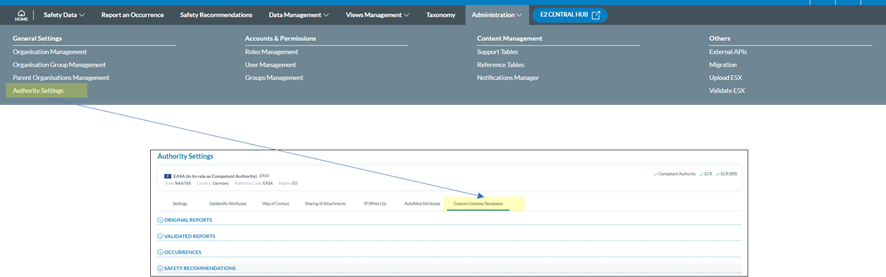
<span>Depending on the permissions the option to manage custom columns at Authority level becomes available on the home page.</span>

[![image.png](https://help.ci-aviationreporting.eu/uploads/images/gallery/2025-11/scaled-1680-/qnMimage.png)](https://help.ci-aviationreporting.eu/uploads/images/gallery/2025-11/qnMimage.png)

<span lang="en-gb">  
</span>

#### <span> </span><span>Setup at user level</span>

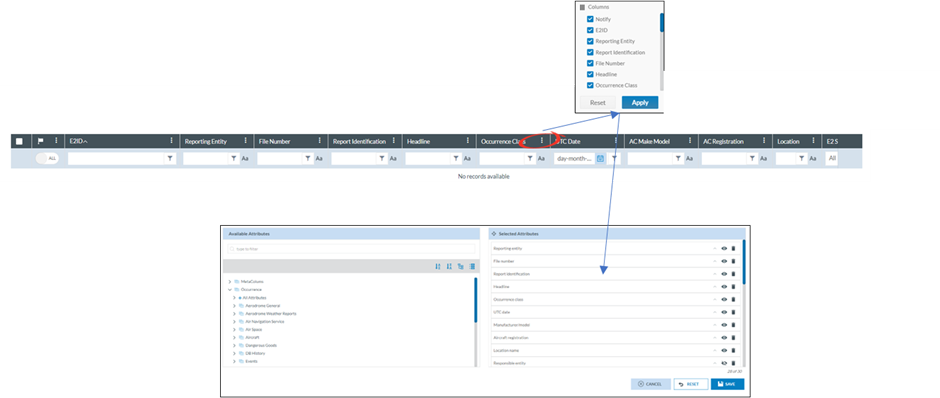
<span>Every user can configure the custom columns per document type by himself.</span>

[![image.png](https://help.ci-aviationreporting.eu/uploads/images/gallery/2025-11/scaled-1680-/VEQimage.png)](https://help.ci-aviationreporting.eu/uploads/images/gallery/2025-11/VEQimage.png)

<span lang="en-gb">  
</span>

#### <span>Interface</span>

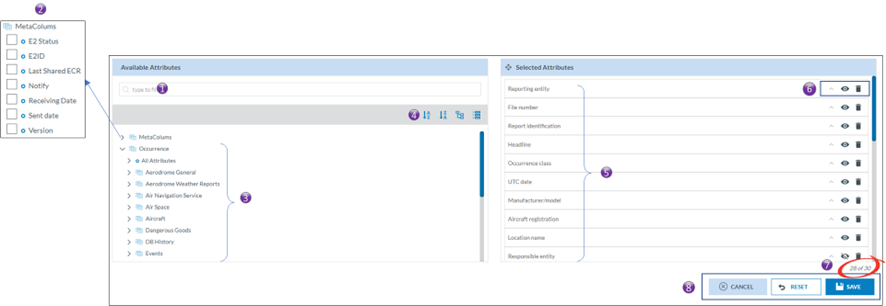
<span>Although there are small nuances between the Authority and the ECCAIRS user’s setup, the interface is the same.</span>

[![image.png](https://help.ci-aviationreporting.eu/uploads/images/gallery/2025-11/scaled-1680-/j3Zimage.png)](https://help.ci-aviationreporting.eu/uploads/images/gallery/2025-11/j3Zimage.png)

<span lang="en-gb">  
</span>

<span><span>1.<span style="font:7pt 'Times New Roman';"> </span></span></span><span>Allows to search through the available attributes and meta data fields.</span>

<span><span>2.<span style="font:7pt 'Times New Roman';"> </span></span></span><span>Exposed meta data fields than be added to the template.</span>

<span><span>3.<span style="font:7pt 'Times New Roman';"> </span></span></span><span>Available attributes. Clicking on “&gt;” expand the entity revealing its attributes.</span>

<span><span>4.<span style="font:7pt 'Times New Roman';"> </span></span></span><span>Allows the attributes to be sorted in ascending or descending order and allows to expand or collapse the full entity tree view.</span>

<span><span>5.<span style="font:7pt 'Times New Roman';"> </span></span></span><span>The selected attributes in the template</span>

<span><span>6.<span style="font:7pt 'Times New Roman';"> </span></span></span><span>Attribute options</span>

<span><span>a.<span style="font:7pt 'Times New Roman';"> </span></span></span><span>Sort order.</span>

<span><span>b.<span style="font:7pt 'Times New Roman';"> </span></span></span><span>View/hide.</span>

<span><span>c.<span style="font:7pt 'Times New Roman';"> </span></span></span><span>Remove.</span>

<span><span>7.<span style="font:7pt 'Times New Roman';"> </span></span></span><span>Shows how many attributes have been added to the template out of 30.</span>

<span><span>8.<span style="font:7pt 'Times New Roman';"> </span></span></span><span>Interface Actions  
These actions only apply to the template that is being edited</span>

<span><span>a.<span style="font:7pt 'Times New Roman';"> </span></span></span><span>Cancel, will revert to the previously saved version.</span>

<span><span>b.<span style="font:7pt 'Times New Roman';"> </span></span></span><span>Reset</span>

<span><span><span style="font:7pt 'Times New Roman';"> </span>i.<span style="font:7pt 'Times New Roman';"> </span></span></span><span>For the Authority, it will set the selected attributes back to their original values.</span>

<span><span><span style="font:7pt 'Times New Roman';"> </span>ii.<span style="font:7pt 'Times New Roman';"> </span></span></span><span>For the user, it will copy the Authority settings to the user’s template.</span>

<span><span>c.<span style="font:7pt 'Times New Roman';"> </span></span></span><span>Save, will save the settings. </span>

#### <span>How to add, remove, sort, hide, and change the position of attributes and fields?</span>

##### <span>Adding</span>

<span>Adding an attribute or a field is done by putting a tick box in the tick box of the attribute in the list of available attributes/fields.</span>

##### <span>Removing</span>

<span>Removing an attribute or a field can either be done by unticking the tick box of the attribute is the list of available attributes/fields. Or by clicking on the trash can icon in the list of selected attributes</span>

##### <span>Sorting</span>

<span>It is possible to sort the list view according to multiple attributes/fields. By clicking on the ^ of an attribute/field the sort order will be set. A small digit will appear next to the ^ indicating that the column will be sorted. The number indicates in the sorting sequence.  
For example a small digit 1 indicates that the column will be sorted first according to that column, a 2 will indicate that it will be first sorted by another column and then sorted by that.  
Changing the sort order from ascending to descending can be done by clicking on the ^ again.</span>

##### <span>Viewing/hiding.</span><span> </span>

<span>The Authority may make certain attributes and fields available to the users, yet it may decide not to show them by default. It is the user who can then decide to show them.   
</span>

[![image.png](https://help.ci-aviationreporting.eu/uploads/images/gallery/2025-11/scaled-1680-/RITimage.png)](https://help.ci-aviationreporting.eu/uploads/images/gallery/2025-11/RITimage.png)

<span lang="en-gb">  
</span>

##### <span>Changing the position of the Attributes in the list view.</span>

<span>When an attribute or field is added to the template it is always added at the end. Changing the position of the attribute or fields in the template can be done by dragging the attributes or field in to the right position.</span>

#### <span lang="en-gb">What are the effects on user’s list views?</span>

<span lang="en-gb">The custom column settings may influence the list views of users. There are Three cases that the custom column settings, set by the Authority, can <span> </span>have an influence on the Eccairs2 users.</span>

<span lang="en-gb"><span>1.<span style="font:7pt 'Times New Roman';"> </span></span></span><span lang="en-gb">A new user.  
The custom column settings will automatically be copied into the new user’s custom column settings. The user can modify them whenever necessary.</span>

<span lang="en-gb"><span>2.<span style="font:7pt 'Times New Roman';"> </span></span></span><span lang="en-gb">An existing user without having changed his custom column settings.  
The custom column settings will automatically be updated in the user’s custom column settings. The user can modify them whenever necessary.</span>

*<span><span>3.<span style="font:7pt 'Times New Roman';"> </span></span></span>*<span lang="en-gb">An existing user having changed his custom column settings.  
The changed authority settings do NOT have an influence on the personal preferences of the user’s custom column settings.</span>

<p class="callout info">*<span>When a user modifies a sort order, adds/removes an attribute, or changes the order of a column, it will automatically be reflected in the user’s custom column template.</span>*</p>

[![image.png](https://help.ci-aviationreporting.eu/uploads/images/gallery/2025-11/scaled-1680-/8bmimage.png)](https://help.ci-aviationreporting.eu/uploads/images/gallery/2025-11/8bmimage.png)

*<span lang="en-gb">  
</span>*

<span> </span>

<span lang="en-gb"></span>

# How to validate an E5X-file

### <span>Who can validate an e5x-file</span>

<span>Only users of registered organisations and Authority users can submit e5x-files. Therefore, it is their prerogative to also validate e5x-files and not submitting them to their Authority</span>

<span>In many cases users of registered organisations and Authority users have an IT service that generates an e5x-file based on data stored in a legacy system. Allowing the IT service to validate, that is check, the e5x-fle, E2 caters for e5x-file validation.</span>

### <span lang="en-gb">As a user from an Authority</span>

  
Depending on the permissions the option to validate e5x, becomes available under the administration menu.

[![image.png](https://help.ci-aviationreporting.eu/uploads/images/gallery/2025-11/scaled-1680-/Fqyimage.png)](https://help.ci-aviationreporting.eu/uploads/images/gallery/2025-11/Fqyimage.png)

#### <span>The Validation e5x-file interface</span><span> </span>

[![image.png](https://help.ci-aviationreporting.eu/uploads/images/gallery/2025-11/scaled-1680-/WaPbSRimage.png)](https://help.ci-aviationreporting.eu/uploads/images/gallery/2025-11/WaPbSRimage.png)

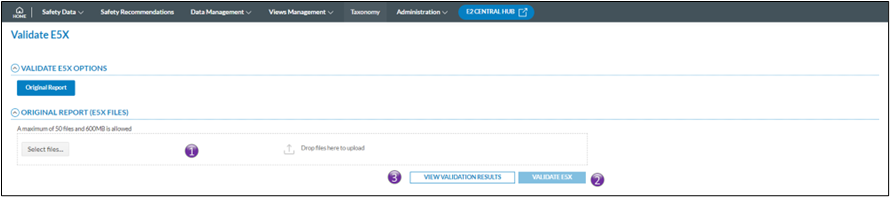
<span><span>1.<span style="font:7pt 'Times New Roman';"> </span></span></span><span>Click either on select files, or drag and drop the files on top of the “Drop files here”; It is possible to validate &gt;1 e5x-file at the time</span>

<span><span>2.<span style="font:7pt 'Times New Roman';"> </span></span></span><span>Click on validate e5x-file and the validation process will start. You will get an email conformation that the e5x-file(s) was (were) uploaded. The file(s) is(are) put on a processing queue, that means that they are not validated immediately.</span>

<span><span>3.<span style="font:7pt 'Times New Roman';"> </span></span></span><span>View the Validations results opens the validation results window. It will give a full overview of all previously validated report request</span>

#### <span>View Validation results</span>

[![image.png](https://help.ci-aviationreporting.eu/uploads/images/gallery/2025-11/scaled-1680-/pARimage.png)](https://help.ci-aviationreporting.eu/uploads/images/gallery/2025-11/pARimage.png)

<span lang="en-gb">  
</span>

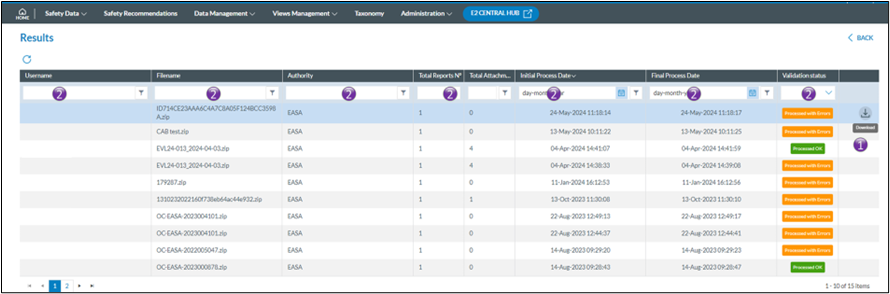
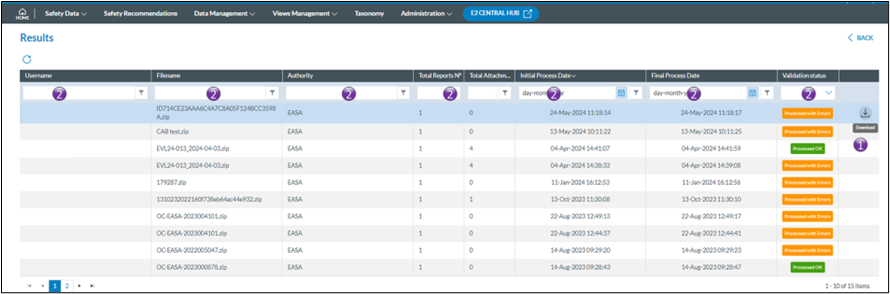
<span><span>1.<span style="font:7pt 'Times New Roman';"> </span></span></span><span>Navigating with the mouse to the last column, allows for downloading the validation logfile in case the validation was processed with error.  
The Validation logfile is a CSV-file that can be opened in excel or equivalent as can be seen in the example  
  
</span>

[![image.png](https://help.ci-aviationreporting.eu/uploads/images/gallery/2025-11/scaled-1680-/u0fimage.png)](https://help.ci-aviationreporting.eu/uploads/images/gallery/2025-11/u0fimage.png)

<span><span>2.<span style="font:7pt 'Times New Roman';"> </span></span></span><span>It is possible to limit the number of rows shown by applying filters in the column headers</span>

<span>Filters are type sensitive that is depending on the type of column a filter is applied, different filter methods are available</span>

### <span>As a user from a registered organisation</span>

[![image.png](https://help.ci-aviationreporting.eu/uploads/images/gallery/2025-11/scaled-1680-/7YTimage.png)](https://help.ci-aviationreporting.eu/uploads/images/gallery/2025-11/7YTimage.png)

#### <span>The validation Interface</span>

<span>From the home page a direct access to the e5x validation is provided by clicking on the Upload PDF/E5X button</span>

<span><span>1.<span style="font:7pt 'Times New Roman';"> </span></span></span><span>Upload PDF/E5X</span>

[![image.png](https://help.ci-aviationreporting.eu/uploads/images/gallery/2025-11/scaled-1680-/6NVimage.png)](https://help.ci-aviationreporting.eu/uploads/images/gallery/2025-11/6NVimage.png)

<span lang="en-gb">  
</span>

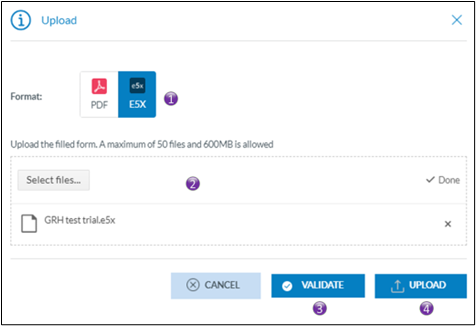
<span><span>1.<span style="font:7pt 'Times New Roman';"> </span></span></span><span>By selecting e5x, the validation button will appear</span>

<span><span>2.<span style="font:7pt 'Times New Roman';"> </span></span></span><span>Click either on select files, or drag and drop the files on top of the “Drop files here”; It is possible to validate &gt;1 e5x-file at the time</span>

<span><span>3.<span style="font:7pt 'Times New Roman';"> </span></span></span><span>Click on validate and the validation process will start. You will get an email conformation that the e5x-file(s) was(were) uploaded. The file(s) is(are) put on a processing queue, that means that they are not validated immediately</span>

<span><span>4.<span style="font:7pt 'Times New Roman';"> </span></span></span><span>This interface is also used for directly uploading e5x-files, no prior validation will be done and upon success or partial success the e5x-file will be submitted to the Authority</span>

#### <span><span>View validation results</span></span>

<span><span><span>2.<span style="font:7pt 'Times New Roman';"> </span></span></span><span>E5X Validation results</span></span>

[![image.png](https://help.ci-aviationreporting.eu/uploads/images/gallery/2025-11/scaled-1680-/SKSimage.png)](https://help.ci-aviationreporting.eu/uploads/images/gallery/2025-11/SKSimage.png)

<span><span><span>1.<span style="font:7pt 'Times New Roman';"> </span></span></span><span>Navigating with the mouse to the last column, allows for downloading the validation logfile in case the validation was processed with error.  
The Validation logfile is a CSV-file that can be opened in excel or equivalent as can be seen in the example  
  
</span></span>

[![image.png](https://help.ci-aviationreporting.eu/uploads/images/gallery/2025-11/scaled-1680-/jmnimage.png)](https://help.ci-aviationreporting.eu/uploads/images/gallery/2025-11/jmnimage.png)

<span><span><span>2.<span style="font:7pt 'Times New Roman';"> </span></span></span><span>It is possible to limit the number of rows shown by applying filters in the column headers</span></span>

<span><span>Filters are type sensitive that is depending on the type of column a filter is applied, different filter methods are available</span></span>

<span></span>