5.4. List of Taxonomies
You can access the list of taxonomies through the ‘Taxonomy’ menu displayed in the bar next to 'Report an Occurrence':

By clicking on this link, the system displays the list of taxonomies in force for the Reporter’s competent Authority:

If the competent Authority the user is reporting to has defined a custom taxonomy, the system displays both the central and the custom taxonomies:
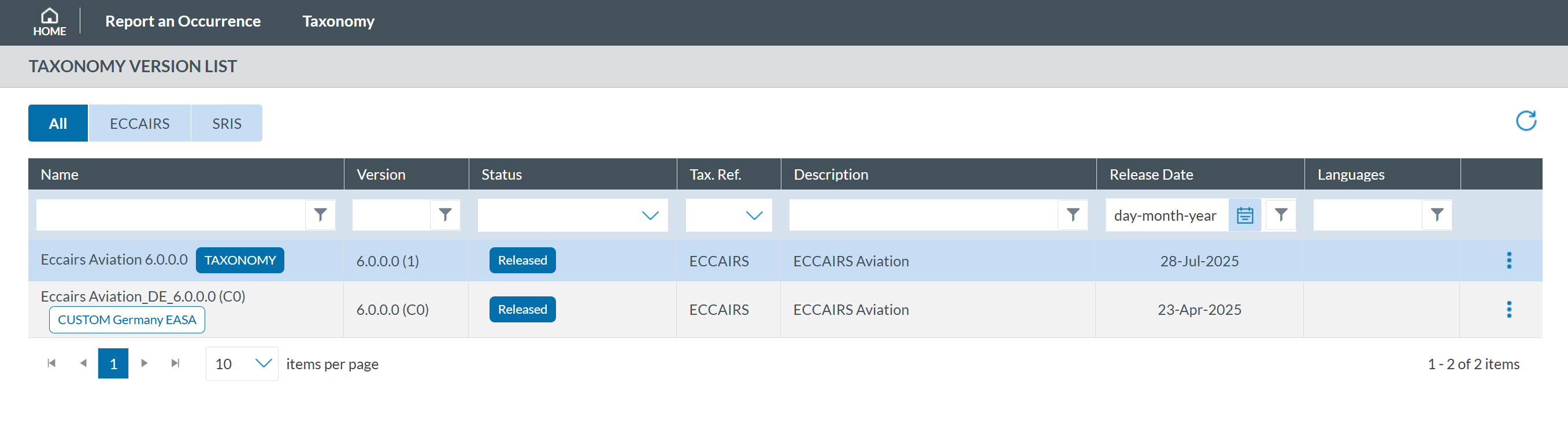
If you click on any of them,you will access the taxonomy browser for that taxonomy. By clicking on the 3-dots button of each taxonomy of the list, the system will display the following options:
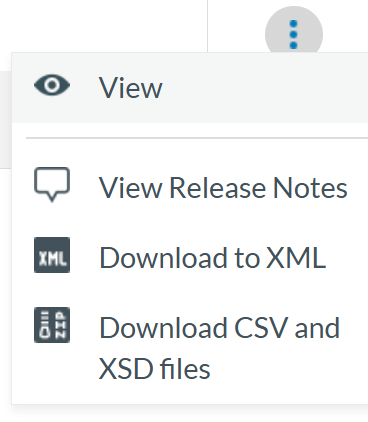
- 'View' shows the taxonomy as detailed in Taxonomy section.
-
‘View Release Notes’ this option shows the user the changes made in the Taxonomy with the latest update.

- ‘Download to XML’ allows any user to download the taxonomy in an xml file format with all the Entities and Attributes.
- ‘Download CSV and XSD files’ by clicking in this option the user downloads a compressed file in zip format that includes all the Value List and Attribute List in that Taxonomy