# How to use the Value List Management Tool

### Abstract

The Value List Management Tool in E2 enables authorized users to create, edit, and disable values in value lists efficiently, with full tracking and collaborative functionality.

### <span style="mso-ansi-language: EN-US;">Some background</span>

<span style="mso-ansi-language: EN-US;">Value lists are a fundamental component of the taxonomies used in ECCAIRS 2 (E2). The management of these value lists is performed at the EASA ECCAIRS level, meaning it is the responsibility of the ECCAIRS system administrators.</span>

<span style="mso-ansi-language: EN-US;">In ECCAIRS 5, an add-on application called the Taxonomy Manager was available. This tool enabled Authorities to contribute directly to specific value lists for which they were considered the source or had authoritative knowledge.</span>

<span style="mso-ansi-language: EN-US;">For example, the operators value list, reporting entities… could be maintained by the relevant National Aviation Authorities.</span>

<span style="mso-ansi-language: EN-US;">These contributions were collected and reviewed at set intervals. The Joint Research Centre (JRC) then consolidated the inputs from various Authorities, and the resulting updates were incorporated into a new taxonomy release.</span>

<span style="mso-ansi-language: EN-US;">Although the Taxonomy Manager gave the Authorities the possibility to independently give their contributions, it was still a time-consuming task for the JRC to gather all data, consolidate it and release a new taxonomy.</span>

<span lang="EN-GB">The JRC was still responsible for:</span>

- <span lang="EN-GB">Collecting all submissions from multiple Authorities,</span>
- <span lang="EN-GB">Validating and consolidating the data to ensure consistency and integrity, and</span>
- <span lang="EN-GB">Publishing the updates through an official taxonomy release.</span>

<span lang="EN-GB">As a result, even with decentralized input, the central coordination and release cycle placed a significant workload on the JRC.</span>

<span lang="EN-GB">In ECCAIRS 2 (E2), the Taxonomy Manager tool from ECCAIRS 5 is no longer available. As a result, the responsibilities previously handled via that tool have been redistributed between the E2 Taxonomy Working Group and<span style="mso-spacerun: yes;"> </span>the E2 System Administrators</span>

### <span lang="EN-GB">Enters the E2 Collaborative Value List Manager</span>

<span lang="EN-GB">Since the Value List Manager from ECCAIRS 1 (E1) is not compatible with ECCAIRS 2 (E2), a new functionality was developed to support value list management within E2. Unlike the E1 approach, this new feature Is not an add-on or external application, it Is fully embedded within the E2 platform.</span>

#### <span lang="EN-GB">The targeted value list for collaborative management</span>

<span lang="EN-GB">The decision to designate a value list as collaborative—meaning it can be updated or maintained by multiple contributors, is the joint prerogative of the Taxonomy Working Groups and the ECCAIRS System Administrators.</span>

<span lang="EN-GB">These values lists are released as collaborative value lists for now</span>

<span lang="EN-GB" style="font-size: 10.0pt; mso-bidi-font-size: 11.0pt; line-height: 107%; font-family: Symbol; mso-fareast-font-family: Symbol; mso-bidi-font-family: Symbol;"><span style="mso-list: Ignore;">·<span style="font: 7.0pt 'Times New Roman';"> </span></span></span><span lang="EN-GB">Operators</span>

#### <span lang="EN-GB">Workflows</span>

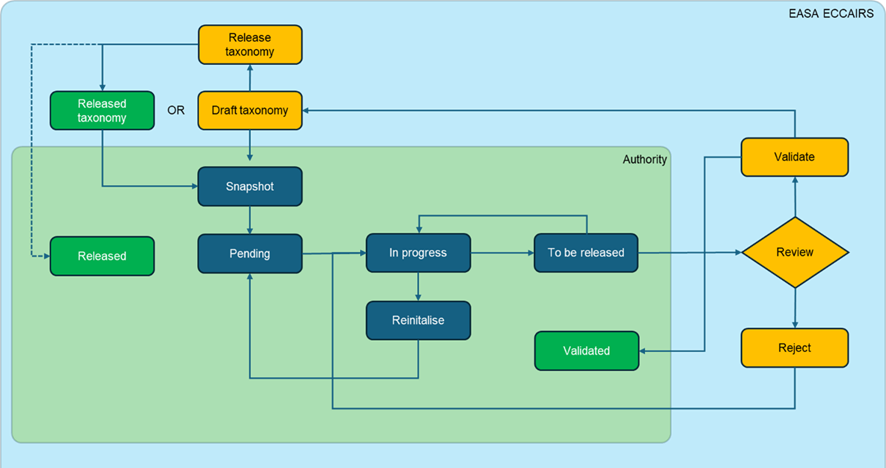
##### <span lang="EN-GB">Global overview</span>

[![image.png](https://help.ci-aviationreporting.eu/uploads/images/gallery/2025-11/scaled-1680-/8Ffimage.png)](https://help.ci-aviationreporting.eu/uploads/images/gallery/2025-11/8Ffimage.png)

<span lang="EN-GB" style="mso-no-proof: yes;">  
</span>

##### <span lang="EN-GB">Validated workflow</span>

[![image.png](https://help.ci-aviationreporting.eu/uploads/images/gallery/2025-11/scaled-1680-/R0oimage.png)](https://help.ci-aviationreporting.eu/uploads/images/gallery/2025-11/R0oimage.png)

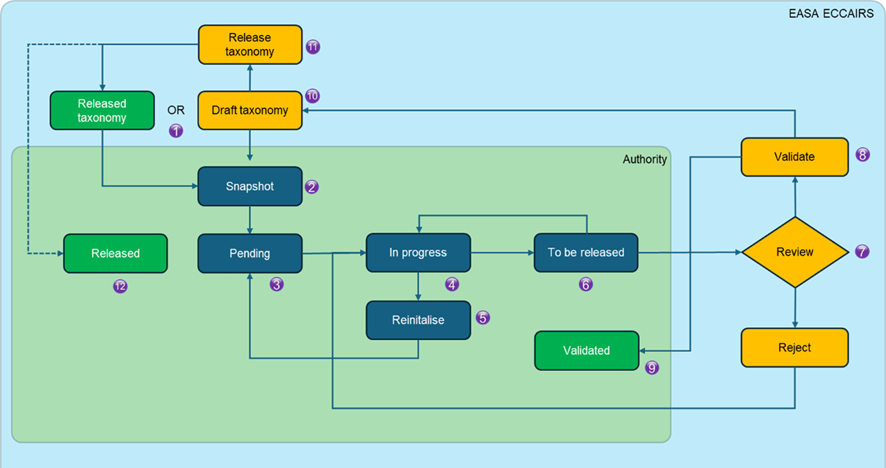
<span lang="EN-GB" style="mso-bidi-font-family: Calibri; mso-bidi-theme-font: minor-latin;"><span style="mso-list: Ignore;">1.<span style="font: 7.0pt 'Times New Roman';"> </span></span></span><span lang="EN-GB">The EASA ECCAIRS system administrators create a snapshot of the value list from a released taxonomy or from a draft taxonomy</span>

<span lang="EN-GB" style="mso-bidi-font-family: Calibri; mso-bidi-theme-font: minor-latin;"><span style="mso-list: Ignore;">2.<span style="font: 7.0pt 'Times New Roman';"> </span></span></span><span lang="EN-GB">The snapshot is delegated to the Authority</span>

<span lang="EN-GB" style="mso-bidi-font-family: Calibri; mso-bidi-theme-font: minor-latin;"><span style="mso-list: Ignore;">3.<span style="font: 7.0pt 'Times New Roman';"> </span></span></span><span lang="EN-GB">The Authority sees the snapshot in pending mode, that is no actions have been done to the value list</span>

<span lang="EN-GB" style="mso-bidi-font-family: Calibri; mso-bidi-theme-font: minor-latin;"><span style="mso-list: Ignore;">4.<span style="font: 7.0pt 'Times New Roman';"> </span></span></span><span lang="EN-GB">When the value list is being worked on, it gets the status in progress</span>

<span lang="EN-GB" style="mso-bidi-font-family: Calibri; mso-bidi-theme-font: minor-latin;"><span style="mso-list: Ignore;">5.<span style="font: 7.0pt 'Times New Roman';"> </span></span></span><span lang="EN-GB">If deemed necessary, the value list can be reset to its initial state so voiding all modifications done to it so far</span>

<span lang="EN-GB" style="mso-bidi-font-family: Calibri; mso-bidi-theme-font: minor-latin;"><span style="mso-list: Ignore;">6.<span style="font: 7.0pt 'Times New Roman';"> </span></span></span><span lang="EN-GB">The authority changes the status as ‘To be Released’ to indicate ECCAIRS system<span style="mso-spacerun: yes;"> </span>administrators that the snapshot is ready to be included in the taxonomy. The ECCAIRS system administrators review the value list</span>

<span lang="EN-GB" style="mso-bidi-font-family: Calibri; mso-bidi-theme-font: minor-latin;"><span style="mso-list: Ignore;">7.<span style="font: 7.0pt 'Times New Roman';"> </span></span></span><span lang="EN-GB">ECCAIRS system administrators assess the Value List</span>

<span lang="EN-GB" style="mso-bidi-font-family: Calibri; mso-bidi-theme-font: minor-latin;"><span style="mso-list: Ignore;">8.<span style="font: 7.0pt 'Times New Roman';"> </span></span></span><span lang="EN-GB">If the ECCAIRS system administrators assess the list to be correct and of good quality, they validate the value list</span>

<span lang="EN-GB" style="mso-bidi-font-family: Calibri; mso-bidi-theme-font: minor-latin;"><span style="mso-list: Ignore;">9.<span style="font: 7.0pt 'Times New Roman';"> </span></span></span><span lang="EN-GB">The authorities see the value list with the status validated. No more modifications can be done it</span>

<span lang="EN-GB" style="mso-bidi-font-family: Calibri; mso-bidi-theme-font: minor-latin;"><span style="mso-list: Ignore;">10.<span style="font: 7.0pt 'Times New Roman';"> </span></span></span><span lang="EN-GB">The validated value list is automatically incorporated in the draft taxonomy</span>

<span lang="EN-GB" style="mso-bidi-font-family: Calibri; mso-bidi-theme-font: minor-latin;"><span style="mso-list: Ignore;">11.<span style="font: 7.0pt 'Times New Roman';"> </span></span></span><span lang="EN-GB">The ECCAIRS system administrators release the draft taxonomy, and the life cycle start all over again</span>

<span lang="EN-GB" style="mso-bidi-font-family: Calibri; mso-bidi-theme-font: minor-latin;"><span style="mso-list: Ignore;">12.<span style="font: 7.0pt 'Times New Roman';"> </span></span></span><span lang="EN-GB">When a Draft taxonomy, that included a validated snapshot is released, then the status of that snapshot is changed to ‘Released’ and a new ‘Pending’ snapshot is generated for the authority to continue working on it</span>

##### <span lang="EN-GB">Rejected workflow</span>

[![image.png](https://help.ci-aviationreporting.eu/uploads/images/gallery/2025-11/scaled-1680-/LEiimage.png)](https://help.ci-aviationreporting.eu/uploads/images/gallery/2025-11/LEiimage.png)

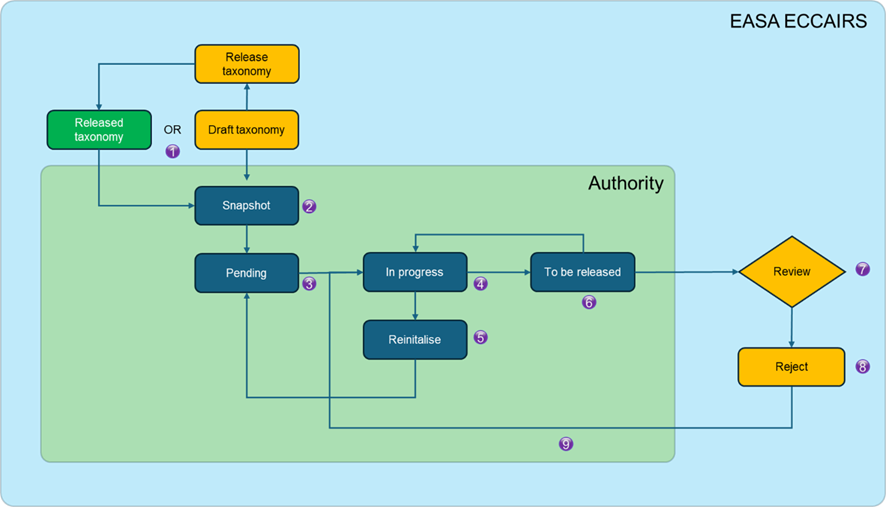
<span lang="EN-GB" style="mso-bidi-font-family: Calibri; mso-bidi-theme-font: minor-latin;"><span style="mso-list: Ignore;">1.<span style="font: 7.0pt 'Times New Roman';"> </span></span></span><span lang="EN-GB">The ECCAIRS system administrators create a snapshot of the value list from a released taxonomy or from a draft taxonomy</span>

<span lang="EN-GB" style="mso-bidi-font-family: Calibri; mso-bidi-theme-font: minor-latin;"><span style="mso-list: Ignore;">2.<span style="font: 7.0pt 'Times New Roman';"> </span></span></span><span lang="EN-GB">The snapshot is delegated to the Authority</span>

<span lang="EN-GB" style="mso-bidi-font-family: Calibri; mso-bidi-theme-font: minor-latin;"><span style="mso-list: Ignore;">3.<span style="font: 7.0pt 'Times New Roman';"> </span></span></span><span lang="EN-GB">The Authority sees the snapshot in pending mode, that is no actions have been done to the value list</span>

<span lang="EN-GB" style="mso-bidi-font-family: Calibri; mso-bidi-theme-font: minor-latin;"><span style="mso-list: Ignore;">4.<span style="font: 7.0pt 'Times New Roman';"> </span></span></span><span lang="EN-GB">When the value list is being worked on, it gets the status in progress</span>

<span lang="EN-GB" style="mso-bidi-font-family: Calibri; mso-bidi-theme-font: minor-latin;"><span style="mso-list: Ignore;">5.<span style="font: 7.0pt 'Times New Roman';"> </span></span></span><span lang="EN-GB">If deemed necessary, the value list can be reset to its initial state so voiding all modifications done to it so far</span>

<span lang="EN-GB" style="mso-bidi-font-family: Calibri; mso-bidi-theme-font: minor-latin;"><span style="mso-list: Ignore;">6.<span style="font: 7.0pt 'Times New Roman';"> </span></span></span><span lang="EN-GB">When all modifications to the value list are done, it can be released for assessment by the ECCAIRS system administrators, it gets the status to be released</span>

<span lang="EN-GB" style="mso-bidi-font-family: Calibri; mso-bidi-theme-font: minor-latin;"><span style="mso-list: Ignore;">7.<span style="font: 7.0pt 'Times New Roman';"> </span></span></span><span lang="EN-GB">The ECCAIRS system administrators review the value list</span>

<span lang="EN-GB" style="mso-bidi-font-family: Calibri; mso-bidi-theme-font: minor-latin;"><span style="mso-list: Ignore;">8.<span style="font: 7.0pt 'Times New Roman';"> </span></span></span><span lang="EN-GB">If the Value list is incorrect or of poor quality, it will be rejected by the EASA ECCAIRS system administrators. A reason for rejection will be added</span>

<span lang="EN-GB" style="mso-bidi-font-family: Calibri; mso-bidi-theme-font: minor-latin;"><span style="mso-list: Ignore;">9.<span style="font: 7.0pt 'Times New Roman';"> </span></span></span><span lang="EN-GB">The authority sees the snapshot as Rejected and the reason for rejection. The authority can then put the snapshot Back to ‘in Progress’</span>

<span lang="EN-GB"> </span>

### <span lang="EN-GB">Using the collaborative value list manager (CVLM)</span>

#### <span lang="EN-GB">Accessibility</span>

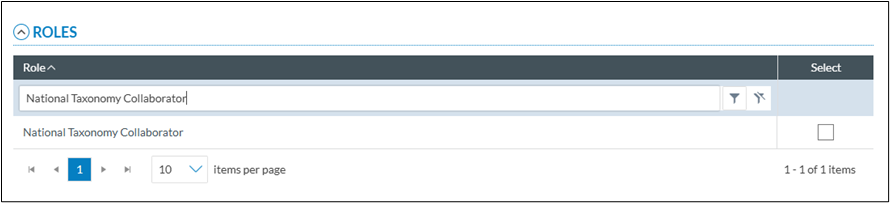
<span lang="EN-GB">A dedicate role is to be assigned to users that will use the collaborative value list manager. This can be assigned at central level or by the National Security Admin of each authority. This role is not the same as the “National Taxonomy Administrator” role, which allows users to manage the custom taxonomy</span>

<span lang="EN-GB" style="mso-no-proof: yes;"></span>

[![image.png](https://help.ci-aviationreporting.eu/uploads/images/gallery/2025-11/scaled-1680-/zodimage.png)](https://help.ci-aviationreporting.eu/uploads/images/gallery/2025-11/zodimage.png)

#### <span lang="EN-GB">Accessing the CVLM</span>

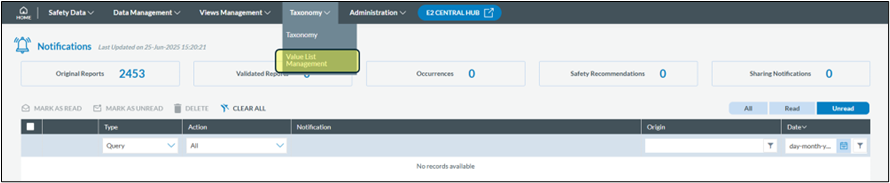
<span lang="EN-GB">If you have been given the National Taxonomy Collaborator role, you can access the CVLM via the taxonomy menu</span>

[![image.png](https://help.ci-aviationreporting.eu/uploads/images/gallery/2025-11/scaled-1680-/0oQimage.png)](https://help.ci-aviationreporting.eu/uploads/images/gallery/2025-11/0oQimage.png)

<span lang="EN-GB" style="mso-no-proof: yes;">  
</span>

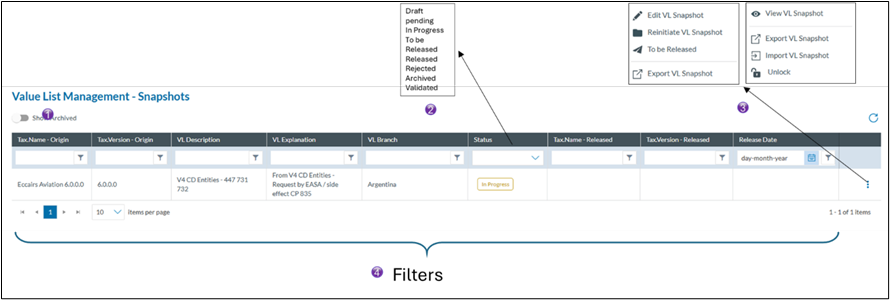
<span lang="EN-GB">The CVLM List view</span>

[![image.png](https://help.ci-aviationreporting.eu/uploads/images/gallery/2025-11/scaled-1680-/dRNimage.png)](https://help.ci-aviationreporting.eu/uploads/images/gallery/2025-11/dRNimage.png)

<span lang="EN-GB" style="mso-no-proof: yes;">  
</span>

<span lang="EN-GB" style="mso-bidi-font-family: Calibri; mso-bidi-theme-font: minor-latin;"><span style="mso-list: Ignore;">1.<span style="font: 7.0pt 'Times New Roman';"> </span></span></span><span lang="EN-GB">With this switch you can visualise all archived snapshots</span>

<span lang="EN-GB" style="mso-bidi-font-family: Calibri; mso-bidi-theme-font: minor-latin;"><span style="mso-list: Ignore;">2.<span style="font: 7.0pt 'Times New Roman';"> </span></span></span><span lang="EN-GB">These are the different status a snapshot can have</span>

<span lang="EN-GB" style="font-family: Symbol; mso-fareast-font-family: Symbol; mso-bidi-font-family: Symbol;"><span style="mso-list: Ignore;">·<span style="font: 7.0pt 'Times New Roman';"> </span></span></span><span lang="EN-GB">Draft</span>

<span lang="EN-GB" style="font-family: Symbol; mso-fareast-font-family: Symbol; mso-bidi-font-family: Symbol;"><span style="mso-list: Ignore;">·<span style="font: 7.0pt 'Times New Roman';"> </span></span></span><span lang="EN-GB">Pending. When a new snapshot is made available or the snapshot has been re-initialised, the status pending is given</span>

<span lang="EN-GB" style="font-family: Symbol; mso-fareast-font-family: Symbol; mso-bidi-font-family: Symbol;"><span style="mso-list: Ignore;">·<span style="font: 7.0pt 'Times New Roman';"> </span></span></span><span lang="EN-GB">In progress, when a value list is being worked on.</span>

<span lang="EN-GB" style="font-family: Symbol; mso-fareast-font-family: Symbol; mso-bidi-font-family: Symbol;"><span style="mso-list: Ignore;">·<span style="font: 7.0pt 'Times New Roman';"> </span></span></span><span lang="EN-GB">To be released, a value list is up to date and is send to the ECCAIRS system administrators for assessment. The value list can be put back to in progress for as long as it has not been validated</span>

<span lang="EN-GB" style="font-family: Symbol; mso-fareast-font-family: Symbol; mso-bidi-font-family: Symbol;"><span style="mso-list: Ignore;">·<span style="font: 7.0pt 'Times New Roman';"> </span></span></span><span lang="EN-GB">Released, it has been validated and is part of the released taxonomy</span>

<span lang="EN-GB" style="font-family: Symbol; mso-fareast-font-family: Symbol; mso-bidi-font-family: Symbol;"><span style="mso-list: Ignore;">·<span style="font: 7.0pt 'Times New Roman';"> </span></span></span><span lang="EN-GB">Rejected, the value list was rejected by the ECCAIRS system administrators</span>

<span lang="EN-GB" style="font-family: Symbol; mso-fareast-font-family: Symbol; mso-bidi-font-family: Symbol;"><span style="mso-list: Ignore;">·<span style="font: 7.0pt 'Times New Roman';"> </span></span></span><span lang="EN-GB">Archived, the archived are automatically generated when a snapshot is Reinitiated</span>

<span lang="EN-GB" style="font-family: Symbol; mso-fareast-font-family: Symbol; mso-bidi-font-family: Symbol;"><span style="mso-list: Ignore;">·<span style="font: 7.0pt 'Times New Roman';"> </span></span></span><span lang="EN-GB">Validated, the value list was of good quality and correct and will be part of the next taxonomy release. No more modifications are possible</span>

<span lang="EN-GB" style="mso-bidi-font-family: Calibri; mso-bidi-theme-font: minor-latin;"><span style="mso-list: Ignore;">3.<span style="font: 7.0pt 'Times New Roman';"> </span></span></span><span lang="EN-GB">These are the different actions that can be performed on the snapshot. This list will contain actions depending on the status of the snapshot</span>

<span lang="EN-GB" style="mso-bidi-font-family: Calibri; mso-bidi-theme-font: minor-latin;"><span style="mso-list: Ignore;">4.<span style="font: 7.0pt 'Times New Roman';"> </span></span></span><span lang="EN-GB">The header filters allow you to filter out certain snapshots</span>

#### <span lang="EN-GB">View the snapshot</span>

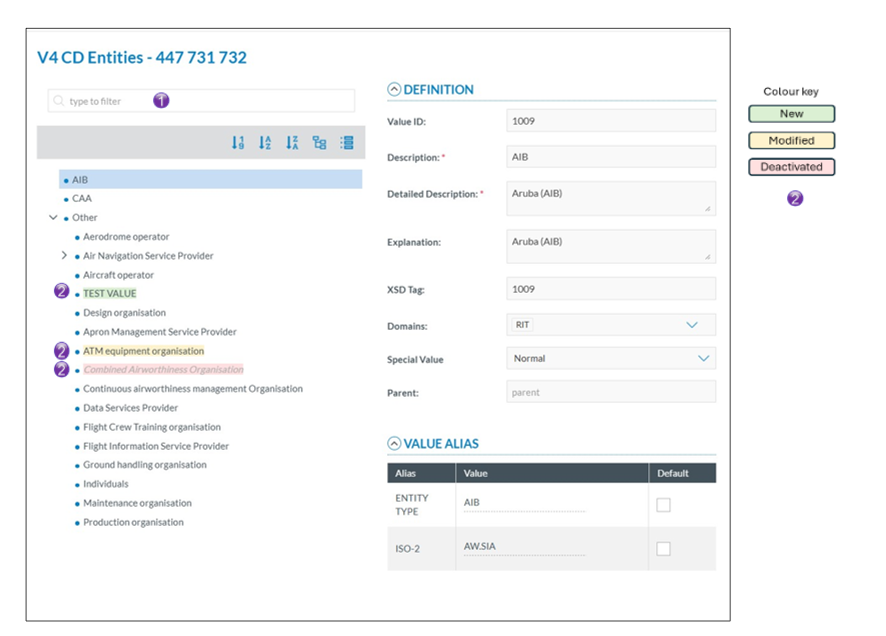
<span lang="EN-GB">This option opens the Value list in read only mode. No modifications can be brought to the Value List. The value list only shows the part that has been delegated to your Authority.  
This option is available regardless of the snapshot status.</span>

[![image.png](https://help.ci-aviationreporting.eu/uploads/images/gallery/2025-11/scaled-1680-/DqVimage.png)](https://help.ci-aviationreporting.eu/uploads/images/gallery/2025-11/DqVimage.png)

<span lang="EN-GB" style="mso-bidi-font-family: Calibri; mso-bidi-theme-font: minor-latin;"><span style="mso-list: Ignore;">1.<span style="font: 7.0pt 'Times New Roman';"> </span></span></span><span lang="EN-GB">Search Functionality  
The integrated filter allows users to search within a Value List for a specific entry. This search is comprehensive, it checks not only the value description, but also the detailed description, explanation, and all defined aliases. </span>

<span lang="EN-GB" style="mso-bidi-font-family: Calibri; mso-bidi-theme-font: minor-latin;"><span style="mso-list: Ignore;">2.<span style="font: 7.0pt 'Times New Roman';"> </span></span></span><span lang="EN-GB">Visual Change Tracking  
To improve clarity when identifying modified entries, a colour-coding system has been implemented. Values that have been affected, either added, edited, or deactivated, are visually highlighted, making it easier to track changes during the editing and review process.</span>

#### <span lang="EN-GB">Edit the snapshot</span>

<span lang="EN-GB">A snapshot can only be edited when it is in the “pending” or “in progress” status</span>

##### <span lang="EN-GB">Edit an existing value</span>

[![image.png](https://help.ci-aviationreporting.eu/uploads/images/gallery/2025-11/scaled-1680-/nG1image.png)](https://help.ci-aviationreporting.eu/uploads/images/gallery/2025-11/nG1image.png)

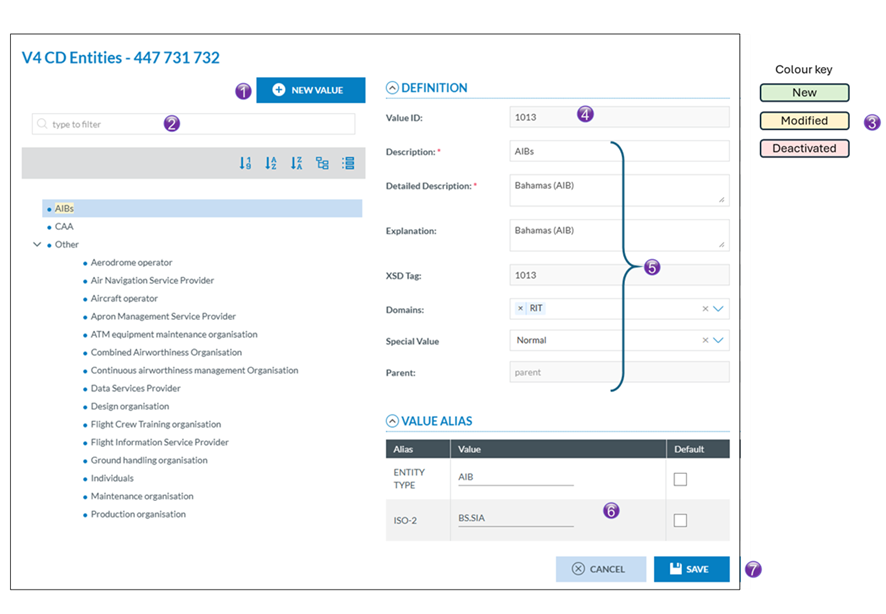
<span lang="EN-GB" style="font-size: 12.0pt; line-height: 107%; font-family: 'Calibri Light',sans-serif; mso-ascii-theme-font: major-latin; mso-fareast-font-family: 'Calibri Light'; mso-fareast-theme-font: major-latin; mso-hansi-theme-font: major-latin; mso-bidi-theme-font: major-latin; color: #1f3763; mso-themecolor: accent1; mso-themeshade: 127;"><span style="mso-list: Ignore;">1.<span style="font: 7.0pt 'Times New Roman';"> </span></span></span><span lang="EN-GB">Search Functionality  
The integrated filter allows users to search within a Value List for a specific entry. This search is comprehensive, it checks not only the value description, but also the detailed description, explanation, and all defined aliases. </span>

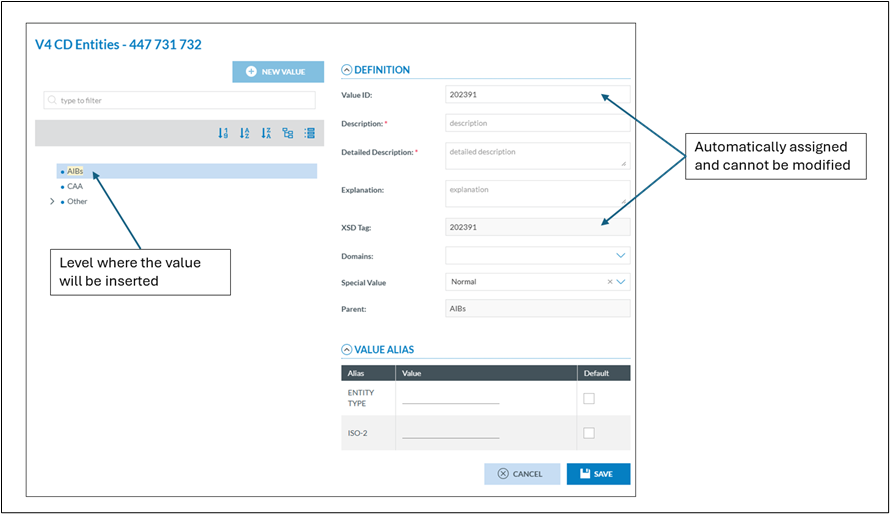
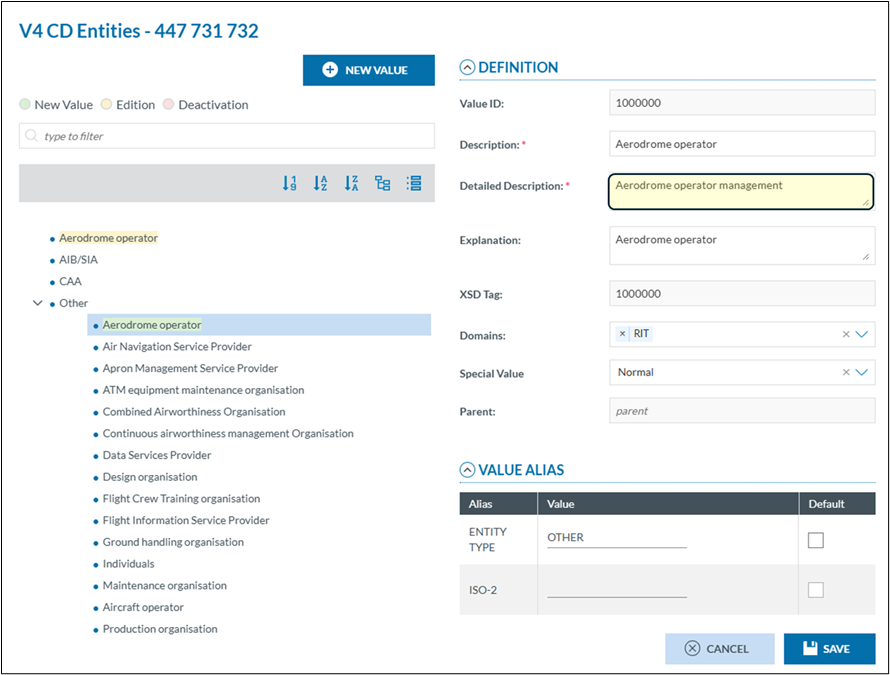
<span lang="EN-GB" style="mso-bidi-font-family: Calibri; mso-bidi-theme-font: minor-latin;"><span style="mso-list: Ignore;">2.<span style="font: 7.0pt 'Times New Roman';"> </span></span></span><span lang="EN-GB">Clicking the "New Value" button adds a new value at the hierarchical level below the currently selected entry. The position can be adjusted later if needed.</span>

<span lang="EN-GB" style="mso-bidi-font-family: Calibri; mso-bidi-theme-font: minor-latin;"><span style="mso-list: Ignore;">3.<span style="font: 7.0pt 'Times New Roman';"> </span></span></span><span lang="EN-GB">Visual Change Tracking  
To improve clarity when identifying modified entries, a colour-coding system has been implemented. Values that have been affected, either added, edited, or deactivated, are visually highlighted, making it easier to track changes during the editing and review process.</span>

<span lang="EN-GB" style="mso-bidi-font-family: Calibri; mso-bidi-theme-font: minor-latin;"><span style="mso-list: Ignore;">4.<span style="font: 7.0pt 'Times New Roman';"> </span></span></span><span lang="EN-GB">The Value ID field is read-only and cannot be modified. When a new value is added, the system automatically assigns a Value ID</span>

<span lang="EN-GB" style="mso-bidi-font-family: Calibri; mso-bidi-theme-font: minor-latin;"><span style="mso-list: Ignore;">5.<span style="font: 7.0pt 'Times New Roman';"> </span></span></span><span lang="EN-GB">These attributes are editable (except the XSD Tag).</span>

<span lang="EN-GB" style="mso-bidi-font-family: Calibri; mso-bidi-theme-font: minor-latin;"><span style="mso-list: Ignore;">6.<span style="font: 7.0pt 'Times New Roman';"> </span></span></span><span lang="EN-GB">The aliases associated with a value are displayed and can be edited. <span style="mso-spacerun: yes;"> </span>Users may modify alias values or set one as the default. However, adding or removing aliases is not permitted, as alias management is handled at the ECCAIRS System level.</span>

<span lang="EN-GB" style="mso-bidi-font-family: Calibri; mso-bidi-theme-font: minor-latin;"><span style="mso-list: Ignore;">7.<span style="font: 7.0pt 'Times New Roman';"> </span></span></span><span lang="EN-GB">No changes are committed until the Save button is clicked. Once saved, the value is assigned the appropriate colour according to the applied change, refer to the defined colour scheme for details.</span>

##### <span lang="EN-GB">Add a new value</span>

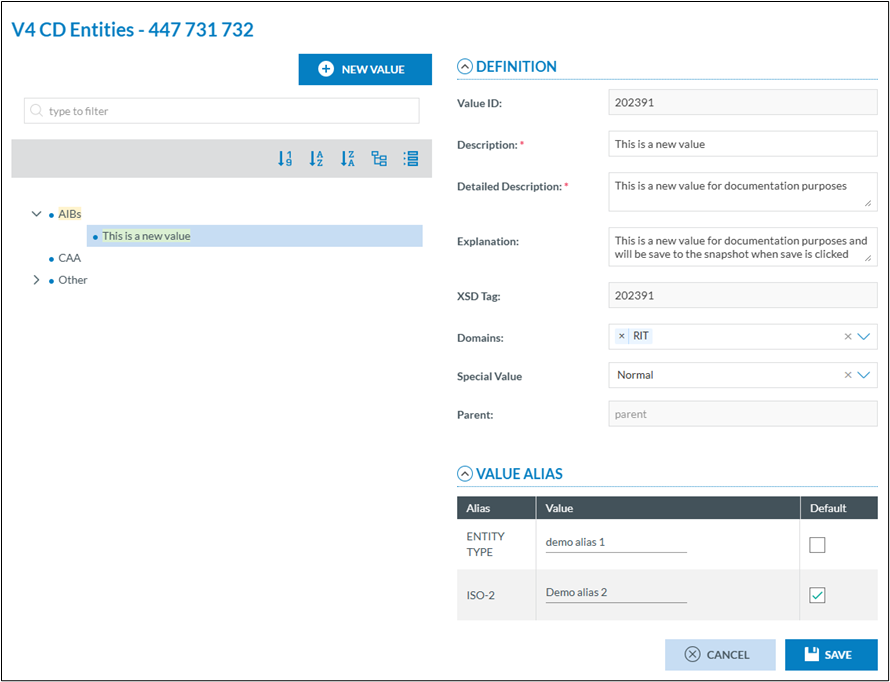
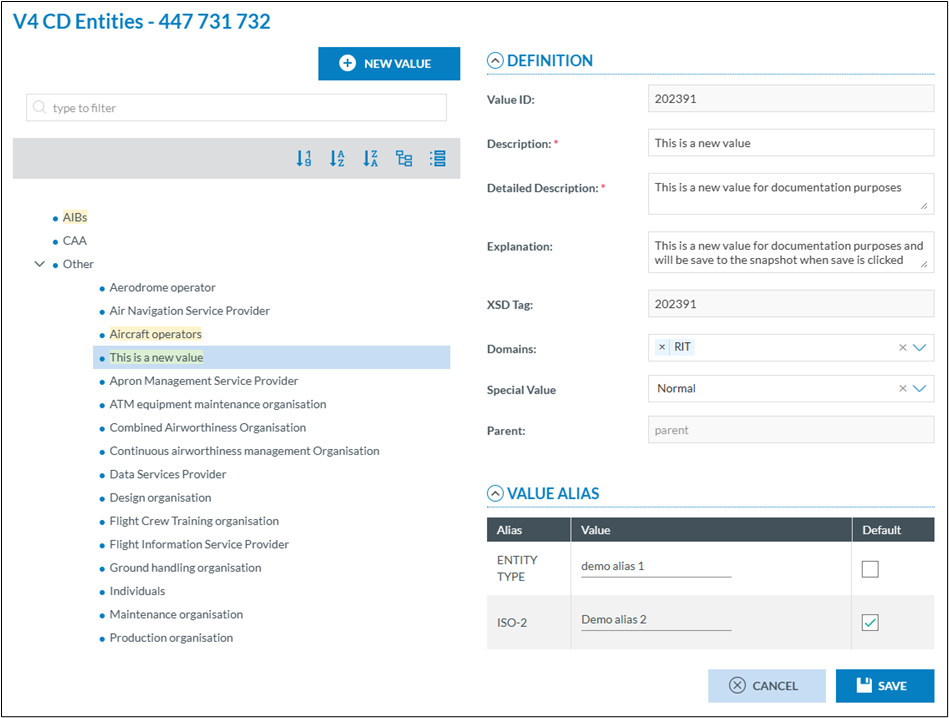
<span lang="EN-GB">By clicking on the add new value button the right pane is blanked, a new value.</span>

[![image.png](https://help.ci-aviationreporting.eu/uploads/images/gallery/2025-11/scaled-1680-/ZXhimage.png)](https://help.ci-aviationreporting.eu/uploads/images/gallery/2025-11/ZXhimage.png)

<span lang="EN-GB">The attributes marked with a red asterisk <span style="color: red;">(\*) </span><span style="color: black; mso-themecolor: text1;">are mandatory.</span></span>

<span lang="EN-GB" style="color: black; mso-themecolor: text1;">When save is clicked the value is save in the snapshot and will be assigned the correct colour according to the colour scheme.</span>

[![image.png](https://help.ci-aviationreporting.eu/uploads/images/gallery/2025-11/scaled-1680-/Bqvimage.png)](https://help.ci-aviationreporting.eu/uploads/images/gallery/2025-11/Bqvimage.png)

##### <span lang="EN-GB">Deactivate a value</span>

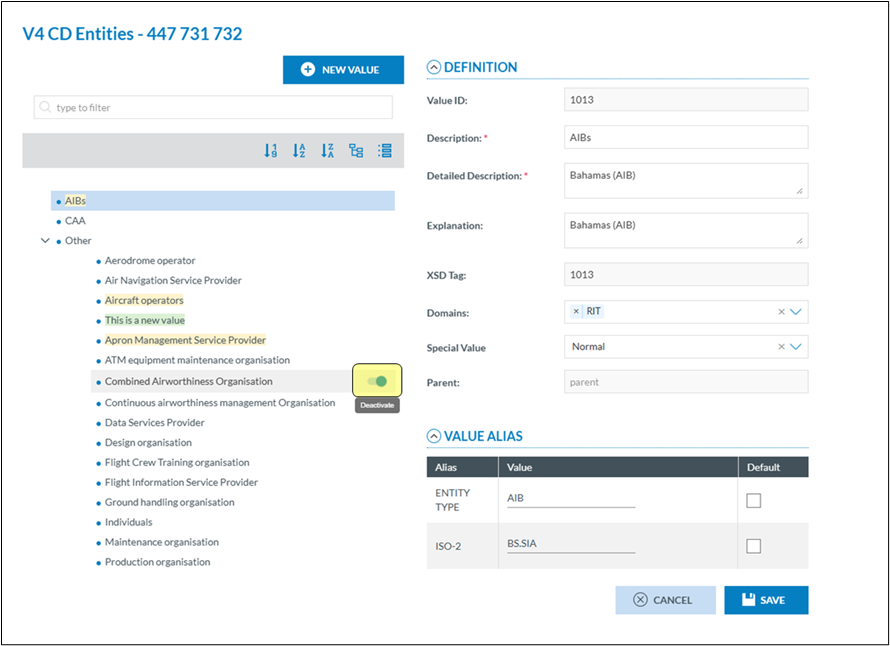
<span lang="EN-GB">Values from a value list are never physically deleted. They are given a deactivated status. This means that the value can no longer be used by reporters in their reports, yet in the already submitted ORs.</span>

<span lang="EN-GB">or existing VRs and OCs, they are still visible. Also, in the value list, they will appear in a greyed-out colour in the taxonomy.</span>

<span lang="EN-GB">When hovering with the mouse over a value, a switch becomes visible. Setting the switch to the left will disable the value, setting it to the right (default) will active the value.</span>

[![image.png](https://help.ci-aviationreporting.eu/uploads/images/gallery/2025-11/scaled-1680-/lBzimage.png)](https://help.ci-aviationreporting.eu/uploads/images/gallery/2025-11/lBzimage.png)

[![image.png](https://help.ci-aviationreporting.eu/uploads/images/gallery/2025-11/scaled-1680-/zJTimage.png)](https://help.ci-aviationreporting.eu/uploads/images/gallery/2025-11/zJTimage.png)
##### <span lang="EN-GB">Changing the position of a value</span>

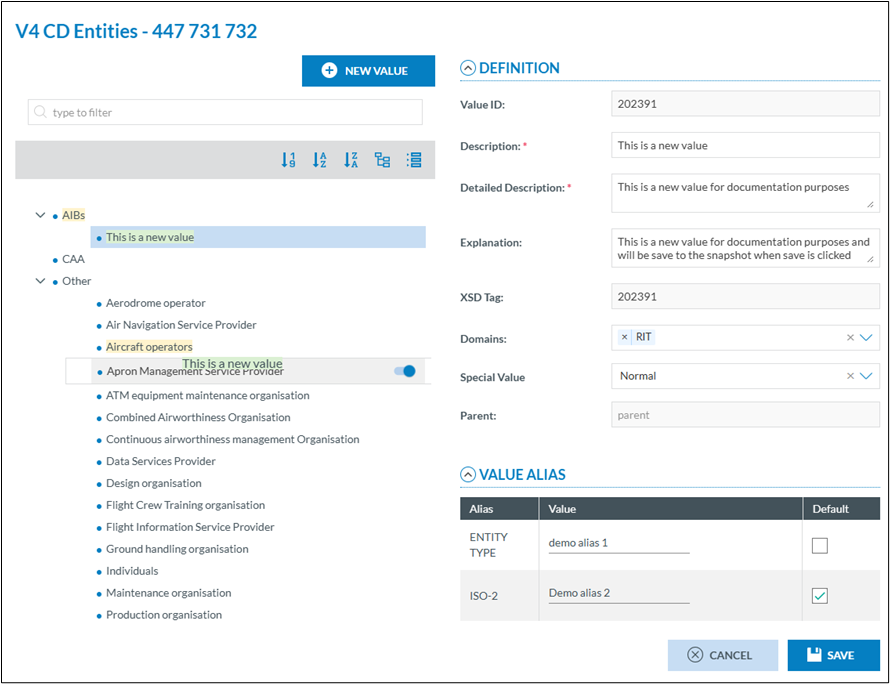
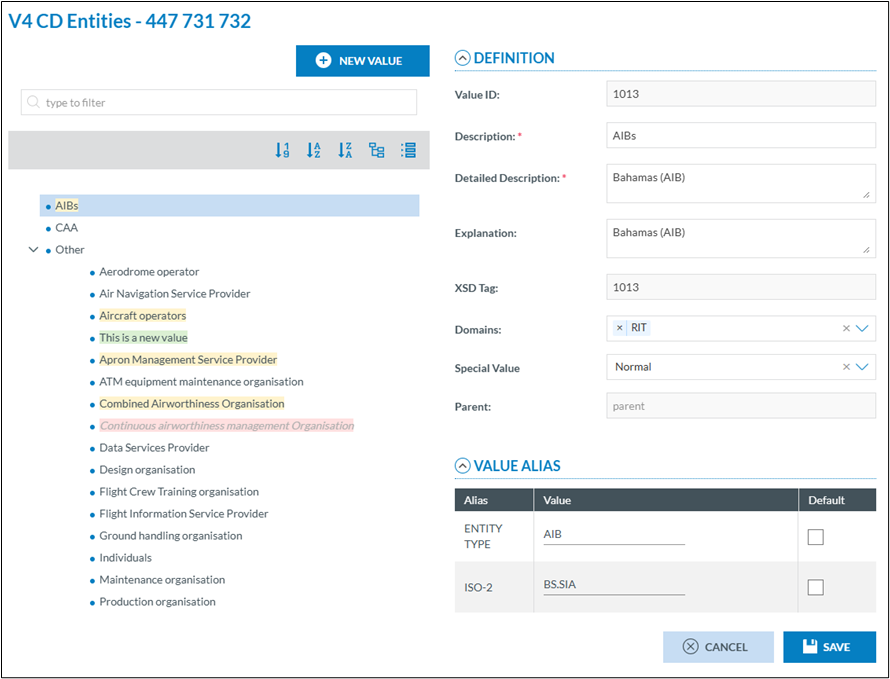
<span lang="EN-GB">Changing the position of a value within a Value List can be done easily using the built-in drag-and-drop functionality in E2. This intuitive feature allows users to reposition values directly within the hierarchy, ensuring the list structure reflects the desired order.</span>

[![image.png](https://help.ci-aviationreporting.eu/uploads/images/gallery/2025-11/scaled-1680-/Og1image.png)](https://help.ci-aviationreporting.eu/uploads/images/gallery/2025-11/Og1image.png)

[![image.png](https://help.ci-aviationreporting.eu/uploads/images/gallery/2025-11/scaled-1680-/Txeimage.png)](https://help.ci-aviationreporting.eu/uploads/images/gallery/2025-11/Txeimage.png)
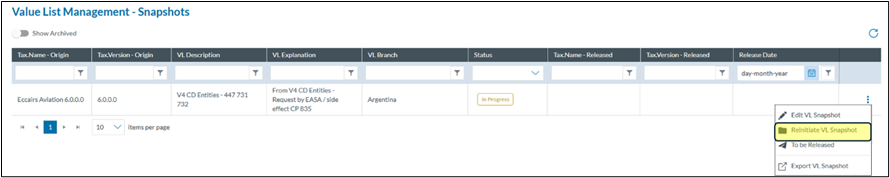
#### <span lang="EN-GB">Reinitiate the snapshot</span>

<span lang="EN-GB">In some cases, it may be desirable to start over completely and discard all previously made changes to a Value List. E2 allows users to do this by using the reinitialise function, which reverts the list to its original state, effectively voiding all modifications made up to that point.</span>

[![image.png](https://help.ci-aviationreporting.eu/uploads/images/gallery/2025-11/scaled-1680-/gGdimage.png)](https://help.ci-aviationreporting.eu/uploads/images/gallery/2025-11/gGdimage.png)

<span lang="EN-GB">To reinitialise, you archive the value list, and a new pending snapshot is created which allows you to start over again. </span>

<span style="mso-ignore: vglayout; position: absolute; z-index: 251660288; margin-left: 2814px; margin-top: 18933px; width: 377px; height: 4px;">![](file:///C:/Users/serrama/AppData/Local/Temp/msohtmlclip1/01/clip_image031.gif)</span><span lang="EN-GB">The value list is set back to the pending status</span>

#### <span lang="EN-GB">Set the snapshot to be release</span>

<span lang="EN-GB">When all modifications for your Authority have been done, you can set the snapshot to the to be released status. This status will trigger an action by the system administrators to validate the snapshot or to reject it. </span>

<span lang="EN-GB">If the snapshot is in the “To be Release status”, it can be set back to in progress. Once the ECCAIRS system administrators have validated the snapshot it gets the status Validated and cannot be changed anymore</span>

[![image.png](https://help.ci-aviationreporting.eu/uploads/images/gallery/2025-11/scaled-1680-/bAcimage.png)](https://help.ci-aviationreporting.eu/uploads/images/gallery/2025-11/bAcimage.png)

#### <span lang="EN-GB">Export/import snapshot</span>

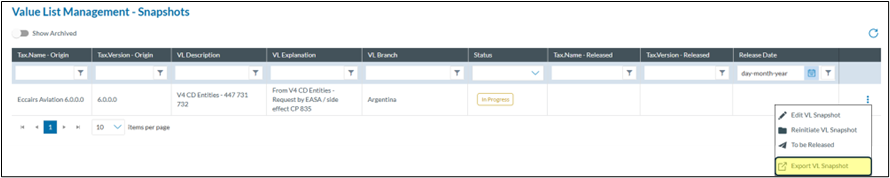
<span lang="EN-GB">Instead of having to add, modify or disable values one by one, the CVLM offers the possibility to first export the values list for editing and import the value list back into the CVLM once done.</span>

[![image.png](https://help.ci-aviationreporting.eu/uploads/images/gallery/2025-11/scaled-1680-/q8Yimage.png)](https://help.ci-aviationreporting.eu/uploads/images/gallery/2025-11/q8Yimage.png)

<span lang="EN-GB">Clicking on the export VL Snapshot will do 2 things:</span>

<span lang="EN-GB" style="mso-bidi-font-family: Calibri; mso-bidi-theme-font: minor-latin;"><span style="mso-list: Ignore;">1.<span style="font: 7.0pt 'Times New Roman';"> </span></span></span><span lang="EN-GB">It will lock the Snapshot, this to prevent that multiple instances are created.</span>

<span lang="EN-GB" style="mso-bidi-font-family: Calibri; mso-bidi-theme-font: minor-latin;"><span style="mso-list: Ignore;">2.<span style="font: 7.0pt 'Times New Roman';"> </span></span></span><span lang="EN-GB">It will create an excel file which is automatically downloaded in the Download folder.</span>

<span lang="EN-GB">Special care is to be taken when editing the Excel file. The exported Excel file has 3 sheets:</span>

<span lang="EN-GB" style="mso-bidi-font-family: Calibri; mso-bidi-theme-font: minor-latin;"><span style="mso-list: Ignore;">1.<span style="font: 7.0pt 'Times New Roman';"> </span></span></span><span lang="EN-GB">Help: containing a brief explanation what needs to be considered when editing values.</span>

<span lang="EN-GB" style="mso-bidi-font-family: Calibri; mso-bidi-theme-font: minor-latin;"><span style="mso-list: Ignore;">2.<span style="font: 7.0pt 'Times New Roman';"> </span></span></span><span lang="EN-GB">Properties: this sheet contains certain characteristics and may NOT be edited.</span>

<span lang="EN-GB" style="mso-bidi-font-family: Calibri; mso-bidi-theme-font: minor-latin;"><span style="mso-list: Ignore;">3.<span style="font: 7.0pt 'Times New Roman';"> </span></span></span><span lang="EN-GB">Values: This sheet contains the value list values.</span>

<span lang="EN-GB">Depending on the value list that is being edited, the Values sheet may contain more or less columns, yet the 13 first columns are always there.</span>

**<span lang="EN-GB">Value List Rules</span>**

**<span lang="EN-GB">1. IsNewRecord</span>**<span lang="EN-GB"> must be:</span>

<span lang="EN-GB">0: Value does not change</span>

<span lang="EN-GB">1: New value</span>

<span lang="EN-GB">2: Value has changed</span>

**<span lang="EN-GB">2. ID</span>**<span lang="EN-GB"> must be unique across the entire Value List or Snapshot (not just within the Excel sheet). The **IDs** assigned to the values in the Excel file are for reference only and may change when imported into the list.</span>

<span lang="EN-GB">3. The **ID of a Parent Value** cannot be the same as the **ID of a Child Value**. Each **Parent Identifier** must exist in the Value List, Snapshot, or within the Excel file. The **level of a Child Value** must be its Parent's level + 1. </span>

**<span lang="EN-GB">4. Value’s level</span>**<span lang="EN-GB"> cannot exceed the maximum number of levels defined in the Value List. Furthermore it must be &gt; 1</span>

**<span lang="EN-GB">5. Description</span>**<span lang="EN-GB"> is limited to 600 characters</span>

**<span lang="EN-GB">6. AlternativeDescription</span>**<span lang="EN-GB"> is limited to 600 characters</span>

**<span lang="EN-GB">7. Detailed Description</span>**<span lang="EN-GB"> is limited to 1200 characters</span>

**<span lang="EN-GB">8. Explanation</span>**<span lang="EN-GB"> is limited to 3600 characters</span>

<span lang="EN-GB">9. The **HasChild** field must be:</span>

<span lang="EN-GB">0: No child values present</span>

<span lang="EN-GB">1: Child values exist  
*(Set to 1 only if the value has children; otherwise, use 0.)*</span>

<span lang="EN-GB">10. The **SpecialValue** field must be  
Special Value has an influence on the position of th value in the Value List. By default (0) the value will be in alphabetical order. 1,2 and 3 will put the value at the end of the list.</span>

<span lang="EN-GB">0: Normal (default)</span>

<span lang="EN-GB">1: None</span>

<span lang="EN-GB">2: Other</span>

<span lang="EN-GB">3: Unknown</span>

<span lang="EN-GB">11. The **Status** field must be:</span>

<span lang="EN-GB">1: Active</span>

<span lang="EN-GB">2: Inactive</span>

<span lang="EN-GB">When creating a new value (IsNewRecord = 1), the **Status** must not be 2.</span>

<span lang="EN-GB">If a value has Status = 2, **all its child values** must also have Status = 2.</span>

<span lang="EN-GB">12. The **XsdTag** of a value must be equal to its **ID**.</span>

<span lang="EN-GB">13. For values in the **RIT Domain**, an 'X' must be entered in the **Domain** column.</span>

<span lang="EN-GB">14. Any **Alias** assigned to a value must already exist in the defined Aliases which are defined at EASA-ECCAIRS level</span>

<span lang="EN-GB">Example  
</span>

[![image.png](https://help.ci-aviationreporting.eu/uploads/images/gallery/2025-11/scaled-1680-/0FTimage.png)](https://help.ci-aviationreporting.eu/uploads/images/gallery/2025-11/0FTimage.png)

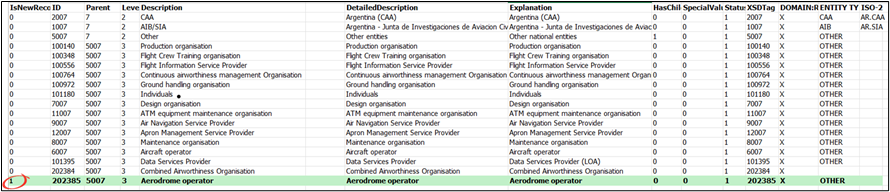
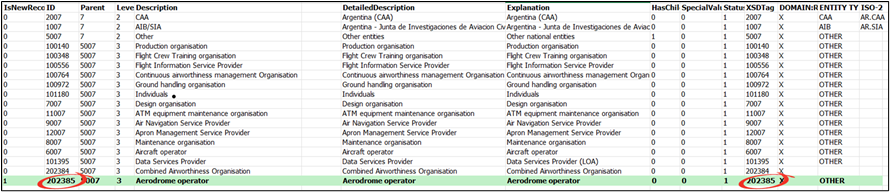
<span lang="EN-GB">Assume a new level 3 Aerodrome to be inserted</span>

<span lang="EN-GB">As this is a new entry, IsNewRecord = 1</span>

[![image.png](https://help.ci-aviationreporting.eu/uploads/images/gallery/2025-11/scaled-1680-/vstimage.png)](https://help.ci-aviationreporting.eu/uploads/images/gallery/2025-11/vstimage.png)

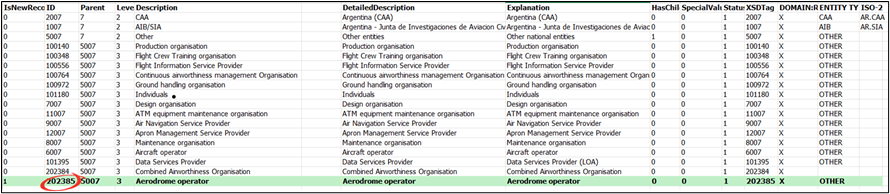
<span lang="EN-GB">Look for the highest ID in the sheet and add 1 to it</span>

[![image.png](https://help.ci-aviationreporting.eu/uploads/images/gallery/2025-11/scaled-1680-/Y2gimage.png)](https://help.ci-aviationreporting.eu/uploads/images/gallery/2025-11/Y2gimage.png)

<span lang="EN-GB">Copy the ID of its parent into the parent column</span>

[![image.png](https://help.ci-aviationreporting.eu/uploads/images/gallery/2025-11/scaled-1680-/betimage.png)](https://help.ci-aviationreporting.eu/uploads/images/gallery/2025-11/betimage.png)

<span lang="EN-GB">The XSDTag is to be the same as the ID</span>

[![image.png](https://help.ci-aviationreporting.eu/uploads/images/gallery/2025-11/scaled-1680-/1xTimage.png)](https://help.ci-aviationreporting.eu/uploads/images/gallery/2025-11/1xTimage.png)

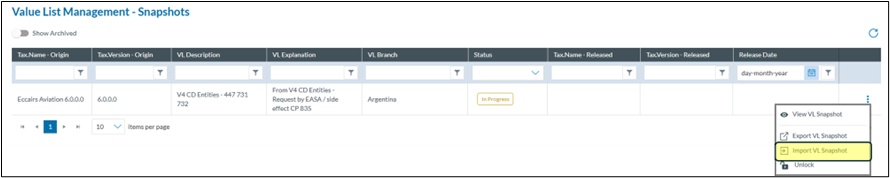
<span lang="EN-GB">Once the value list is edited, it can be imported back into E2 using the import action</span>

[![image.png](https://help.ci-aviationreporting.eu/uploads/images/gallery/2025-11/scaled-1680-/N4nimage.png)](https://help.ci-aviationreporting.eu/uploads/images/gallery/2025-11/N4nimage.png)

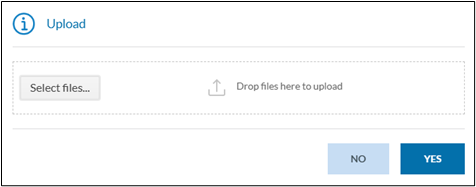
<span lang="EN-GB">When clicking this option, E2 will prompt for the file to import  
</span>

[![image.png](https://help.ci-aviationreporting.eu/uploads/images/gallery/2025-11/scaled-1680-/puLimage.png)](https://help.ci-aviationreporting.eu/uploads/images/gallery/2025-11/puLimage.png)

<span lang="EN-GB">Either drag the file into the prompt window or select the file by clicking on select files.</span>

<span lang="EN-GB">The result of the import will be sent to you by email and the value list will be unlocked.</span>

#### <span lang="EN-GB">Editing values through an Excel file</span>

<span lang="EN-GB">If only changing some values, it is not necessary to have all the rows in the Excel file.  
All unnecessary rows can be deleted</span>

[![image.png](https://help.ci-aviationreporting.eu/uploads/images/gallery/2025-11/scaled-1680-/qyXimage.png)](https://help.ci-aviationreporting.eu/uploads/images/gallery/2025-11/qyXimage.png)

<span lang="EN-GB" style="mso-bidi-font-family: Calibri; mso-bidi-theme-font: minor-latin;"><span style="mso-list: Ignore;">1.<span style="font: 7.0pt 'Times New Roman';"> </span></span></span><span lang="EN-GB">As it is a modification, the IsNewRecord should be 2</span>

<span lang="EN-GB" style="mso-bidi-font-family: Calibri; mso-bidi-theme-font: minor-latin;"><span style="mso-list: Ignore;">2.<span style="font: 7.0pt 'Times New Roman';"> </span></span></span><span lang="EN-GB">Change whatever column you want to modify, bearing the restrictions in mind</span>

<span lang="EN-GB">Once done upload the excel file</span>

[![image.png](https://help.ci-aviationreporting.eu/uploads/images/gallery/2025-11/scaled-1680-/rulimage.png)](https://help.ci-aviationreporting.eu/uploads/images/gallery/2025-11/rulimage.png)

#### <span lang="EN-GB">Unlocking a value list</span>

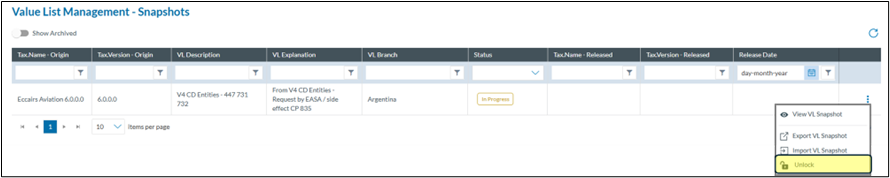
<span lang="EN-GB">In case a value list was exported, and nothing needs to be changed then it can be unlocked without having to import anything by clicking unlock </span>

[![image.png](https://help.ci-aviationreporting.eu/uploads/images/gallery/2025-11/scaled-1680-/V1Rimage.png)](https://help.ci-aviationreporting.eu/uploads/images/gallery/2025-11/V1Rimage.png)

#### <span lang="EN-GB">Rejected snapshot</span>

<span lang="EN-GB">When after assessment by the ECCAIRS system administrators as snapshot is rejected, you will be informed. You will see the status as Rejected in the list and see the reason for rejection in the list view</span>

[![image.png](https://help.ci-aviationreporting.eu/uploads/images/gallery/2025-11/scaled-1680-/5JNimage.png)](https://help.ci-aviationreporting.eu/uploads/images/gallery/2025-11/5JNimage.png)

<span lang="EN-GB">The ECCAIRS System Administrators can push a snapshot back into “In Progress” status, allowing further modifications. However, this is not an automatic process, it requires a manual action by the administrators. If you need to continue editing a previously submitted snapshot, you can request that it be returned to “In Progress” status. </span>