# How to organise organisations in groups

### <span style="mso-ansi-language: EN-US;">Some background</span>

#### <span style="mso-ansi-language: EN-US;">What is an organisation?</span>

<span style="mso-ansi-language: EN-US;">An organisation refers to a specific entity or entity type involved in aviation safety reporting. Organisations represent the various reporting entities such as, airlines operators, aerodromes, maintenance organisations, air traffic control, and other entities within the aviation industry. Each organisation is assigned a unique identifier and is associated with specific attributes.</span>

<span style="mso-ansi-language: EN-US;">In E2, organisations are managed by the Authorities and the users, also known as reporters, are managed by both the Authorities and the Organisation managers. It is reporters that are responsible for providing information about accidents or incident by using the forms made available to them.</span>

<span style="mso-ansi-language: EN-US;">Reports created by an organisation user are visible to all reporters of his organisation. No organisation has access to another organisation’s reports.</span>

##### <span style="mso-ansi-language: EN-US;">How to name an organisation</span>

<span style="mso-ansi-language: EN-US;">Giving a meaningful name to an organization serves several important purposes. It helps to easily identify the organisation's identity and its field of activity.  
Every organisation has its own unique identifier; it is good practice to include this identifier in the organisation’s name in e2. Organisations tend to change names from time to time, while their unique identifier remains the same.</span>

<span style="mso-ansi-language: EN-US;">Examples:</span>

<span lang="EN-GB" style="font-family: Symbol; mso-fareast-font-family: Symbol; mso-bidi-font-family: Symbol;"><span style="mso-list: Ignore;">·<span style="font: 7.0pt 'Times New Roman';"> </span></span></span><span lang="EN-GB">CH.AOC.xxxx // Mountain xxx AG</span>

<span lang="EN-GB" style="font-family: Symbol; mso-fareast-font-family: Symbol; mso-bidi-font-family: Symbol;"><span style="mso-list: Ignore;">·<span style="font: 7.0pt 'Times New Roman';"> </span></span></span><span lang="EN-GB">EASA.145.xxxx // Super Maintenance of Aircraft </span>

<span lang="FR-BE" style="font-family: Symbol; mso-fareast-font-family: Symbol; mso-bidi-font-family: Symbol; mso-ansi-language: FR-BE;"><span style="mso-list: Ignore;">·<span style="font: 7.0pt 'Times New Roman';"> </span></span></span><span lang="FR-BE" style="mso-ansi-language: FR-BE;">EASA.21J.xxxx // Continental Technologies Design GmbH</span>

<span lang="EN-GB" style="font-family: Symbol; mso-fareast-font-family: Symbol; mso-bidi-font-family: Symbol;"><span style="mso-list: Ignore;">·<span style="font: 7.0pt 'Times New Roman';"> </span></span></span><span lang="EN-GB">BE/ATO-xxxx // Fantastic Air Academy</span>

<span lang="EN-GB" style="font-family: Symbol; mso-fareast-font-family: Symbol; mso-bidi-font-family: Symbol;"><span style="mso-list: Ignore;">·<span style="font: 7.0pt 'Times New Roman';"> </span></span></span><span lang="EN-GB">…</span>

<span lang="EN-GB">By including the identifier in the name of the organisation in E2, it is easier to identify the type of organisation and eventually to add them to an organisation group.</span>

#### <span style="mso-ansi-language: EN-US;">What is an organisation group?</span>

##### <span style="mso-ansi-language: EN-US;">How to name an organisation group</span>

<span style="mso-ansi-language: EN-US;">Giving a meaningful name to an organization group is key. There are no golden rules as how to name the groups. Yet, consider the specific goals for which an organisation should be in a certain group. </span>

<span style="mso-ansi-language: EN-US;">Examples of grouping by activity</span>

<span style="font-family: Symbol; mso-fareast-font-family: Symbol; mso-bidi-font-family: Symbol; mso-ansi-language: EN-US;"><span style="mso-list: Ignore;">·<span style="font: 7.0pt 'Times New Roman';"> </span></span></span><span style="mso-ansi-language: EN-US;">A group containing organisation </span><span style="font-family: Wingdings; mso-ascii-font-family: Calibri; mso-ascii-theme-font: minor-latin; mso-hansi-font-family: Calibri; mso-hansi-theme-font: minor-latin; mso-ansi-language: EN-US; mso-char-type: symbol; mso-symbol-font-family: Wingdings;"><span style="mso-char-type: symbol; mso-symbol-font-family: Wingdings;">à</span></span><span style="mso-ansi-language: EN-US;"> AOC Holders</span>

<span style="font-family: Symbol; mso-fareast-font-family: Symbol; mso-bidi-font-family: Symbol; mso-ansi-language: EN-US;"><span style="mso-list: Ignore;">·<span style="font: 7.0pt 'Times New Roman';"> </span></span></span><span style="mso-ansi-language: EN-US;">A group containing aerodrome operators </span><span style="font-family: Wingdings; mso-ascii-font-family: Calibri; mso-ascii-theme-font: minor-latin; mso-hansi-font-family: Calibri; mso-hansi-theme-font: minor-latin; mso-ansi-language: EN-US; mso-char-type: symbol; mso-symbol-font-family: Wingdings;"><span style="mso-char-type: symbol; mso-symbol-font-family: Wingdings;">à</span></span><span style="mso-ansi-language: EN-US;"> ADR operators</span>

<span style="font-family: Symbol; mso-fareast-font-family: Symbol; mso-bidi-font-family: Symbol; mso-ansi-language: EN-US;"><span style="mso-list: Ignore;">·<span style="font: 7.0pt 'Times New Roman';"> </span></span></span><span style="mso-ansi-language: EN-US;">A group containing Ground handling organisations </span><span style="font-family: Wingdings; mso-ascii-font-family: Calibri; mso-ascii-theme-font: minor-latin; mso-hansi-font-family: Calibri; mso-hansi-theme-font: minor-latin; mso-ansi-language: EN-US; mso-char-type: symbol; mso-symbol-font-family: Wingdings;"><span style="mso-char-type: symbol; mso-symbol-font-family: Wingdings;">à</span></span><span style="mso-ansi-language: EN-US;"> Ground handling</span>

#### <span style="mso-ansi-language: EN-US;">What is a parent organisation?</span>

<span style="mso-ansi-language: EN-US;">The parent organization in ECCAIRS2 facilitates data analysis and reporting by providing a framework to track and analyse safety-related information based on the organisational structure of the overhead organisation.</span>

<span style="mso-ansi-language: EN-US;">An organisation such as an airline group having multiple AOCs may want to see in one glance what has been reported and to whom it has been reported to. So, providing a holistic view of safety-related data within the organization's hierarchy.</span>

#### <span style="mso-bookmark: _Toc136430317;"><span style="mso-ansi-language: EN-US;">How to name a parent organisation</span></span>

<span style="mso-ansi-language: EN-US;">As there may be more parent organisations within an Authority, it is important to give a correct and meaningful name, for instance the name of the overarching or umbrella company.</span>

### <span style="mso-ansi-language: EN-US;">How to add an organisation?</span>

<span style="mso-ansi-language: EN-US;">Depending on the permissions the option to manage organisation becomes available on the home page. </span>

[![image.png](https://help.ci-aviationreporting.eu/uploads/images/gallery/2025-11/scaled-1680-/I9ximage.png)](https://help.ci-aviationreporting.eu/uploads/images/gallery/2025-11/I9ximage.png)

#### <span style="mso-ansi-language: EN-US;">Create the organisation details</span>

<span style="mso-ansi-language: EN-US;">Click on New organisation</span>

[![image.png](https://help.ci-aviationreporting.eu/uploads/images/gallery/2025-11/scaled-1680-/6Voimage.png)](https://help.ci-aviationreporting.eu/uploads/images/gallery/2025-11/6Voimage.png)

<span style="mso-ansi-language: EN-US;">There are two distinctive parts </span>

[![image.png](https://help.ci-aviationreporting.eu/uploads/images/gallery/2025-11/scaled-1680-/osYimage.png)](https://help.ci-aviationreporting.eu/uploads/images/gallery/2025-11/osYimage.png)

<span style="mso-ansi-language: EN-US;">The fields marked with a red asterisk are mandatory.</span>

<span style="mso-ansi-language: EN-US;">Organisation details</span>

<span style="font-family: Symbol; mso-fareast-font-family: Symbol; mso-bidi-font-family: Symbol; mso-ansi-language: EN-US;"><span style="mso-list: Ignore;">·<span style="font: 7.0pt 'Times New Roman';"> </span></span></span><span style="mso-ansi-language: EN-US;">Organisation name: As mentioned before, it is key to give the organisation a meaningful name allowing for an easy grouping of organisations later.</span>

<span style="font-family: Symbol; mso-fareast-font-family: Symbol; mso-bidi-font-family: Symbol; mso-ansi-language: EN-US;"><span style="mso-list: Ignore;">·<span style="font: 7.0pt 'Times New Roman';"> </span></span></span><span style="mso-ansi-language: EN-US;">Responsible NAA: is automatically filled out as by logging in the NAA is already known</span>

<span style="font-family: Symbol; mso-fareast-font-family: Symbol; mso-bidi-font-family: Symbol; mso-ansi-language: EN-US;"><span style="mso-list: Ignore;">·<span style="font: 7.0pt 'Times New Roman';"> </span></span></span><span style="mso-ansi-language: EN-US;">Phone: is optional </span>

<span style="font-family: Symbol; mso-fareast-font-family: Symbol; mso-bidi-font-family: Symbol; mso-ansi-language: EN-US;"><span style="mso-list: Ignore;">·<span style="font: 7.0pt 'Times New Roman';"> </span></span></span><span style="mso-ansi-language: EN-US;">Responsible contact (optional): Is the contact person within the organisation that can be contacted in case of need, it doesn’t need to be an e2 user</span>

<span style="font-family: 'Courier New'; mso-fareast-font-family: 'Courier New'; mso-ansi-language: EN-US;"><span style="mso-list: Ignore;">o<span style="font: 7.0pt 'Times New Roman';"> </span></span></span><span style="mso-ansi-language: EN-US;">Full name: full name of the responsible contact</span>

<span style="font-family: 'Courier New'; mso-fareast-font-family: 'Courier New'; mso-ansi-language: EN-US;"><span style="mso-list: Ignore;">o<span style="font: 7.0pt 'Times New Roman';"> </span></span></span><span style="mso-ansi-language: EN-US;">Email address: email address of the responsible contact</span>

<span style="font-family: 'Courier New'; mso-fareast-font-family: 'Courier New'; mso-ansi-language: EN-US;"><span style="mso-list: Ignore;">o<span style="font: 7.0pt 'Times New Roman';"> </span></span></span><span style="mso-ansi-language: EN-US;">Phone: Telephone number of the responsible contact</span>

<span style="mso-ansi-language: EN-US;"> </span>

<span style="mso-ansi-language: EN-US;">Organisation manager details</span>

<span style="mso-ansi-language: EN-US;">At the same time the organisation is created, an organisation manager is created too. This person will manage the organisation’s account from with the organisation. This user has the permission to create additional organisation managers and reporters</span>

<span style="font-family: Symbol; mso-fareast-font-family: Symbol; mso-bidi-font-family: Symbol; mso-ansi-language: EN-US;"><span style="mso-list: Ignore;">·<span style="font: 7.0pt 'Times New Roman';"> </span></span></span><span style="mso-ansi-language: EN-US;">Username: Username need to be unique cross Eccairs 2, that is it cannot be used by any other Authority. This can be sometimes a burden as many people have the same names. As a suggestion, the approval number of the organisation can be used. This has the advantage that it is unique, and that the manager of the organisation remembers his approval number.  
Example username = </span><span lang="FR-BE" style="mso-ansi-language: FR-BE;">EASA.21J.9876</span>

<span style="font-family: Symbol; mso-fareast-font-family: Symbol; mso-bidi-font-family: Symbol; mso-ansi-language: EN-US;"><span style="mso-list: Ignore;">·<span style="font: 7.0pt 'Times New Roman';"> </span></span></span><span style="mso-ansi-language: EN-US;">Description: is an optional field allowing to enter a user’s description</span>

<span style="font-family: Symbol; mso-fareast-font-family: Symbol; mso-bidi-font-family: Symbol; mso-ansi-language: EN-US;"><span style="mso-list: Ignore;">·<span style="font: 7.0pt 'Times New Roman';"> </span></span></span><span style="mso-ansi-language: EN-US;">Creation date &amp; Modification date; these dates are system generated and show when the account was created/last modified</span>

<span style="font-family: Symbol; mso-fareast-font-family: Symbol; mso-bidi-font-family: Symbol; mso-ansi-language: EN-US;"><span style="mso-list: Ignore;">·<span style="font: 7.0pt 'Times New Roman';"> </span></span></span><span style="mso-ansi-language: EN-US;">Last Activity: this shows when the user last logged on to E2</span>

<span style="font-family: Symbol; mso-fareast-font-family: Symbol; mso-bidi-font-family: Symbol; mso-ansi-language: EN-US;"><span style="mso-list: Ignore;">·<span style="font: 7.0pt 'Times New Roman';"> </span></span></span><span style="mso-ansi-language: EN-US;">Disabled: when a new account is created, the account is disabled until the user has activated the account. The account can also be disabled/enabled manually by the organisation manager</span>

<span style="font-family: Symbol; mso-fareast-font-family: Symbol; mso-bidi-font-family: Symbol; mso-ansi-language: EN-US;"><span style="mso-list: Ignore;">·<span style="font: 7.0pt 'Times New Roman';"> </span></span></span><span style="mso-ansi-language: EN-US;">Blocked: When a user has failed too many times to login to the system (wrong password), then the account is blocked and needs to be unblocked by the organisation manager.  
An account is also automatically blocked after 90 days of inactivity. In needed, it is to be unblocked by the organisation manager.</span>

<span style="font-family: Symbol; mso-fareast-font-family: Symbol; mso-bidi-font-family: Symbol; mso-ansi-language: EN-US;"><span style="mso-list: Ignore;">·<span style="font: 7.0pt 'Times New Roman';"> </span></span></span><span style="mso-ansi-language: EN-US;">First Name and Last Name: are both mandatory fields</span>

<span style="font-family: Symbol; mso-fareast-font-family: Symbol; mso-bidi-font-family: Symbol; mso-ansi-language: EN-US;"><span style="mso-list: Ignore;">·<span style="font: 7.0pt 'Times New Roman';"> </span></span></span><span style="mso-ansi-language: EN-US;">Phone: is an optional field containing the telephone number of the user</span>

<span style="font-family: Symbol; mso-fareast-font-family: Symbol; mso-bidi-font-family: Symbol; mso-ansi-language: EN-US;"><span style="mso-list: Ignore;">·<span style="font: 7.0pt 'Times New Roman';"> </span></span></span><span style="mso-ansi-language: EN-US;">Email Address: Is the email address of the user. To this email address the activation email will be sent. It is key that this is correct, if not the user will not be able to activate the account</span>

<span style="font-family: Symbol; mso-fareast-font-family: Symbol; mso-bidi-font-family: Symbol; mso-ansi-language: EN-US;"><span style="mso-list: Ignore;">·<span style="font: 7.0pt 'Times New Roman';"> </span></span></span><span style="mso-ansi-language: EN-US;">Job title: is an optional field that can be used to enter the user’s job title</span>

<span style="mso-ansi-language: EN-US;"> </span><span style="mso-ansi-language: EN-US;">The activation email is sent as soon as the organisation is saved to the data base</span>

#### <span style="mso-ansi-language: EN-US;">Create an additional organisation user</span>

<span style="mso-ansi-language: EN-US;">For this opening the organisation for edit is required. Besides modifying some fields, this window also allows to create addition users</span>

<span style="mso-ansi-language: EN-US;">ECCAIRS 2 distinguishes two types of users. </span>

<span style="mso-bidi-font-family: Calibri; mso-bidi-theme-font: minor-latin; mso-ansi-language: EN-US;"><span style="mso-list: Ignore;">1.<span style="font: 7.0pt 'Times New Roman';"> </span></span></span><span style="mso-ansi-language: EN-US;">The human user  
A human Eccairs2 user refers to an individual who interacts with and utilizes Eccairs 2 to enter incident reports for his organisation and/or manages the organisations account. In this context, "human user" typically refers to reporters who use Eccairs2 for reporting purposes.</span>

<span style="mso-ansi-language: EN-US;"> </span>[![image.png](https://help.ci-aviationreporting.eu/uploads/images/gallery/2025-11/scaled-1680-/jRWimage.png)](https://help.ci-aviationreporting.eu/uploads/images/gallery/2025-11/jRWimage.png)

<span lang="EN-GB" style="mso-no-proof: yes;">  
</span>

<span style="mso-ansi-language: EN-US;"><span style="mso-tab-count: 1;"> </span></span>

<span style="mso-ansi-language: EN-US;">The information to be entered is like the information entered when creating the organisation manager when creating the organisation account:  
  
</span>

<span style="font-family: Symbol; mso-fareast-font-family: Symbol; mso-bidi-font-family: Symbol; mso-ansi-language: EN-US;"><span style="mso-list: Ignore;">·<span style="font: 7.0pt 'Times New Roman';"> </span></span></span><span style="mso-ansi-language: EN-US;">Username: Username need to be unique cross Eccairs 2, that is it cannot be used by any other Authority. This can be sometimes a burden as many people have the same names. </span>

<span style="font-family: Symbol; mso-fareast-font-family: Symbol; mso-bidi-font-family: Symbol; mso-ansi-language: EN-US;"><span style="mso-list: Ignore;">·<span style="font: 7.0pt 'Times New Roman';"> </span></span></span><span style="mso-ansi-language: EN-US;">Description: is an optional field allowing to enter a user’s description</span>

<span style="font-family: Symbol; mso-fareast-font-family: Symbol; mso-bidi-font-family: Symbol; mso-ansi-language: EN-US;"><span style="mso-list: Ignore;">·<span style="font: 7.0pt 'Times New Roman';"> </span></span></span><span style="mso-ansi-language: EN-US;">Creation date &amp; Modification date; these dates are system generated and show when the account was created/last modified</span>

<span style="font-family: Symbol; mso-fareast-font-family: Symbol; mso-bidi-font-family: Symbol; mso-ansi-language: EN-US;"><span style="mso-list: Ignore;">·<span style="font: 7.0pt 'Times New Roman';"> </span></span></span><span style="mso-ansi-language: EN-US;">Last Activity: this shows when the user last logged on to E2</span>

<span style="font-family: Symbol; mso-fareast-font-family: Symbol; mso-bidi-font-family: Symbol; mso-ansi-language: EN-US;"><span style="mso-list: Ignore;">·<span style="font: 7.0pt 'Times New Roman';"> </span></span></span><span style="mso-ansi-language: EN-US;">Disabled: when a new account is created, the account is disabled until the user has activated the account. The account can also be disabled/enabled manually by the organisation manager</span>

<span style="font-family: Symbol; mso-fareast-font-family: Symbol; mso-bidi-font-family: Symbol; mso-ansi-language: EN-US;"><span style="mso-list: Ignore;">·<span style="font: 7.0pt 'Times New Roman';"> </span></span></span><span style="mso-ansi-language: EN-US;">Blocked: When a user has failed too many times to login to the system (wrong password), then the account is blocked and needs to be unblocked by the organisation manager.  
An account is also automatically blocked after 90 days of inactivity. In needed, it is to be unblocked by the organisation manager.</span>

<span style="font-family: Symbol; mso-fareast-font-family: Symbol; mso-bidi-font-family: Symbol; mso-ansi-language: EN-US;"><span style="mso-list: Ignore;">·<span style="font: 7.0pt 'Times New Roman';"> </span></span></span><span style="mso-ansi-language: EN-US;">First Name and Last Name: are both mandatory fields</span>

<span style="font-family: Symbol; mso-fareast-font-family: Symbol; mso-bidi-font-family: Symbol; mso-ansi-language: EN-US;"><span style="mso-list: Ignore;">·<span style="font: 7.0pt 'Times New Roman';"> </span></span></span><span style="mso-ansi-language: EN-US;">Phone: is an optional field containing the telephone number of the user</span>

<span style="font-family: Symbol; mso-fareast-font-family: Symbol; mso-bidi-font-family: Symbol; mso-ansi-language: EN-US;"><span style="mso-list: Ignore;">·<span style="font: 7.0pt 'Times New Roman';"> </span></span></span><span style="mso-ansi-language: EN-US;">Email Address: Is the email address of the user. To this email address the activation email will be sent. It is key that this is correct, if not the user will not be able to activate the account</span>

<span style="font-family: Symbol; mso-fareast-font-family: Symbol; mso-bidi-font-family: Symbol; mso-ansi-language: EN-US;"><span style="mso-list: Ignore;">·<span style="font: 7.0pt 'Times New Roman';"> </span></span></span><span style="mso-ansi-language: EN-US;">Job title: is an optional field that can be used to enter the user’s job title</span>

<span style="mso-ansi-language: EN-US;"> </span><span style="mso-ansi-language: EN-US;">The activation email is sent as soon as the organisation is saved to the data base  
  
</span>

<p class="callout info"><span style="mso-ansi-language: EN-US;">When a user requests his account to be deleted, then both the blocked and the Disabled switches are set. In addition, all fields will be void except the username.</span></p>

<span style="mso-ansi-language: EN-US;"> </span>

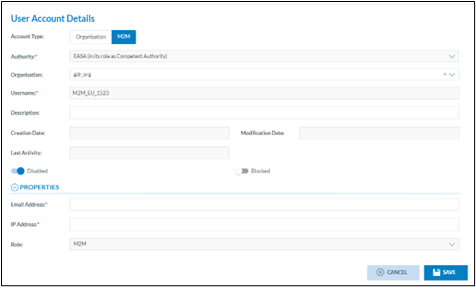
<span style="mso-bidi-font-family: Calibri; mso-bidi-theme-font: minor-latin; mso-ansi-language: EN-US;"><span style="mso-list: Ignore;">2.<span style="font: 7.0pt 'Times New Roman';"> </span></span></span><span style="mso-ansi-language: EN-US;">The machine-to-machine user  
A machine-to-machine (M2M) user refers to an automated system or device that interacts with Eccairs2 without the need for human intervention. In M2M communication, machines, or devices exchange information via so called Application Programming Interface, which is a set of definitions, protocols and methods for building and integrating application.  
  
</span>

[![image.png](https://help.ci-aviationreporting.eu/uploads/images/gallery/2025-11/scaled-1680-/DElimage.png)](https://help.ci-aviationreporting.eu/uploads/images/gallery/2025-11/DElimage.png)

<span lang="EN-GB" style="mso-no-proof: yes;">  
</span>

<span style="mso-ansi-language: EN-US;"> </span>

<span style="mso-ansi-language: EN-US;">Unlike the human user, the M2M users will use a token to logon to Eccairs2 and can not gain access to the font end of the application</span>

<span style="font-family: Symbol; mso-fareast-font-family: Symbol; mso-bidi-font-family: Symbol; mso-ansi-language: EN-US;"><span style="mso-list: Ignore;">·<span style="font: 7.0pt 'Times New Roman';"> </span></span></span><span style="mso-ansi-language: EN-US;">Authority: is prefilled and is the Authority in which the organisation is defined</span>

<span style="font-family: Symbol; mso-fareast-font-family: Symbol; mso-bidi-font-family: Symbol; mso-ansi-language: EN-US;"><span style="mso-list: Ignore;">·<span style="font: 7.0pt 'Times New Roman';"> </span></span></span><span style="mso-ansi-language: EN-US;">Organisation: is the organisation in which the M2M user is created</span>

<span style="font-family: Symbol; mso-fareast-font-family: Symbol; mso-bidi-font-family: Symbol; mso-ansi-language: EN-US;"><span style="mso-list: Ignore;">·<span style="font: 7.0pt 'Times New Roman';"> </span></span></span><span style="mso-ansi-language: EN-US;">Username: the user is system generated, is unique across Eccairs2 and cannot be changed</span>

<span style="font-family: Symbol; mso-fareast-font-family: Symbol; mso-bidi-font-family: Symbol; mso-ansi-language: EN-US;"><span style="mso-list: Ignore;">·<span style="font: 7.0pt 'Times New Roman';"> </span></span></span><span style="mso-ansi-language: EN-US;">Description: is an optional field allowing to enter a user’s description</span>

<span style="font-family: Symbol; mso-fareast-font-family: Symbol; mso-bidi-font-family: Symbol; mso-ansi-language: EN-US;"><span style="mso-list: Ignore;">·<span style="font: 7.0pt 'Times New Roman';"> </span></span></span><span style="mso-ansi-language: EN-US;">Creation date &amp; Modification date; these dates are system generated and show when the account was created/last modified</span>

<span style="font-family: Symbol; mso-fareast-font-family: Symbol; mso-bidi-font-family: Symbol; mso-ansi-language: EN-US;"><span style="mso-list: Ignore;">·<span style="font: 7.0pt 'Times New Roman';"> </span></span></span><span style="mso-ansi-language: EN-US;">Last Activity: this shows when the user last logged on to E2</span>

<span style="font-family: Symbol; mso-fareast-font-family: Symbol; mso-bidi-font-family: Symbol; mso-ansi-language: EN-US;"><span style="mso-list: Ignore;">·<span style="font: 7.0pt 'Times New Roman';"> </span></span></span><span style="mso-ansi-language: EN-US;">Disabled: when a new account is created, the account is disabled until the user has activated the account. The account can also be disabled/enabled manually by the organisation manager</span>

<span style="font-family: Symbol; mso-fareast-font-family: Symbol; mso-bidi-font-family: Symbol; mso-ansi-language: EN-US;"><span style="mso-list: Ignore;">·<span style="font: 7.0pt 'Times New Roman';"> </span></span></span><span style="mso-ansi-language: EN-US;">Blocked: When a user has failed too many times to login to the system (wrong password), then the account is blocked and needs to be unblocked by the organisation manager.  
An account is also automatically blocked after 90 days of inactivity. In needed, it is to be unblocked by the organisation manager.</span>

<span style="font-family: Symbol; mso-fareast-font-family: Symbol; mso-bidi-font-family: Symbol; mso-ansi-language: EN-US;"><span style="mso-list: Ignore;">·<span style="font: 7.0pt 'Times New Roman';"> </span></span></span><span style="mso-ansi-language: EN-US;">Email address: Is the email address of the user. To this email address the activation email will be sent. It is key that this is correct, if not the user will not be able to activate the account</span>

<span style="font-family: Symbol; mso-fareast-font-family: Symbol; mso-bidi-font-family: Symbol; mso-ansi-language: EN-US;"><span style="mso-list: Ignore;">·<span style="font: 7.0pt 'Times New Roman';"> </span></span></span><span style="mso-ansi-language: EN-US;">IP address: when a M2M user connect to E2, the IP address from which it tries to access E2 needs to be whitelisted. This is to ensure that only recognized machine gain access to E2</span>

<span style="mso-ansi-language: EN-US;">Only 1 IP address can be entered in this field.<span style="mso-spacerun: yes;"> </span>If an organisation requires more than 1 IP address, then these need to be added to the authority whitelist  
  
</span>

[![image.png](https://help.ci-aviationreporting.eu/uploads/images/gallery/2025-11/scaled-1680-/IFYimage.png)](https://help.ci-aviationreporting.eu/uploads/images/gallery/2025-11/IFYimage.png)

<span style="mso-ansi-language: EN-US;">  
  
</span>

<span style="font-family: Symbol; mso-fareast-font-family: Symbol; mso-bidi-font-family: Symbol; mso-ansi-language: EN-US;"><span style="mso-list: Ignore;">·<span style="font: 7.0pt 'Times New Roman';"> </span></span></span><span style="mso-ansi-language: EN-US;">Role: is the role that is assigned to the M2M user and cannot be changed.</span>

### <span style="mso-ansi-language: EN-US;">How to add an organisation group?</span>

<span style="mso-ansi-language: EN-US;">Depending on the permissions the option to manage organisation groups becomes available on the home page. </span>

[![image.png](https://help.ci-aviationreporting.eu/uploads/images/gallery/2025-11/scaled-1680-/W8Eimage.png)](https://help.ci-aviationreporting.eu/uploads/images/gallery/2025-11/W8Eimage.png)

### <span style="mso-ansi-language: EN-US;">How to add organisations to an organisation group?</span>

[![image.png](https://help.ci-aviationreporting.eu/uploads/images/gallery/2025-11/scaled-1680-/wVqimage.png)](https://help.ci-aviationreporting.eu/uploads/images/gallery/2025-11/wVqimage.png)

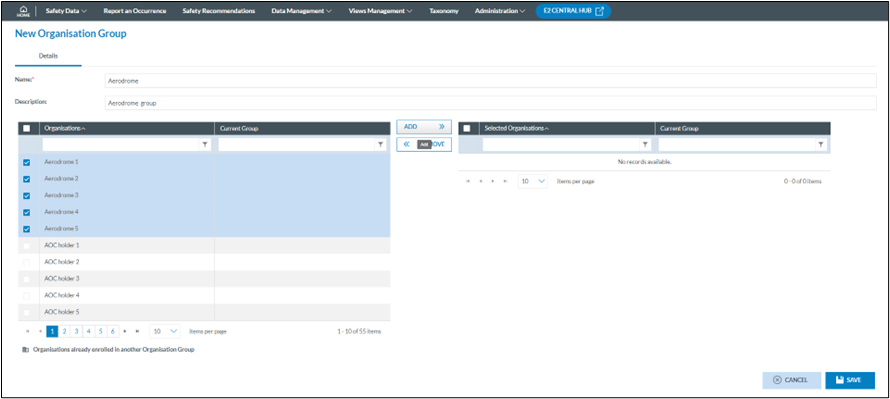
<span style="mso-ansi-language: EN-US;">By clicking on new organisation group, the group editing form becomes available.</span>

<span style="mso-ansi-language: EN-US;">Name: Is the name of the group  
Description: contains a short description of the group?</span>

<span style="mso-ansi-language: EN-US;">There are two panes, The left pane contains all organisation within the Authority and the right pane contains all selected organisations within the group.</span>

<span style="mso-ansi-language: EN-US;">Adding and removing organisations can be done by selecting the organisation from the appropriate pane and clicking on the action button.</span>

[![image.png](https://help.ci-aviationreporting.eu/uploads/images/gallery/2025-11/scaled-1680-/H6bimage.png)](https://help.ci-aviationreporting.eu/uploads/images/gallery/2025-11/H6bimage.png)

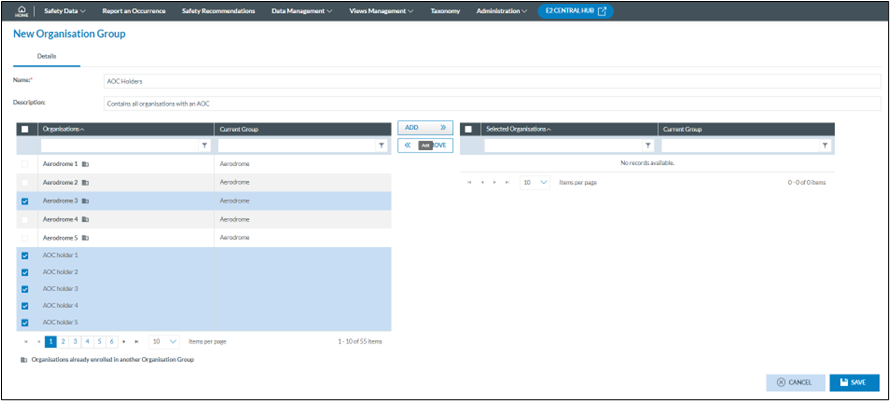
<span style="mso-ansi-language: EN-US;">When creating or editing another group, an extra icon will appear next to those organisations that are already within another group. An organisation can only be in one group.</span>

[![image.png](https://help.ci-aviationreporting.eu/uploads/images/gallery/2025-11/scaled-1680-/1Ypimage.png)](https://help.ci-aviationreporting.eu/uploads/images/gallery/2025-11/1Ypimage.png)

<span style="mso-ansi-language: EN-US;">If an organisation residing in another group is added to the current group, a warning will appear. If proceeded, then the organisation is added to the current group.</span>

[![image.png](https://help.ci-aviationreporting.eu/uploads/images/gallery/2025-11/scaled-1680-/jfcimage.png)](https://help.ci-aviationreporting.eu/uploads/images/gallery/2025-11/jfcimage.png)

### <span style="mso-ansi-language: EN-US;">How to edit an organisation group?</span>

<span style="mso-ansi-language: EN-US;">When hovering over the list a pencil and a trashcan icon will appear at the end of the line, the pencil will open the edit form, the trashcan will delete the group.</span>

[![image.png](https://help.ci-aviationreporting.eu/uploads/images/gallery/2025-11/scaled-1680-/PPvimage.png)](https://help.ci-aviationreporting.eu/uploads/images/gallery/2025-11/PPvimage.png)

#### <span style="mso-ansi-language: EN-US;">Edit Details</span>

[![image.png](https://help.ci-aviationreporting.eu/uploads/images/gallery/2025-11/scaled-1680-/BCtimage.png)](https://help.ci-aviationreporting.eu/uploads/images/gallery/2025-11/BCtimage.png)

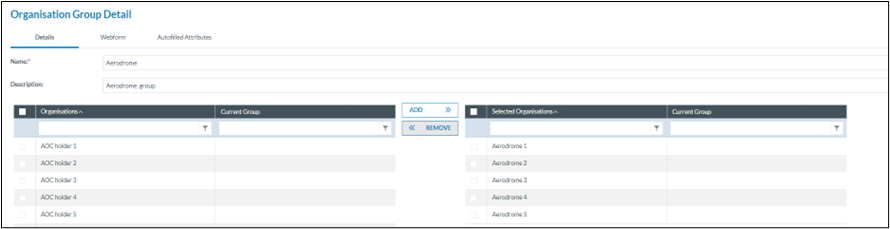
<span style="mso-ansi-language: EN-US;">Name: Is the name of the group  
Description: contains a short description of the group?</span>

<span style="mso-ansi-language: EN-US;">There are two panes, The left pane contains all organisation within the Authority and the right pane contains all selected organisations within the group.</span>

<span style="mso-ansi-language: EN-US;">Adding and removing organisations can be done by selecting the organisation from the appropriate pane and clicking on the action button.</span>

<span style="mso-ansi-language: EN-US;">If an organisation residing in another group is added to the current group, a warning will appear. If proceeded, then the organisation is added to the current group.</span>

[![image.png](https://help.ci-aviationreporting.eu/uploads/images/gallery/2025-11/scaled-1680-/2kHimage.png)](https://help.ci-aviationreporting.eu/uploads/images/gallery/2025-11/2kHimage.png)

#### <span style="mso-ansi-language: EN-US;">Edit Webforms</span>

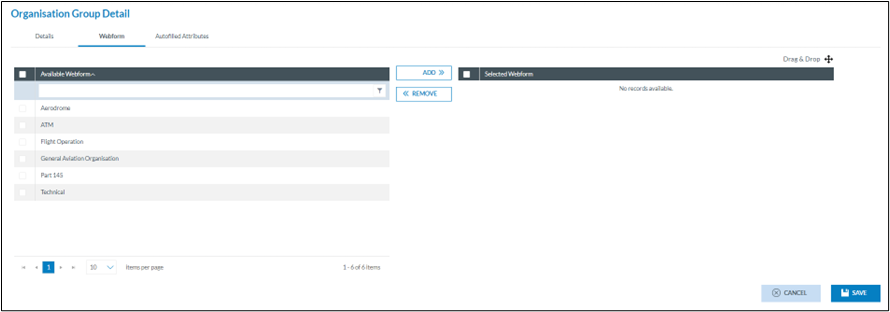
<span lang="EN-GB" style="mso-bidi-font-family: Calibri; mso-bidi-theme-font: minor-latin; color: black; mso-themecolor: text1;">A form for incident reporting is a digital tool that allows reporters to report any incidents or accidents that occurred. The purpose of incident reporting is to help identify potential safety hazards and prevent future incidents.</span>

<span lang="EN-GB" style="mso-bidi-font-family: Calibri; mso-bidi-theme-font: minor-latin; color: black; mso-themecolor: text1;">Incident reporting forms typically ask for details about the nature of the incident, including the type of aircraft involved, the location and time of the incident, the weather conditions, and any other relevant details. They may also ask for information about the individuals involved in the incident, including their, job titles, and contact information.</span>

<span lang="EN-GB" style="mso-bidi-font-family: Calibri; mso-bidi-theme-font: minor-latin; color: black; mso-themecolor: text1;">Eccairs2 (E2) provides 5 standard reporting forms that can be made available to organisations, they are always available and can be used by any Authority and assigned to any organisation.</span>

<span lang="EN-GB" style="mso-bidi-font-family: Calibri; mso-bidi-theme-font: minor-latin; color: black; mso-themecolor: text1;"><span style="mso-list: Ignore;">1.<span style="font: 7.0pt 'Times New Roman';"> </span></span></span><span lang="EN-GB" style="mso-bidi-font-family: Calibri; mso-bidi-theme-font: minor-latin; color: black; mso-themecolor: text1;">Technical</span>

<span style="mso-bookmark: _Hlk134712529;"><span lang="EN-GB" style="mso-bidi-font-family: Calibri; mso-bidi-theme-font: minor-latin; color: black; mso-themecolor: text1;"><span style="mso-list: Ignore;">2.<span style="font: 7.0pt 'Times New Roman';"> </span></span></span><span lang="EN-GB" style="mso-bidi-font-family: Calibri; mso-bidi-theme-font: minor-latin; color: black; mso-themecolor: text1;">General Aviation</span></span>

<span style="mso-bookmark: _Hlk134712529;"><span lang="EN-GB" style="mso-bidi-font-family: Calibri; mso-bidi-theme-font: minor-latin; color: black; mso-themecolor: text1;"><span style="mso-list: Ignore;">3.<span style="font: 7.0pt 'Times New Roman';"> </span></span></span><span lang="EN-GB" style="mso-bidi-font-family: Calibri; mso-bidi-theme-font: minor-latin; color: black; mso-themecolor: text1;">Aerodrome</span></span>

<span style="mso-bookmark: _Hlk134712529;"><span lang="EN-GB" style="mso-bidi-font-family: Calibri; mso-bidi-theme-font: minor-latin; color: black; mso-themecolor: text1;"><span style="mso-list: Ignore;">4.<span style="font: 7.0pt 'Times New Roman';"> </span></span></span><span lang="EN-GB" style="mso-bidi-font-family: Calibri; mso-bidi-theme-font: minor-latin; color: black; mso-themecolor: text1;">ATM/ANS</span></span>

<span style="mso-bookmark: _Hlk134712529;"><span lang="EN-GB" style="mso-bidi-font-family: Calibri; mso-bidi-theme-font: minor-latin; color: black; mso-themecolor: text1;"><span style="mso-list: Ignore;">5.<span style="font: 7.0pt 'Times New Roman';"> </span></span></span><span lang="EN-GB" style="mso-bidi-font-family: Calibri; mso-bidi-theme-font: minor-latin; color: black; mso-themecolor: text1;">Flight Operation</span></span>

<span lang="EN-GB" style="mso-bidi-font-family: Calibri; mso-bidi-theme-font: minor-latin; color: black; mso-themecolor: text1;">In many cases these 5 general forms are sufficient to allow organisation reporters to adequately send in their reports. Yet as these are standard forms, they may ask for irrelevant information and so clutter the form. </span>

<span lang="EN-GB" style="mso-bidi-font-family: Calibri; mso-bidi-theme-font: minor-latin; color: black; mso-themecolor: text1;">E2 offers Authorities to create their own web forms which will better cover their needs. These Authority defined forms will become available to be assigned to organisations when enabled.</span>

[![image.png](https://help.ci-aviationreporting.eu/uploads/images/gallery/2025-11/scaled-1680-/LVyimage.png)](https://help.ci-aviationreporting.eu/uploads/images/gallery/2025-11/LVyimage.png)

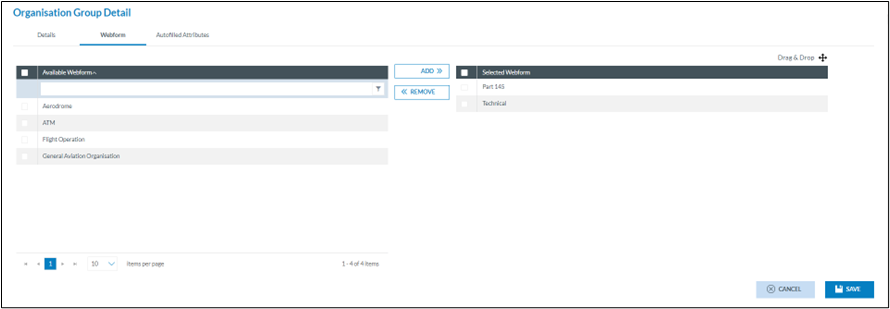
<span lang="EN-GB">By default, any organisation has access to all enabled forms, yet this implies that reporters must select the form and may inadvertently start coding the report in a wrong form.  
To circumvent this, E2 can limit the number of forms users have access to. In the example above, here is in addition an Authority developed form Part 145. </span>

[![image.png](https://help.ci-aviationreporting.eu/uploads/images/gallery/2025-11/scaled-1680-/5vJimage.png)](https://help.ci-aviationreporting.eu/uploads/images/gallery/2025-11/5vJimage.png)

<span lang="EN-GB">In the example above, the technical and Part 145 forms will be available to all users of the organisations in the organisation group. So, to limit the number of forms they can select from.  
  
The advantage of assigning Authority-defined forms to an organisation group is that they allow organisations to use customised data entry forms to suit their specific needs and requirements. Tailored forms to collect the desired information can enhance the quality and accuracy of the data entered. These customisations help to eliminate unnecessary fields and ensures that essential data is captured consistently by all organisation within the group.</span>

#### <span lang="EN-GB"> </span><span style="mso-ansi-language: EN-US;">Edit Auto filled Attributes</span>

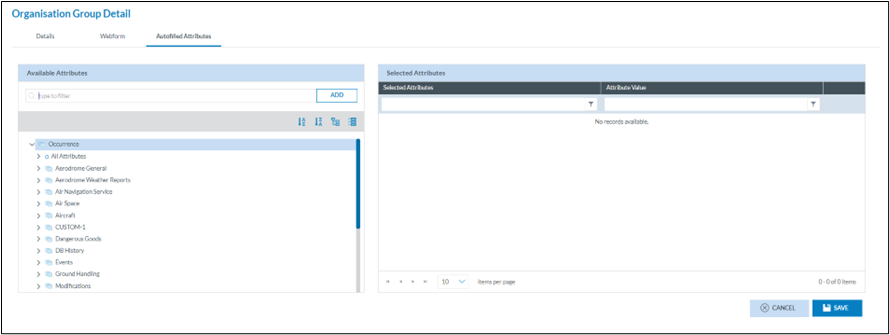
<span style="mso-ansi-language: EN-US;">Auto-filled attributes in E2 provide several advantages that contribute to more efficient data entry and improved data quality. Auto-filled attributes automatically populate certain fields with pre-defined values. This saves time for users by reducing the need for manual input. It minimizes repetitive data entry tasks, especially for common or recurring information or information that is already known</span>

[![image.png](https://help.ci-aviationreporting.eu/uploads/images/gallery/2025-11/scaled-1680-/zdNimage.png)](https://help.ci-aviationreporting.eu/uploads/images/gallery/2025-11/zdNimage.png)

<span style="mso-ansi-language: EN-US;">Any attribute, whether from the ECCIARS taxonomy or Custom Taxonomy can be chosen to be automatically filled out on the form.</span>

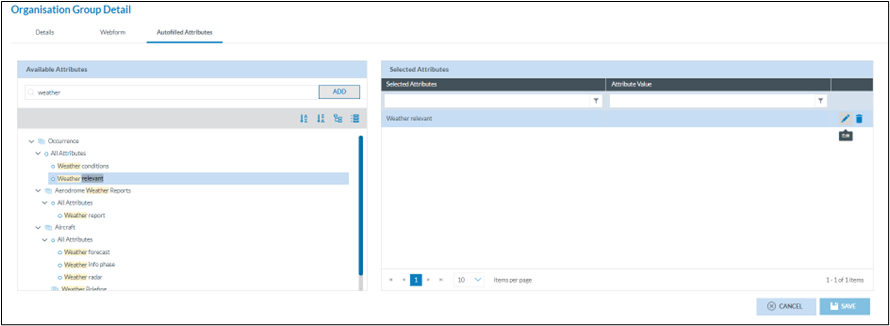
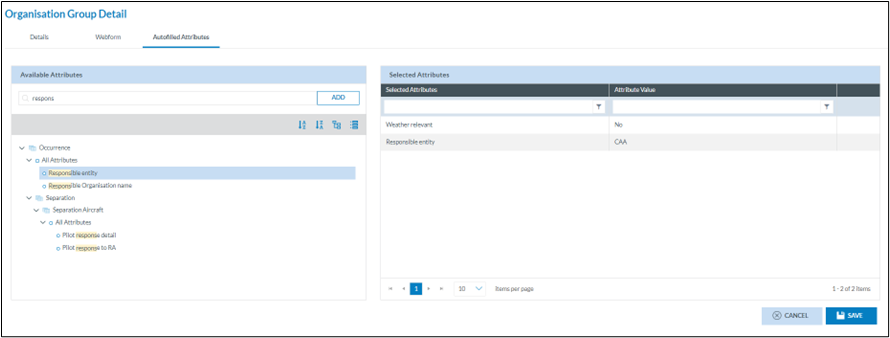
<span style="mso-ansi-language: EN-US;">Select the attribute that is to be automatically filled from the left pane. Either by using the search capability or by expanding the taxonomy tree.  
Clicking on add will move the attribute to the right pane where it can be edited.  
  
</span>

[![image.png](https://help.ci-aviationreporting.eu/uploads/images/gallery/2025-11/scaled-1680-/JFNimage.png)](https://help.ci-aviationreporting.eu/uploads/images/gallery/2025-11/JFNimage.png)

<span style="mso-ansi-language: EN-US;">With the pencil a value to be used in the automatic filling can be entered.  
There is no limitation in the number of attributes that can be automatically filled.  
  
</span>

[![image.png](https://help.ci-aviationreporting.eu/uploads/images/gallery/2025-11/scaled-1680-/CRHimage.png)](https://help.ci-aviationreporting.eu/uploads/images/gallery/2025-11/CRHimage.png)

<span style="mso-ansi-language: EN-US;">Even though an attribute has a value assigned to be automatically filled, the value will not be assigned to the attribute if the attribute is not on the form.</span>

### <span style="mso-ansi-language: EN-US;">How to create a parent organisation?</span>

<span style="mso-ansi-language: EN-US;">Depending on the permissions the option to manage parent organisations becomes available on the home page. </span>

[![image.png](https://help.ci-aviationreporting.eu/uploads/images/gallery/2025-11/scaled-1680-/fhAimage.png)](https://help.ci-aviationreporting.eu/uploads/images/gallery/2025-11/fhAimage.png)

[![image.png](https://help.ci-aviationreporting.eu/uploads/images/gallery/2025-11/scaled-1680-/GhJimage.png)](https://help.ci-aviationreporting.eu/uploads/images/gallery/2025-11/GhJimage.png)

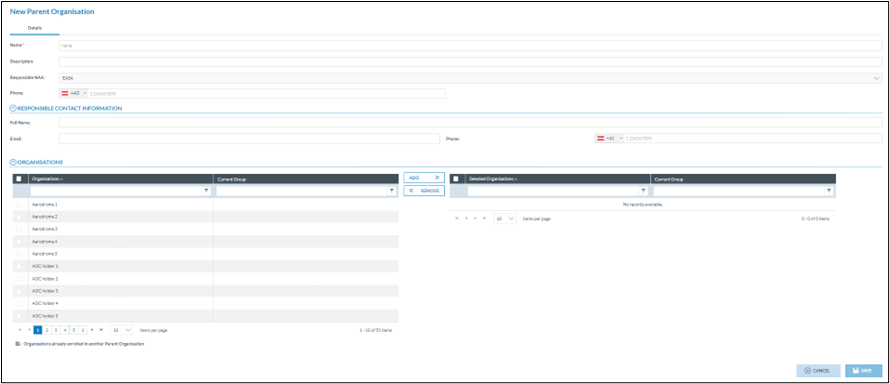
<span style="mso-ansi-language: EN-US;">By clicking on new parent organisation, the configuration form is shown</span>

[![image.png](https://help.ci-aviationreporting.eu/uploads/images/gallery/2025-11/scaled-1680-/Gyyimage.png)](https://help.ci-aviationreporting.eu/uploads/images/gallery/2025-11/Gyyimage.png)

#### <span style="mso-ansi-language: EN-US;">General details</span>

<span style="mso-ansi-language: EN-US;">Name: As there may be more parent organisations within an Authority, it is important to give a correct and meaningful name, for instance the name of the overarching or umbrella company.</span>

<span style="mso-ansi-language: EN-US;">Description: this free text field contains a short description of which organisations are in the parent organisation.</span>

<span style="mso-ansi-language: EN-US;">Responsible NAA: this is automatically filled out with the Authority in which the Parent organisation is created.</span>

<span style="mso-ansi-language: EN-US;">Phone: is a telephone where the Parent organisation can be reached.</span>

#### <span style="mso-ansi-language: EN-US;">Responsible contact information</span>

<span style="mso-ansi-language: EN-US;">Although these are optional fields, it is important to have the details of the contact person within the parent organisation. This person doesn’t necessarily have to be an E2 user</span>

<span style="mso-ansi-language: EN-US;">Full Name: is the first and last name of the responsible contact</span>

<span style="mso-ansi-language: EN-US;">Email address: is the email address of the responsible contact</span>

<span style="mso-ansi-language: EN-US;">Phone: is the telephone number of the responsible contact</span>

#### <span style="mso-ansi-language: EN-US;">Organisations</span>

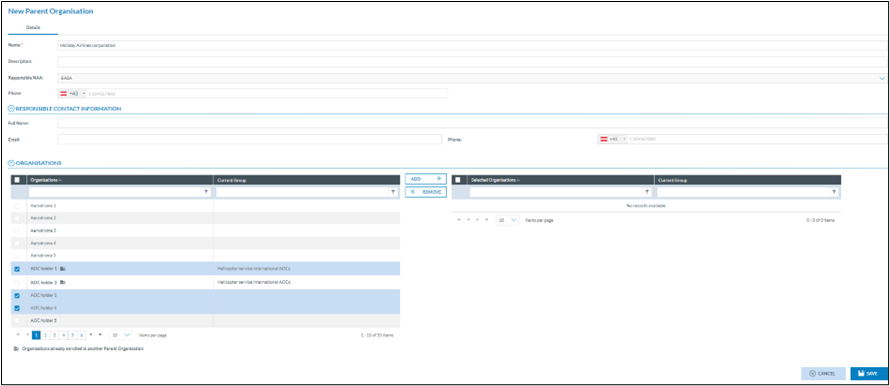
<span style="mso-ansi-language: EN-US;">This area contains 2 panes.  
On the left all known organisations are shown. If an organisation is already part of another parent organisation, then the name of the parent organisation is shown in the “Current Group” column of the left pane:</span><span style="mso-ansi-language: EN-US;"> </span>

[![image.png](https://help.ci-aviationreporting.eu/uploads/images/gallery/2025-11/scaled-1680-/DJPimage.png)](https://help.ci-aviationreporting.eu/uploads/images/gallery/2025-11/DJPimage.png)

<span style="mso-ansi-language: EN-US;">Adding/removing organisations from the parent group is done by selecting the appropriate organisations and executing the add/remove action.</span>

<span style="mso-ansi-language: EN-US;">In case an organisation is added which is already part of another parent organisation, a warning message will be shown.</span>

[![image.png](https://help.ci-aviationreporting.eu/uploads/images/gallery/2025-11/scaled-1680-/B24image.png)](https://help.ci-aviationreporting.eu/uploads/images/gallery/2025-11/B24image.png)

<span style="mso-ansi-language: EN-US;">If decided to continue, the organisation will be removed form the parent organisation and added to the current parent organisation.</span>

<span style="mso-ansi-language: EN-US;"></span>