# How to create an Export by Attribute list

### <span lang="EN-GB">Introduction</span>

<span lang="EN-GB">Depending on how users intend to utilise the data from E2, they may require different data fields. E2 offers a functionality that allows users to create custom export attribute lists tailored to their specific needs.</span>

<span lang="EN-GB">Export attribute lists are user bound, that is they cannot be shared amongst other users. Every Authority user has access to this feature.</span>

### <span lang="EN-GB">Accessing the export by attribute list functionality</span>

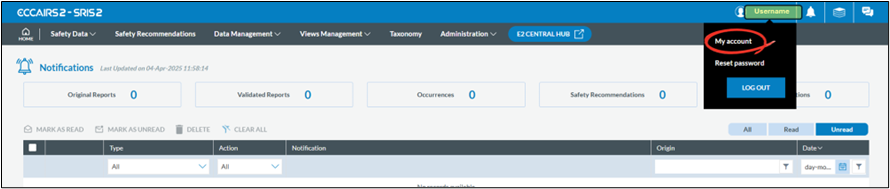
<span lang="EN-GB">To gain access to click on your username and select My Account:</span>

[![image.png](https://help.ci-aviationreporting.eu/uploads/images/gallery/2025-11/scaled-1680-/Dxgimage.png)](https://help.ci-aviationreporting.eu/uploads/images/gallery/2025-11/Dxgimage.png)

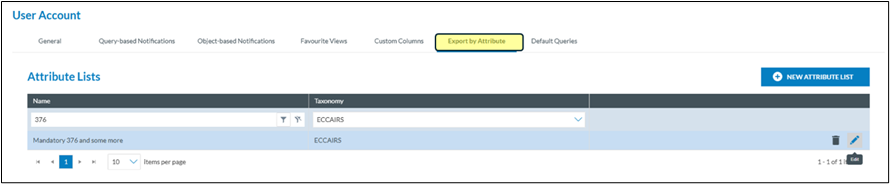
<span lang="EN-GB">Click on the Export by attribute</span>

[![image.png](https://help.ci-aviationreporting.eu/uploads/images/gallery/2025-11/scaled-1680-/4bcimage.png)](https://help.ci-aviationreporting.eu/uploads/images/gallery/2025-11/4bcimage.png)

### <span lang="EN-GB">Add an export by attribute list</span>

[![image.png](https://help.ci-aviationreporting.eu/uploads/images/gallery/2025-11/scaled-1680-/hdlimage.png)](https://help.ci-aviationreporting.eu/uploads/images/gallery/2025-11/hdlimage.png)

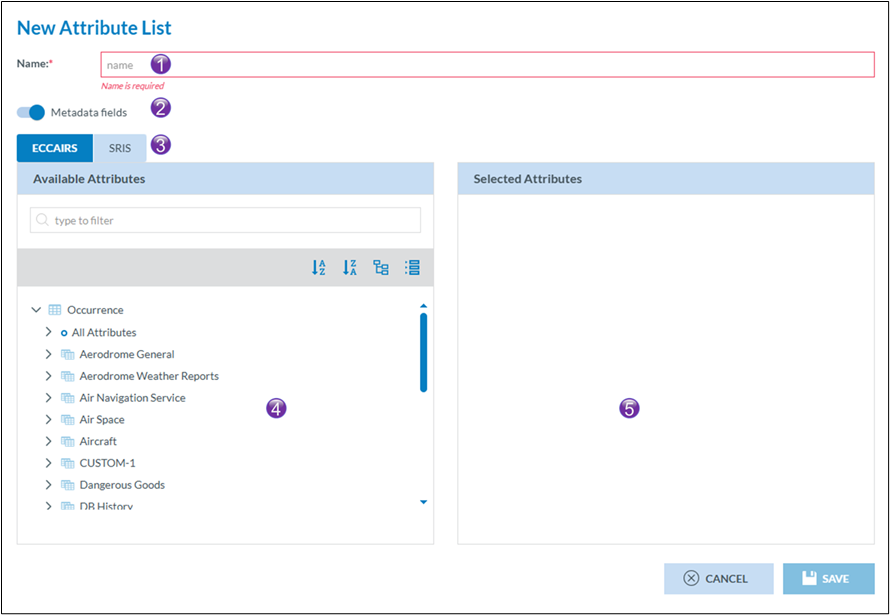
<span lang="EN-GB">Click on new attribute list</span>

[![image.png](https://help.ci-aviationreporting.eu/uploads/images/gallery/2025-11/scaled-1680-/KJjimage.png)](https://help.ci-aviationreporting.eu/uploads/images/gallery/2025-11/KJjimage.png)

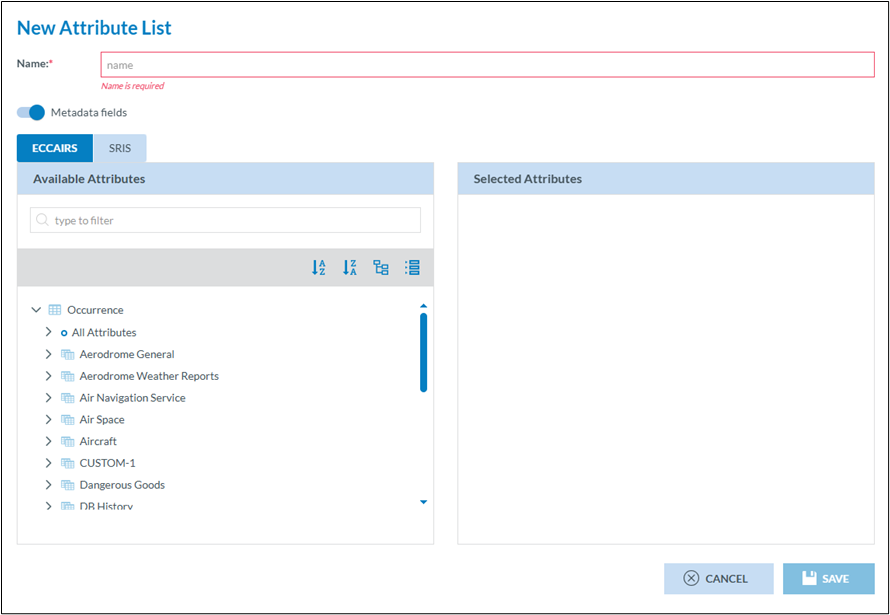
<span lang="EN-GB" style="mso-fareast-font-family: Arial;"><span style="mso-list: Ignore;">1.<span style="font: 7.0pt 'Times New Roman';"> </span></span></span><span lang="EN-GB">Each export by attribute list needs to have a meaningful name</span>

<span lang="EN-GB" style="mso-fareast-font-family: Arial;"><span style="mso-list: Ignore;">2.<span style="font: 7.0pt 'Times New Roman';"> </span></span></span><span lang="EN-GB">When exporting, E2 allows that ALL meta data fields are exported too. This switch, which is set by default to true, can be turned off if this is not required</span>

<span lang="EN-GB" style="mso-fareast-font-family: Arial;"><span style="mso-list: Ignore;">3.<span style="font: 7.0pt 'Times New Roman';"> </span></span></span><span lang="EN-GB">And export list is based on a certain taxonomy. Depending on how your Authority is setup you can chose between ECCAIRS and SRIS. This chose will define what attributes van be selected in (4)</span>

<span lang="EN-GB" style="mso-fareast-font-family: Arial;"><span style="mso-list: Ignore;">4.<span style="font: 7.0pt 'Times New Roman';"> </span></span></span><span lang="EN-GB">This list contains ALL attributes you have access to</span>

<span lang="EN-GB" style="mso-fareast-font-family: Arial;"><span style="mso-list: Ignore;">5.<span style="font: 7.0pt 'Times New Roman';"> </span></span></span><span lang="EN-GB">This list contains your selected attributes </span>

[![image.png](https://help.ci-aviationreporting.eu/uploads/images/gallery/2025-11/scaled-1680-/qKaimage.png)](https://help.ci-aviationreporting.eu/uploads/images/gallery/2025-11/qKaimage.png)

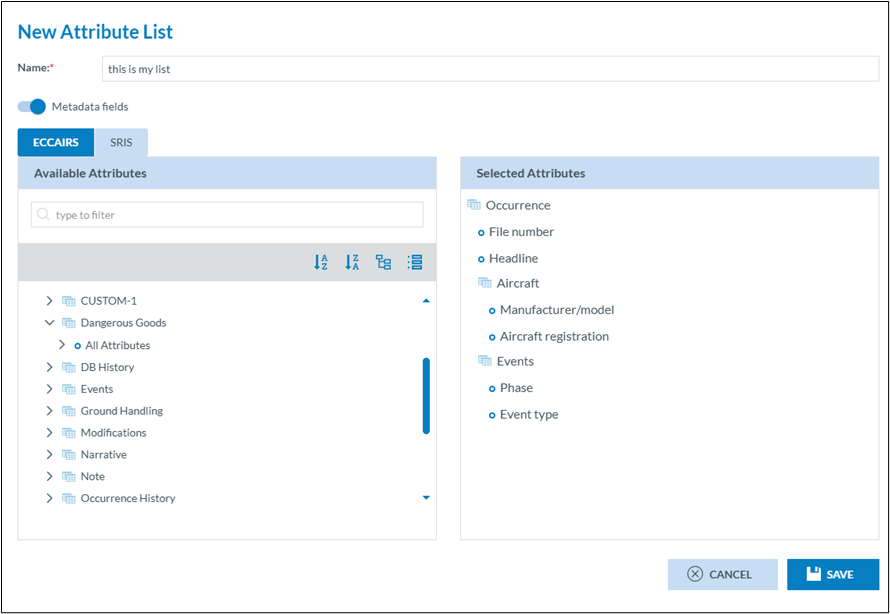
<span lang="EN-GB">Click Save, and the list will be instantly available for use.</span>

### <span lang="EN-GB">Editing an export by attribute list</span>

[![image.png](https://help.ci-aviationreporting.eu/uploads/images/gallery/2025-11/scaled-1680-/NQfimage.png)](https://help.ci-aviationreporting.eu/uploads/images/gallery/2025-11/NQfimage.png)

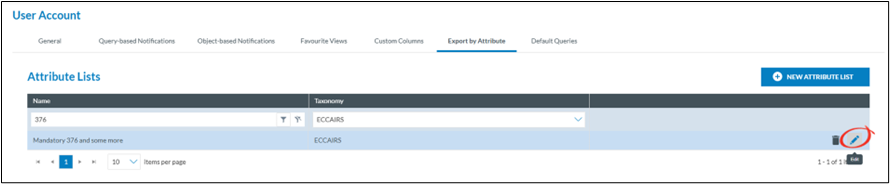
<span lang="EN-GB">Export by attribute lists can always be modified, even if they have been used before.  
Click on the pencil of the export by attribute lists you want to change and the same interface as creatin a new export by attribute lists is shown.</span>

### <span lang="EN-GB">Deleting an export by attribute list</span>

[![image.png](https://help.ci-aviationreporting.eu/uploads/images/gallery/2025-11/scaled-1680-/qtGhKEimage.png)](https://help.ci-aviationreporting.eu/uploads/images/gallery/2025-11/qtGhKEimage.png)

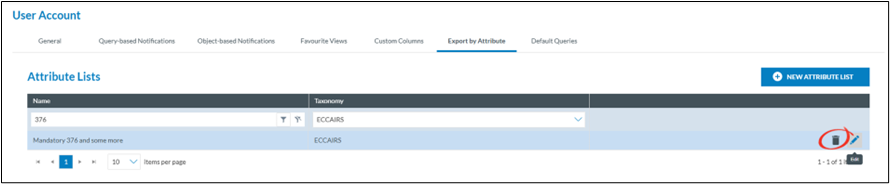
<span lang="EN-GB">Export by attribute lists can always be deleted, regardless of they have been used before.  
Click on the trash can of the export by attribute lists you want to delete.</span>

### <span lang="EN-GB">Creating an export by attribute list in the fly</span>

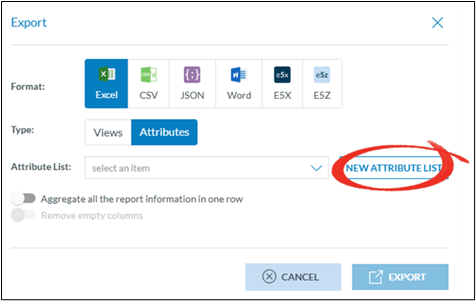
<span lang="EN-GB">In many cases, when exporting data, users may find that the existing attribute lists are not suitable. To avoid leaving the list view with selected documents, they can create an export attribute list on the fly.</span>

[![image.png](https://help.ci-aviationreporting.eu/uploads/images/gallery/2025-11/scaled-1680-/hbTimage.png)](https://help.ci-aviationreporting.eu/uploads/images/gallery/2025-11/hbTimage.png)

<span lang="EN-GB" style="font-family: Symbol; mso-fareast-font-family: Symbol; mso-bidi-font-family: Symbol;"><span style="mso-list: Ignore;">·<span style="font: 7.0pt 'Times New Roman';"> </span></span></span><span lang="EN-GB">Select the documents you want to export</span>

<span lang="EN-GB" style="font-family: Symbol; mso-fareast-font-family: Symbol; mso-bidi-font-family: Symbol;"><span style="mso-list: Ignore;">·<span style="font: 7.0pt 'Times New Roman';"> </span></span></span><span lang="EN-GB">Click on file</span>

<span lang="EN-GB" style="font-family: Symbol; mso-fareast-font-family: Symbol; mso-bidi-font-family: Symbol;"><span style="mso-list: Ignore;">·<span style="font: 7.0pt 'Times New Roman';"> </span></span></span><span lang="EN-GB">Click on export</span>

<span lang="EN-GB" style="font-family: Symbol; mso-fareast-font-family: Symbol; mso-bidi-font-family: Symbol;"><span style="mso-list: Ignore;">·<span style="font: 7.0pt 'Times New Roman';"> </span></span></span><span lang="EN-GB">Select attributes</span>

<span lang="EN-GB" style="font-family: Symbol; mso-fareast-font-family: Symbol; mso-bidi-font-family: Symbol;"><span style="mso-list: Ignore;">·<span style="font: 7.0pt 'Times New Roman';"> </span></span></span><span lang="EN-GB">Select new attribute list</span>

[![image.png](https://help.ci-aviationreporting.eu/uploads/images/gallery/2025-11/scaled-1680-/wWDimage.png)](https://help.ci-aviationreporting.eu/uploads/images/gallery/2025-11/wWDimage.png)

<span lang="EN-GB">The new attribute creation window will be shown </span>

[![image.png](https://help.ci-aviationreporting.eu/uploads/images/gallery/2025-11/scaled-1680-/xdiimage.png)](https://help.ci-aviationreporting.eu/uploads/images/gallery/2025-11/xdiimage.png)