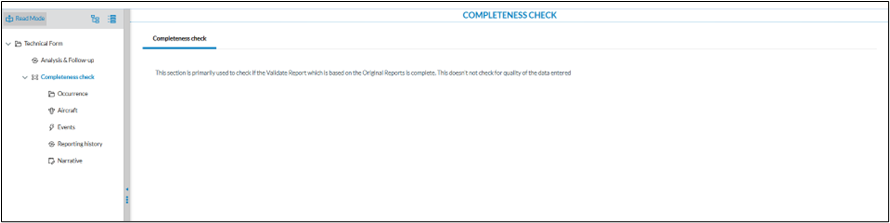
# How to check for completeness

### <span style="mso-ansi-language: EN-US;">E2 and mandatory attributes</span>

<span style="mso-ansi-language: EN-US;">The first step in processing a report is verifying its completeness. While determining which fields are mandatory can be subjective, Regulation 376 specifies that certain attributes are required depending on the type of report submitted.</span>

<span style="mso-ansi-language: EN-US;">E2 does not prevent the submission of reports with missing mandatory fields. Instead, it issues a warning to the reporter at the time of submission, indicating which mandatory attributes are missing. </span><span lang="EN-GB">The list of unfilled mandatory fields is not visible to the Authority’s occurrence officers responsible for processing the reports.</span>

### <span lang="EN-GB">Steps to close the gap</span>

<span lang="EN-GB">This document outlines how to address this gap by making the missing mandatory fields accessible to occurrence officers. The solution involves five main steps:</span>

<span lang="EN-GB" style="mso-fareast-font-family: Arial;"><span style="mso-list: Ignore;">1.<span style="font: 7.0pt 'Times New Roman';"> </span></span></span><span lang="EN-GB">Extend or create a custom taxonomy</span>

<span lang="EN-GB" style="font-size: 10.0pt; mso-bidi-font-size: 11.0pt; line-height: 150%; font-family: 'Courier New'; mso-fareast-font-family: 'Courier New';"><span style="mso-list: Ignore;">o<span style="font: 7.0pt 'Times New Roman';"> </span></span></span><span lang="EN-GB">Add custom attributes</span>

<span lang="EN-GB" style="font-size: 10.0pt; mso-bidi-font-size: 11.0pt; line-height: 150%; font-family: 'Courier New'; mso-fareast-font-family: 'Courier New';"><span style="mso-list: Ignore;">o<span style="font: 7.0pt 'Times New Roman';"> </span></span></span><span lang="EN-GB">Add a custom value list</span>

<span lang="EN-GB" style="mso-fareast-font-family: Arial;"><span style="mso-list: Ignore;">2.<span style="font: 7.0pt 'Times New Roman';"> </span></span></span><span lang="EN-GB">Create the necessary queries</span>

<span lang="EN-GB" style="mso-fareast-font-family: Arial;"><span style="mso-list: Ignore;">3.<span style="font: 7.0pt 'Times New Roman';"> </span></span></span><span lang="EN-GB">Create the necessary batch operations</span>

<span lang="EN-GB" style="mso-fareast-font-family: Arial;"><span style="mso-list: Ignore;">4.<span style="font: 7.0pt 'Times New Roman';"> </span></span></span><span lang="EN-GB">Modify the views</span>

<span lang="EN-GB" style="mso-fareast-font-family: Arial;"><span style="mso-list: Ignore;">5.<span style="font: 7.0pt 'Times New Roman';"> </span></span></span><span lang="EN-GB">Combine the BOs in a Batch Group (optional)</span>

#### <span lang="EN-GB">Extend or create a custom taxonomy</span>

<span lang="EN-GB">For every mandatory attribute that is to be checked on completeness a custom taxonomy attribute is to be created. </span>

[![image.png](https://help.ci-aviationreporting.eu/uploads/images/gallery/2025-11/scaled-1680-/dAQimage.png)](https://help.ci-aviationreporting.eu/uploads/images/gallery/2025-11/dAQimage.png)

<span lang="EN-GB" style="mso-no-proof: yes;">  
</span>

<p class="callout warning"><span lang="EN-GB">All custom attributes must be created under the Occurrence entity</span></p>

<span lang="EN-GB">Each custom attribute should be created consistently and linked to a predefined custom value list. If the value list doesn’t exist, it must be created before defining the custom taxonomy fields. If a yes/no value list is already available, it can be reused, but note that it will only contain the values "Yes" and "No."</span>

<span lang="EN-GB">The descriptions should be concise and meaningful, as they will later serve as labels in the view (e.g., “Aircraft category missing”).</span>

<span lang="EN-GB">Once all custom attributes have been created and their descriptions filled out, you can proceed to generate the custom taxonomy. While this process may be tedious, it is crucial to ensure that the custom fields are created carefully.</span>

<span lang="EN-GB">As a best practice, it is recommended to prefix custom attributes, as shown in the example above (e.g., “C\_Q\_aircraft\_category”) which stands for C=Custom and Q=Quality</span>

#### <span lang="EN-GB">Create the necessary queries</span>

<span lang="EN-GB">In this step, all necessary queries to check for attribute completeness are created.  
Again per attribute that you want to check, a query is to be created.</span>

[![image.png](https://help.ci-aviationreporting.eu/uploads/images/gallery/2025-11/scaled-1680-/9vNimage.png)](https://help.ci-aviationreporting.eu/uploads/images/gallery/2025-11/9vNimage.png)

<span lang="EN-GB">In E2, an attribute only exists if it has a value.  
Therefore, using the filter "on does not exist" will return documents where the attribute is not filled out.</span>

<span lang="EN-GB"><span style="mso-spacerun: yes;"> </span>Tip: It’s good practice to:</span>

- <span lang="EN-GB">Give your queries meaningful names, ideally with a consistent prefix.</span>
- <span lang="EN-GB">Store queries in a dedicated library to keep things organized and improve clarity.</span>

#### <span lang="EN-GB">Create the necessary batch operations</span>

<span lang="EN-GB">The custom attributes have been created, the custom taxonomy has been released, and all necessary queries have been set up. The batch operations can be created.  
Per attribute that you want to check, 2 batch operations are to be created.</span>

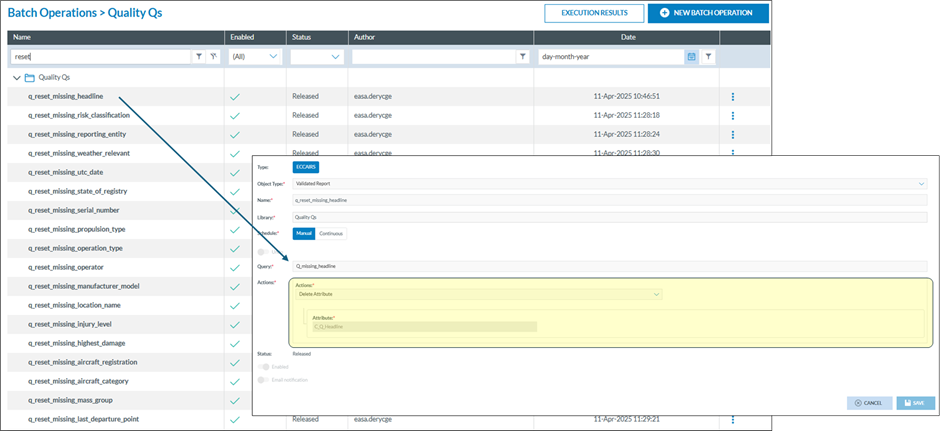
*<span lang="EN-GB">Until the MABO functionality becomes available, you first need to reset (delete) the C\_A\_xxx attributes. If not done, the BO’s may generate an error indicating that the value has already been set. With the MABO, you can indicate what E2 needs to do if a value has already been set.</span>*

##### <span lang="EN-GB">Resetting the C\_A\_xx attributes</span>

<span lang="EN-GB">Per attribute that you want to check, a reset BO is to be created</span>

[![image.png](https://help.ci-aviationreporting.eu/uploads/images/gallery/2025-11/scaled-1680-/zmQimage.png)](https://help.ci-aviationreporting.eu/uploads/images/gallery/2025-11/zmQimage.png)

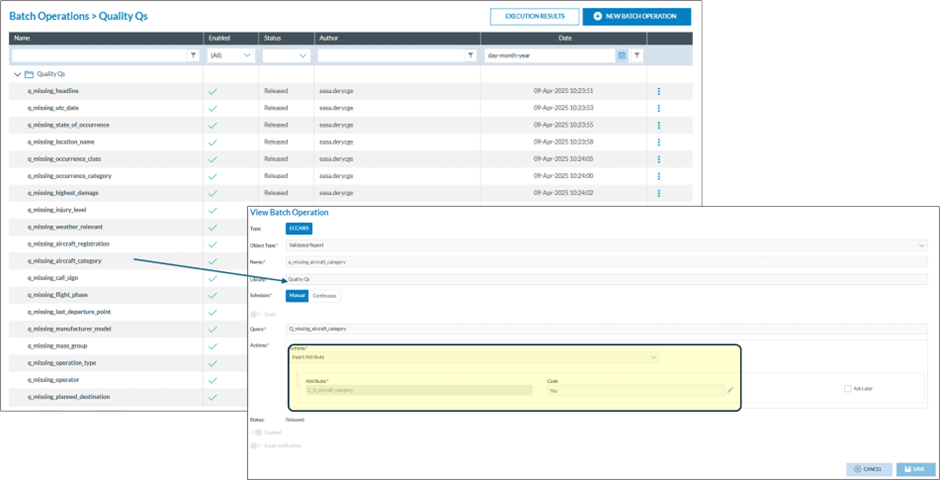
#### <span lang="EN-GB">Insert the values in the C\_A\_xx attributes</span>

<span lang="EN-GB">Per attribute that you want to check, a reset BO is to be created</span>

[![image.png](https://help.ci-aviationreporting.eu/uploads/images/gallery/2025-11/scaled-1680-/u7nimage.png)](https://help.ci-aviationreporting.eu/uploads/images/gallery/2025-11/u7nimage.png)

<span lang="EN-GB">Here each query is filling in the appropriate custom field</span>

<span lang="EN-GB">Bear in mind that a new development is currently ongoing (MABA, Multi Action Batch Operation) that will combine all individual BOs into 1 BO.</span>

#### <span lang="EN-GB">Modify the views</span>

<span lang="EN-GB">Rendering the result of the completeness is subjective and depends how the presentation looks like</span>

<span lang="EN-GB">As a good practice is having<span style="mso-spacerun: yes;"> </span>separate sections containing the relevant attributes of an entity.</span>

[![image.png](https://help.ci-aviationreporting.eu/uploads/images/gallery/2025-11/scaled-1680-/6pTimage.png)](https://help.ci-aviationreporting.eu/uploads/images/gallery/2025-11/6pTimage.png)

[![image.png](https://help.ci-aviationreporting.eu/uploads/images/gallery/2025-11/scaled-1680-/iTTimage.png)](https://help.ci-aviationreporting.eu/uploads/images/gallery/2025-11/iTTimage.png)
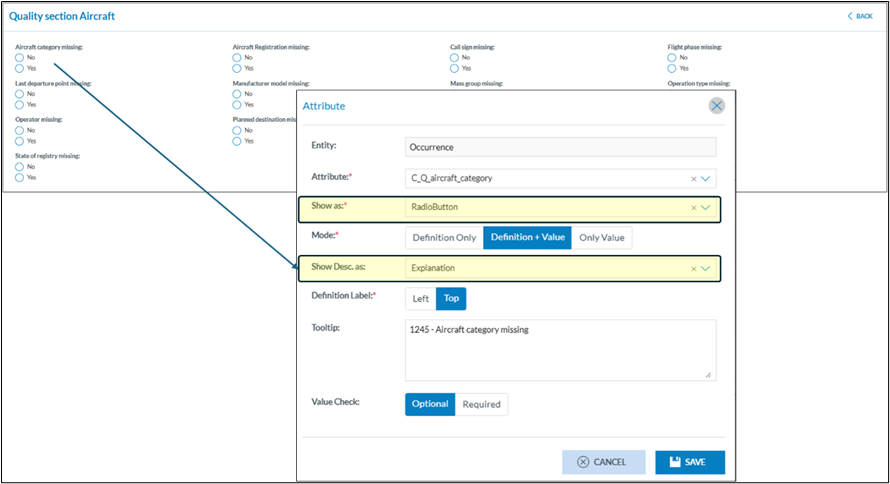
<span lang="EN-GB">Here you see how important it is to give the custom taxonomy fields a meaningful and short description. It is here used as labels. Maybe it is also good to show the attributes as radio buttons.</span>

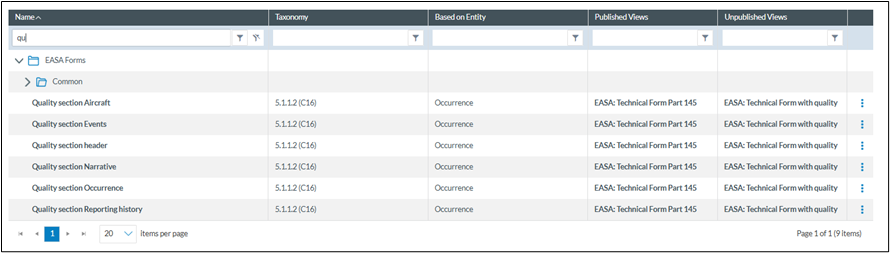
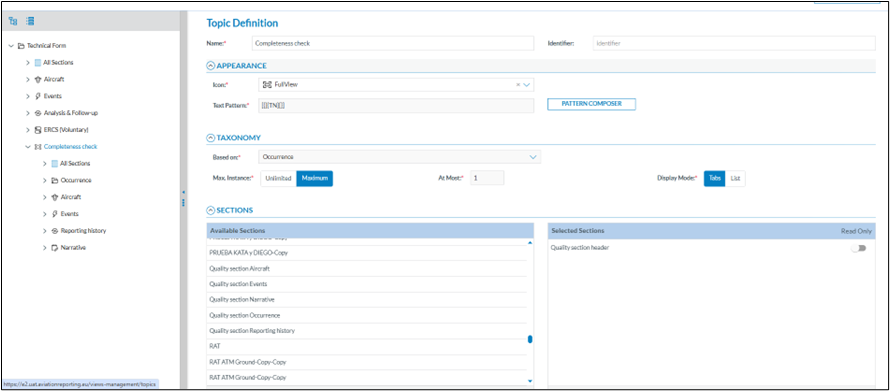
<span lang="EN-GB">Adding the dedicated sections to existing forms is the same as adding sections in other views</span>

[![image.png](https://help.ci-aviationreporting.eu/uploads/images/gallery/2025-11/scaled-1680-/3Jbimage.png)](https://help.ci-aviationreporting.eu/uploads/images/gallery/2025-11/3Jbimage.png)

[![image.png](https://help.ci-aviationreporting.eu/uploads/images/gallery/2025-11/scaled-1680-/ihHimage.png)](https://help.ci-aviationreporting.eu/uploads/images/gallery/2025-11/ihHimage.png)
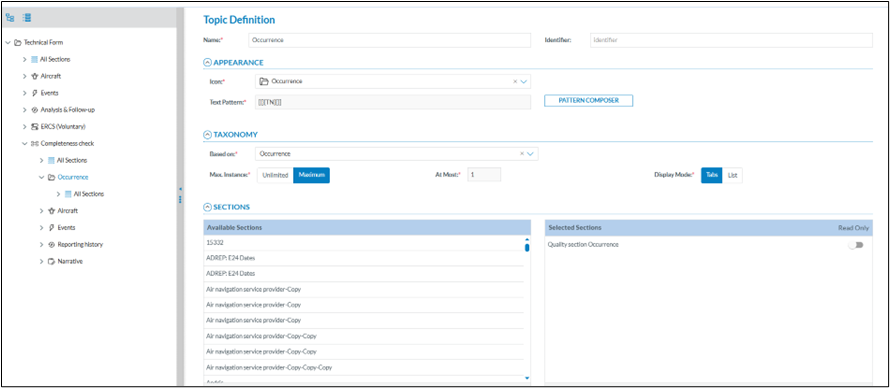
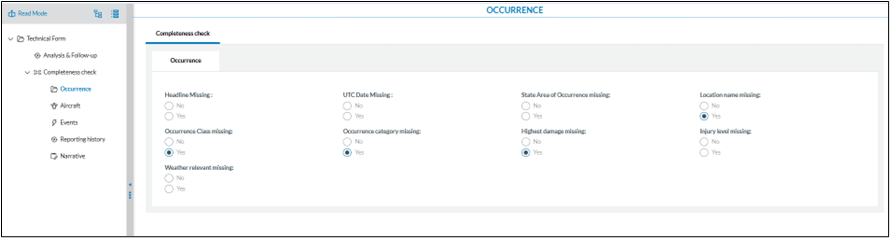
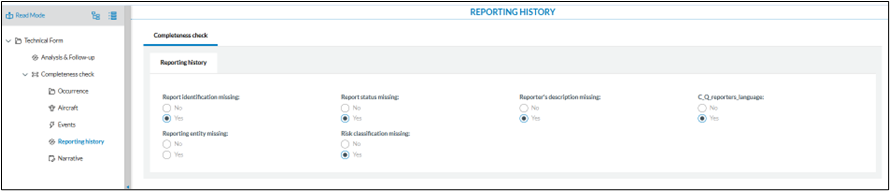
<span style="mso-ansi-language: EN-US;">The result may then look like this</span>

[![image.png](https://help.ci-aviationreporting.eu/uploads/images/gallery/2025-11/scaled-1680-/kpcimage.png)](https://help.ci-aviationreporting.eu/uploads/images/gallery/2025-11/kpcimage.png)

[![image.png](https://help.ci-aviationreporting.eu/uploads/images/gallery/2025-11/scaled-1680-/8q3image.png)](https://help.ci-aviationreporting.eu/uploads/images/gallery/2025-11/8q3image.png)
[![image.png](https://help.ci-aviationreporting.eu/uploads/images/gallery/2025-11/scaled-1680-/iEfimage.png)](https://help.ci-aviationreporting.eu/uploads/images/gallery/2025-11/iEfimage.png)
### <span lang="EN-GB">Combine the BOs in a Batch Group (optional)</span>

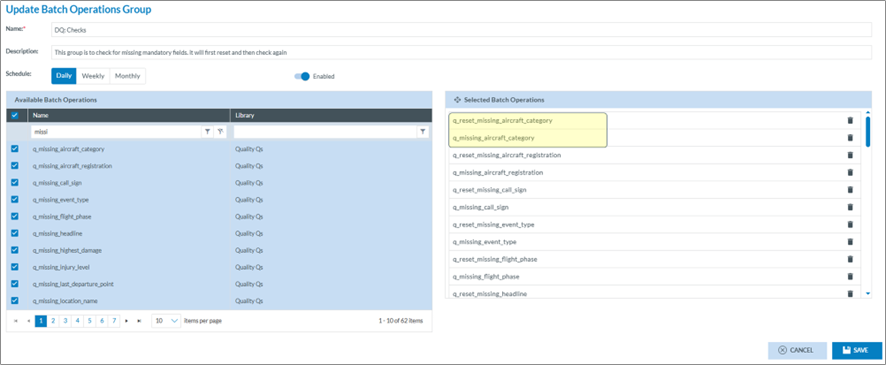
<span lang="EN-GB">Optionally the BOs can be combined in a BO group. Bar in mind that a BO group can not be started ad-hoc, it is planned, daily, weekly or monthly.  
make sure that the reset BO’s are run before the missing BO’s.</span>

[![image.png](https://help.ci-aviationreporting.eu/uploads/images/gallery/2025-11/scaled-1680-/9QTimage.png)](https://help.ci-aviationreporting.eu/uploads/images/gallery/2025-11/9QTimage.png)

<span lang="EN-GB" style="mso-no-proof: yes;">  
</span>

<span lang="EN-GB"></span>