# How o M2M User

### <span style="font-family: 'Arial',sans-serif; mso-ansi-language: EN-US;">What is an M2M user?</span>

<span style="font-family: 'Arial',sans-serif; mso-ansi-language: EN-US;">A “machine-to-machine” (M2M) user is basically a "device". In automated communication, M2M devices are designed to communicate with each other autonomously, without requiring human input. They can send and receive data or instructions to perform tasks, monitor conditions, or exchange information with other devices. An M2M user in Eccairs2, will use the exposed API methods allowing to perform tasks related to Submitting reports.</span>

### <span style="font-family: 'Arial',sans-serif; mso-ansi-language: EN-US;">Setting Up an M2M user</span>

#### <span style="font-family: 'Arial',sans-serif; mso-ansi-language: EN-US;">What permissions does a user need to have?</span>

<span style="font-family: 'Arial',sans-serif; mso-ansi-language: EN-US;">Before a user can setup a M2M user, a dedicated role (M2M CRUD) is to be assigned to him. It is the E2 Support Team that will add this permission to the National Security Administrator. This will be done for the first time that an M2M user is to be created in one of the Authority’s organisations.</span>

#### <span style="font-family: 'Arial',sans-serif; mso-ansi-language: EN-US;">How to access the M2M creation?</span>

<span style="font-family: 'Arial',sans-serif; mso-ansi-language: EN-US;">Depending on the user’s permissions, the Organisation management can be opened</span>

[![image.png](https://help.ci-aviationreporting.eu/uploads/images/gallery/2025-11/scaled-1680-/F71image.png)](https://help.ci-aviationreporting.eu/uploads/images/gallery/2025-11/F71image.png)

<span lang="EN-GB" style="font-family: 'Arial',sans-serif; mso-no-proof: yes;">  
</span>

[![image.png](https://help.ci-aviationreporting.eu/uploads/images/gallery/2025-11/scaled-1680-/4r1image.png)](https://help.ci-aviationreporting.eu/uploads/images/gallery/2025-11/4r1image.png)

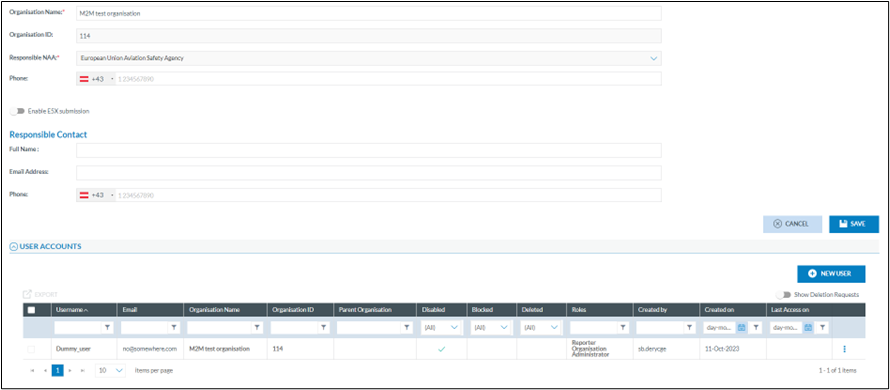
<span style="font-family: 'Arial',sans-serif; mso-ansi-language: EN-US;">As a M2M user can only exist in an existing Organisation, the organisation is to be opened in detail</span>

[![image.png](https://help.ci-aviationreporting.eu/uploads/images/gallery/2025-11/scaled-1680-/LSlimage.png)](https://help.ci-aviationreporting.eu/uploads/images/gallery/2025-11/LSlimage.png)

#### <span style="font-family: 'Arial',sans-serif; mso-ansi-language: EN-US;">How to add the M2M user to the organisation?</span>

<span style="font-family: 'Arial',sans-serif; mso-ansi-language: EN-US;">Although a M2M user is not the same as a human user, they are created in the same way.</span>

<span style="font-family: 'Arial',sans-serif; mso-ansi-language: EN-US;">By clicking on the “new user” button, the user create account window opens</span>

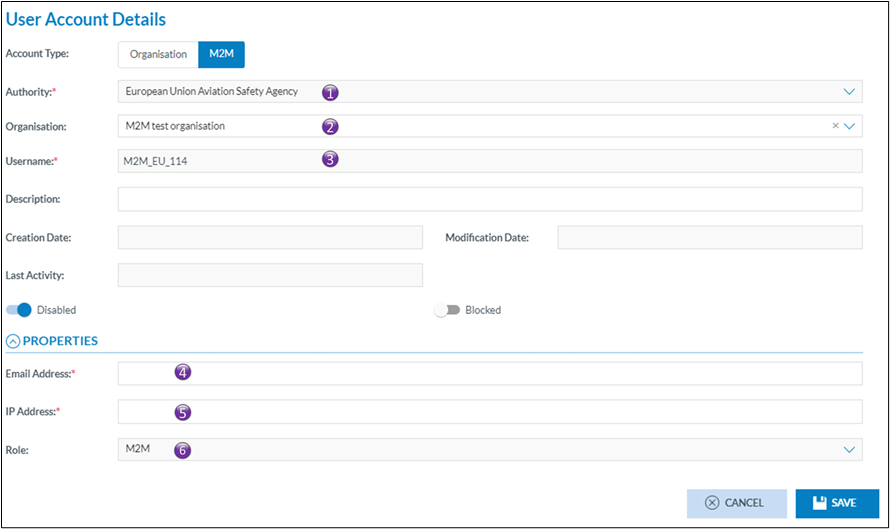
<span style="font-family: 'Arial',sans-serif; mso-ansi-language: EN-US;">Click on the M2M tab which will open the M2M user creation window. If the M2M is not visible, this indicates that the user willing to create the M2M user doesn’t have the permission (M2M CRUD role) assigned to him. This M2M CRUD role is either to be given by the E2 support Team for the first time or is to be given by the Authority’s nation security administrator.</span>

[![image.png](https://help.ci-aviationreporting.eu/uploads/images/gallery/2025-11/scaled-1680-/bJJimage.png)](https://help.ci-aviationreporting.eu/uploads/images/gallery/2025-11/bJJimage.png)

<span style="font-family: 'Arial',sans-serif; mso-fareast-font-family: Arial; mso-ansi-language: EN-US;"><span style="mso-list: Ignore;">1.<span style="font: 7.0pt 'Times New Roman';"> </span></span></span><span style="font-family: 'Arial',sans-serif; mso-ansi-language: EN-US;">Is the name of the Authority in which the M2M user is created. This is prefilled and cannot be modified. It is the Authority of the user that creates the M2M user</span>

<span style="font-family: 'Arial',sans-serif; mso-fareast-font-family: Arial; mso-ansi-language: EN-US;"><span style="mso-list: Ignore;">2.<span style="font: 7.0pt 'Times New Roman';"> </span></span></span><span style="font-family: 'Arial',sans-serif; mso-ansi-language: EN-US;">Is the name of the organisation in which the M2M is to be created</span>

<span style="font-family: 'Arial',sans-serif; mso-fareast-font-family: Arial; mso-ansi-language: EN-US;"><span style="mso-list: Ignore;">3.<span style="font: 7.0pt 'Times New Roman';"> </span></span></span><span style="font-family: 'Arial',sans-serif; mso-ansi-language: EN-US;">Is the username, the username is automatically generated by the system. It ensures that the username is unique throughout Eccairs2. As this is an automatically assigned username, that means, when creating a M2M user for the same organisation in another environment it will not be the same</span>

<span style="font-family: 'Arial',sans-serif; mso-fareast-font-family: Arial; mso-ansi-language: EN-US;"><span style="mso-list: Ignore;">4.<span style="font: 7.0pt 'Times New Roman';"> </span></span></span><span style="font-family: 'Arial',sans-serif; mso-ansi-language: EN-US;">Is the email address to where the activation email for the M2M will be sent. Often this is the email address of the person responsible for the M2M interfacing</span>

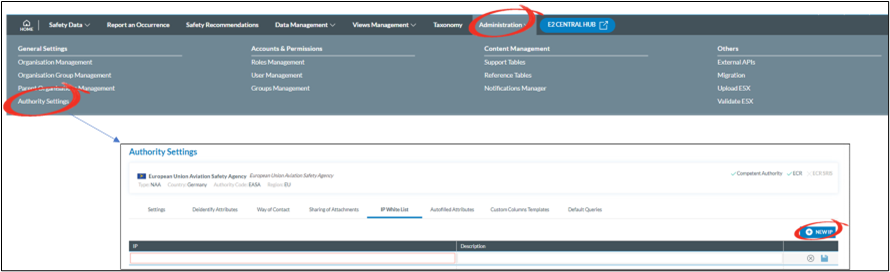
<span style="font-family: 'Arial',sans-serif; mso-fareast-font-family: Arial; mso-ansi-language: EN-US;"><span style="mso-list: Ignore;">5.<span style="font: 7.0pt 'Times New Roman';"> </span></span></span><span style="font-family: 'Arial',sans-serif; mso-ansi-language: EN-US;">Before access to E2 is allowed via a M2M interface, E2 is to know the IP-address(es) of the machine(s) with whom it will communicate. Here only one IP address can be added. If more than one IP address is to be added, then this is to be done via the Authority settings.  
  
</span>

[![image.png](https://help.ci-aviationreporting.eu/uploads/images/gallery/2025-11/scaled-1680-/notimage.png)](https://help.ci-aviationreporting.eu/uploads/images/gallery/2025-11/notimage.png)

<span style="font-family: 'Arial',sans-serif; mso-fareast-font-family: Arial; mso-ansi-language: EN-US;"><span style="mso-list: Ignore;">6.<span style="font: 7.0pt 'Times New Roman';"> </span></span></span><span style="font-family: 'Arial',sans-serif; mso-ansi-language: EN-US;">The role assigned to the M2M user, this is Automatically done by the system and cannot be changed. If this is empty, then a configuration error has occurred, and it is key to create a service desk ticket.</span>

### <span style="font-family: 'Arial',sans-serif; mso-ansi-language: EN-US;">Frequently asked questions</span>

#### <span style="font-family: 'Arial',sans-serif; mso-ansi-language: EN-US;">How many M2M user can an organisation have?</span>

<span style="font-family: 'Arial',sans-serif; mso-ansi-language: EN-US;">Only one M2M is allowed per organisation. The access to E2 is given via the whitelisted IP addresses so no need for extra M2M users</span>

#### <span style="font-family: 'Arial',sans-serif; mso-ansi-language: EN-US;">Who will activate the account?</span>

<span style="font-family: 'Arial',sans-serif; mso-ansi-language: EN-US;">As with all accounts, an activation email will be sent to the email address mentioned in the M2M user’s profile (4). The activation email will be valid for 6 hours</span>

#### <span style="font-family: 'Arial',sans-serif; mso-ansi-language: EN-US;">What to do if a M2M activation code has expired?</span>

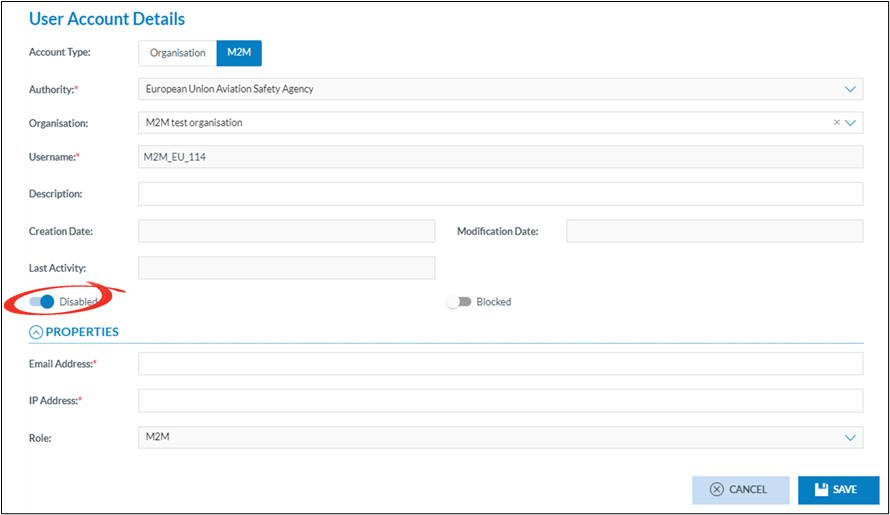
<span style="font-family: 'Arial',sans-serif; mso-ansi-language: EN-US;">In the event an M2M activation code expired (&gt; 72 hours), the M2M user can no longer be activated by the user. The activation code can be resent following these steps</span>

<span style="font-family: 'Arial',sans-serif; mso-fareast-font-family: Arial; mso-ansi-language: EN-US;"><span style="mso-list: Ignore;">1.<span style="font: 7.0pt 'Times New Roman';"> </span></span></span><span style="font-family: 'Arial',sans-serif; mso-ansi-language: EN-US;">Enable the M2M Account</span>

[![image.png](https://help.ci-aviationreporting.eu/uploads/images/gallery/2025-11/scaled-1680-/r0timage.png)](https://help.ci-aviationreporting.eu/uploads/images/gallery/2025-11/r0timage.png)

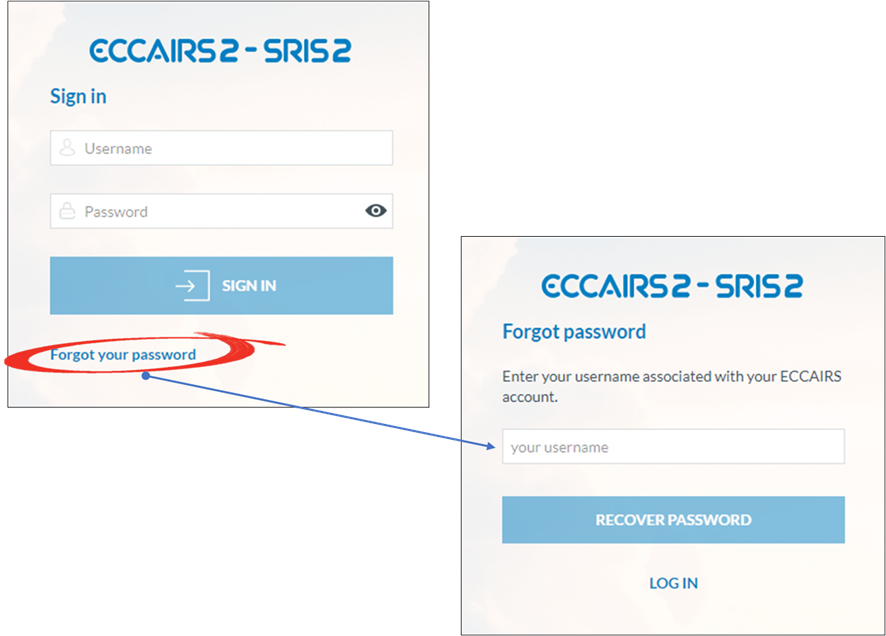
<span style="font-family: 'Arial',sans-serif; mso-fareast-font-family: Arial; mso-ansi-language: EN-US;"><span style="mso-list: Ignore;">2.<span style="font: 7.0pt 'Times New Roman';"> </span></span></span><span style="font-family: 'Arial',sans-serif; mso-ansi-language: EN-US;">Open the ECCAIRS logon screen and click forgot password  
  
</span>

[![image.png](https://help.ci-aviationreporting.eu/uploads/images/gallery/2025-11/scaled-1680-/5HDimage.png)](https://help.ci-aviationreporting.eu/uploads/images/gallery/2025-11/5HDimage.png)

<span lang="EN-GB" style="font-family: 'Arial',sans-serif; mso-no-proof: yes;">  
</span>

<span style="font-family: 'Arial',sans-serif; mso-ansi-language: EN-US;"> </span><span style="font-family: 'Arial',sans-serif; mso-ansi-language: EN-US;">An email will be sent to the email address linked to the username, which is not necessarily the same as the user resending the activation email</span>

#### <span style="font-family: 'Arial',sans-serif; mso-ansi-language: EN-US;"> </span><span style="font-family: 'Arial',sans-serif; mso-ansi-language: EN-US;">What if the email address of the M2M user changed?</span>

<span style="font-family: 'Arial',sans-serif; mso-ansi-language: EN-US;">Like with all other accounts, email addresses can easily be modified. </span>

<span style="font-family: 'Arial',sans-serif; mso-ansi-language: EN-US;">  
  
</span>

<span style="font-family: 'Arial',sans-serif; mso-ansi-language: EN-US;"> </span>

<span style="font-family: 'Arial',sans-serif; mso-ansi-language: EN-US;"> </span>

<span style="font-family: 'Arial',sans-serif; mso-ansi-language: EN-US;"></span>