# 6.5. Others

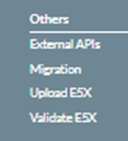
<span lang="EN-GB">The Menus under Administration – Others are the following:</span>

[![image.png](https://help.ci-aviationreporting.eu/uploads/images/gallery/2025-11/scaled-1680-/CSVimage.png)](https://help.ci-aviationreporting.eu/uploads/images/gallery/2025-11/CSVimage.png)

<span lang="EN-GB" style="mso-ansi-language: EN-GB; mso-fareast-language: EN-GB;"> </span>

### <span style="mso-fareast-font-family: Calibri; mso-bidi-font-family: Calibri;"><span style="mso-list: Ignore;">6.5.1.<span style="font: 7.0pt 'Times New Roman';"> </span></span></span>External APIs

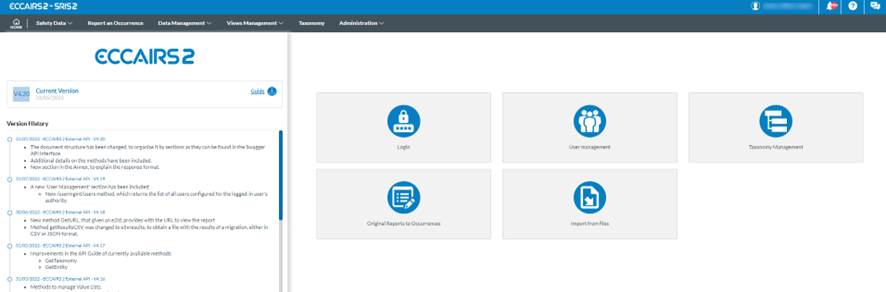
<span lang="EN-GB">There is a set of methods that can be accessed via API. It is accessed by selecting the ‘Administration - Others – External APIs’ menu option.</span>

[![image.png](https://help.ci-aviationreporting.eu/uploads/images/gallery/2025-11/scaled-1680-/Nzkimage.png)](https://help.ci-aviationreporting.eu/uploads/images/gallery/2025-11/Nzkimage.png)

<span lang="EN-GB" style="mso-ansi-language: EN-GB; mso-fareast-language: EN-GB;"> </span>

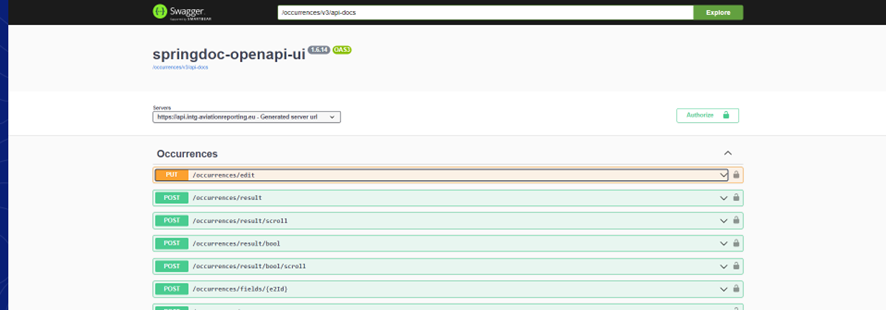
<span lang="EN-GB">Administrators can select the icons to access the available methods, classified by repository. It will access Swagger, which helps users consume the API services.<span style="mso-spacerun: yes;"> </span></span>

[![image.png](https://help.ci-aviationreporting.eu/uploads/images/gallery/2025-11/scaled-1680-/hwkimage.png)](https://help.ci-aviationreporting.eu/uploads/images/gallery/2025-11/hwkimage.png)

<span lang="EN-GB"><span style="mso-spacerun: yes;"> </span></span>

<span lang="EN-GB" style="mso-ansi-language: EN-GB; mso-fareast-language: EN-GB;"> </span>

<span lang="EN-GB">The attached document provides further information on all the methods available for API users. </span>

<span lang="EN-GB"> </span>

<span lang="EN-GB"> </span>

[![image.png](https://help.ci-aviationreporting.eu/uploads/images/gallery/2025-11/scaled-1680-/20Qimage.png)](https://help.ci-aviationreporting.eu/uploads/images/gallery/2025-11/20Qimage.png)

### <span style="mso-fareast-font-family: Calibri; mso-bidi-font-family: Calibri;"><span style="mso-list: Ignore;">6.5.2.<span style="font: 7.0pt 'Times New Roman';"> </span></span></span>Migration

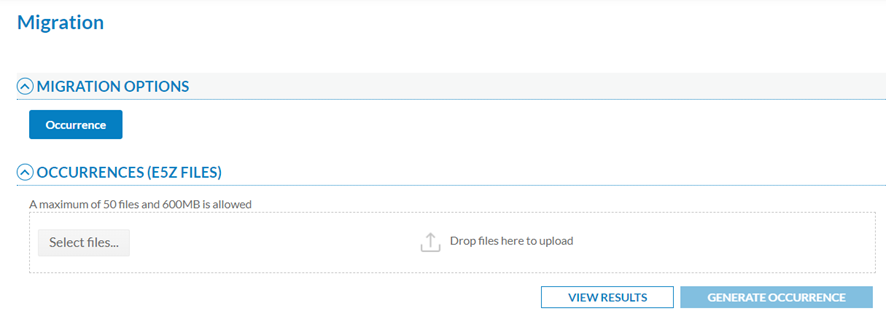
<span lang="EN-GB">This option of the Administration menu displays the migration window as follows:</span>

[![image.png](https://help.ci-aviationreporting.eu/uploads/images/gallery/2025-11/scaled-1680-/JzFimage.png)](https://help.ci-aviationreporting.eu/uploads/images/gallery/2025-11/JzFimage.png)

<span lang="EN-GB" style="mso-ansi-language: EN-GB; mso-fareast-language: EN-GB;"> </span>

<span lang="EN-GB">E5Z is the extension given **<span style="mso-bidi-font-family: 'Times New Roman';">to compressed</span>** XML files in ECCAIRS2 that contain one or more occurrences (OCs or SRs) in XML format. If it contains attachments, E5Z files can also include folders with the same name as the corresponding XML.</span>

<span lang="EN-GB">The Administrator has to select the files through the ‘Select files’ button or by dragging and dropping them in the E5Z files section and clicking on ‘Generate Occurrence’ or ‘Generate Safety Recommendation’ if the Administrator’s Authority is an SIA.</span>

<span lang="EN-GB">A maximum of 50 files and 600 MB is allowed.</span>

<span lang="EN-GB">When migrating Occurrences, the system validates if an occurrence already exists in the Authority by checking the following Attributes of the ECCAIRS Central Taxonomy:</span>

<span lang="EN-GB" style="font-family: Symbol; mso-fareast-font-family: Symbol; mso-bidi-font-family: Symbol; color: #1b3891; mso-themecolor: text1;"><span style="mso-list: Ignore;">·<span style="font: 7.0pt 'Times New Roman';"> </span></span></span><span lang="EN-GB">Responsible Entity (453)</span>

<span lang="EN-GB" style="font-family: Symbol; mso-fareast-font-family: Symbol; mso-bidi-font-family: Symbol; color: #1b3891; mso-themecolor: text1;"><span style="mso-list: Ignore;">·<span style="font: 7.0pt 'Times New Roman';"> </span></span></span><span lang="EN-GB">File Number (452)</span>

<span lang="EN-GB">A new version of the occurrence will be created if there is a match. Otherwise, a new occurrence is created.</span>

<span lang="EN-GB">Thus, for new OCs, the system will display a message explaining the OC has been generated. (Simultaneously, the system emails the Administrator to inform them of the migration result). Then the Administrator has to click on ‘View results’. The system will display the list of migrations with the most recent on the top of the table:</span>

[![image.png](https://help.ci-aviationreporting.eu/uploads/images/gallery/2025-11/scaled-1680-/j86image.png)](https://help.ci-aviationreporting.eu/uploads/images/gallery/2025-11/j86image.png)

<span lang="EN-GB" style="mso-ansi-language: EN-GB; mso-fareast-language: EN-GB;"> </span>

<span lang="EN-GB">The list indicates per column the following data concerning each migration process by which migrations can be filtered:</span>

<span lang="EN-GB" style="font-family: Symbol; mso-fareast-font-family: Symbol; mso-bidi-font-family: Symbol; color: #1b3891; mso-themecolor: text1;"><span style="mso-list: Ignore;">·<span style="font: 7.0pt 'Times New Roman';"> </span></span></span><span lang="EN-GB">Username: the author of the migration</span>

<span lang="EN-GB" style="font-family: Symbol; mso-fareast-font-family: Symbol; mso-bidi-font-family: Symbol; color: #1b3891; mso-themecolor: text1;"><span style="mso-list: Ignore;">·<span style="font: 7.0pt 'Times New Roman';"> </span></span></span><span lang="EN-GB">Filename: of the E5Z file</span>

<span lang="EN-GB" style="font-family: Symbol; mso-fareast-font-family: Symbol; mso-bidi-font-family: Symbol; color: #1b3891; mso-themecolor: text1;"><span style="mso-list: Ignore;">·<span style="font: 7.0pt 'Times New Roman';"> </span></span></span><span lang="EN-GB">Authority to which the Administrator belongs</span>

<span lang="EN-GB" style="font-family: Symbol; mso-fareast-font-family: Symbol; mso-bidi-font-family: Symbol; color: #1b3891; mso-themecolor: text1;"><span style="mso-list: Ignore;">·<span style="font: 7.0pt 'Times New Roman';"> </span></span></span><span lang="EN-GB">Total reports: number of total OCs</span>

<span lang="EN-GB" style="font-family: Symbol; mso-fareast-font-family: Symbol; mso-bidi-font-family: Symbol; color: #1b3891; mso-themecolor: text1;"><span style="mso-list: Ignore;">·<span style="font: 7.0pt 'Times New Roman';"> </span></span></span><span lang="EN-GB">Total attachments: number of total attachments</span>

<span lang="EN-GB" style="font-family: Symbol; mso-fareast-font-family: Symbol; mso-bidi-font-family: Symbol; color: #1b3891; mso-themecolor: text1;"><span style="mso-list: Ignore;">·<span style="font: 7.0pt 'Times New Roman';"> </span></span></span><span lang="EN-GB">Number of loaded reports</span>

<span lang="EN-GB" style="font-family: Symbol; mso-fareast-font-family: Symbol; mso-bidi-font-family: Symbol; color: #1b3891; mso-themecolor: text1;"><span style="mso-list: Ignore;">·<span style="font: 7.0pt 'Times New Roman';"> </span></span></span><span lang="EN-GB">Number of loaded attachments</span>

<span lang="EN-GB" style="font-family: Symbol; mso-fareast-font-family: Symbol; mso-bidi-font-family: Symbol; color: #1b3891; mso-themecolor: text1;"><span style="mso-list: Ignore;">·<span style="font: 7.0pt 'Times New Roman';"> </span></span></span><span lang="EN-GB">Initial Process Date</span>

<span lang="EN-GB" style="font-family: Symbol; mso-fareast-font-family: Symbol; mso-bidi-font-family: Symbol; color: #1b3891; mso-themecolor: text1;"><span style="mso-list: Ignore;">·<span style="font: 7.0pt 'Times New Roman';"> </span></span></span><span lang="EN-GB">Final Process Date</span>

<span lang="EN-GB" style="font-family: Symbol; mso-fareast-font-family: Symbol; mso-bidi-font-family: Symbol; color: #1b3891; mso-themecolor: text1;"><span style="mso-list: Ignore;">·<span style="font: 7.0pt 'Times New Roman';"> </span></span></span><span lang="EN-GB">Migration Date</span>

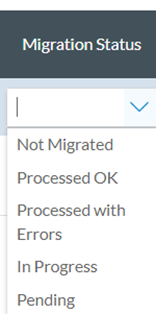
<span lang="EN-GB" style="font-family: Symbol; mso-fareast-font-family: Symbol; mso-bidi-font-family: Symbol; color: #1b3891; mso-themecolor: text1;"><span style="mso-list: Ignore;">·<span style="font: 7.0pt 'Times New Roman';"> </span></span></span><span lang="EN-GB">Migration status: it can be the following:</span>

[![image.png](https://help.ci-aviationreporting.eu/uploads/images/gallery/2025-11/scaled-1680-/vrZimage.png)](https://help.ci-aviationreporting.eu/uploads/images/gallery/2025-11/vrZimage.png)

<span lang="EN-GB" style="mso-ansi-language: EN-GB; mso-fareast-language: EN-GB;"> </span>

<span lang="EN-GB">If the Administrator moves the mouse over the last column of the migration row, the system will display two icons:</span>

[![image.png](https://help.ci-aviationreporting.eu/uploads/images/gallery/2025-11/scaled-1680-/mzKimage.png)](https://help.ci-aviationreporting.eu/uploads/images/gallery/2025-11/mzKimage.png)

<span lang="EN-GB" style="mso-ansi-language: EN-GB; mso-fareast-language: EN-GB;"> </span>

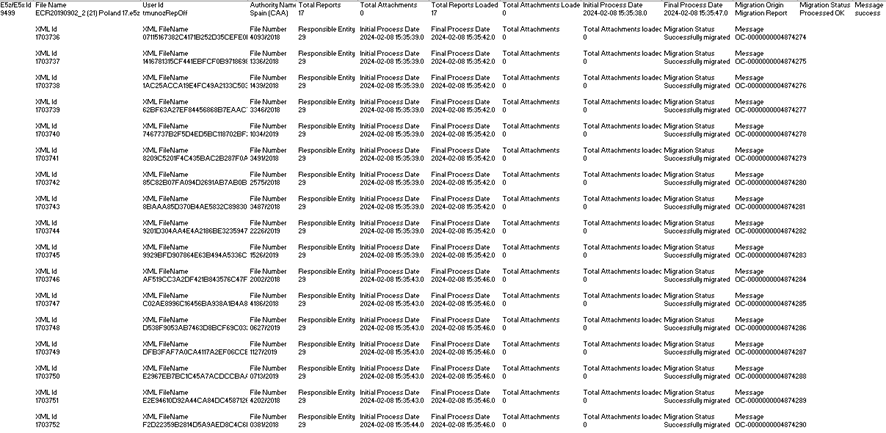
<span lang="EN-GB">The download icon downloads an Excel file with the information of the migration results per XML of the E5Z file, i.e.:</span>

[![image.png](https://help.ci-aviationreporting.eu/uploads/images/gallery/2025-11/scaled-1680-/Ijrimage.png)](https://help.ci-aviationreporting.eu/uploads/images/gallery/2025-11/Ijrimage.png)

<span lang="EN-GB" style="mso-ansi-language: EN-GB; mso-fareast-language: EN-GB;"> </span>

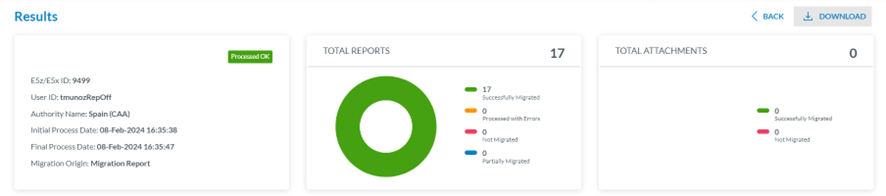
<span lang="EN-GB">The eye icon accesses a view page with the results of the migration, as follows:</span>

[![image.png](https://help.ci-aviationreporting.eu/uploads/images/gallery/2025-11/scaled-1680-/wTbimage.png)](https://help.ci-aviationreporting.eu/uploads/images/gallery/2025-11/wTbimage.png)

<span lang="EN-GB" style="mso-ansi-language: EN-GB; mso-fareast-language: EN-GB;"> </span>

<span lang="EN-GB">Above the panel, on the right side, there is a Download option that downloads the view page in PDF format.</span>

<span lang="EN-GB">The first section of the page is the Results section, which indicates the status of the process: whether it has been successfully migrated or has been processed with errors, not migrated or partially migrated. </span>

<span lang="EN-GB">The central panel shows a percentage drawing showing the number of processed reports and their status.</span>

<span lang="EN-GB">The left panel indicates the following:</span>

<span lang="EN-GB" style="font-family: Symbol; mso-fareast-font-family: Symbol; mso-bidi-font-family: Symbol; color: #1b3891; mso-themecolor: text1;"><span style="mso-list: Ignore;">·<span style="font: 7.0pt 'Times New Roman';"> </span></span></span><span lang="EN-GB">File ID</span>

<span lang="EN-GB" style="font-family: Symbol; mso-fareast-font-family: Symbol; mso-bidi-font-family: Symbol; color: #1b3891; mso-themecolor: text1;"><span style="mso-list: Ignore;">·<span style="font: 7.0pt 'Times New Roman';"> </span></span></span><span lang="EN-GB">User ID</span>

<span lang="EN-GB" style="font-family: Symbol; mso-fareast-font-family: Symbol; mso-bidi-font-family: Symbol; color: #1b3891; mso-themecolor: text1;"><span style="mso-list: Ignore;">·<span style="font: 7.0pt 'Times New Roman';"> </span></span></span><span lang="EN-GB">Authority Name</span>

<span lang="EN-GB" style="font-family: Symbol; mso-fareast-font-family: Symbol; mso-bidi-font-family: Symbol; color: #1b3891; mso-themecolor: text1;"><span style="mso-list: Ignore;">·<span style="font: 7.0pt 'Times New Roman';"> </span></span></span><span lang="EN-GB">Initial Process Date</span>

<span lang="EN-GB" style="font-family: Symbol; mso-fareast-font-family: Symbol; mso-bidi-font-family: Symbol; color: #1b3891; mso-themecolor: text1;"><span style="mso-list: Ignore;">·<span style="font: 7.0pt 'Times New Roman';"> </span></span></span><span lang="EN-GB">Final Process Date</span>

<span lang="EN-GB" style="font-family: Symbol; mso-fareast-font-family: Symbol; mso-bidi-font-family: Symbol; color: #1b3891; mso-themecolor: text1;"><span style="mso-list: Ignore;">·<span style="font: 7.0pt 'Times New Roman';"> </span></span></span><span lang="EN-GB">Migration Origin</span>

<span lang="EN-GB">The right panel refers to the attachment and indicates the total number of successfully migrated and un-migrated attachments.</span>

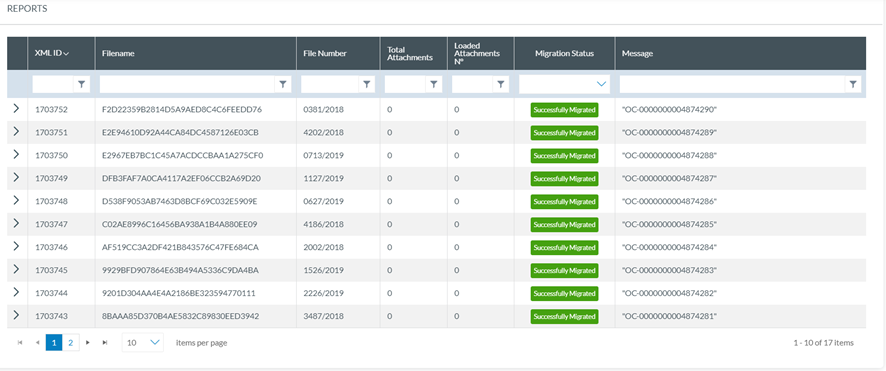
<span lang="EN-GB">The second part of the page, below, is the Reports section with the table of reports included in the migration:</span>

[![image.png](https://help.ci-aviationreporting.eu/uploads/images/gallery/2025-11/scaled-1680-/DQEimage.png)](https://help.ci-aviationreporting.eu/uploads/images/gallery/2025-11/DQEimage.png)

<span lang="EN-GB" style="mso-ansi-language: EN-GB; mso-fareast-language: EN-GB;"> </span>

<span lang="EN-GB">It presents a report per row, and per report, the following columns can also be used as filters:</span>

<span lang="EN-GB" style="font-family: Symbol; mso-fareast-font-family: Symbol; mso-bidi-font-family: Symbol; color: #1b3891; mso-themecolor: text1;"><span style="mso-list: Ignore;">·<span style="font: 7.0pt 'Times New Roman';"> </span></span></span><span lang="EN-GB">The XML ID: Unique for each one</span>

<span lang="EN-GB" style="font-family: Symbol; mso-fareast-font-family: Symbol; mso-bidi-font-family: Symbol; color: #1b3891; mso-themecolor: text1;"><span style="mso-list: Ignore;">·<span style="font: 7.0pt 'Times New Roman';"> </span></span></span><span lang="EN-GB">The File Name: Unique for each one</span>

<span lang="EN-GB" style="font-family: Symbol; mso-fareast-font-family: Symbol; mso-bidi-font-family: Symbol; color: #1b3891; mso-themecolor: text1;"><span style="mso-list: Ignore;">·<span style="font: 7.0pt 'Times New Roman';"> </span></span></span><span lang="EN-GB">Total Attachments (included in the XML)</span>

<span lang="EN-GB" style="font-family: Symbol; mso-fareast-font-family: Symbol; mso-bidi-font-family: Symbol; color: #1b3891; mso-themecolor: text1;"><span style="mso-list: Ignore;">·<span style="font: 7.0pt 'Times New Roman';"> </span></span></span><span lang="EN-GB">Number of loaded attachments</span>

<span lang="EN-GB" style="font-family: Symbol; mso-fareast-font-family: Symbol; mso-bidi-font-family: Symbol; color: #1b3891; mso-themecolor: text1;"><span style="mso-list: Ignore;">·<span style="font: 7.0pt 'Times New Roman';"> </span></span></span><span lang="EN-GB">Migration status: it can be successfully migrated or has been processed with errors, not migrated or partially migrated</span>

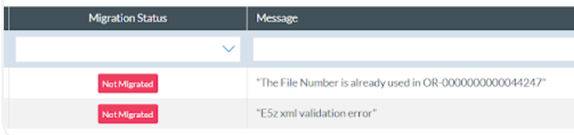
<span lang="EN-GB" style="font-family: Symbol; mso-fareast-font-family: Symbol; mso-bidi-font-family: Symbol; color: #1b3891; mso-themecolor: text1;"><span style="mso-list: Ignore;">·<span style="font: 7.0pt 'Times New Roman';"> </span></span></span><span lang="EN-GB">Message: With the E2 ID for the OC in case of a successful migration, like in the image above, or it can be messages explaining the cause of a failed or final migration as follows:</span>

[![image.png](https://help.ci-aviationreporting.eu/uploads/images/gallery/2025-11/scaled-1680-/WZTimage.png)](https://help.ci-aviationreporting.eu/uploads/images/gallery/2025-11/WZTimage.png)

<span lang="EN-GB">If the user clicks on the arrow at the beginning of a report’s row, the system displays the attachments’ list of that OC below the list:</span>

<span lang="EN-GB" style="mso-ansi-language: EN-GB; mso-fareast-language: EN-GB;"> </span>

<span lang="EN-GB"> </span>[![image.png](https://help.ci-aviationreporting.eu/uploads/images/gallery/2025-11/scaled-1680-/rlyimage.png)](https://help.ci-aviationreporting.eu/uploads/images/gallery/2025-11/rlyimage.png)

<span lang="EN-GB">The list presents the attachment of the specific OC, if it exists, with one attachment per row. Each row is divided into columns that can be used as filters:</span>

<span lang="EN-GB" style="font-family: Symbol; mso-fareast-font-family: Symbol; mso-bidi-font-family: Symbol; color: #1b3891; mso-themecolor: text1;"><span style="mso-list: Ignore;">·<span style="font: 7.0pt 'Times New Roman';"> </span></span></span><span lang="EN-GB">Attachment ID: unique for each one</span>

<span lang="EN-GB" style="font-family: Symbol; mso-fareast-font-family: Symbol; mso-bidi-font-family: Symbol; color: #1b3891; mso-themecolor: text1;"><span style="mso-list: Ignore;">·<span style="font: 7.0pt 'Times New Roman';"> </span></span></span><span lang="EN-GB">Attachment Name: also unique</span>

<span lang="EN-GB" style="font-family: Symbol; mso-fareast-font-family: Symbol; mso-bidi-font-family: Symbol; color: #1b3891; mso-themecolor: text1;"><span style="mso-list: Ignore;">·<span style="font: 7.0pt 'Times New Roman';"> </span></span></span><span lang="EN-GB">Migration Status: migrated, partially migrated, processed with errors, not migrated</span>

<span lang="EN-GB" style="font-family: Symbol; mso-fareast-font-family: Symbol; mso-bidi-font-family: Symbol; color: #1b3891; mso-themecolor: text1;"><span style="mso-list: Ignore;">·<span style="font: 7.0pt 'Times New Roman';"> </span></span></span><span lang="EN-GB">Message: Referring to the success of the migration or explaining the cause of a partial migration, with error or not migrated.</span>

<span lang="EN-GB">The last section of the view page is the attachment list:</span>

[![image.png](https://help.ci-aviationreporting.eu/uploads/images/gallery/2025-11/scaled-1680-/WOfimage.png)](https://help.ci-aviationreporting.eu/uploads/images/gallery/2025-11/WOfimage.png)

<span lang="EN-GB" style="mso-ansi-language: EN-GB; mso-fareast-language: EN-GB;"> </span>

<span lang="EN-GB">It presents the list of all the attachments of all the OCs of the list of reports. The information is the same as the attachment per report.</span>

### <span style="mso-fareast-font-family: Calibri; mso-bidi-font-family: Calibri;"><span style="mso-list: Ignore;">6.5.3.<span style="font: 7.0pt 'Times New Roman';"> </span></span></span>Upload E5X files

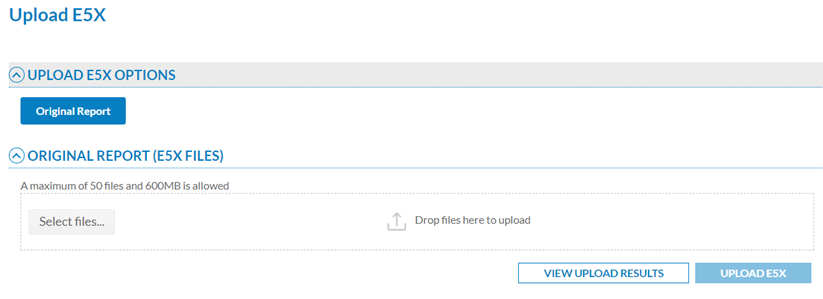
<span lang="EN-GB">This option of the Administration menu displays the Upload E5X files window:</span>

[![image.png](https://help.ci-aviationreporting.eu/uploads/images/gallery/2025-11/scaled-1680-/R7Zimage.png)](https://help.ci-aviationreporting.eu/uploads/images/gallery/2025-11/R7Zimage.png)

<span lang="EN-GB" style="mso-ansi-language: EN-GB; mso-fareast-language: EN-GB;"> </span>

<span lang="EN-GB">E5X is the extension given to compressed XML files in ECCAIRS2 that contain one or more original reports (ORs) in XML format. E5X files can also contain folders with the same name as the corresponding XML.</span>

<span lang="EN-GB">The Administrator has to select the files through the ‘Select files’ button or by dragging and dropping them in the E5X files section and clicking on ‘Upload E5X’.</span>

<span lang="EN-GB">The system will display a message warning that the process can take some time and will communicate if the process has been successful.</span>

<span lang="EN-GB">In parallel, the system emails the Administrator: Your request to upload the ‘DEMO.e5x content to ECCAIRS2 has been successfully received'.</span>

<span lang="EN-GB">When the process has finished, the system will send another message on the status of the process.</span>

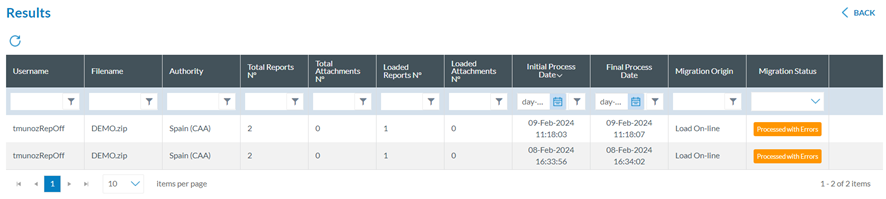
<span lang="EN-GB">Then, the Administrator has to click on ‘View upload results’, and the system will display the view page providing the list of all the uploads by date order, with the last upload in first place:</span>

[![image.png](https://help.ci-aviationreporting.eu/uploads/images/gallery/2025-11/scaled-1680-/xhvimage.png)](https://help.ci-aviationreporting.eu/uploads/images/gallery/2025-11/xhvimage.png)

<span lang="EN-GB" style="mso-ansi-language: EN-GB; mso-fareast-language: EN-GB;"> </span>

<span lang="EN-GB">The list functions like the migration process but with original reports instead of OCs. See the previous section for further details.</span>

### <span style="mso-fareast-font-family: Calibri; mso-bidi-font-family: Calibri;"><span style="mso-list: Ignore;">6.5.4.<span style="font: 7.0pt 'Times New Roman';"> </span></span></span>Validate E5Xfiles

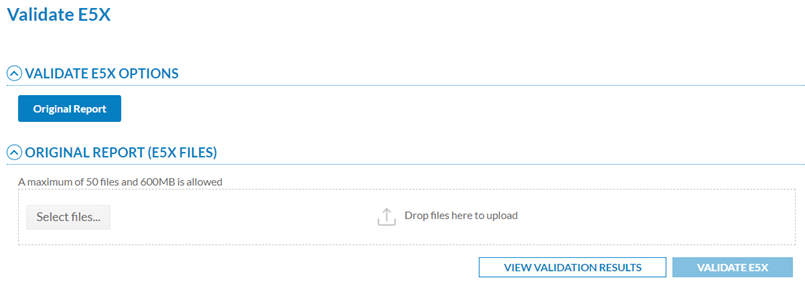
<span lang="EN-GB">This option of the administration menu displays the following window:</span>

[![image.png](https://help.ci-aviationreporting.eu/uploads/images/gallery/2025-11/scaled-1680-/Ykrimage.png)](https://help.ci-aviationreporting.eu/uploads/images/gallery/2025-11/Ykrimage.png)

<span lang="EN-GB" style="mso-ansi-language: EN-GB; mso-fareast-language: EN-GB;"> </span>

<span lang="EN-GB">The Administrator has to select the files through the ‘Select files’ button or by dragging and dropping them in the E5X files section and clicking on ‘Validate E5X’.</span>

<span lang="EN-GB">The system displays a message once it is validated. At the same time, the system sends an email to the Administrator on the result of the validation. The Administrator has to click on ‘View validation results’, and the system opens the following Results page:</span>

[![image.png](https://help.ci-aviationreporting.eu/uploads/images/gallery/2025-11/scaled-1680-/SYBimage.png)](https://help.ci-aviationreporting.eu/uploads/images/gallery/2025-11/SYBimage.png)

<span lang="EN-GB" style="mso-ansi-language: EN-GB; mso-fareast-language: EN-GB;"> </span>

<span lang="EN-GB">It presents a table with the processed validations, with the most recent ones in the first place. The columns per each validation row are the following (they can also be used as filters):</span>

<span lang="EN-GB" style="font-family: Symbol; mso-fareast-font-family: Symbol; mso-bidi-font-family: Symbol; color: #1b3891; mso-themecolor: text1;"><span style="mso-list: Ignore;">·<span style="font: 7.0pt 'Times New Roman';"> </span></span></span><span lang="EN-GB">Username: the author of the validation</span>

<span lang="EN-GB" style="font-family: Symbol; mso-fareast-font-family: Symbol; mso-bidi-font-family: Symbol; color: #1b3891; mso-themecolor: text1;"><span style="mso-list: Ignore;">·<span style="font: 7.0pt 'Times New Roman';"> </span></span></span><span lang="EN-GB">Filename: of the E5X file</span>

<span lang="EN-GB" style="font-family: Symbol; mso-fareast-font-family: Symbol; mso-bidi-font-family: Symbol; color: #1b3891; mso-themecolor: text1;"><span style="mso-list: Ignore;">·<span style="font: 7.0pt 'Times New Roman';"> </span></span></span><span lang="EN-GB">Authority to which the Administrator belongs</span>

<span lang="EN-GB" style="font-family: Symbol; mso-fareast-font-family: Symbol; mso-bidi-font-family: Symbol; color: #1b3891; mso-themecolor: text1;"><span style="mso-list: Ignore;">·<span style="font: 7.0pt 'Times New Roman';"> </span></span></span><span lang="EN-GB">Total reports: number of total ORs</span>

<span lang="EN-GB" style="font-family: Symbol; mso-fareast-font-family: Symbol; mso-bidi-font-family: Symbol; color: #1b3891; mso-themecolor: text1;"><span style="mso-list: Ignore;">·<span style="font: 7.0pt 'Times New Roman';"> </span></span></span><span lang="EN-GB">Total attachments: number of total attachments</span>

<span lang="EN-GB" style="font-family: Symbol; mso-fareast-font-family: Symbol; mso-bidi-font-family: Symbol; color: #1b3891; mso-themecolor: text1;"><span style="mso-list: Ignore;">·<span style="font: 7.0pt 'Times New Roman';"> </span></span></span><span lang="EN-GB">Initial Process Date</span>

<span lang="EN-GB" style="font-family: Symbol; mso-fareast-font-family: Symbol; mso-bidi-font-family: Symbol; color: #1b3891; mso-themecolor: text1;"><span style="mso-list: Ignore;">·<span style="font: 7.0pt 'Times New Roman';"> </span></span></span><span lang="EN-GB">Final Process Date</span>

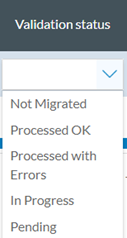
<span lang="EN-GB" style="font-family: Symbol; mso-fareast-font-family: Symbol; mso-bidi-font-family: Symbol; color: #1b3891; mso-themecolor: text1;"><span style="mso-list: Ignore;">·<span style="font: 7.0pt 'Times New Roman';"> </span></span></span><span lang="EN-GB">Validation status: it can be</span>

[![image.png](https://help.ci-aviationreporting.eu/uploads/images/gallery/2025-11/scaled-1680-/HVBimage.png)](https://help.ci-aviationreporting.eu/uploads/images/gallery/2025-11/HVBimage.png)

<span lang="EN-GB" style="mso-ansi-language: EN-GB; mso-fareast-language: EN-GB;"> </span>

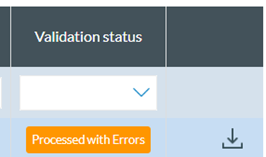
<span lang="EN-GB">On the last column of the specific validation row, the Administrator can mouse over, and a download icon will appear.</span>

[![image.png](https://help.ci-aviationreporting.eu/uploads/images/gallery/2025-11/scaled-1680-/bWrimage.png)](https://help.ci-aviationreporting.eu/uploads/images/gallery/2025-11/bWrimage.png)

<span lang="EN-GB"> </span>

<span lang="EN-GB" style="mso-ansi-language: EN-GB; mso-fareast-language: EN-GB;"> </span>

<span lang="EN-GB">The Administrator can click on it to download an XLS file with the results of the validation:</span>

[![image.png](https://help.ci-aviationreporting.eu/uploads/images/gallery/2025-11/scaled-1680-/TdDimage.png)](https://help.ci-aviationreporting.eu/uploads/images/gallery/2025-11/TdDimage.png)