# 6.2. General Settings

### <span style="mso-bookmark: _Ref159853925;">6.2.1. Organisation Management</span>

<span lang="EN-GB">Organisations are defined locally by a user enrolled in the National Security Administrator role. When defining organisations, it can be assigned the webforms that will be used by that organisation when reporting ORs via the E2 Reporting Portal. It can also be determined through predefined Attributes automatically filling with the predefined value when the organisation's users create new ORs.</span>

<span lang="EN-GB">Administrators have to unfold ‘Administration’ and click on ‘Organisation Management’ under ‘General Settings’. The system will display the Organisation Management menu:</span>

[![image.png](https://help.ci-aviationreporting.eu/uploads/images/gallery/2025-11/scaled-1680-/sVYimage.png)](https://help.ci-aviationreporting.eu/uploads/images/gallery/2025-11/sVYimage.png)

<span lang="EN-GB" style="mso-ansi-language: EN-GB; mso-fareast-language: EN-GB;"> </span>

<span lang="EN-GB">It displays a table of organisations with the following columns per Organisation row, which also work as filters:</span>

<span lang="EN-GB" style="font-family: Symbol; mso-fareast-font-family: Symbol; mso-bidi-font-family: Symbol; color: #1b3891; mso-themecolor: text1;"><span style="mso-list: Ignore;">·<span style="font: 7.0pt 'Times New Roman';"> </span></span></span><span lang="EN-GB">Name: it is unique for each organisation</span>

<span lang="EN-GB" style="font-family: Symbol; mso-fareast-font-family: Symbol; mso-bidi-font-family: Symbol; color: #1b3891; mso-themecolor: text1;"><span style="mso-list: Ignore;">·<span style="font: 7.0pt 'Times New Roman';"> </span></span></span><span lang="EN-GB">Phone: it is not mandatory</span>

<span lang="EN-GB" style="font-family: Symbol; mso-fareast-font-family: Symbol; mso-bidi-font-family: Symbol; color: #1b3891; mso-themecolor: text1;"><span style="mso-list: Ignore;">·<span style="font: 7.0pt 'Times New Roman';"> </span></span></span><span lang="EN-GB">Created by: the Administrator that created the organisation </span>

<span lang="EN-GB" style="font-family: Symbol; mso-fareast-font-family: Symbol; mso-bidi-font-family: Symbol; color: #1b3891; mso-themecolor: text1;"><span style="mso-list: Ignore;">·<span style="font: 7.0pt 'Times New Roman';"> </span></span></span><span lang="EN-GB">Creation date: the date when the organisation was created in E2</span>

<span lang="EN-GB">The last column provides a delete and edit icon per each organisation, as follows:</span>

[![image.png](https://help.ci-aviationreporting.eu/uploads/images/gallery/2025-11/scaled-1680-/Dpeimage.png)](https://help.ci-aviationreporting.eu/uploads/images/gallery/2025-11/Dpeimage.png)

<span lang="EN-GB" style="mso-ansi-language: EN-GB; mso-fareast-language: EN-GB;"> </span>

<span lang="EN-GB">Above the table, on the right side, there are the following buttons:</span>

<span lang="EN-GB" style="font-family: Symbol; mso-fareast-font-family: Symbol; mso-bidi-font-family: Symbol; color: #1b3891; mso-themecolor: text1;"><span style="mso-list: Ignore;">·<span style="font: 7.0pt 'Times New Roman';"> </span></span></span><span lang="EN-GB">Import Organisations and Users</span>

<span lang="EN-GB" style="font-family: Symbol; mso-fareast-font-family: Symbol; mso-bidi-font-family: Symbol; color: #1b3891; mso-themecolor: text1;"><span style="mso-list: Ignore;">·<span style="font: 7.0pt 'Times New Roman';"> </span></span></span><span lang="EN-GB">New Organisation</span>

#### <span style="mso-fareast-font-family: Calibri; mso-bidi-font-family: Calibri;"><span style="mso-list: Ignore;">6.2.1.1. </span></span>Create an organisation

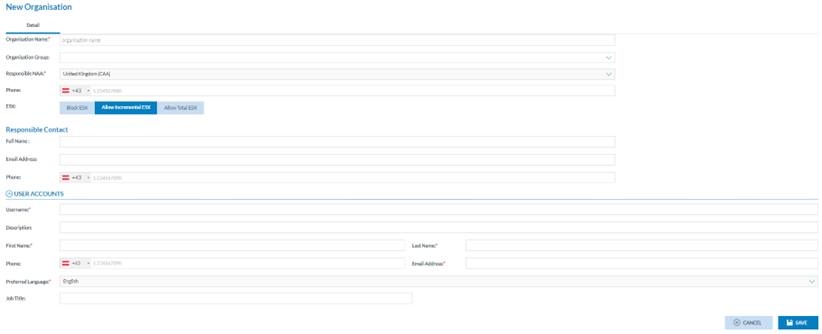
<span lang="EN-GB">Administrators have to click on ‘New Organisation’ above the table of organisations, and the system will display the ‘New Organisation’ page:</span>

[![image.png](https://help.ci-aviationreporting.eu/uploads/images/gallery/2025-11/scaled-1680-/kMCimage.png)](https://help.ci-aviationreporting.eu/uploads/images/gallery/2025-11/kMCimage.png)

<span lang="EN-GB" style="mso-ansi-language: EN-GB; mso-fareast-language: EN-GB;"> </span>

<span lang="EN-GB">The mandatory fields are the following:</span>

<span lang="EN-GB" style="font-family: Symbol; mso-fareast-font-family: Symbol; mso-bidi-font-family: Symbol; color: #1b3891; mso-themecolor: text1;"><span style="mso-list: Ignore;">·<span style="font: 7.0pt 'Times New Roman';"> </span></span></span>**<span lang="EN-GB" style="mso-bidi-font-family: 'Times New Roman';">Organisation Name</span>**<span lang="EN-GB">: it has to be unique for each organisation</span>

<span lang="EN-GB" style="font-family: Symbol; mso-fareast-font-family: Symbol; mso-bidi-font-family: Symbol; color: #1b3891; mso-themecolor: text1;"><span style="mso-list: Ignore;">·<span style="font: 7.0pt 'Times New Roman';"> </span></span></span>**<span lang="EN-GB" style="mso-bidi-font-family: 'Times New Roman';">Responsible NAA</span>**<span lang="EN-GB">: the system sets the Authority to which the Administrator belongs. By default, it is not editable.</span>

<span lang="EN-GB" style="font-family: Symbol; mso-fareast-font-family: Symbol; mso-bidi-font-family: Symbol; color: #1b3891; mso-themecolor: text1;"><span style="mso-list: Ignore;">·<span style="font: 7.0pt 'Times New Roman';"> </span></span></span>**<span lang="EN-GB" style="mso-bidi-font-family: 'Times New Roman';">E5X</span>**<span lang="EN-GB">: by default, it is ‘Allow Incremental E5X’. Administrators can select ‘Block E5X’ or ‘Allow Total E5X’ instead:</span>

<span lang="EN-GB" style="font-family: Wingdings; mso-fareast-font-family: Wingdings; mso-bidi-font-family: Wingdings; color: #1b3891; mso-themecolor: text1;"><span style="mso-list: Ignore;">ü<span style="font: 7.0pt 'Times New Roman';"> </span></span></span><span lang="EN-GB">Block E5X will not allow users of this organisation to import ORs through E5X files</span>

<span lang="EN-GB" style="font-family: Wingdings; mso-fareast-font-family: Wingdings; mso-bidi-font-family: Wingdings; color: #1b3891; mso-themecolor: text1;"><span style="mso-list: Ignore;">ü<span style="font: 7.0pt 'Times New Roman';"> </span></span></span><span lang="EN-GB">‘Allow incremental E5X’ refers to importing all the versions of the ORs through the E5X; it means the first version of each OR and all their updates.</span>

<span lang="EN-GB" style="font-family: Wingdings; mso-fareast-font-family: Wingdings; mso-bidi-font-family: Wingdings; color: #1b3891; mso-themecolor: text1;"><span style="mso-list: Ignore;">ü<span style="font: 7.0pt 'Times New Roman';"> </span></span></span><span lang="EN-GB">‘Allow Total E5X’ refers to import only the last version of the ORs</span>

<span lang="EN-GB" style="font-family: Symbol; mso-fareast-font-family: Symbol; mso-bidi-font-family: Symbol; color: #1b3891; mso-themecolor: text1;"><span style="mso-list: Ignore;">·<span style="font: 7.0pt 'Times New Roman';"> </span></span></span>**<span lang="EN-GB" style="mso-bidi-font-family: 'Times New Roman';">Username</span>**<span lang="EN-GB">: it refers to the user that will be created when the organisation is created</span>

<span lang="EN-GB" style="font-family: Symbol; mso-fareast-font-family: Symbol; mso-bidi-font-family: Symbol; color: #1b3891; mso-themecolor: text1;"><span style="mso-list: Ignore;">·<span style="font: 7.0pt 'Times New Roman';"> </span></span></span>**<span lang="EN-GB" style="mso-bidi-font-family: 'Times New Roman';">First name</span>**<span lang="EN-GB">: first name of the user that will be created when the organisation is created</span>

<span lang="EN-GB" style="font-family: Symbol; mso-fareast-font-family: Symbol; mso-bidi-font-family: Symbol; color: #1b3891; mso-themecolor: text1;"><span style="mso-list: Ignore;">·<span style="font: 7.0pt 'Times New Roman';"> </span></span></span>**<span lang="EN-GB" style="mso-bidi-font-family: 'Times New Roman';">Last name</span>**<span lang="EN-GB">: first name of the user that will be created when the organisation is created</span>

<span lang="EN-GB" style="font-family: Symbol; mso-fareast-font-family: Symbol; mso-bidi-font-family: Symbol; color: #1b3891; mso-themecolor: text1;"><span style="mso-list: Ignore;">·<span style="font: 7.0pt 'Times New Roman';"> </span></span></span>**<span lang="EN-GB" style="mso-bidi-font-family: 'Times New Roman';">Email address</span>**<span lang="EN-GB">: User email will be created when the organisation is created. Preferred language: by default, it is English, which is not editable.</span>

<span lang="EN-GB">The optional fields are the following:</span>

<span lang="EN-GB" style="font-family: Symbol; mso-fareast-font-family: Symbol; mso-bidi-font-family: Symbol; color: #1b3891; mso-themecolor: text1;"><span style="mso-list: Ignore;">·<span style="font: 7.0pt 'Times New Roman';"> </span></span></span><span lang="EN-GB">Organisation Group: drop-down menu providing the organisation groups to be selected, if any</span>

<span lang="EN-GB" style="font-family: Symbol; mso-fareast-font-family: Symbol; mso-bidi-font-family: Symbol; color: #1b3891; mso-themecolor: text1;"><span style="mso-list: Ignore;">·<span style="font: 7.0pt 'Times New Roman';"> </span></span></span><span lang="EN-GB">Phone: telephone number of the organisation</span>

<span lang="EN-GB" style="font-family: Symbol; mso-fareast-font-family: Symbol; mso-bidi-font-family: Symbol; color: #1b3891; mso-themecolor: text1;"><span style="mso-list: Ignore;">·<span style="font: 7.0pt 'Times New Roman';"> </span></span></span><span lang="EN-GB">Responsible contact fields: all of them are optional. They are to contact the responsible of the organisation:</span>

<span lang="EN-GB" style="font-family: Wingdings; mso-fareast-font-family: Wingdings; mso-bidi-font-family: Wingdings; color: #1b3891; mso-themecolor: text1;"><span style="mso-list: Ignore;">ü<span style="font: 7.0pt 'Times New Roman';"> </span></span></span><span lang="EN-GB">Full name: it is referred to the responsible contact of the organisation</span>

<span lang="EN-GB" style="font-family: Wingdings; mso-fareast-font-family: Wingdings; mso-bidi-font-family: Wingdings; color: #1b3891; mso-themecolor: text1;"><span style="mso-list: Ignore;">ü<span style="font: 7.0pt 'Times New Roman';"> </span></span></span><span lang="EN-GB">Email address: it is referred to the responsible contact of the organisation</span>

<span lang="EN-GB" style="font-family: Wingdings; mso-fareast-font-family: Wingdings; mso-bidi-font-family: Wingdings; color: #1b3891; mso-themecolor: text1;"><span style="mso-list: Ignore;">ü<span style="font: 7.0pt 'Times New Roman';"> </span></span></span><span lang="EN-GB">Phone: telephone number of the responsible contact</span>

<span lang="EN-GB" style="font-family: Symbol; mso-fareast-font-family: Symbol; mso-bidi-font-family: Symbol; color: #1b3891; mso-themecolor: text1;"><span style="mso-list: Ignore;">·<span style="font: 7.0pt 'Times New Roman';"> </span></span></span><span lang="EN-GB">User account fields: the following fields are optional:</span>

<span lang="EN-GB" style="font-family: Wingdings; mso-fareast-font-family: Wingdings; mso-bidi-font-family: Wingdings; color: #1b3891; mso-themecolor: text1;"><span style="mso-list: Ignore;">ü<span style="font: 7.0pt 'Times New Roman';"> </span></span></span><span lang="EN-GB">Description concerning the username</span>

<span lang="EN-GB" style="font-family: Wingdings; mso-fareast-font-family: Wingdings; mso-bidi-font-family: Wingdings; color: #1b3891; mso-themecolor: text1;"><span style="mso-list: Ignore;">ü<span style="font: 7.0pt 'Times New Roman';"> </span></span></span><span lang="EN-GB">Phone related to the user account</span>

<span lang="EN-GB" style="font-family: Wingdings; mso-fareast-font-family: Wingdings; mso-bidi-font-family: Wingdings; color: #1b3891; mso-themecolor: text1;"><span style="mso-list: Ignore;">ü<span style="font: 7.0pt 'Times New Roman';"> </span></span></span><span lang="EN-GB">Job Title</span>

<span lang="EN-GB">Administrators have to fill in the mandatory fields and click the ‘Save’ button. The system will save the data in the database, create a new organisation with the new user, and add it to the organisation's table.</span>

<span lang="EN-GB">The created organisational user will have the Reporter and Organisation Administrator roles assigned automatically.</span>

#### <span style="mso-fareast-font-family: Calibri; mso-bidi-font-family: Calibri;"><span style="mso-list: Ignore;">6.2.1.2. </span></span>Edit an organisation

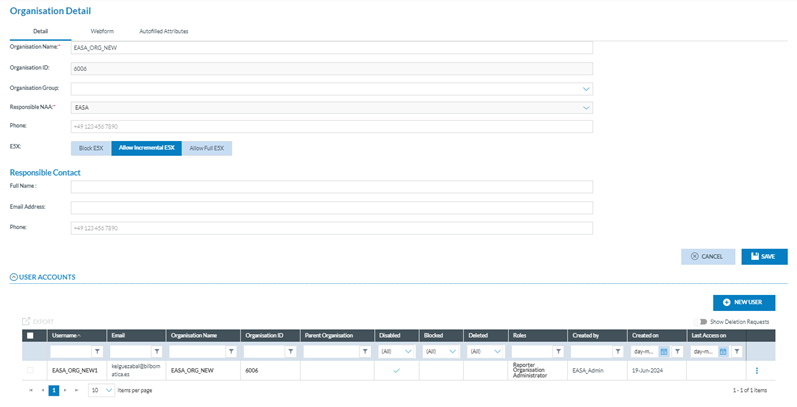
<span lang="EN-GB">Administrators have to click on the Edit icon of the specific organisation of the table of organisations, and the system will display the Edit organisation page:</span><span lang="EN-GB" style="mso-ansi-language: EN-GB;"><span style="mso-spacerun: yes;"> </span></span>

[![image.png](https://help.ci-aviationreporting.eu/uploads/images/gallery/2025-11/scaled-1680-/N1oimage.png)](https://help.ci-aviationreporting.eu/uploads/images/gallery/2025-11/N1oimage.png)

<span lang="EN-GB" style="mso-ansi-language: EN-GB; mso-fareast-language: EN-GB;"> </span>

#### <span style="mso-fareast-font-family: Calibri; mso-bidi-font-family: Calibri;"><span style="mso-list: Ignore;">6.2.1.3. </span></span>Detail tab

<span lang="EN-GB">The page displays a Detail tab, which reproduces the Organisation creation page, with the addition of an Organisation ID, which is not editable by the system. See the previous section for further details on the fields.</span>

<span lang="EN-GB">Administrators can update the needed fields.</span>

<span lang="EN-GB">Moreover, it transforms the user accounts area with a table of accounts with the user accounts for the current organisation.</span>

<span lang="EN-GB">The table is preceded by a check box and the following columns that can be used as filters:</span>

<span lang="EN-GB" style="font-family: Symbol; mso-fareast-font-family: Symbol; mso-bidi-font-family: Symbol; color: #1b3891; mso-themecolor: text1;"><span style="mso-list: Ignore;">·<span style="font: 7.0pt 'Times New Roman';"> </span></span></span><span lang="EN-GB">Username: of the account</span>

<span lang="EN-GB" style="font-family: Symbol; mso-fareast-font-family: Symbol; mso-bidi-font-family: Symbol; color: #1b3891; mso-themecolor: text1;"><span style="mso-list: Ignore;">·<span style="font: 7.0pt 'Times New Roman';"> </span></span></span><span lang="EN-GB">Email: to which the account is associated</span>

<span lang="EN-GB" style="font-family: Symbol; mso-fareast-font-family: Symbol; mso-bidi-font-family: Symbol; color: #1b3891; mso-themecolor: text1;"><span style="mso-list: Ignore;">·<span style="font: 7.0pt 'Times New Roman';"> </span></span></span><span lang="EN-GB">Organisation Name: as set in the creation page or later edited</span>

<span lang="EN-GB" style="font-family: Symbol; mso-fareast-font-family: Symbol; mso-bidi-font-family: Symbol; color: #1b3891; mso-themecolor: text1;"><span style="mso-list: Ignore;">·<span style="font: 7.0pt 'Times New Roman';"> </span></span></span><span lang="EN-GB">Organisation ID: as generated by the system, it is unique for each organisation</span>

<span lang="EN-GB" style="font-family: Symbol; mso-fareast-font-family: Symbol; mso-bidi-font-family: Symbol; color: #1b3891; mso-themecolor: text1;"><span style="mso-list: Ignore;">·<span style="font: 7.0pt 'Times New Roman';"> </span></span></span><span lang="EN-GB">Parent organisation: the organisation from which the organisation is child</span>

<span lang="EN-GB" style="font-family: Symbol; mso-fareast-font-family: Symbol; mso-bidi-font-family: Symbol; color: #1b3891; mso-themecolor: text1;"><span style="mso-list: Ignore;">·<span style="font: 7.0pt 'Times New Roman';"> </span></span></span><span lang="EN-GB">Disabled: it shows a green tick if the account is disabled</span>

<span lang="EN-GB" style="font-family: Symbol; mso-fareast-font-family: Symbol; mso-bidi-font-family: Symbol; color: #1b3891; mso-themecolor: text1;"><span style="mso-list: Ignore;">·<span style="font: 7.0pt 'Times New Roman';"> </span></span></span><span lang="EN-GB">Blocked: green tick if disabled</span>

<span lang="EN-GB" style="font-family: Symbol; mso-fareast-font-family: Symbol; mso-bidi-font-family: Symbol; color: #1b3891; mso-themecolor: text1;"><span style="mso-list: Ignore;">·<span style="font: 7.0pt 'Times New Roman';"> </span></span></span><span lang="EN-GB">Deleted: green tick if deleted</span>

<span lang="EN-GB" style="font-family: Symbol; mso-fareast-font-family: Symbol; mso-bidi-font-family: Symbol; color: #1b3891; mso-themecolor: text1;"><span style="mso-list: Ignore;">·<span style="font: 7.0pt 'Times New Roman';"> </span></span></span><span lang="EN-GB">Roles: by default, the system assigns the accounts created by Administrators to the Reporter organisation' Administrator role</span>

<span lang="EN-GB" style="font-family: Symbol; mso-fareast-font-family: Symbol; mso-bidi-font-family: Symbol; color: #1b3891; mso-themecolor: text1;"><span style="mso-list: Ignore;">·<span style="font: 7.0pt 'Times New Roman';"> </span></span></span><span lang="EN-GB">Created by: the author of the account</span>

<span lang="EN-GB" style="font-family: Symbol; mso-fareast-font-family: Symbol; mso-bidi-font-family: Symbol; color: #1b3891; mso-themecolor: text1;"><span style="mso-list: Ignore;">·<span style="font: 7.0pt 'Times New Roman';"> </span></span></span><span lang="EN-GB">Created on: date of the account’s creation</span>

<span lang="EN-GB" style="font-family: Symbol; mso-fareast-font-family: Symbol; mso-bidi-font-family: Symbol; color: #1b3891; mso-themecolor: text1;"><span style="mso-list: Ignore;">·<span style="font: 7.0pt 'Times New Roman';"> </span></span></span><span lang="EN-GB">Last access on: date of last access to the account</span>

<span lang="EN-GB">The last section of the table per each row provides a 3-dot menu with Edit and Export options.</span>

<span lang="EN-GB">Above the table, there is a ‘Show Deletion Requests’ that shows, if existing, the accounts whose users have requested their deletion.</span>

#### <span style="mso-fareast-font-family: Calibri; mso-bidi-font-family: Calibri;"><span style="mso-list: Ignore;">6.2.1.4. </span></span>Add more account users to the Organisation

<span lang="EN-GB">Administrators can add users through the ‘New user’ button above the accounts table.</span>

<span lang="EN-GB">This button opens the User account details page:</span>

<span lang="EN-GB">Administrators have to fill in the mandatory fields:</span>

<span lang="EN-GB" style="font-family: Symbol; mso-fareast-font-family: Symbol; mso-bidi-font-family: Symbol; color: #1b3891; mso-themecolor: text1;"><span style="mso-list: Ignore;">·<span style="font: 7.0pt 'Times New Roman';"> </span></span></span><span lang="EN-GB">Username</span>

<span lang="EN-GB" style="font-family: Symbol; mso-fareast-font-family: Symbol; mso-bidi-font-family: Symbol; color: #1b3891; mso-themecolor: text1;"><span style="mso-list: Ignore;">·<span style="font: 7.0pt 'Times New Roman';"> </span></span></span><span lang="EN-GB">First Name</span>

<span lang="EN-GB" style="font-family: Symbol; mso-fareast-font-family: Symbol; mso-bidi-font-family: Symbol; color: #1b3891; mso-themecolor: text1;"><span style="mso-list: Ignore;">·<span style="font: 7.0pt 'Times New Roman';"> </span></span></span><span lang="EN-GB">Last Name</span>

<span lang="EN-GB" style="font-family: Symbol; mso-fareast-font-family: Symbol; mso-bidi-font-family: Symbol; color: #1b3891; mso-themecolor: text1;"><span style="mso-list: Ignore;">·<span style="font: 7.0pt 'Times New Roman';"> </span></span></span><span lang="EN-GB">Email address</span>

<span lang="EN-GB">The ‘Disabled’ toggle will be activated and deactivated once the created user activates it through the email they receive after its creation.</span>

<span lang="EN-GB">The blocked toggle is deactivated; Administrators must activate it if needed to block the account.</span>

<span lang="EN-GB">Administrators can fill in the optional fields.</span>

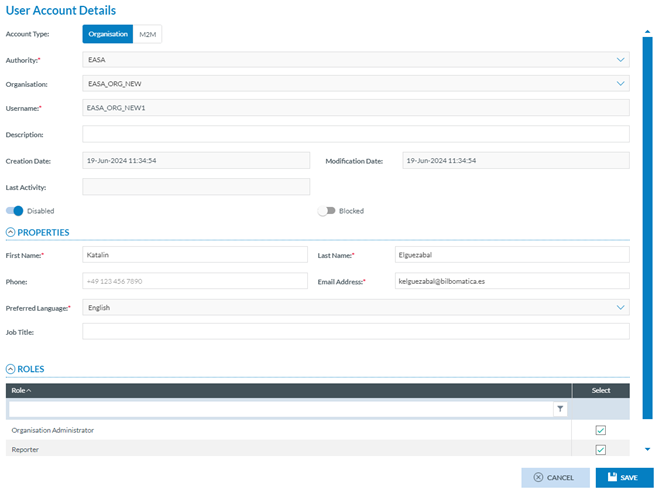
<span lang="EN-GB">At the bottom of the page, the system displays a Roles table, where Administrators can select the roles for the user account. The available roles are Organisation Administrator, Organisation Autofilled Attributes and Reporter. Administrators can choose any one or both. They must fill in the mandatory fields and click the ‘Save’ button. The system will save the data in the database and add the account to the Edit Organisation page.</span>

#### <span style="mso-fareast-font-family: Calibri; mso-bidi-font-family: Calibri;"><span style="mso-list: Ignore;">6.2.1.5.</span></span><span style="mso-fareast-font-family: Calibri; mso-bidi-font-family: Calibri;"><span style="mso-list: Ignore;"><span style="font: 7.0pt 'Times New Roman';"> </span></span></span>Edit a user account

<span lang="EN-GB">Administrators can edit an account once on the Edit an Organisation page. They have to click on the abovementioned Edit option of the 3-dot menu of the specific account, and the system will display the Edit user account page:</span>

[![image.png](https://help.ci-aviationreporting.eu/uploads/images/gallery/2025-11/scaled-1680-/exjimage.png)](https://help.ci-aviationreporting.eu/uploads/images/gallery/2025-11/exjimage.png)

<span lang="EN-GB" style="mso-ansi-language: EN-GB; mso-fareast-language: EN-GB;"> </span>

<span lang="EN-GB">It is the same page as the previous one (adding a user account) but already has the data filled in. </span>

<span lang="EN-GB">Only the following fields will be editable:</span>

<span lang="EN-GB" style="font-family: Symbol; mso-fareast-font-family: Symbol; mso-bidi-font-family: Symbol; color: #1b3891; mso-themecolor: text1;"><span style="mso-list: Ignore;">·<span style="font: 7.0pt 'Times New Roman';"> </span></span></span><span lang="EN-GB">Description</span>

<span lang="EN-GB" style="font-family: Symbol; mso-fareast-font-family: Symbol; mso-bidi-font-family: Symbol; color: #1b3891; mso-themecolor: text1;"><span style="mso-list: Ignore;">·<span style="font: 7.0pt 'Times New Roman';"> </span></span></span><span lang="EN-GB">Disabled toggle</span>

<span lang="EN-GB" style="font-family: Symbol; mso-fareast-font-family: Symbol; mso-bidi-font-family: Symbol; color: #1b3891; mso-themecolor: text1;"><span style="mso-list: Ignore;">·<span style="font: 7.0pt 'Times New Roman';"> </span></span></span><span lang="EN-GB">Blocked toggle</span>

<span lang="EN-GB" style="font-family: Symbol; mso-fareast-font-family: Symbol; mso-bidi-font-family: Symbol; color: #1b3891; mso-themecolor: text1;"><span style="mso-list: Ignore;">·<span style="font: 7.0pt 'Times New Roman';"> </span></span></span><span lang="EN-GB">First Name</span>

<span lang="EN-GB" style="font-family: Symbol; mso-fareast-font-family: Symbol; mso-bidi-font-family: Symbol; color: #1b3891; mso-themecolor: text1;"><span style="mso-list: Ignore;">·<span style="font: 7.0pt 'Times New Roman';"> </span></span></span><span lang="EN-GB">Last Name</span>

<span lang="EN-GB" style="font-family: Symbol; mso-fareast-font-family: Symbol; mso-bidi-font-family: Symbol; color: #1b3891; mso-themecolor: text1;"><span style="mso-list: Ignore;">·<span style="font: 7.0pt 'Times New Roman';"> </span></span></span><span lang="EN-GB">Phone</span>

<span lang="EN-GB" style="font-family: Symbol; mso-fareast-font-family: Symbol; mso-bidi-font-family: Symbol; color: #1b3891; mso-themecolor: text1;"><span style="mso-list: Ignore;">·<span style="font: 7.0pt 'Times New Roman';"> </span></span></span><span lang="EN-GB">Email Address</span>

<span lang="EN-GB" style="font-family: Symbol; mso-fareast-font-family: Symbol; mso-bidi-font-family: Symbol; color: #1b3891; mso-themecolor: text1;"><span style="mso-list: Ignore;">·<span style="font: 7.0pt 'Times New Roman';"> </span></span></span><span lang="EN-GB">Job Title</span>

<span lang="EN-GB" style="font-family: Symbol; mso-fareast-font-family: Symbol; mso-bidi-font-family: Symbol; color: #1b3891; mso-themecolor: text1;"><span style="mso-list: Ignore;">·<span style="font: 7.0pt 'Times New Roman';"> </span></span></span><span lang="EN-GB">Roles</span>

<span lang="EN-GB">Administrators can update the needed fields, always keeping the mandatory fields filled. </span>

<span lang="EN-GB">Then, they have to click on the Save button, and the system will save the updates in the database, and the list of user accounts will be updated accordingly.</span>

#### <span style="mso-fareast-font-family: Calibri; mso-bidi-font-family: Calibri;"><span style="mso-list: Ignore;">6.2.1.6. </span></span>Export a user account

**<span lang="EN-GB" style="mso-bidi-font-family: 'Times New Roman';">Individual export</span>**<span lang="EN-GB">: Administrators have to click on the Export option of the 3-dot menu of the specific account at the table of accounts. The system will directly export it to an Excel (XLS) file.</span>

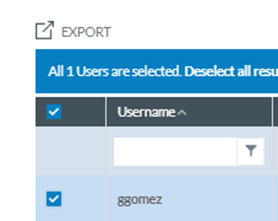
**<span lang="EN-GB" style="mso-bidi-font-family: 'Times New Roman';">Multiple export</span>**<span lang="EN-GB">: Alternatively, administrators can select the checkboxes of specific accounts in the accounts table.</span>

<span lang="EN-GB">Administrators can also select all the accounts at a time by checking the check box on the left of the Username column.</span>

[![image.png](https://help.ci-aviationreporting.eu/uploads/images/gallery/2025-11/scaled-1680-/6Bqimage.png)](https://help.ci-aviationreporting.eu/uploads/images/gallery/2025-11/6Bqimage.png)

<span lang="EN-GB" style="mso-ansi-language: EN-GB; mso-fareast-language: EN-GB;"> </span>

<span lang="EN-GB"><span style="mso-spacerun: yes;"> </span>Then, they must click the Export icon above the table on the left.</span>

<span lang="EN-GB"><span style="mso-spacerun: yes;"> </span>The system will directly export them to an XLS file.</span>

#### <span style="mso-fareast-font-family: Calibri; mso-bidi-font-family: Calibri;"><span style="mso-list: Ignore;">6.2.1.7. </span></span><span style="mso-fareast-font-family: Calibri; mso-bidi-font-family: Calibri;"><span style="mso-list: Ignore;"><span style="font: 7.0pt 'Times New Roman';"> </span></span></span>Webforms tab

<span lang="EN-GB">Through this tab, administrators select the webforms available to the organisation’s users when accessing the E2 Reporting Portal, which is among the organisation's webforms defined at the Authority level.</span>

<span lang="EN-GB">Administrators have to click on the Webforms tab of the Edit Organisation page, and the system will display the Webforms tab:</span>

[![image.png](https://help.ci-aviationreporting.eu/uploads/images/gallery/2025-11/scaled-1680-/xzximage.png)](https://help.ci-aviationreporting.eu/uploads/images/gallery/2025-11/xzximage.png)

<span lang="EN-GB" style="mso-ansi-language: EN-GB; mso-fareast-language: EN-GB;"> </span>

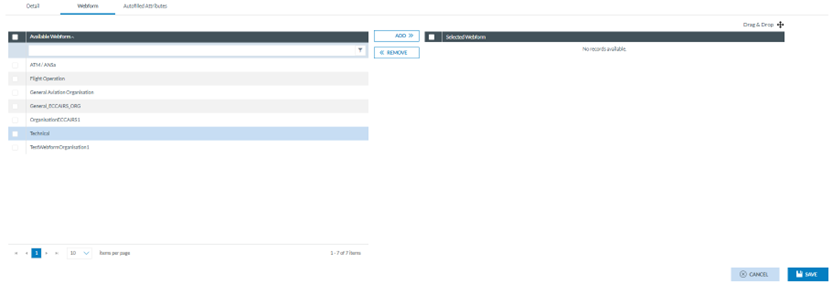
<span lang="EN-GB">The left panel displays the list of organisation webforms available, with a checkbox to be selected.</span>

<span lang="EN-GB">Administrators can check the needed webforms and click the ADD button in the middle of the page.</span>

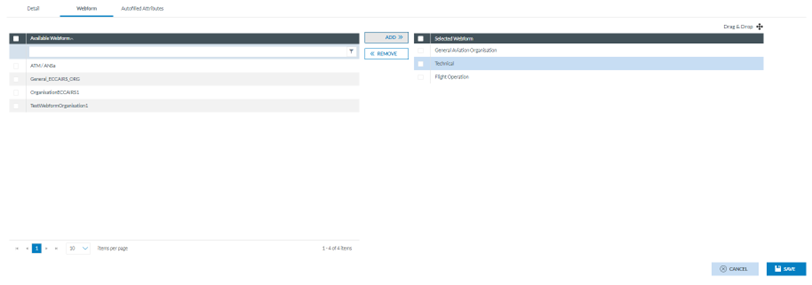
<span lang="EN-GB">The selected webforms will be added to the right panel where Administrators can order them by dragging and dropping them as needed:</span>

[![image.png](https://help.ci-aviationreporting.eu/uploads/images/gallery/2025-11/scaled-1680-/WAzimage.png)](https://help.ci-aviationreporting.eu/uploads/images/gallery/2025-11/WAzimage.png)

<span lang="EN-GB" style="mso-ansi-language: EN-GB; mso-fareast-language: EN-GB;"> </span>

<span lang="EN-GB">Then, Administrators have to click on the ‘Save’ button, and the webforms are saved for the specific organisation.</span>

#### <span style="mso-fareast-font-family: Calibri; mso-bidi-font-family: Calibri;"><span style="mso-list: Ignore;">6.2.1.8. A</span></span><span style="mso-bookmark: _Ref159832724;">utofilled Attributes</span> tab

<span lang="EN-GB">This tab is to help users when filling the webforms in the E2 Reporting Portal. Thus, it allows us to select Attributes and give them a value, so when users of that organisation are filling a webform, those Attributes are predefined.</span>

<span lang="EN-GB">Administrators have to click on the ‘Autofilled Attributes’ tab, and the system will display the ‘Autofilled Attributes’ page:</span>

[![image.png](https://help.ci-aviationreporting.eu/uploads/images/gallery/2025-11/scaled-1680-/qmiimage.png)](https://help.ci-aviationreporting.eu/uploads/images/gallery/2025-11/qmiimage.png)

<span lang="EN-GB" style="mso-ansi-language: EN-GB; mso-fareast-language: EN-GB;"> </span>

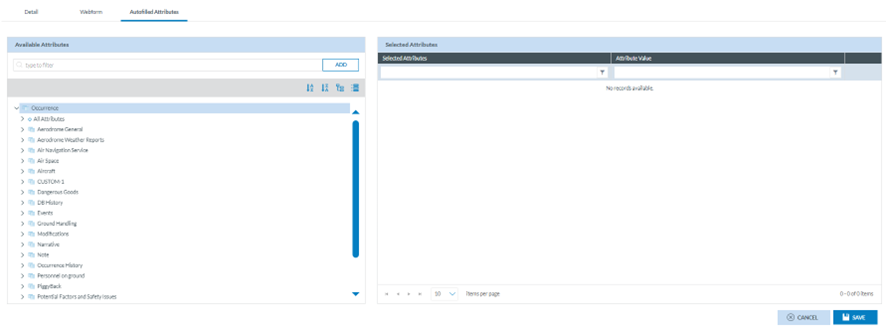
<span lang="EN-GB">The left panel provides the ‘Available Attributes’ with the Taxonomy browser.</span>

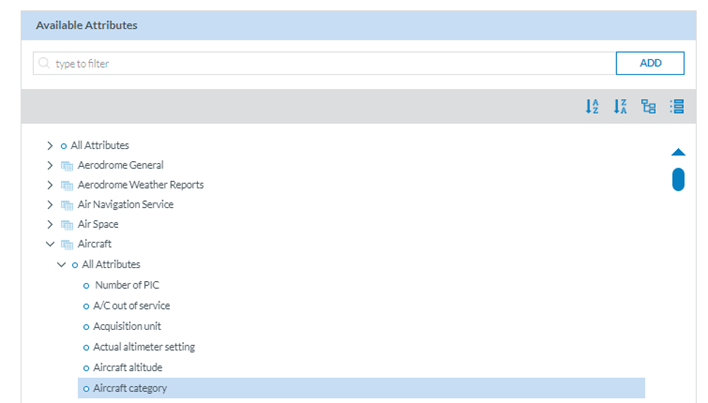
<span lang="EN-GB">Administrators have to make a search through the filter or navigate through the tree to select specific Attributes. Administrators have to select the particular Attributes, one by one, and click on the ‘ADD’ button:</span>

[![image.png](https://help.ci-aviationreporting.eu/uploads/images/gallery/2025-11/scaled-1680-/QLkimage.png)](https://help.ci-aviationreporting.eu/uploads/images/gallery/2025-11/QLkimage.png)

<span lang="EN-GB" style="mso-ansi-language: EN-GB; mso-fareast-language: EN-GB;"> </span>

<span lang="EN-GB">The system will transfer the Attribute to the right panel:</span>

[![image.png](https://help.ci-aviationreporting.eu/uploads/images/gallery/2025-11/scaled-1680-/XMMimage.png)](https://help.ci-aviationreporting.eu/uploads/images/gallery/2025-11/XMMimage.png)

<span lang="EN-GB" style="mso-ansi-language: EN-GB; mso-fareast-language: EN-GB;"> </span>

<span lang="EN-GB">Each selected Attribute of the right panel will provide an Edit and a Delete icon.</span>

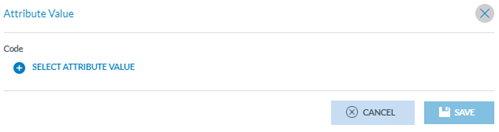
<span lang="EN-GB">To fill in the value, Administrators have to click on the edit icon, and the system will display a window to fill in the specific value:</span>

[![image.png](https://help.ci-aviationreporting.eu/uploads/images/gallery/2025-11/scaled-1680-/1OOimage.png)](https://help.ci-aviationreporting.eu/uploads/images/gallery/2025-11/1OOimage.png)

<span lang="EN-GB" style="mso-ansi-language: EN-GB; mso-fareast-language: EN-GB;"> </span>

<span lang="EN-GB">The type of value to be provided by the system will depend on the specific Attribute data type.</span>

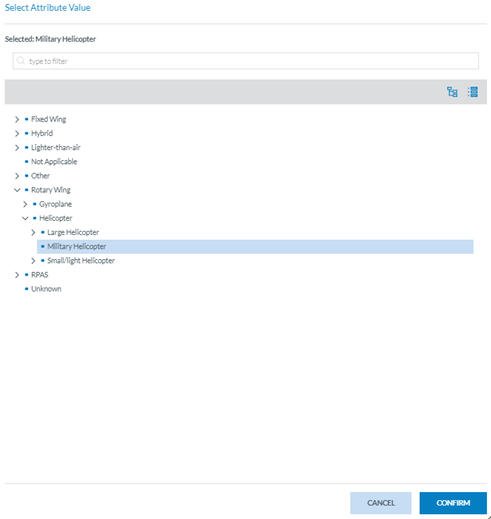
<span lang="EN-GB">In the case above, Administrators have to click on ‘Select Attribute Value’, and the system will open a Select Attribute value window:</span>

[![image.png](https://help.ci-aviationreporting.eu/uploads/images/gallery/2025-11/scaled-1680-/G1wimage.png)](https://help.ci-aviationreporting.eu/uploads/images/gallery/2025-11/G1wimage.png)

<span lang="EN-GB" style="mso-ansi-language: EN-GB; mso-fareast-language: EN-GB;"> </span>

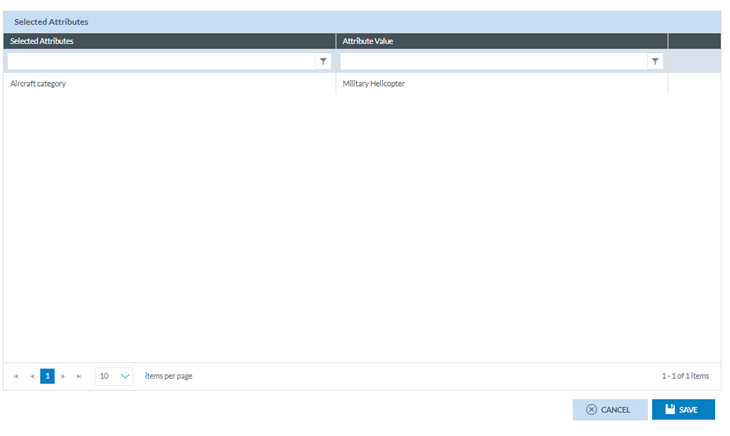
<span lang="EN-GB">Administrators have to select a value and click the ‘Confirm’ button. The system will display a window to save the value. The system will add the value to the selected Attribute in the right panel:</span>

[![image.png](https://help.ci-aviationreporting.eu/uploads/images/gallery/2025-11/scaled-1680-/Okpimage.png)](https://help.ci-aviationreporting.eu/uploads/images/gallery/2025-11/Okpimage.png)

<span lang="EN-GB" style="mso-ansi-language: EN-GB; mso-fareast-language: EN-GB;"> </span>

<span lang="EN-GB">Then, Administrators have to click ‘Save’, and the system will add the selected Attributes to the specific organisation.</span>

#### <span style="mso-fareast-font-family: Calibri; mso-bidi-font-family: Calibri;"><span style="mso-list: Ignore;">6.2.1.9. </span></span>Delete an organisation

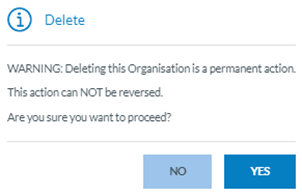
<span lang="EN-GB">Administrators have to click on the Delete icon of the specific organisation on the table of organisations, and the system will display a confirmation message:</span>

[![image.png](https://help.ci-aviationreporting.eu/uploads/images/gallery/2025-11/scaled-1680-/gvCimage.png)](https://help.ci-aviationreporting.eu/uploads/images/gallery/2025-11/gvCimage.png)

<span lang="EN-GB" style="mso-ansi-language: EN-GB; mso-fareast-language: EN-GB;"> </span>

<span lang="EN-GB">If Administrators confirm, the system will delete the organisation from the database and remove the organisation from the table of organisations. The users from the deleted organisation cannot report ORs anymore but the previously existing ones are kept and those already sent to the corresponding Authority can be manage by the Authority Officers, if they need it.</span>

#### <span style="mso-fareast-font-family: Calibri; mso-bidi-font-family: Calibri;"><span style="mso-list: Ignore;">6.2.1.10. </span></span>Import organisation and users

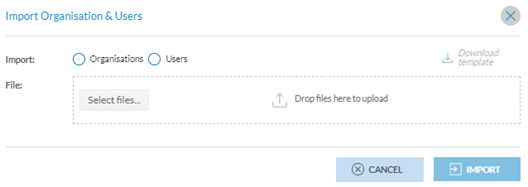
<span lang="EN-GB">Administrators can import the organisation's and its users' data through the ‘Import Organisation &amp; Users’ button above the table of organisations. This button opens the ‘Import Organisation &amp; Users’ window:</span>

[![image.png](https://help.ci-aviationreporting.eu/uploads/images/gallery/2025-11/scaled-1680-/wEdimage.png)](https://help.ci-aviationreporting.eu/uploads/images/gallery/2025-11/wEdimage.png)

<span lang="EN-GB" style="mso-ansi-language: EN-GB; mso-fareast-language: EN-GB;"> </span>

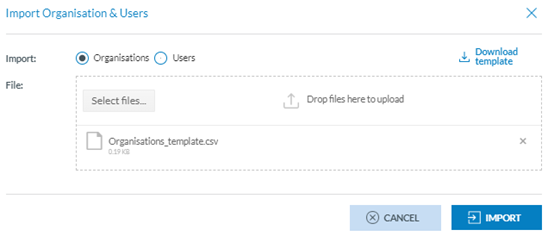
<span lang="EN-GB">Administrators must select Organisations or Users, and the ‘Download template’ option will be activated. Then, Administrators have to click on ‘Download template’, and the system will download an xls template, which Administrators have to fill in with the data of Organisations or Users depending on the selection. Once the template is filled, they have to upload it to the system through the ‘Select files’ button or by dragging and dropping it to the File area of the window:</span>

[![image.png](https://help.ci-aviationreporting.eu/uploads/images/gallery/2025-11/scaled-1680-/ZHJimage.png)](https://help.ci-aviationreporting.eu/uploads/images/gallery/2025-11/ZHJimage.png)

<span lang="EN-GB" style="mso-ansi-language: EN-GB; mso-fareast-language: EN-GB;"> </span>

<span lang="EN-GB">Administrators must click the ‘Import’ button, and the Organisations or Users will be imported into the system, adding the imported data to its database.</span>

### 6.2.2 Organisation Group management

<span lang="EN-GB">Administrators can group organisations of the same type to assign them the same webforms or auto-filled Attributes.</span>

<span lang="EN-GB">When selecting this option, the following table is displayed:</span>

[![image.png](https://help.ci-aviationreporting.eu/uploads/images/gallery/2025-11/scaled-1680-/It2image.png)](https://help.ci-aviationreporting.eu/uploads/images/gallery/2025-11/It2image.png)

<span lang="EN-GB" style="mso-ansi-language: EN-GB; mso-fareast-language: EN-GB;"> </span>

<span lang="EN-GB">It presents the table of Organisation Groups with the following columns that also work as filters:</span>

<span lang="EN-GB" style="font-family: Symbol; mso-fareast-font-family: Symbol; mso-bidi-font-family: Symbol; color: #1b3891; mso-themecolor: text1;"><span style="mso-list: Ignore;">·<span style="font: 7.0pt 'Times New Roman';"> </span></span></span><span lang="EN-GB">Name: unique for each record</span>

<span lang="EN-GB" style="font-family: Symbol; mso-fareast-font-family: Symbol; mso-bidi-font-family: Symbol; color: #1b3891; mso-themecolor: text1;"><span style="mso-list: Ignore;">·<span style="font: 7.0pt 'Times New Roman';"> </span></span></span><span lang="EN-GB">Description: it is optional</span>

<span lang="EN-GB" style="font-family: Symbol; mso-fareast-font-family: Symbol; mso-bidi-font-family: Symbol; color: #1b3891; mso-themecolor: text1;"><span style="mso-list: Ignore;">·<span style="font: 7.0pt 'Times New Roman';"> </span></span></span><span lang="EN-GB">Organisations included: it has to include at least one organisation. The same organisation cannot belong to various groups.</span>

<span lang="EN-GB" style="font-family: Symbol; mso-fareast-font-family: Symbol; mso-bidi-font-family: Symbol; color: #1b3891; mso-themecolor: text1;"><span style="mso-list: Ignore;">·<span style="font: 7.0pt 'Times New Roman';"> </span></span></span><span lang="EN-GB">Created by: the author of the group</span>

<span lang="EN-GB" style="font-family: Symbol; mso-fareast-font-family: Symbol; mso-bidi-font-family: Symbol; color: #1b3891; mso-themecolor: text1;"><span style="mso-list: Ignore;">·<span style="font: 7.0pt 'Times New Roman';"> </span></span></span><span lang="EN-GB">Created on: the creation date</span>

<span lang="EN-GB">On the last column of each row, there is a Delete and Edit icon.</span>

<span lang="EN-GB">Above the table, the system displays the ‘New Organisation Group’ button.</span>

#### <span style="mso-fareast-font-family: Calibri; mso-bidi-font-family: Calibri;"><span style="mso-list: Ignore;">6.2.2.1. </span></span><span style="mso-fareast-font-family: Calibri; mso-bidi-font-family: Calibri;"><span style="mso-list: Ignore;"><span style="font: 7.0pt 'Times New Roman';"> </span></span></span>Create an Organisation Group

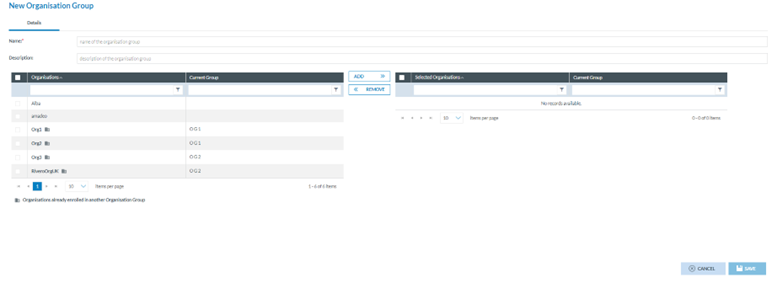
<span lang="EN-GB">Administrators have to click on ‘New Organisation Group’ above the table, and the system will display the ‘New Organisation Group’ page:</span>

[![image.png](https://help.ci-aviationreporting.eu/uploads/images/gallery/2025-11/scaled-1680-/D15image.png)](https://help.ci-aviationreporting.eu/uploads/images/gallery/2025-11/D15image.png)

<span lang="EN-GB" style="mso-ansi-language: EN-GB; mso-fareast-language: EN-GB;"> </span>

<span lang="EN-GB">The page provides the following fields:</span>

<span lang="EN-GB" style="font-family: Symbol; mso-fareast-font-family: Symbol; mso-bidi-font-family: Symbol; color: #1b3891; mso-themecolor: text1;"><span style="mso-list: Ignore;">·<span style="font: 7.0pt 'Times New Roman';"> </span></span></span><span lang="EN-GB">Name: unique for each group and mandatory</span>

<span lang="EN-GB" style="font-family: Symbol; mso-fareast-font-family: Symbol; mso-bidi-font-family: Symbol; color: #1b3891; mso-themecolor: text1;"><span style="mso-list: Ignore;">·<span style="font: 7.0pt 'Times New Roman';"> </span></span></span><span lang="EN-GB">Description: optional description of the group</span>

<span lang="EN-GB" style="font-family: Symbol; mso-fareast-font-family: Symbol; mso-bidi-font-family: Symbol; color: #1b3891; mso-themecolor: text1;"><span style="mso-list: Ignore;">·<span style="font: 7.0pt 'Times New Roman';"> </span></span></span><span lang="EN-GB">The left panel has a table of organisations with two columns:</span>

<span lang="EN-GB" style="font-family: Wingdings; mso-fareast-font-family: Wingdings; mso-bidi-font-family: Wingdings; color: #1b3891; mso-themecolor: text1;"><span style="mso-list: Ignore;">ü<span style="font: 7.0pt 'Times New Roman';"> </span></span></span><span lang="EN-GB">Organisations: Organisations already associated with a group display a Group icon next to their name on the table</span>

<span lang="EN-GB" style="font-family: Wingdings; mso-fareast-font-family: Wingdings; mso-bidi-font-family: Wingdings; color: #1b3891; mso-themecolor: text1;"><span style="mso-list: Ignore;">ü<span style="font: 7.0pt 'Times New Roman';"> </span></span></span><span lang="EN-GB">Current Group, if existing</span>

<span lang="EN-GB" style="font-family: Symbol; mso-fareast-font-family: Symbol; mso-bidi-font-family: Symbol; color: #1b3891; mso-themecolor: text1;"><span style="mso-list: Ignore;">·<span style="font: 7.0pt 'Times New Roman';"> </span></span></span><span lang="EN-GB">Right panel with a table of the selected organisations with the following columns:</span>

<span lang="EN-GB" style="font-family: Wingdings; mso-fareast-font-family: Wingdings; mso-bidi-font-family: Wingdings; color: #1b3891; mso-themecolor: text1;"><span style="mso-list: Ignore;">ü<span style="font: 7.0pt 'Times New Roman';"> </span></span></span><span lang="EN-GB">Selected Organisation.</span>

<span lang="EN-GB" style="font-family: Wingdings; mso-fareast-font-family: Wingdings; mso-bidi-font-family: Wingdings; color: #1b3891; mso-themecolor: text1;"><span style="mso-list: Ignore;">ü<span style="font: 7.0pt 'Times New Roman';"> </span></span></span><span lang="EN-GB">Current Group.</span>

<span lang="EN-GB">Administrators have to fill in at least the Name of the group and can click on ‘Save’ to save the group without organisations.</span>

<span lang="EN-GB">To create a group with associated organisations, apart from filling in the name, Administrators have to select through the check box the organisation/s needed, click on the ADD button, and they will be transferred to the table of organisations chosen:</span>

[![image.png](https://help.ci-aviationreporting.eu/uploads/images/gallery/2025-11/scaled-1680-/jU3image.png)](https://help.ci-aviationreporting.eu/uploads/images/gallery/2025-11/jU3image.png)

<span lang="EN-GB" style="mso-ansi-language: EN-GB; mso-fareast-language: EN-GB;"> </span>

<span lang="EN-GB">When clicking on ‘ADD’, if any of the selected organisations have a predefined configuration, the system will display a confirmation message since, if it is confirmed, the predefined configuration will be lost for that organisation.</span>

<span lang="EN-GB">Administrators can remove the selected organisations from the right panel through the' REMOVE' button.</span>

<span lang="EN-GB">Administrators have to click the ‘Save’ button, and the system will save the data in the database. A new Organisation Group will be added to the Organisation Groups table.</span>

<span lang="EN-GB">Note that if any of the selected organisations already belongs to a group, when Administrators click on ‘Save’, the system will display a confirmation message since, if the information is saved, those organisations will be associated with the new group but not the previous group anymore; the association with the previous group will be removed.</span>

#### <span style="mso-fareast-font-family: Calibri; mso-bidi-font-family: Calibri;"><span style="mso-list: Ignore;">6.2.2.2. </span></span>Edit an Organisation Group

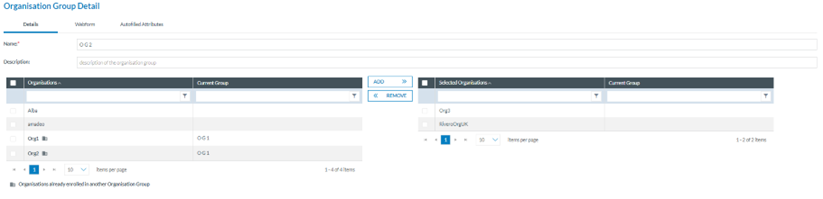
<span lang="EN-GB">Administrators must click the Edit icon of the specific group in the Organisation Groups table. The system will display the Edit Organisation Group page:</span>

[![image.png](https://help.ci-aviationreporting.eu/uploads/images/gallery/2025-11/scaled-1680-/lJtimage.png)](https://help.ci-aviationreporting.eu/uploads/images/gallery/2025-11/lJtimage.png)

<span lang="EN-GB" style="mso-ansi-language: EN-GB; mso-fareast-language: EN-GB;"> </span>

<span lang="EN-GB">The functioning of this page is like the Creation page described in the previous section. See it for further details. Administrators have to make the needed updates and click on the Save button. The system will save the updates in the database, and the table of Organisation Groups will be saved accordingly.</span>

#### <span style="mso-fareast-font-family: Calibri; mso-bidi-font-family: Calibri;"><span style="mso-list: Ignore;">6.2.2.3. </span></span>Delete an Organisation Group

<span lang="EN-GB">Administrators click the Delete icon of the specific group in the Organisation Groups table. The system will delete the Organisation Group from the database.</span>

### 6.2.3. Parent Organisation Management

<span lang="EN-GB">The Parent Organisation is a concept to identify some organisations that supervise other organisations. They can be defined by a user enrolled on the National Security Administrator role at the Authority level.</span>

<span lang="EN-GB">Parent Organisation Management is the third option of the ‘Administration&gt;General Settings’ menu:</span>

[![image.png](https://help.ci-aviationreporting.eu/uploads/images/gallery/2025-11/scaled-1680-/1dCimage.png)](https://help.ci-aviationreporting.eu/uploads/images/gallery/2025-11/1dCimage.png)

<span lang="EN-GB" style="mso-ansi-language: EN-GB; mso-fareast-language: EN-GB;"> </span>

<span lang="EN-GB">It displays the table of Parent Organisations with the following columns also working as filters:</span>

<span lang="EN-GB" style="font-family: Symbol; mso-fareast-font-family: Symbol; mso-bidi-font-family: Symbol; color: #1b3891; mso-themecolor: text1;"><span style="mso-list: Ignore;">·<span style="font: 7.0pt 'Times New Roman';"> </span></span></span><span lang="EN-GB">Name: unique for each record</span>

<span lang="EN-GB" style="font-family: Symbol; mso-fareast-font-family: Symbol; mso-bidi-font-family: Symbol; color: #1b3891; mso-themecolor: text1;"><span style="mso-list: Ignore;">·<span style="font: 7.0pt 'Times New Roman';"> </span></span></span><span lang="EN-GB">Description: Optional</span>

<span lang="EN-GB" style="font-family: Symbol; mso-fareast-font-family: Symbol; mso-bidi-font-family: Symbol; color: #1b3891; mso-themecolor: text1;"><span style="mso-list: Ignore;">·<span style="font: 7.0pt 'Times New Roman';"> </span></span></span><span lang="EN-GB">Organisations included: organisations associated with the parent organisation.</span>

<span lang="EN-GB" style="font-family: Symbol; mso-fareast-font-family: Symbol; mso-bidi-font-family: Symbol; color: #1b3891; mso-themecolor: text1;"><span style="mso-list: Ignore;">·<span style="font: 7.0pt 'Times New Roman';"> </span></span></span><span lang="EN-GB">Created on: Creation date</span>

<span lang="EN-GB" style="font-family: Symbol; mso-fareast-font-family: Symbol; mso-bidi-font-family: Symbol; color: #1b3891; mso-themecolor: text1;"><span style="mso-list: Ignore;">·<span style="font: 7.0pt 'Times New Roman';"> </span></span></span><span lang="EN-GB">Created by: the author (Administrator)</span>

<span lang="EN-GB">On the last section of each row, each record provides an Edit and Delete icon when hovering over the section.</span>

<span lang="EN-GB">Above the table, the system provides the ‘New Parent Organisation’ button.</span>

#### <span style="mso-fareast-font-family: Calibri; mso-bidi-font-family: Calibri;"><span style="mso-list: Ignore;">6.2.3.1. </span></span>Create a parent organisation

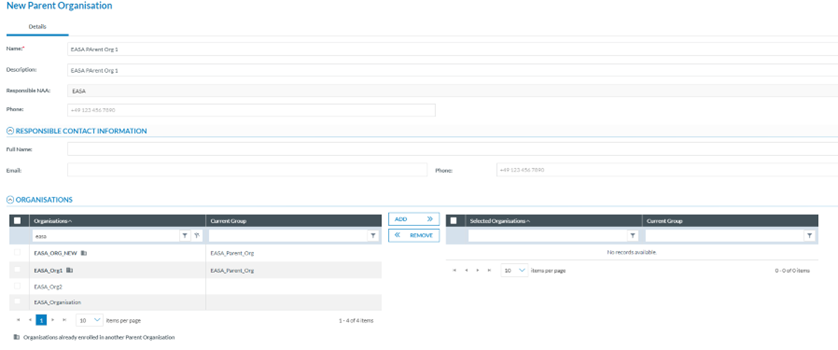
<span lang="EN-GB">Administrators have to click on ‘New Parent Organisation’ above the table, and the system will display the ‘New Parent Organisation’ page:</span>

[![image.png](https://help.ci-aviationreporting.eu/uploads/images/gallery/2025-11/scaled-1680-/dzZimage.png)](https://help.ci-aviationreporting.eu/uploads/images/gallery/2025-11/dzZimage.png)

<span lang="EN-GB" style="mso-ansi-language: EN-GB; mso-fareast-language: EN-GB;"> </span>

<span lang="EN-GB">The page provides the following fields:</span>

<span lang="EN-GB" style="font-family: Symbol; mso-fareast-font-family: Symbol; mso-bidi-font-family: Symbol; color: #1b3891; mso-themecolor: text1;"><span style="mso-list: Ignore;">·<span style="font: 7.0pt 'Times New Roman';"> </span></span></span><span lang="EN-GB">Name: mandatory and unique for each parent organisation</span>

<span lang="EN-GB" style="font-family: Symbol; mso-fareast-font-family: Symbol; mso-bidi-font-family: Symbol; color: #1b3891; mso-themecolor: text1;"><span style="mso-list: Ignore;">·<span style="font: 7.0pt 'Times New Roman';"> </span></span></span><span lang="EN-GB">Description: Optional</span>

<span lang="EN-GB" style="font-family: Symbol; mso-fareast-font-family: Symbol; mso-bidi-font-family: Symbol; color: #1b3891; mso-themecolor: text1;"><span style="mso-list: Ignore;">·<span style="font: 7.0pt 'Times New Roman';"> </span></span></span><span lang="EN-GB">Responsible NAA: the system sets by default to which the current Administrator belongs. It is not editable</span>

<span lang="EN-GB" style="font-family: Symbol; mso-fareast-font-family: Symbol; mso-bidi-font-family: Symbol; color: #1b3891; mso-themecolor: text1;"><span style="mso-list: Ignore;">·<span style="font: 7.0pt 'Times New Roman';"> </span></span></span><span lang="EN-GB">Responsible contact information:</span>

<span lang="EN-GB" style="font-family: Wingdings; mso-fareast-font-family: Wingdings; mso-bidi-font-family: Wingdings; color: #1b3891; mso-themecolor: text1;"><span style="mso-list: Ignore;">ü<span style="font: 7.0pt 'Times New Roman';"> </span></span></span><span lang="EN-GB">Full name: optional</span>

<span lang="EN-GB" style="font-family: Wingdings; mso-fareast-font-family: Wingdings; mso-bidi-font-family: Wingdings; color: #1b3891; mso-themecolor: text1;"><span style="mso-list: Ignore;">ü<span style="font: 7.0pt 'Times New Roman';"> </span></span></span><span lang="EN-GB">Email: Optional</span>

<span lang="EN-GB" style="font-family: Wingdings; mso-fareast-font-family: Wingdings; mso-bidi-font-family: Wingdings; color: #1b3891; mso-themecolor: text1;"><span style="mso-list: Ignore;">ü<span style="font: 7.0pt 'Times New Roman';"> </span></span></span><span lang="EN-GB">Phone: Optional</span>

<span lang="EN-GB" style="font-family: Symbol; mso-fareast-font-family: Symbol; mso-bidi-font-family: Symbol; color: #1b3891; mso-themecolor: text1;"><span style="mso-list: Ignore;">·<span style="font: 7.0pt 'Times New Roman';"> </span></span></span><span lang="EN-GB">Organisations:</span>

<span lang="EN-GB" style="font-family: Wingdings; mso-fareast-font-family: Wingdings; mso-bidi-font-family: Wingdings; color: #1b3891; mso-themecolor: text1;"><span style="mso-list: Ignore;">ü<span style="font: 7.0pt 'Times New Roman';"> </span></span></span><span lang="EN-GB">The left panel shows a table of organisations in two columns:</span>

<span lang="EN-GB" style="mso-bidi-font-family: Calibri; color: #1b3891; mso-themecolor: text1;"><span style="mso-list: Ignore;">o<span style="font: 7.0pt 'Times New Roman';"> </span></span></span><span lang="EN-GB">The Organisation. Organisations associated with another parent organisation display an icon next to their name on the table.</span>

<span lang="EN-GB" style="mso-bidi-font-family: Calibri; color: #1b3891; mso-themecolor: text1;"><span style="mso-list: Ignore;">o<span style="font: 7.0pt 'Times New Roman';"> </span></span></span><span lang="EN-GB">The associated parent organisation, if existing.</span>

<span lang="EN-GB" style="font-family: Wingdings; mso-fareast-font-family: Wingdings; mso-bidi-font-family: Wingdings; color: #1b3891; mso-themecolor: text1;"><span style="mso-list: Ignore;">ü<span style="font: 7.0pt 'Times New Roman';"> </span></span></span><span lang="EN-GB">Right panel with a table of the selected organisations with the following columns:</span>

<span lang="EN-GB" style="mso-bidi-font-family: Calibri; color: #1b3891; mso-themecolor: text1;"><span style="mso-list: Ignore;">o<span style="font: 7.0pt 'Times New Roman';"> </span></span></span><span lang="EN-GB">Selected Organisation.</span>

<span lang="EN-GB" style="mso-bidi-font-family: Calibri; color: #1b3891; mso-themecolor: text1;"><span style="mso-list: Ignore;">o<span style="font: 7.0pt 'Times New Roman';"> </span></span></span><span lang="EN-GB">Current Group.</span>

<span lang="EN-GB">Administrators have to fill in at least the Name and can click on ‘Save’ to save the parent organisation without organisations associated with it.</span>

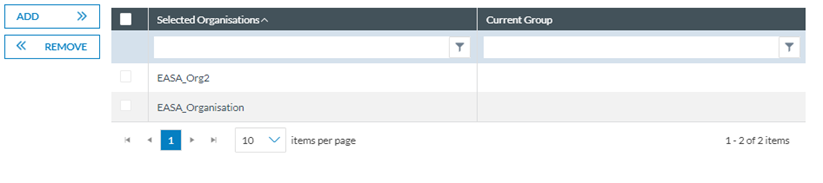
<span lang="EN-GB">To create a parent organisation with associated organisations, apart from filling in the name, Administrators have to select through the check box the organisation/s needed, click on the ADD button, and they will be transferred to the table of selected organisations:</span>

[![image.png](https://help.ci-aviationreporting.eu/uploads/images/gallery/2025-11/scaled-1680-/Ndyimage.png)](https://help.ci-aviationreporting.eu/uploads/images/gallery/2025-11/Ndyimage.png)

<span lang="EN-GB" style="mso-ansi-language: EN-GB; mso-fareast-language: EN-GB;"> </span>

<span lang="EN-GB">When clicking on ‘ADD’ if any of the selected organisations have a predefined configuration, the system will display a confirmation message since, if it is confirmed, the predefined configuration will be lost for that organisation.</span>

<span lang="EN-GB">Administrators can remove the selected organisations from the right panel through the' REMOVE' button.</span>

<span lang="EN-GB">Administrators have to click the ‘Save’ button, and the system will save the data in the database. A new Parent Organisation will be added to the table of Parent Organisations.</span>

<span lang="EN-GB">Note that if any of the selected organisations already belongs to a parent, when Administrators click on ‘Save’, the system will display a confirmation message since if the information is saved, those organisations will be associated with the new parent organisation but not the previous parent anymore; the association with the previous parent organisation will be removed.</span>

#### <span style="mso-fareast-font-family: Calibri; mso-bidi-font-family: Calibri;"><span style="mso-list: Ignore;">6.2.3.2. </span></span>Edit a parent organisation

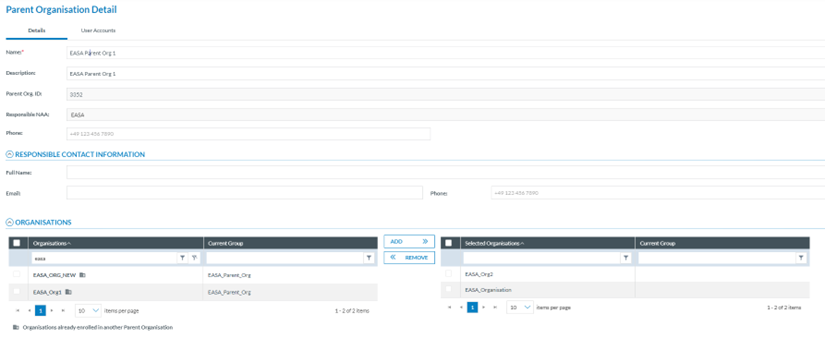
<span lang="EN-GB">Administrators click the Edit icon on the last section of the row of the specific parent organisation of the table. The system will display the Edit parent organisation page:</span>

[![image.png](https://help.ci-aviationreporting.eu/uploads/images/gallery/2025-11/scaled-1680-/ANJimage.png)](https://help.ci-aviationreporting.eu/uploads/images/gallery/2025-11/ANJimage.png)

<span lang="EN-GB" style="mso-ansi-language: EN-GB; mso-fareast-language: EN-GB;"> </span>

<span lang="EN-GB">Its functionality is the same as in the previous section. See it for further details. Administrators can update the needed fields and click the ‘Save’ button. The system will save the updates in the database, and the table of parent organisations will be updated accordingly.</span>

### 6.2.4. Authority settings

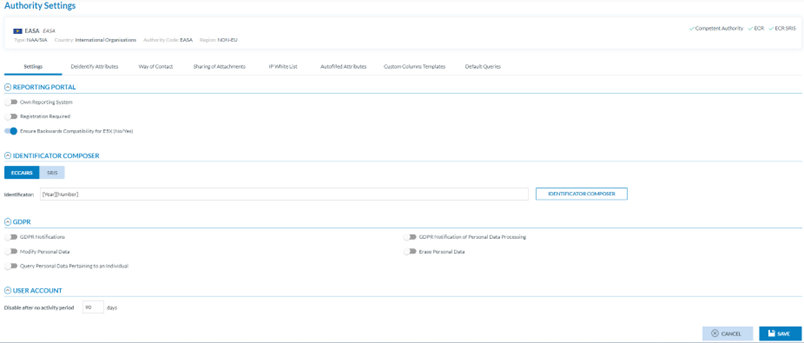
<span lang="EN-GB">In the fourth option of the Administration&gt;General Settings menu, you can find the following settings:</span>

[![image.png](https://help.ci-aviationreporting.eu/uploads/images/gallery/2025-11/scaled-1680-/yAIimage.png)](https://help.ci-aviationreporting.eu/uploads/images/gallery/2025-11/yAIimage.png)

<span lang="EN-GB" style="mso-ansi-language: EN-GB; mso-fareast-language: EN-GB;"> </span>

<span lang="EN-GB">The page provides the Authority settings of the current Administrator, including the Authority type, country, Authority code, and Region.</span>

#### 6.2.4.1. Settings tab

<span lang="EN-GB">By default, the system displays the Settings tab below the Authority information with the following fields:</span>

<span lang="EN-GB" style="font-family: Symbol; mso-fareast-font-family: Symbol; mso-bidi-font-family: Symbol; color: #1b3891; mso-themecolor: text1;"><span style="mso-list: Ignore;">·<span style="font: 7.0pt 'Times New Roman';"> </span></span></span><span lang="EN-GB">Reporting Portal:</span>

<span lang="EN-GB" style="font-family: Wingdings; mso-fareast-font-family: Wingdings; mso-bidi-font-family: Wingdings; color: #1b3891; mso-themecolor: text1;"><span style="mso-list: Ignore;">ü<span style="font: 7.0pt 'Times New Roman';"> </span></span></span><span lang="EN-GB">Own reporting system: disabled by default. It sets if the Authority has its own reporting system</span>

<span lang="EN-GB" style="font-family: Wingdings; mso-fareast-font-family: Wingdings; mso-bidi-font-family: Wingdings; color: #1b3891; mso-themecolor: text1;"><span style="mso-list: Ignore;">ü<span style="font: 7.0pt 'Times New Roman';"> </span></span></span><span lang="EN-GB">Registration required: <span style="mso-spacerun: yes;"> </span>disabled by default. It determines whether or not the reporter's registration is required.</span>

<span lang="EN-GB" style="font-family: Wingdings; mso-fareast-font-family: Wingdings; mso-bidi-font-family: Wingdings; color: #1b3891; mso-themecolor: text1;"><span style="mso-list: Ignore;">ü<span style="font: 7.0pt 'Times New Roman';"> </span></span></span><span lang="EN-GB">Ensure backward compatibility with E5X (No/Yes), which is only available for Plan B Authorities. By default, it is enabled, ensuring compatibility with the Taxonomy 4.1.0.7.</span>

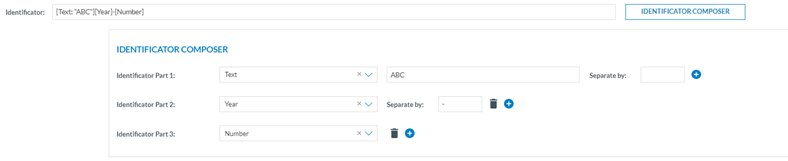
<span lang="EN-GB" style="font-family: Symbol; mso-fareast-font-family: Symbol; mso-bidi-font-family: Symbol; color: #1b3891; mso-themecolor: text1;"><span style="mso-list: Ignore;">·<span style="font: 7.0pt 'Times New Roman';"> </span></span></span><span lang="EN-GB">Identificator Composer: it determines the pattern that the File Number will follow for all the reports automatically generated in the Authority:</span>

<span lang="EN-GB" style="font-family: Wingdings; mso-fareast-font-family: Wingdings; mso-bidi-font-family: Wingdings; color: #1b3891; mso-themecolor: text1;"><span style="mso-list: Ignore;">ü<span style="font: 7.0pt 'Times New Roman';"> </span></span></span><span lang="EN-GB">Administrators can customise it based on Attributes, text, dates or a sequence of numbers. They can also concatenate conditions to customize the File Number further based on their needs.</span>

<span lang="EN-GB" style="font-family: Wingdings; mso-fareast-font-family: Wingdings; mso-bidi-font-family: Wingdings; color: #1b3891; mso-themecolor: text1;"><span style="mso-list: Ignore;">ü<span style="font: 7.0pt 'Times New Roman';"> </span></span></span><span lang="EN-GB">In the Identificator text field, Administrators will preview the changes made in the Identificator composer edition section.</span>

<span lang="EN-GB" style="font-family: Wingdings; mso-fareast-font-family: Wingdings; mso-bidi-font-family: Wingdings; color: #1b3891; mso-themecolor: text1;"><span style="mso-list: Ignore;">ü<span style="font: 7.0pt 'Times New Roman';"> </span></span></span><span lang="EN-GB">By clicking the </span>[![image.png](https://help.ci-aviationreporting.eu/uploads/images/gallery/2025-11/scaled-1680-/xNnimage.png) ](https://help.ci-aviationreporting.eu/uploads/images/gallery/2025-11/xNnimage.png)<span lang="EN-GB"> 'add' icon, Administrators can add as many conditions as needed.</span>

<span lang="EN-GB" style="font-family: Wingdings; mso-fareast-font-family: Wingdings; mso-bidi-font-family: Wingdings; color: #1b3891; mso-themecolor: text1;"><span style="mso-list: Ignore;">ü<span style="font: 7.0pt 'Times New Roman';"> </span></span></span><span lang="EN-GB">If you want to delete a condition, click the </span>[![image.png](https://help.ci-aviationreporting.eu/uploads/images/gallery/2025-11/scaled-1680-/rR3image.png) ](https://help.ci-aviationreporting.eu/uploads/images/gallery/2025-11/rR3image.png)<span lang="EN-GB"> </span><span lang="EN-GB" style="mso-fareast-language: EN-GB; mso-no-proof: yes;"> </span><span lang="EN-GB"> ‘delete’ icon.</span>

[![image.png](https://help.ci-aviationreporting.eu/uploads/images/gallery/2025-11/scaled-1680-/nH0image.png)](https://help.ci-aviationreporting.eu/uploads/images/gallery/2025-11/nH0image.png)

<span lang="EN-GB" style="mso-ansi-language: EN-GB; mso-fareast-language: EN-GB;"> </span>

<span lang="EN-GB">It must, at least, have an incremental number to guarantee the uniqueness of the file number.</span>

<span lang="EN-GB" style="font-family: Symbol; mso-fareast-font-family: Symbol; mso-bidi-font-family: Symbol; color: #1b3891; mso-themecolor: text1;"><span style="mso-list: Ignore;">·<span style="font: 7.0pt 'Times New Roman';"> </span></span></span><span lang="EN-GB">User account: Disable after no activity period: Set, by default, at 90 days. Administrators can update it to another number of days.</span>

<span lang="EN-GB">Once the period is reached, the system will send an email to the user informing about the inactivation of the account giving him or her 14 days more to login into E2 before the user account is deactivated.</span>

<span lang="EN-GB">Once Administrators have filled in the tab as desired, they have to click on ‘Save’ before accessing the ‘Deidentify Attributes’ tab.</span>

#### 6.2.4.2. Deidentify Attributes tab

<span lang="EN-GB">When sharing an occurrence or safety recommendation with other Authorities or the ECR, the Officers can de-identify Attributes.</span>

<span lang="EN-GB">The Administrator selects the Attributes that will potentially be deidentified through this tab.</span>

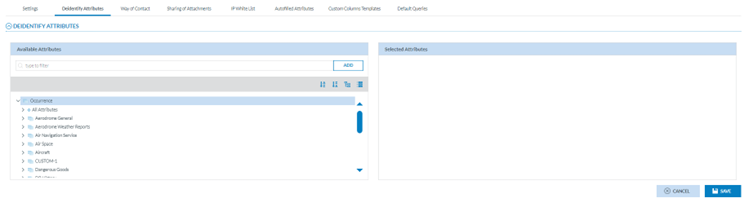
<span lang="EN-GB">The tab provides two panels:</span>

[![image.png](https://help.ci-aviationreporting.eu/uploads/images/gallery/2025-11/scaled-1680-/bekimage.png)](https://help.ci-aviationreporting.eu/uploads/images/gallery/2025-11/bekimage.png)

<span lang="EN-GB" style="mso-ansi-language: EN-GB; mso-fareast-language: EN-GB;"> </span>

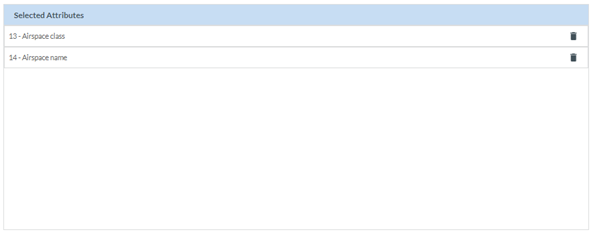
<span lang="EN-GB">On the left is the Taxonomy browser, where Administrators must select the Attributes to be de-identified. Administrators have to select the specific Attributes and click on the ‘ADD’ button so they will be transferred to the right panel (Selected Attributes):</span>

[![image.png](https://help.ci-aviationreporting.eu/uploads/images/gallery/2025-11/scaled-1680-/82timage.png)](https://help.ci-aviationreporting.eu/uploads/images/gallery/2025-11/82timage.png)

<span lang="EN-GB" style="mso-ansi-language: EN-GB; mso-fareast-language: EN-GB;"> </span>

<span lang="EN-GB">Administrators can remove the selected Attributes from the list through the Delete icon next to each selected Attribute.</span>

<span lang="EN-GB">Administrators must save the information before accessing other tabs. Otherwise, the data will not be saved.</span>

#### 6.2.4.3. Way of Contact tab

<span lang="EN-GB">This tab provides the following table of Administrative Contacts:</span>

[![image.png](https://help.ci-aviationreporting.eu/uploads/images/gallery/2025-11/scaled-1680-/rgmimage.png)](https://help.ci-aviationreporting.eu/uploads/images/gallery/2025-11/rgmimage.png)

<span lang="EN-GB" style="mso-ansi-language: EN-GB; mso-fareast-language: EN-GB;"> </span>

<span lang="EN-GB">Each row presents an administrative contact and the related emails. Every time the ‘Way of Contact’ defined in this table is triggered, an email will be sent to the email addresses specified in this field. For example, if a Reporter makes a Registration Request, an email will be sent to these addresses to inform them about the new request.</span>

<span lang="EN-GB">Administrators are not able to create the contacts. They can only edit the email, which is editable through the Edit icon on the last section of each row.</span>

<span lang="EN-GB">The icon appears when hovering over the section.</span>

<span lang="EN-GB">Administrators have to click on the icon, and the system opens the email field of the specific row:</span>

[![image.png](https://help.ci-aviationreporting.eu/uploads/images/gallery/2025-11/scaled-1680-/CQGimage.png)](https://help.ci-aviationreporting.eu/uploads/images/gallery/2025-11/CQGimage.png)

<span lang="EN-GB" style="mso-ansi-language: EN-GB; mso-fareast-language: EN-GB;"> </span>

<span lang="EN-GB">Once Administrators introduce an email(s) in the correct format, the Disc (Save) icon is activated. Administrators must click on it, and the email will be updated in the database.</span>

#### 6.2.4.4. Sharing of Attachments tab

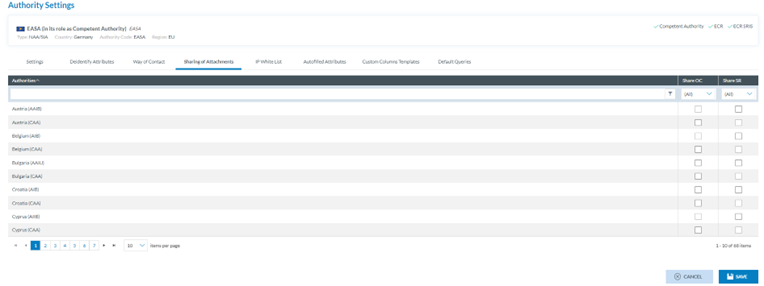
<span lang="EN-GB">This tab aims to select the authorities that will be available to the users of the current authority for sharing OCs and SRs.</span>

<span lang="EN-GB">It displays a list of E2 authorities with a check box for each OC and SR (disabled or enabled depending on the authority type – NAA/SIA). The columns work as filters:</span>

[![image.png](https://help.ci-aviationreporting.eu/uploads/images/gallery/2025-11/scaled-1680-/Bxaimage.png)](https://help.ci-aviationreporting.eu/uploads/images/gallery/2025-11/Bxaimage.png)

<span lang="EN-GB" style="mso-ansi-language: EN-GB; mso-fareast-language: EN-GB;"> </span>

<span lang="EN-GB">Administrators must select the desired Authorities to which the attachments in OCs or SRs can be shared and click on ‘Save’. The system will save the updates in the database.</span>

#### 6.2.4.5. IP Whitelist tab

<span lang="EN-GB">The users who want to access the public API methods, via Swagger or otherwise must have their IPs whitelisted.</span>

<span lang="EN-GB">This tab shows the whitelisted IPs:</span>

[![image.png](https://help.ci-aviationreporting.eu/uploads/images/gallery/2025-11/scaled-1680-/63Iimage.png)](https://help.ci-aviationreporting.eu/uploads/images/gallery/2025-11/63Iimage.png)

<span lang="EN-GB" style="mso-ansi-language: EN-GB; mso-fareast-language: EN-GB;"> </span>

<span lang="EN-GB">Each row provides its IP and Description. The last section corresponds to the Delete and Edit icons that only appear when hovering over the section.</span>

#### 6.2.4.6. <span style="mso-fareast-font-family: Calibri; mso-bidi-font-family: Calibri;"><span style="mso-list: Ignore;"><span style="font: 7.0pt 'Times New Roman';"> </span></span></span>Create an IP

<span lang="EN-GB">Administrators have to click on the ‘New IP’ button above the table that adds a new row to the table:</span>

[![image.png](https://help.ci-aviationreporting.eu/uploads/images/gallery/2025-11/scaled-1680-/XgPimage.png)](https://help.ci-aviationreporting.eu/uploads/images/gallery/2025-11/XgPimage.png)

<span lang="EN-GB" style="mso-ansi-language: EN-GB; mso-fareast-language: EN-GB;"> </span>

<span lang="EN-GB">The IP is mandatory and unique for each record, and the Description is optional.</span>

<span lang="EN-GB">Administrators must fill in at least the IP address in the IP column and click the ‘Save’ icon. The system will save the data in the database, and the new whitelisted IP is created.</span>

#### 6.2.4.7. Delete an IP

<span lang="EN-GB">Administrators have to click on the Delete icon of the specific IP, and the system will delete it from the database.</span>

#### 6.2.4.8. Autofilled Attributes tab

[![image.png](https://help.ci-aviationreporting.eu/uploads/images/gallery/2025-11/scaled-1680-/Rvrimage.png)](https://help.ci-aviationreporting.eu/uploads/images/gallery/2025-11/Rvrimage.png)
<span lang="EN-GB" style="mso-ansi-language: EN-GB; mso-fareast-language: EN-GB;"> </span>

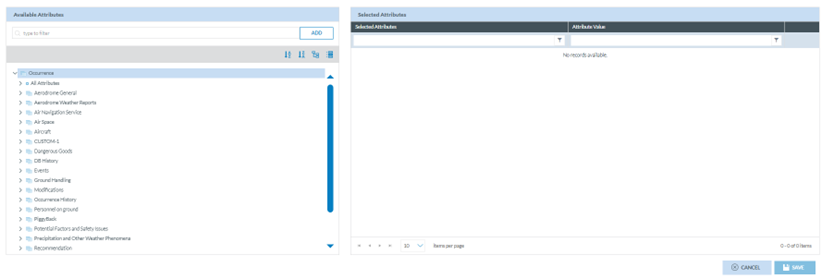
<span lang="EN-GB">The management of this functionality works as Section ‘</span><span lang="EN-GB">Autofilled Attributes</span><span lang="EN-GB">’ of the Organisation. See the Autofilled Attributes tab section for details. The difference is that Autofilled Attributes of the Organisation works for the webforms of that organisation, and this case is restricted to VRs and OCs created from scratch by the Authority Officers.</span>

#### 6.2.4.9. Custom Columns Templates tab

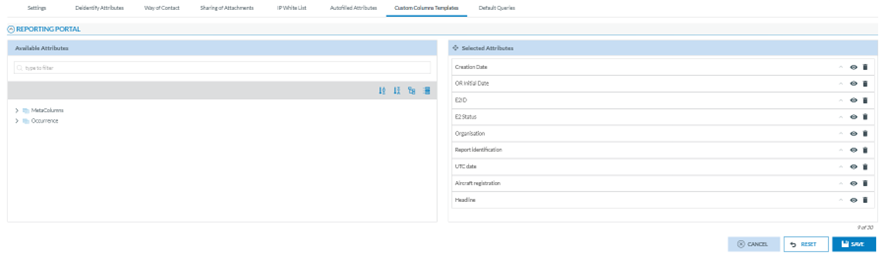
<span lang="EN-GB">Through this page, the Administrator can select the Attributes available in the lists of ORs, VRs, OCs or SRs (according to the Authority type) in the corresponding ‘Safety Data’ or ‘Safety Recommendations’ menus of the Officers belonging to that Authority and the Attributes available in the landing page of the Reporting Portal for their reporters.</span>

<span lang="EN-GB">This tab is divided into sections, one per document list:</span>

[![image.png](https://help.ci-aviationreporting.eu/uploads/images/gallery/2025-11/scaled-1680-/fCwimage.png)](https://help.ci-aviationreporting.eu/uploads/images/gallery/2025-11/fCwimage.png)

<span lang="EN-GB" style="mso-ansi-language: EN-GB; mso-fareast-language: EN-GB;"> </span>

<span lang="EN-GB">All the sections are managed in the same way, as follows:</span>

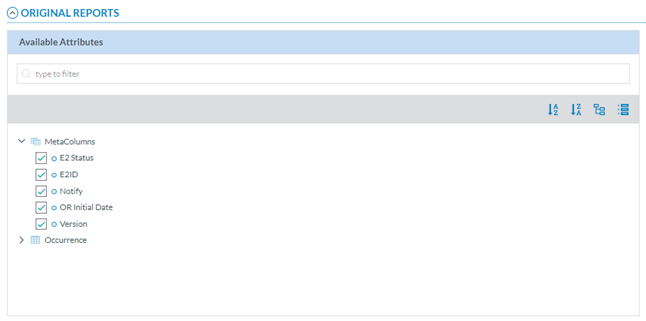
<span lang="EN-GB">The left pane includes a search filter and the MetaColumns, with all its Attributes checked by default:</span>

[![image.png](https://help.ci-aviationreporting.eu/uploads/images/gallery/2025-11/scaled-1680-/NXrimage.png)](https://help.ci-aviationreporting.eu/uploads/images/gallery/2025-11/NXrimage.png)

<span lang="EN-GB" style="mso-ansi-language: EN-GB; mso-fareast-language: EN-GB;"> </span>

<span lang="EN-GB">Below is the Taxonomy Central or Custom, if existing for that Authority, through which the Officer can navigate to select more Attributes. See </span><span lang="EN-GB">Taxonomy</span><span lang="EN-GB"> for further details on its navigation.</span>

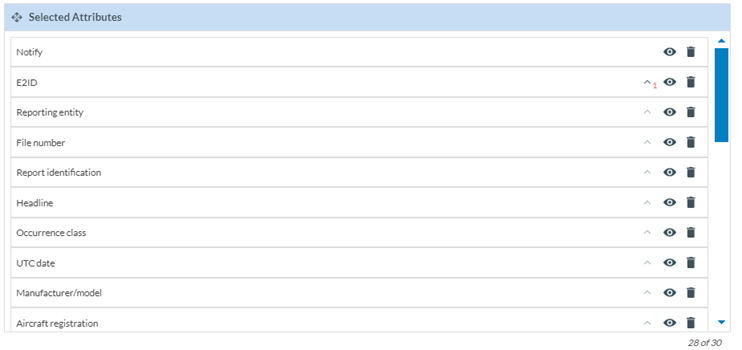
<span lang="EN-GB">The right pane provides the selected metacolumns and Attributes. By default, the system provides a list of metacolumns and Attributes.</span>

[![image.png](https://help.ci-aviationreporting.eu/uploads/images/gallery/2025-11/scaled-1680-/kPbimage.png)](https://help.ci-aviationreporting.eu/uploads/images/gallery/2025-11/kPbimage.png)

<span lang="EN-GB" style="mso-ansi-language: EN-GB; mso-fareast-language: EN-GB;"> </span>

<span lang="EN-GB">The officer can hide them through the eye icon next to each one.</span>

<span lang="EN-GB">The rubbish icon is to delete the Attribute of the table of reports.</span>

<span lang="EN-GB">The arrow next to the eye icon is to set the order of each Attribute:</span>

[![image.png](https://help.ci-aviationreporting.eu/uploads/images/gallery/2025-11/scaled-1680-/IAHimage.png)](https://help.ci-aviationreporting.eu/uploads/images/gallery/2025-11/IAHimage.png)

<span lang="EN-GB" style="mso-ansi-language: EN-GB; mso-fareast-language: EN-GB;"> </span>

<span lang="EN-GB">Administrators can also alter their order by dragging and dropping them.</span>

<span lang="EN-GB">When the Administrator is updating the Attributes, before saving the updates, they can always click on the ‘Reset’ button below the list of selected Attributes so that the system will set the ‘Selected Attributes’ page to the default selection and order. </span>

<span lang="EN-GB">Once the Administrator has updated the selected Attributes and metacolumns, they have to click on the ‘Save’ button, and the Custom columns will be updated based on the selected Attributes.</span>

#### 6.2.4.10. Default Queries

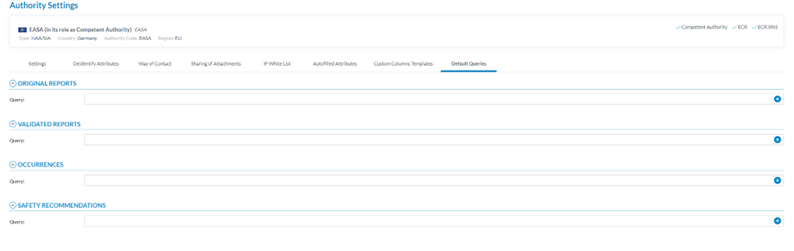
<span lang="EN-GB">This is the last tab in the Authority settings section:</span>

[![image.png](https://help.ci-aviationreporting.eu/uploads/images/gallery/2025-11/scaled-1680-/cDpimage.png)](https://help.ci-aviationreporting.eu/uploads/images/gallery/2025-11/cDpimage.png)

[![image.png](https://help.ci-aviationreporting.eu/uploads/images/gallery/2025-11/scaled-1680-/Pe8image.png)](https://help.ci-aviationreporting.eu/uploads/images/gallery/2025-11/Pe8image.png)
<span lang="EN-GB" style="mso-ansi-language: EN-GB; mso-fareast-language: EN-GB;"> </span>

<span lang="EN-GB" style="mso-ansi-language: EN-GB; mso-fareast-language: EN-GB;"> </span>

<span lang="EN-GB">Through this page, the Administrator can select the queries that the system triggers when opening the ORs, the VRs, the OCs or the SRs menus (according to the Authority Type – NAA/SIA) of the users of its Authority.</span>

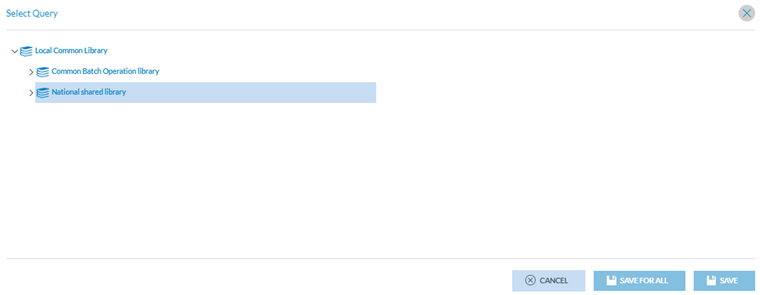
<span lang="EN-GB">The Administrator has to click on the ‘+’ icon of the query field, and the system will open the Select Query window:[![image.png](https://help.ci-aviationreporting.eu/uploads/images/gallery/2025-11/scaled-1680-/61Yimage.png)](https://help.ci-aviationreporting.eu/uploads/images/gallery/2025-11/61Yimage.png) </span>
<span lang="EN-GB" style="mso-ansi-language: EN-GB; mso-fareast-language: EN-GB;"> </span>

<span lang="EN-GB">Therein, Administrators have to select the specific query. If clicking on the ‘Save’ button, the query will be applied to users of this Authority who have not selected their own queries; if clicking on ‘Save for all’, the query will be applied to all the users of this Authority.</span>