# 5.4. Webforms

<span lang="EN-GB">Webforms are E2 platform digital forms available through which reporters of the E2 Web Application can introduce ORs. They are composed of Views.</span>

<span lang="EN-GB">Administrators can create, edit, view, publish and unpublish their views, and regarding ECCAIRS webforms, they can view, enable and disable them. Webforms cannot be deleted.</span>

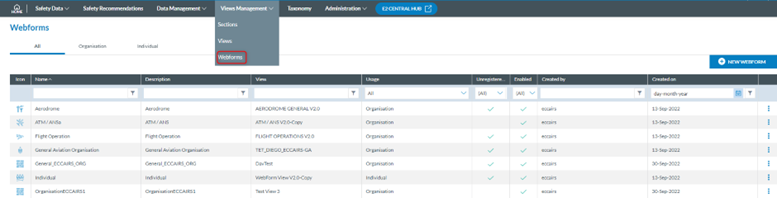
<span lang="EN-GB">To access this menu, the Administrator has to unfold Views management at the E2 Web Application and click on ‘Webforms’, and the system will display the Webforms menu:</span>

[![image.png](https://help.ci-aviationreporting.eu/uploads/images/gallery/2025-11/scaled-1680-/PETimage.png)](https://help.ci-aviationreporting.eu/uploads/images/gallery/2025-11/PETimage.png)

<span lang="EN-GB" style="mso-ansi-language: EN-GB; mso-fareast-language: EN-GB;"> </span>

<span lang="EN-GB">It displays the ‘All’ tab with all Webforms, including the Organisation and the Individual webforms. Next to it are the Organisation tab, with the list of Organisation webforms and the Individual tab, with the table of Individual webforms.</span>

<span lang="EN-GB">All the tables have the following columns, all working as filters except for the icon: </span>

<span lang="EN-GB" style="font-family: Symbol; mso-fareast-font-family: Symbol; mso-bidi-font-family: Symbol; color: #1b3891; mso-themecolor: text1;"><span style="mso-list: Ignore;">·<span style="font: 7.0pt 'Times New Roman';"> </span></span></span><span lang="EN-GB">Icon: unique for each webform.</span>

<span lang="EN-GB" style="font-family: Symbol; mso-fareast-font-family: Symbol; mso-bidi-font-family: Symbol; color: #1b3891; mso-themecolor: text1;"><span style="mso-list: Ignore;">·<span style="font: 7.0pt 'Times New Roman';"> </span></span></span><span lang="EN-GB">Name: unique for each webform</span>

<span lang="EN-GB" style="font-family: Symbol; mso-fareast-font-family: Symbol; mso-bidi-font-family: Symbol; color: #1b3891; mso-themecolor: text1;"><span style="mso-list: Ignore;">·<span style="font: 7.0pt 'Times New Roman';"> </span></span></span><span lang="EN-GB">Description: to describe the webform</span>

<span lang="EN-GB" style="font-family: Symbol; mso-fareast-font-family: Symbol; mso-bidi-font-family: Symbol; color: #1b3891; mso-themecolor: text1;"><span style="mso-list: Ignore;">·<span style="font: 7.0pt 'Times New Roman';"> </span></span></span><span lang="EN-GB">View: that is associated with the webform</span>

<span lang="EN-GB" style="font-family: Symbol; mso-fareast-font-family: Symbol; mso-bidi-font-family: Symbol; color: #1b3891; mso-themecolor: text1;"><span style="mso-list: Ignore;">·<span style="font: 7.0pt 'Times New Roman';"> </span></span></span><span lang="EN-GB">Usage: can be organisation or individual</span>

<span lang="EN-GB" style="font-family: Symbol; mso-fareast-font-family: Symbol; mso-bidi-font-family: Symbol; color: #1b3891; mso-themecolor: text1;"><span style="mso-list: Ignore;">·<span style="font: 7.0pt 'Times New Roman';"> </span></span></span><span lang="EN-GB">Unregistered reporting: available for unregistered reporters</span>

<span lang="EN-GB" style="font-family: Symbol; mso-fareast-font-family: Symbol; mso-bidi-font-family: Symbol; color: #1b3891; mso-themecolor: text1;"><span style="mso-list: Ignore;">·<span style="font: 7.0pt 'Times New Roman';"> </span></span></span><span lang="EN-GB">Enabled: green tick for enabled</span>

<span lang="EN-GB" style="font-family: Symbol; mso-fareast-font-family: Symbol; mso-bidi-font-family: Symbol; color: #1b3891; mso-themecolor: text1;"><span style="mso-list: Ignore;">·<span style="font: 7.0pt 'Times New Roman';"> </span></span></span><span lang="EN-GB">Created by: the author of the webform, that can be ECCAIRS or the Authority Administrators</span>

<span lang="EN-GB" style="font-family: Symbol; mso-fareast-font-family: Symbol; mso-bidi-font-family: Symbol; color: #1b3891; mso-themecolor: text1;"><span style="mso-list: Ignore;">·<span style="font: 7.0pt 'Times New Roman';"> </span></span></span><span lang="EN-GB">Created on: creation date</span>

<span lang="EN-GB">The last column has a 3-dot menu to manage each webform.</span>

<span lang="EN-GB">Administrators can alter the order in which the webforms appear in the Reporting Portal by dragging and dropping the rows in the Organisation and Individual tabs.</span>

### 5.4.1. Webform Management

#### <span style="mso-fareast-font-family: Calibri; mso-bidi-font-family: Calibri;"><span style="mso-list: Ignore;">5.4.1.1. </span></span>Create a new webform

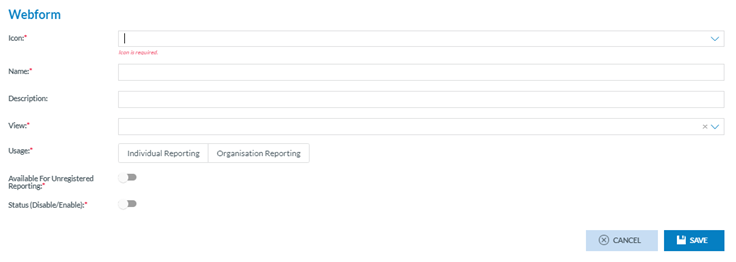
<span lang="EN-GB">Administrators have to click on the ‘New Webform’ button above the table, and the system will display the Webform creation page:</span>

<span lang="EN-GB" style="mso-ansi-language: EN-GB; mso-fareast-language: EN-GB;"> </span>

<span lang="EN-GB">Administrators have to fill in the mandatory fields:</span>

[![image.png](https://help.ci-aviationreporting.eu/uploads/images/gallery/2025-11/scaled-1680-/dQaimage.png)](https://help.ci-aviationreporting.eu/uploads/images/gallery/2025-11/dQaimage.png)

<span lang="EN-GB" style="font-family: Symbol; mso-fareast-font-family: Symbol; mso-bidi-font-family: Symbol; color: #1b3891; mso-themecolor: text1;"><span style="mso-list: Ignore;">·<span style="font: 7.0pt 'Times New Roman';"> </span></span></span><span lang="EN-GB">Icon: the drop-down menu provides all the available icons</span>

<span lang="EN-GB" style="font-family: Symbol; mso-fareast-font-family: Symbol; mso-bidi-font-family: Symbol; color: #1b3891; mso-themecolor: text1;"><span style="mso-list: Ignore;">·<span style="font: 7.0pt 'Times New Roman';"> </span></span></span><span lang="EN-GB">Name: has to be different to the existing ones</span>

<span lang="EN-GB" style="font-family: Symbol; mso-fareast-font-family: Symbol; mso-bidi-font-family: Symbol; color: #1b3891; mso-themecolor: text1;"><span style="mso-list: Ignore;">·<span style="font: 7.0pt 'Times New Roman';"> </span></span></span><span lang="EN-GB">View: the drop-down menu provides all the available views. Only views not used in other webforms can be selected and saved.</span>

<span lang="EN-GB" style="font-family: Symbol; mso-fareast-font-family: Symbol; mso-bidi-font-family: Symbol; color: #1b3891; mso-themecolor: text1;"><span style="mso-list: Ignore;">·<span style="font: 7.0pt 'Times New Roman';"> </span></span></span><span lang="EN-GB">Usage: Administrators have to select Individual or Organisation Reporting if the webform is going to be addressed to individual reporters or Organisation reporters</span>

<span lang="EN-GB" style="font-family: Symbol; mso-fareast-font-family: Symbol; mso-bidi-font-family: Symbol; color: #1b3891; mso-themecolor: text1;"><span style="mso-list: Ignore;">·<span style="font: 7.0pt 'Times New Roman';"> </span></span></span><span lang="EN-GB">Available for Unregistered Reporting toggle: deactivated by default. If activated, the webform will be available for non-registered reporters of the E2 Reporting Portal.</span>

<span lang="EN-GB" style="font-family: Symbol; mso-fareast-font-family: Symbol; mso-bidi-font-family: Symbol; color: #1b3891; mso-themecolor: text1;"><span style="mso-list: Ignore;">·<span style="font: 7.0pt 'Times New Roman';"> </span></span></span><span lang="EN-GB">Status toggle: by default, it is disabled. If activated, it is enabled so when the webform is saved. The webform will be available in the E2 Reporting Portal to report ORs</span>

<span lang="EN-GB">The Description field is optional.</span>

<span lang="EN-GB">Once Administrators have filled out all mandatory fields, they have to click the ‘Save’ button. The system will save the new webform and add the webform to the ‘All’ table and the table of the selected usage, individual or organisation.</span>

#### <span style="mso-fareast-font-family: Calibri; mso-bidi-font-family: Calibri;"><span style="mso-list: Ignore;">5.4.1.2. </span></span>Edit a webform

<span lang="EN-GB">Only disabled non-ECCAIRS’ webforms can be edited.</span>

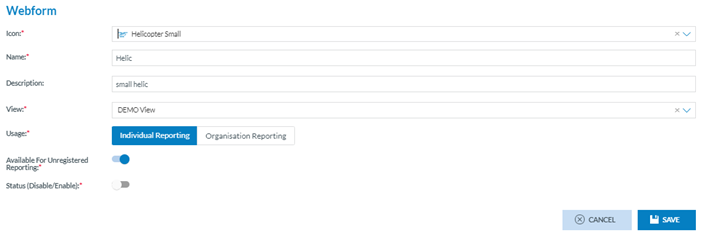
<span lang="EN-GB">Administrators have to click on the ‘Edit webform’ option of the 3-dot menu of the specific webform of the table, and the system will display the ‘Edit webform’ page:</span>

[![image.png](https://help.ci-aviationreporting.eu/uploads/images/gallery/2025-11/scaled-1680-/J1Ximage.png)](https://help.ci-aviationreporting.eu/uploads/images/gallery/2025-11/J1Ximage.png)

<span lang="EN-GB" style="mso-ansi-language: EN-GB; mso-fareast-language: EN-GB;"> </span>

<span lang="EN-GB">The function is the same as in the previous version. Once Administrators click the Save button, the system will save the update in the database and add the update to the webform tables.</span>

#### <span style="mso-fareast-font-family: Calibri; mso-bidi-font-family: Calibri;"><span style="mso-list: Ignore;">5.4.1.3. V</span></span>iew a webform

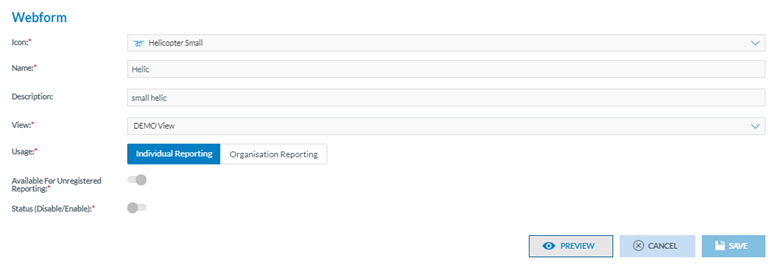
<span lang="EN-GB">Administrators have to click on the View webform option of the 3-dot menu of the specific webform of the table, and the system will display the ‘View webform’ page:</span>

[![image.png](https://help.ci-aviationreporting.eu/uploads/images/gallery/2025-11/scaled-1680-/kayimage.png)](https://help.ci-aviationreporting.eu/uploads/images/gallery/2025-11/kayimage.png)

<span lang="EN-GB" style="mso-ansi-language: EN-GB; mso-fareast-language: EN-GB;"> </span>

<span lang="EN-GB">It is similar to the previously described ‘Edit webform’ option. However, the fields are not editable, and it includes a ‘Preview’ button which accesses the webform as displayed in the E2 Reporting Portal when the users are filling it:</span>

[![image.png](https://help.ci-aviationreporting.eu/uploads/images/gallery/2025-11/scaled-1680-/Hikimage.png)](https://help.ci-aviationreporting.eu/uploads/images/gallery/2025-11/Hikimage.png)