# 4.7. Set Custom Taxonomy properties

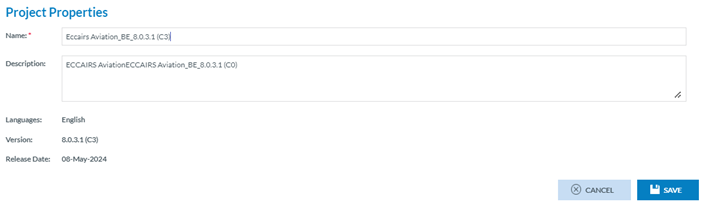
<span lang="EN-GB">National Security Administrators have to click on ‘Set Properties’ option of the 3-dots menu of the specific Not Archived Custom Taxonomy of the list. The system will display the specific Taxonomy Properties page:</span>

[![image.png](https://help.ci-aviationreporting.eu/uploads/images/gallery/2025-11/scaled-1680-/pX7image.png)](https://help.ci-aviationreporting.eu/uploads/images/gallery/2025-11/pX7image.png)

<span lang="EN-GB" style="mso-ansi-language: EN-GB; mso-fareast-language: EN-GB;"> </span>

<span lang="EN-GB">The only editable fields are the following:</span>

<span lang="EN-GB" style="font-family: Symbol; mso-fareast-font-family: Symbol; mso-bidi-font-family: Symbol; color: #1b3891; mso-themecolor: text1;"><span style="mso-list: Ignore;">·<span style="font: 7.0pt 'Times New Roman';"> </span></span></span><span lang="EN-GB">Name: it is mandatory and unique for each Taxonomy</span>

<span lang="EN-GB" style="font-family: Symbol; mso-fareast-font-family: Symbol; mso-bidi-font-family: Symbol; color: #1b3891; mso-themecolor: text1;"><span style="mso-list: Ignore;">·<span style="font: 7.0pt 'Times New Roman';"> </span></span></span><span lang="EN-GB">Description: optional</span>

<span lang="EN-GB">National Security Administrators can update the fields and click on ‘Save’, the system will save the information in the database and the table of Taxonomies will be updated accordingly.</span>