# 7. My account

# 7.1. My account menu

<span lang="EN-GB">This menu is accessible once the Administrator clicks on their username:</span>

[![image.png](https://help.ci-aviationreporting.eu/uploads/images/gallery/2025-11/scaled-1680-/i9timage.png)](https://help.ci-aviationreporting.eu/uploads/images/gallery/2025-11/i9timage.png)

<span lang="EN-GB" style="mso-ansi-language: EN-GB; mso-fareast-language: EN-GB;"> </span>

<span lang="EN-GB">The Administrator clicks on it, and the system displays ‘My Account’ page.</span>

# 7.2. Personal Details

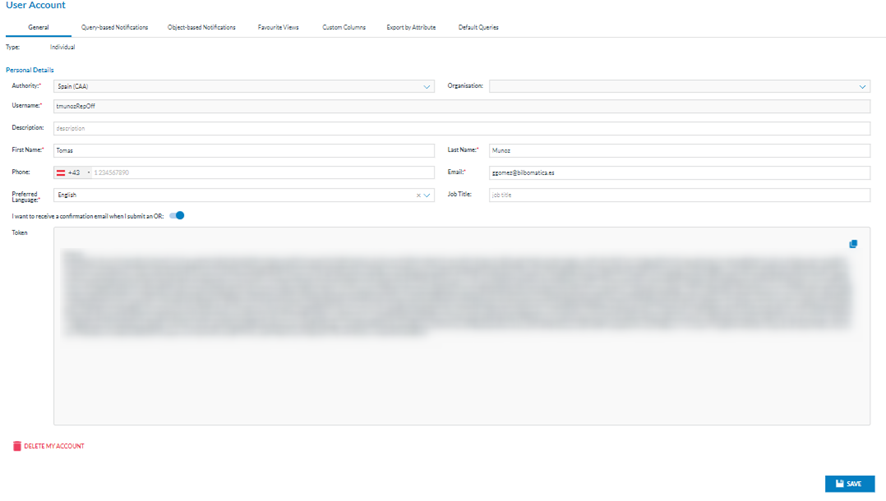
<span lang="EN-GB">This is the first tab of “My Account” page.</span>

[![image.png](https://help.ci-aviationreporting.eu/uploads/images/gallery/2025-11/scaled-1680-/6y1image.png)](https://help.ci-aviationreporting.eu/uploads/images/gallery/2025-11/6y1image.png)

<span lang="EN-GB">The first tab is ‘General’, indicating the type of account (individual or organisation) and the edit page for the personal details. </span>

<span lang="EN-GB">The personal details fields are the following:</span>

<span lang="EN-GB" style="font-family: Symbol; mso-fareast-font-family: Symbol; mso-bidi-font-family: Symbol; color: #1b3891; mso-themecolor: text1;"><span style="mso-list: Ignore;">·<span style="font: 7.0pt 'Times New Roman';"> </span></span></span><span lang="EN-GB">Authority: not editable, to which the Administrator belongs</span>

<span lang="EN-GB" style="font-family: Symbol; mso-fareast-font-family: Symbol; mso-bidi-font-family: Symbol; color: #1b3891; mso-themecolor: text1;"><span style="mso-list: Ignore;">·<span style="font: 7.0pt 'Times New Roman';"> </span></span></span><span lang="EN-GB">Organisation: not applicable for Administrators</span>

<span lang="EN-GB" style="font-family: Symbol; mso-fareast-font-family: Symbol; mso-bidi-font-family: Symbol; color: #1b3891; mso-themecolor: text1;"><span style="mso-list: Ignore;">·<span style="font: 7.0pt 'Times New Roman';"> </span></span></span><span lang="EN-GB">Username: of the Administrator, it is not editable</span>

<span lang="EN-GB" style="font-family: Symbol; mso-fareast-font-family: Symbol; mso-bidi-font-family: Symbol; color: #1b3891; mso-themecolor: text1;"><span style="mso-list: Ignore;">·<span style="font: 7.0pt 'Times New Roman';"> </span></span></span><span lang="EN-GB">Description: optional field and editable</span>

<span lang="EN-GB" style="font-family: Symbol; mso-fareast-font-family: Symbol; mso-bidi-font-family: Symbol; color: #1b3891; mso-themecolor: text1;"><span style="mso-list: Ignore;">·<span style="font: 7.0pt 'Times New Roman';"> </span></span></span><span lang="EN-GB">First name: of the Administrator, editable mandatory field</span>

<span lang="EN-GB" style="font-family: Symbol; mso-fareast-font-family: Symbol; mso-bidi-font-family: Symbol; color: #1b3891; mso-themecolor: text1;"><span style="mso-list: Ignore;">·<span style="font: 7.0pt 'Times New Roman';"> </span></span></span><span lang="EN-GB">Last name: of the Administrator, editable mandatory field</span>

<span lang="EN-GB" style="font-family: Symbol; mso-fareast-font-family: Symbol; mso-bidi-font-family: Symbol; color: #1b3891; mso-themecolor: text1;"><span style="mso-list: Ignore;">·<span style="font: 7.0pt 'Times New Roman';"> </span></span></span><span lang="EN-GB">Phone: optional and editable</span>

<span lang="EN-GB" style="font-family: Symbol; mso-fareast-font-family: Symbol; mso-bidi-font-family: Symbol; color: #1b3891; mso-themecolor: text1;"><span style="mso-list: Ignore;">·<span style="font: 7.0pt 'Times New Roman';"> </span></span></span><span lang="EN-GB">Email: mandatory and editable</span>

<span lang="EN-GB" style="font-family: Symbol; mso-fareast-font-family: Symbol; mso-bidi-font-family: Symbol; color: #1b3891; mso-themecolor: text1;"><span style="mso-list: Ignore;">·<span style="font: 7.0pt 'Times New Roman';"> </span></span></span><span lang="EN-GB">Preferred language: mandatory and editable; doesn’t affect system behaviour at this stage of development.</span>

<span lang="EN-GB" style="font-family: Symbol; mso-fareast-font-family: Symbol; mso-bidi-font-family: Symbol; color: #1b3891; mso-themecolor: text1;"><span style="mso-list: Ignore;">·<span style="font: 7.0pt 'Times New Roman';"> </span></span></span><span lang="EN-GB">Job title: optional and editable</span>

<span lang="EN-GB" style="font-family: Symbol; mso-fareast-font-family: Symbol; mso-bidi-font-family: Symbol; color: #1b3891; mso-themecolor: text1;"><span style="mso-list: Ignore;">·<span style="font: 7.0pt 'Times New Roman';"> </span></span></span><span lang="EN-GB">‘I want to receive an email when I submit an ‘OR’ toggle</span><span lang="EN-GB" style="font-family: Symbol; mso-fareast-font-family: Symbol; mso-bidi-font-family: Symbol; color: #1b3891; mso-themecolor: text1;"><span style="mso-list: Ignore;">·<span style="font: 7.0pt 'Times New Roman';"> </span></span></span>

<span lang="EN-GB" style="font-family: Symbol; mso-fareast-font-family: Symbol; mso-bidi-font-family: Symbol; color: #1b3891; mso-themecolor: text1;"><span style="mso-list: Ignore;">·<span style="font: 7.0pt 'Times New Roman';"> </span></span></span><span lang="EN-GB">Token: it connects the Administrator to the API. It is not editable. It provides a copy icon to copy it</span><span lang="EN-GB" style="font-family: Symbol; mso-fareast-font-family: Symbol; mso-bidi-font-family: Symbol; color: #1b3891; mso-themecolor: text1;"><span style="mso-list: Ignore;"><span style="font: 7.0pt 'Times New Roman';"> </span></span></span>

<span lang="EN-GB" style="font-family: Symbol; mso-fareast-font-family: Symbol; mso-bidi-font-family: Symbol; color: #1b3891; mso-themecolor: text1;"><span style="mso-list: Ignore;">·<span style="font: 7.0pt 'Times New Roman';"> </span></span></span><span lang="EN-GB">Delete my account icon: it requests the Administrators to delete the account after a confirmation message.</span>

<span lang="EN-GB">The Administrator can update the editable fields by clicking the ‘Save’ button. The system will save the updates on the Personal details in the database.</span>

# 7.3. Query-based notifications

<span lang="EN-GB">Even though it is available for Administrators, this tab only applies if the Administrator also have an Officer role. If so, refer to the Occurrence Officer manual for details.</span>

# 7.4. Object-based notifications

<span lang="EN-GB">Even though it is available for Administrators, this tab only applies if the Administrator also have an Officer role. If so, refer to the Occurrence Officer manual for details.</span>

# 7.5. Favourite Views

<span lang="EN-GB">Even though it is available for Administrators, this tab only applies if the Administrator also have an Officer role. If so, refer to the Occurrence Officer manual for details.</span>

# 7.6. Custom Column

<span lang="EN-GB">Even though it is available for Administrators, this tab only applies if the Administrator also have an Officer role. If so, refer to the Occurrence Officer manual for details.</span>

# 7.7.	Export by Attribute

<span lang="EN-GB">Even though it is available for Administrators, this tab only applies if the Administrator also have an Officer role. If so, refer to the Occurrence Officer manual for details.</span>

# 7.8. Default queries

<span lang="EN-GB">Even though it is available for Administrators, this tab only applies if the Administrator also have an Officer role. If so, refer to the Occurrence Officer manual for details.</span>