# 4. Taxonomy

# 4.1. Introduction

<span lang="EN-GB">The E2 system is built around the ECCAIRS Taxonomy, constituted by ADREP Taxonomy + ECCAIRS/EU specific Taxonomy. While most of it is centrally maintained, per specific governance through the NA’s established Data and Quality Working Group, there is also the possibility for Authorities to maintain their own Custom Taxonomy, which allows them to adapt their usage of E2 to their own processes. The same applies to the SRIS Taxonomy for safety recommendations.</span>

<span lang="EN-GB">To access the Taxonomies, the National Security Administrator has to access the Taxonomy menu.</span>

[![image.png](https://help.ci-aviationreporting.eu/uploads/images/gallery/2025-11/scaled-1680-/SBMimage.png)](https://help.ci-aviationreporting.eu/uploads/images/gallery/2025-11/SBMimage.png)

<span lang="EN-GB"> </span>The system will display the list of Taxonomies in force for the Authority of the National Security Administrator. It includes the Custom and Central Taxonomies released and ECCAIRS and SRIS Taxonomies depending on the Authority type (NAA, SIA or both).

[![image.png](https://help.ci-aviationreporting.eu/uploads/images/gallery/2025-11/scaled-1680-/7dbimage.png)](https://help.ci-aviationreporting.eu/uploads/images/gallery/2025-11/7dbimage.png)

<span lang="EN-GB" style="mso-fareast-language: EN-GB; mso-no-proof: yes;"> </span>

<span lang="EN-GB">National Security Administrators can filter ‘All’, ECCAIRS and SRIs Taxonomies through the tabs displayed above the table.</span>

<span lang="EN-GB">The table of Taxonomies present the following columns that also work as filters:</span>

<span lang="EN-GB" style="font-family: Symbol; mso-fareast-font-family: Symbol; mso-bidi-font-family: Symbol; color: #1b3891; mso-themecolor: text1;"><span style="mso-list: Ignore;">·<span style="font: 7.0pt 'Times New Roman';"> </span></span></span><span lang="EN-GB">Name: unique for each Taxonomy</span>

<span lang="EN-GB" style="font-family: Symbol; mso-fareast-font-family: Symbol; mso-bidi-font-family: Symbol; color: #1b3891; mso-themecolor: text1;"><span style="mso-list: Ignore;">·<span style="font: 7.0pt 'Times New Roman';"> </span></span></span><span lang="EN-GB">Version: your digits separated by dots</span>

<span lang="EN-GB" style="font-family: Symbol; mso-fareast-font-family: Symbol; mso-bidi-font-family: Symbol; color: #1b3891; mso-themecolor: text1;"><span style="mso-list: Ignore;">·<span style="font: 7.0pt 'Times New Roman';"> </span></span></span><span lang="EN-GB">Status: it can be:</span>

<span lang="EN-GB" style="font-family: Wingdings; mso-fareast-font-family: Wingdings; mso-bidi-font-family: Wingdings; color: #1b3891; mso-themecolor: text1;"><span style="mso-list: Ignore;">ü<span style="font: 7.0pt 'Times New Roman';"> </span></span></span><span lang="EN-GB">Archived</span>

<span lang="EN-GB" style="font-family: Wingdings; mso-fareast-font-family: Wingdings; mso-bidi-font-family: Wingdings; color: #1b3891; mso-themecolor: text1;"><span style="mso-list: Ignore;">ü<span style="font: 7.0pt 'Times New Roman';"> </span></span></span><span lang="EN-GB">Draft</span>

<span lang="EN-GB" style="font-family: Wingdings; mso-fareast-font-family: Wingdings; mso-bidi-font-family: Wingdings; color: #1b3891; mso-themecolor: text1;"><span style="mso-list: Ignore;">ü<span style="font: 7.0pt 'Times New Roman';"> </span></span></span><span lang="EN-GB">Released</span>

<span lang="EN-GB" style="font-family: Symbol; mso-fareast-font-family: Symbol; mso-bidi-font-family: Symbol; color: #1b3891; mso-themecolor: text1;"><span style="mso-list: Ignore;">·<span style="font: 7.0pt 'Times New Roman';"> </span></span></span><span lang="EN-GB">Taxonomy Reference: it can be:</span>

<span lang="EN-GB" style="font-family: Wingdings; mso-fareast-font-family: Wingdings; mso-bidi-font-family: Wingdings; color: #1b3891; mso-themecolor: text1;"><span style="mso-list: Ignore;">ü<span style="font: 7.0pt 'Times New Roman';"> </span></span></span><span lang="EN-GB">ECCAIRS</span>

<span lang="EN-GB" style="font-family: Wingdings; mso-fareast-font-family: Wingdings; mso-bidi-font-family: Wingdings; color: #1b3891; mso-themecolor: text1;"><span style="mso-list: Ignore;">ü<span style="font: 7.0pt 'Times New Roman';"> </span></span></span><span lang="EN-GB">SRIS</span>

<span lang="EN-GB" style="font-family: Symbol; mso-fareast-font-family: Symbol; mso-bidi-font-family: Symbol; color: #1b3891; mso-themecolor: text1;"><span style="mso-list: Ignore;">·<span style="font: 7.0pt 'Times New Roman';"> </span></span></span><span lang="EN-GB">Description</span>

<span lang="EN-GB" style="font-family: Symbol; mso-fareast-font-family: Symbol; mso-bidi-font-family: Symbol; color: #1b3891; mso-themecolor: text1;"><span style="mso-list: Ignore;">·<span style="font: 7.0pt 'Times New Roman';"> </span></span></span><span lang="EN-GB">Release Date</span>

<span lang="EN-GB" style="font-family: Symbol; mso-fareast-font-family: Symbol; mso-bidi-font-family: Symbol; color: #1b3891; mso-themecolor: text1;"><span style="mso-list: Ignore;">·<span style="font: 7.0pt 'Times New Roman';"> </span></span></span><span lang="EN-GB">Languages: for now, there are not translations</span>

<span lang="EN-GB">If the National Security Administrator has the National Taxonomy Administrator role, the list of Taxonomies will also include the Authority's Custom Taxonomies in all the status, if exist. </span>

<span lang="EN-GB">The last section of each row provides a 3-dots menu with the following options for archived Taxonomies:</span>

[![image.png](https://help.ci-aviationreporting.eu/uploads/images/gallery/2025-11/scaled-1680-/hugimage.png)](https://help.ci-aviationreporting.eu/uploads/images/gallery/2025-11/hugimage.png)

<span lang="EN-GB" style="mso-ansi-language: EN-GB; mso-fareast-language: EN-GB;"> </span>

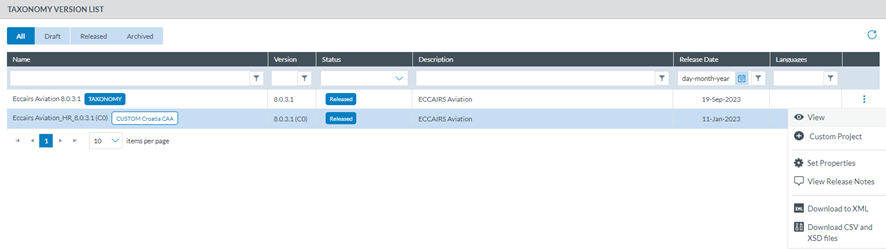
<span lang="EN-GB">The Released Taxonomies provide the following options:</span>

[![image.png](https://help.ci-aviationreporting.eu/uploads/images/gallery/2025-11/scaled-1680-/Utzimage.png)](https://help.ci-aviationreporting.eu/uploads/images/gallery/2025-11/Utzimage.png)

<span lang="EN-GB" style="mso-ansi-language: EN-GB; mso-fareast-language: EN-GB;"> </span>

<span lang="EN-GB">The Custom Project option is shown only if a Draft version of the Taxonomy does not exist. </span>

<span lang="EN-GB">The Draft Taxonomies provide the following options:</span>

[![image.png](https://help.ci-aviationreporting.eu/uploads/images/gallery/2025-11/scaled-1680-/lugimage.png)](https://help.ci-aviationreporting.eu/uploads/images/gallery/2025-11/lugimage.png)

# 4.2. View a Taxonomy

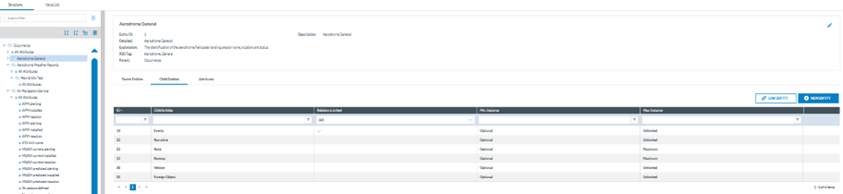
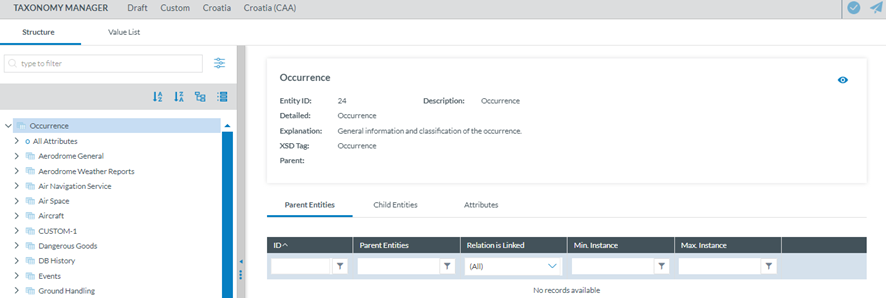
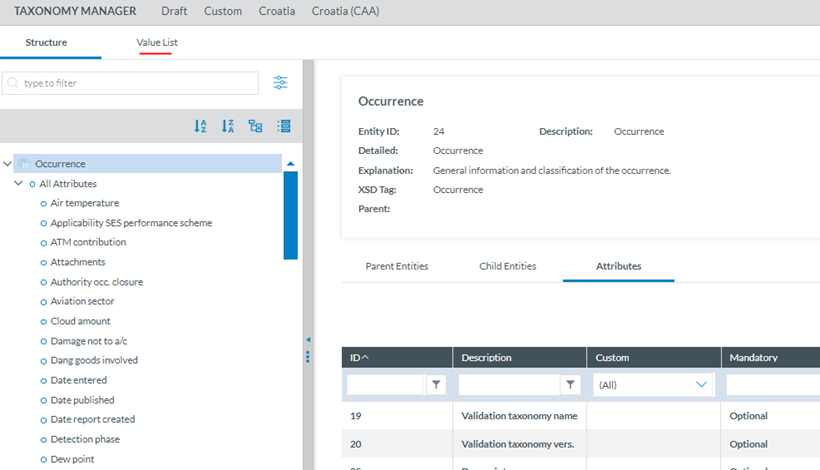
<span lang="EN-GB">National Security Administrators have to click on the 3-dots menu ‘View' option and the system will display the Taxonomy Structure tab.</span>

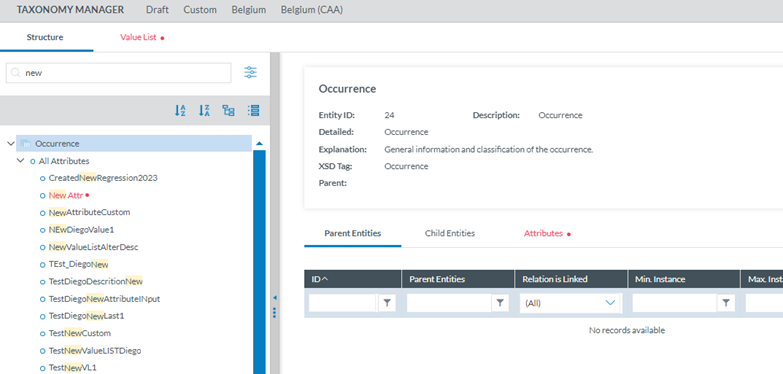
<span style="mso-bookmark: _Hlk170382653;"><span lang="EN-GB">The Taxonomy tree and the search bar are displayed on the left side of the screen. They can be hidden by clicking on the 'arrow' icon. The left panel is resizable by clicking on the 3-dots menu and moving it to the left or to the right. </span></span>

<span style="mso-bookmark: _Hlk170382653;"><span lang="EN-GB">The National Security Administrator can navigate through the tree by unfolding the arrows and clicking on the displayed elements. On the right side, the information of the selected element will be displayed.</span></span>

[![image.png](https://help.ci-aviationreporting.eu/uploads/images/gallery/2025-11/scaled-1680-/JCMimage.png)](https://help.ci-aviationreporting.eu/uploads/images/gallery/2025-11/JCMimage.png)

<span style="mso-bookmark: _Hlk170382653;"><span lang="EN-GB" style="mso-fareast-language: EN-GB; mso-no-proof: yes;"> </span></span>

<p class="callout info"><span style="mso-bookmark: _Hlk170382653;"><span lang="EN-GB">Note that the View option only provides view menus and not editing or management options.</span></span></p>

### <span style="mso-bookmark: _Toc170415813;"><span style="mso-bookmark: _Toc170230801;"><span style="mso-bookmark: _Toc162438984;"><span style="mso-fareast-font-family: Calibri; mso-bidi-font-family: Calibri;"><span style="mso-list: Ignore;"><span style="color: #206ea7;">4.2.1. </span></span></span>Search box</span></span></span>

<span lang="EN-GB">It is under the Structure Tab. The Value list tab and its navigation is explained in the Taxonomy Values Lists section.</span>

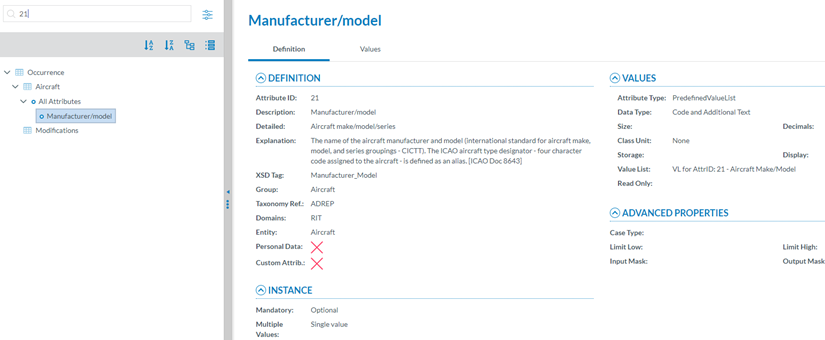
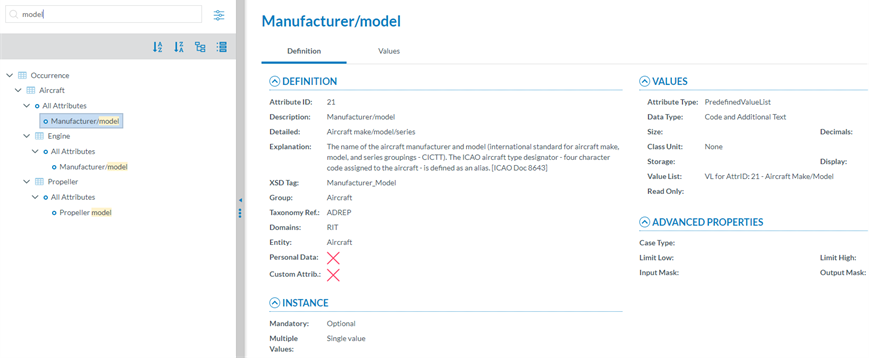
<span lang="EN-GB">Entities and Attributes can be found by typing the Taxonomy Code or the Description in the Search box. </span>

<span lang="EN-GB" style="font-family: Symbol; mso-fareast-font-family: Symbol; mso-bidi-font-family: Symbol; color: #1b3891; mso-themecolor: text1;"><span style="mso-list: Ignore;">·<span style="font: 7.0pt 'Times New Roman';"> </span></span></span><span lang="EN-GB">By Taxonomy Code:</span>

[![image.png](https://help.ci-aviationreporting.eu/uploads/images/gallery/2025-11/scaled-1680-/27Qimage.png)](https://help.ci-aviationreporting.eu/uploads/images/gallery/2025-11/27Qimage.png)

<span lang="EN-GB" style="mso-ansi-language: EN-GB; mso-fareast-language: EN-GB;"> </span>

<span lang="EN-GB" style="font-family: Symbol; mso-fareast-font-family: Symbol; mso-bidi-font-family: Symbol; color: #1b3891; mso-themecolor: text1;"><span style="mso-list: Ignore;">·<span style="font: 7.0pt 'Times New Roman';"> </span></span></span><span lang="EN-GB">By Description:</span>

[![image.png](https://help.ci-aviationreporting.eu/uploads/images/gallery/2025-11/scaled-1680-/cFCimage.png)](https://help.ci-aviationreporting.eu/uploads/images/gallery/2025-11/cFCimage.png)

<span lang="EN-GB" style="mso-ansi-language: EN-GB; mso-fareast-language: EN-GB;"> </span>

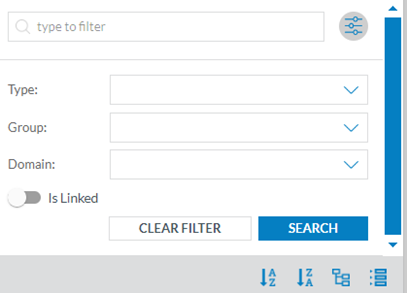
<span lang="EN-GB">If the National Security Administrator clicks on the 'Advanced search' button, a layer with more filters will be displayed. </span><span lang="EN-GB" style="mso-ansi-language: EN-GB;"><span style="mso-spacerun: yes;"> </span></span>

[![image.png](https://help.ci-aviationreporting.eu/uploads/images/gallery/2025-11/scaled-1680-/yULimage.png)](https://help.ci-aviationreporting.eu/uploads/images/gallery/2025-11/yULimage.png)

<span lang="EN-GB" style="mso-ansi-language: EN-GB; mso-fareast-language: EN-GB;"> </span>

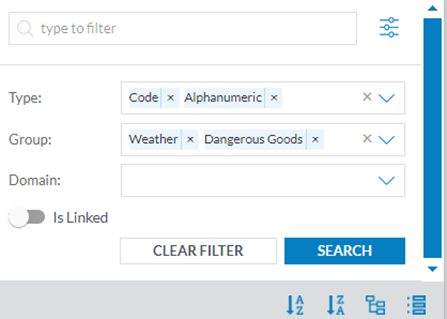
<span lang="EN-GB">For each filter the National Security Administrator can select as many values as needed. Then, the National Security Administrator has to click on the 'Search' button to refresh the tree with the introduced filters.</span>

<span lang="EN-GB" style="mso-ansi-language: EN-GB;"><span style="mso-spacerun: yes;"> </span></span>[![image.png](https://help.ci-aviationreporting.eu/uploads/images/gallery/2025-11/scaled-1680-/s4Pimage.png)](https://help.ci-aviationreporting.eu/uploads/images/gallery/2025-11/s4Pimage.png)

<span lang="EN-GB" style="mso-ansi-language: EN-GB; mso-fareast-language: EN-GB;"> </span>

<span lang="EN-GB">The Taxonomy tree can be ordered alphabetically by clicking on the 'A-Z' icon or 'Z-A' icon: </span>[![image.png](https://help.ci-aviationreporting.eu/uploads/images/gallery/2025-11/scaled-1680-/GZcimage.png)](https://help.ci-aviationreporting.eu/uploads/images/gallery/2025-11/GZcimage.png)

<span lang="EN-GB" style="mso-fareast-language: EN-GB; mso-no-proof: yes;"> </span>

<span lang="EN-GB">All item of the Taxonomy tree can be collapsed and expanded through the following buttons: </span>

[![image.png](https://help.ci-aviationreporting.eu/uploads/images/gallery/2025-11/scaled-1680-/HKEimage.png)](https://help.ci-aviationreporting.eu/uploads/images/gallery/2025-11/HKEimage.png)

<span lang="EN-GB" style="mso-ansi-language: EN-GB; mso-fareast-language: EN-GB;"> </span>

### <span style="mso-bookmark: _Toc170415814;"><span style="mso-fareast-font-family: Calibri; mso-bidi-font-family: Calibri;"><span style="mso-list: Ignore;">4.2.2. F</span></span>ilter the information</span>

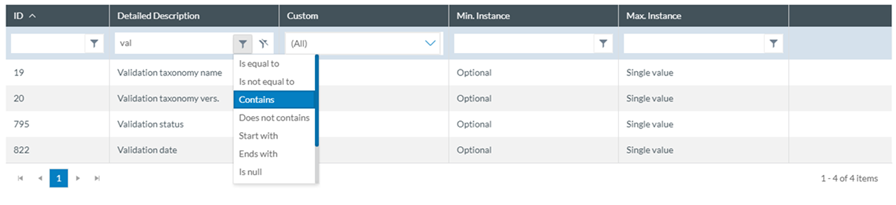
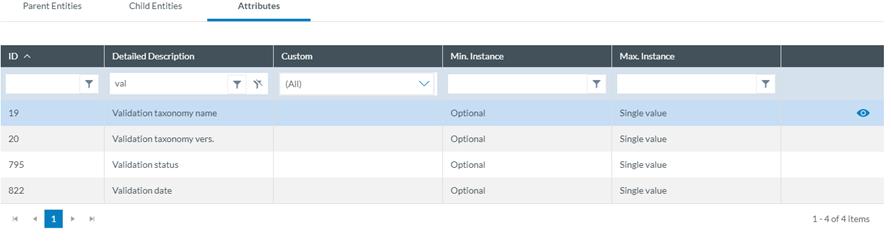
<span lang="EN-GB">The National Security Administrators can filter the table of Parent Entities, Child Entities and Attributes by typing the term to be searched in the filter row. They can restrict the results by clicking on the '</span>[![image.png](https://help.ci-aviationreporting.eu/uploads/images/gallery/2025-11/scaled-1680-/Es9image.png) ](https://help.ci-aviationreporting.eu/uploads/images/gallery/2025-11/Es9image.png)<span lang="EN-GB">filter' button, by default 'contains' condition is selected. </span>

<span lang="EN-GB">To delete the filter, the National Security Administrator has to click on the '</span><span lang="EN-GB" style="mso-fareast-language: EN-GB; mso-no-proof: yes;"> </span>[![image.png](https://help.ci-aviationreporting.eu/uploads/images/gallery/2025-11/scaled-1680-/u3Zimage.png) ](https://help.ci-aviationreporting.eu/uploads/images/gallery/2025-11/u3Zimage.png)<span lang="EN-GB">clear filter' icon.</span>

[![image.png](https://help.ci-aviationreporting.eu/uploads/images/gallery/2025-11/scaled-1680-/vG3image.png)](https://help.ci-aviationreporting.eu/uploads/images/gallery/2025-11/vG3image.png)

<span lang="EN-GB" style="mso-ansi-language: EN-GB; mso-fareast-language: EN-GB;"> </span>

#### <span style="mso-fareast-font-family: Calibri; mso-bidi-font-family: Calibri;"><span style="mso-list: Ignore;">4.2.2.1<span style="font: 7.0pt 'Times New Roman';"> </span></span></span>View detailed information

<span lang="EN-GB">To view more information of the select Entity, the National Security Administrator has to click on the 'eye' icon.</span>

[![image.png](https://help.ci-aviationreporting.eu/uploads/images/gallery/2025-11/scaled-1680-/nsyimage.png)](https://help.ci-aviationreporting.eu/uploads/images/gallery/2025-11/nsyimage.png)

<span lang="EN-GB" style="mso-ansi-language: EN-GB; mso-fareast-language: EN-GB;"> </span>

<span lang="EN-GB">To view more information about the Parent Entities, Child Entities or Attributes, the National Security Administrator has to click the 'eye' icon that appears while moving the mouse over the row.</span>

[![image.png](https://help.ci-aviationreporting.eu/uploads/images/gallery/2025-11/scaled-1680-/SgMimage.png)](https://help.ci-aviationreporting.eu/uploads/images/gallery/2025-11/SgMimage.png)

<span lang="EN-GB" style="mso-ansi-language: EN-GB; mso-fareast-language: EN-GB;"> </span>

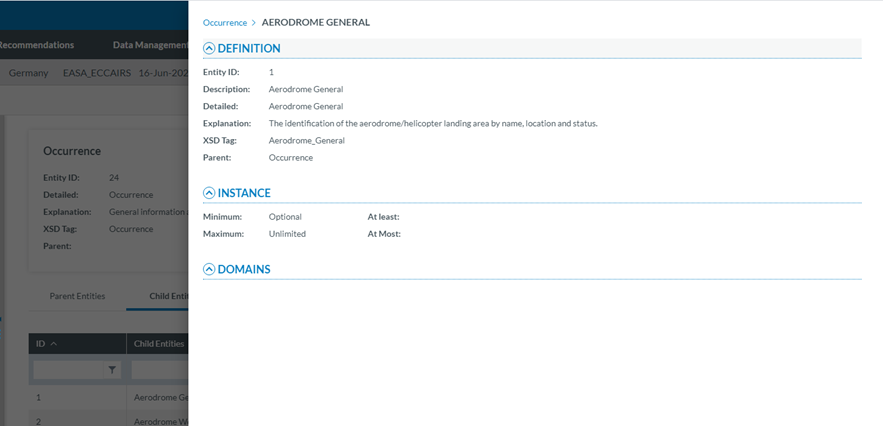
<span lang="EN-GB">A slide-in panel with the element information will be displayed when clicking on the' eye' icon. The National Security Administrator has to click outside the panel to close it and go back to the previous screen.</span>

[![image.png](https://help.ci-aviationreporting.eu/uploads/images/gallery/2025-11/scaled-1680-/yoNimage.png)](https://help.ci-aviationreporting.eu/uploads/images/gallery/2025-11/yoNimage.png)

<span lang="EN-GB" style="mso-ansi-language: EN-GB; mso-fareast-language: EN-GB;"> </span>

### <span style="mso-bookmark: _Toc170415815;"><span style="mso-fareast-font-family: Calibri; mso-bidi-font-family: Calibri;"><span style="mso-list: Ignore;">4.2.3. T</span></span>axonomy structure</span>

<span lang="EN-GB">ECCAIRS and SRIS Taxonomies have the same structure:</span>

<span lang="EN-GB" style="font-family: Symbol; mso-fareast-font-family: Symbol; mso-bidi-font-family: Symbol; color: #1b3891; mso-themecolor: text1;"><span style="mso-list: Ignore;">·<span style="font: 7.0pt 'Times New Roman';"> </span></span></span><span lang="EN-GB">Entities</span>

<span lang="EN-GB" style="font-family: Symbol; mso-fareast-font-family: Symbol; mso-bidi-font-family: Symbol; color: #1b3891; mso-themecolor: text1;"><span style="mso-list: Ignore;">·<span style="font: 7.0pt 'Times New Roman';"> </span></span></span><span lang="EN-GB">Attributes</span>

<span lang="EN-GB" style="font-family: Symbol; mso-fareast-font-family: Symbol; mso-bidi-font-family: Symbol; color: #1b3891; mso-themecolor: text1;"><span style="mso-list: Ignore;">·<span style="font: 7.0pt 'Times New Roman';"> </span></span></span><span lang="EN-GB">Value Lists</span>

<span lang="EN-GB" style="font-family: Symbol; mso-fareast-font-family: Symbol; mso-bidi-font-family: Symbol; color: #1b3891; mso-themecolor: text1;"><span style="mso-list: Ignore;">·<span style="font: 7.0pt 'Times New Roman';"> </span></span></span><span lang="EN-GB">Values</span>

#### <span style="mso-fareast-font-family: Calibri; mso-bidi-font-family: Calibri;"><span style="mso-list: Ignore;">4.2.3.1.<span style="font: 7.0pt 'Times New Roman';"> </span></span></span>Entities

<span lang="EN-GB" style="font-family: Symbol; mso-fareast-font-family: Symbol; mso-bidi-font-family: Symbol; color: #1b3891; mso-themecolor: text1;"><span style="mso-list: Ignore;">·<span style="font: 7.0pt 'Times New Roman';"> </span></span></span><span lang="EN-GB">Entities are used to represent items to which a set of Attributes can be associated. </span>

<span lang="EN-GB" style="font-family: Symbol; mso-fareast-font-family: Symbol; mso-bidi-font-family: Symbol; color: #1b3891; mso-themecolor: text1;"><span style="mso-list: Ignore;">·<span style="font: 7.0pt 'Times New Roman';"> </span></span></span><span lang="EN-GB">An Entity can be, for example, the “Aircraft" involved in the incident-accident or the related “Events" description.</span>

<span lang="EN-GB" style="font-family: Symbol; mso-fareast-font-family: Symbol; mso-bidi-font-family: Symbol; color: #1b3891; mso-themecolor: text1;"><span style="mso-list: Ignore;">·<span style="font: 7.0pt 'Times New Roman';"> </span></span></span><span lang="EN-GB">There may be multiple instances of an Entity since more than one of these items can be involved in an occurrence.</span>

<span lang="EN-GB" style="font-family: Symbol; mso-fareast-font-family: Symbol; mso-bidi-font-family: Symbol; color: #1b3891; mso-themecolor: text1;"><span style="mso-list: Ignore;">·<span style="font: 7.0pt 'Times New Roman';"> </span></span></span><span lang="EN-GB">Entities may have child entities: “Engine" is child Entity of the “Aircraft" Entity.</span>

<span lang="EN-GB" style="font-family: Symbol; mso-fareast-font-family: Symbol; mso-bidi-font-family: Symbol; color: #1b3891; mso-themecolor: text1;"><span style="mso-list: Ignore;">·<span style="font: 7.0pt 'Times New Roman';"> </span></span></span><span lang="EN-GB">Entities can be linked to other entities.</span>

#### <span style="mso-fareast-font-family: Calibri; mso-bidi-font-family: Calibri;"><span style="mso-list: Ignore;">4.2.3.2.<span style="font: 7.0pt 'Times New Roman';"> </span></span></span>Entities information

<span lang="EN-GB">Entities in the Taxonomy tree are marked with </span>[![image.png](https://help.ci-aviationreporting.eu/uploads/images/gallery/2025-11/scaled-1680-/Okcimage.png) ](https://help.ci-aviationreporting.eu/uploads/images/gallery/2025-11/Okcimage.png)<span lang="EN-GB">icon. When the Entity is a Linked Entity, it is also marked in green colour.</span>

<span lang="EN-GB">The following information will be displayed in the right side of the screen when the National Security Administrator clicks on an Entity in the Taxonomy tree:</span>

<span lang="EN-GB" style="font-family: Symbol; mso-fareast-font-family: Symbol; mso-bidi-font-family: Symbol; color: #1b3891; mso-themecolor: text1;"><span style="mso-list: Ignore;">·<span style="font: 7.0pt 'Times New Roman';"> </span></span></span><span lang="EN-GB">Entity information: A brief summary of the selected Entity</span>

<span lang="EN-GB" style="font-family: Symbol; mso-fareast-font-family: Symbol; mso-bidi-font-family: Symbol; color: #1b3891; mso-themecolor: text1;"><span style="mso-list: Ignore;">·<span style="font: 7.0pt 'Times New Roman';"> </span></span></span><span lang="EN-GB">Parent Entities: The list of its parent Entities</span>

<span lang="EN-GB" style="font-family: Symbol; mso-fareast-font-family: Symbol; mso-bidi-font-family: Symbol; color: #1b3891; mso-themecolor: text1;"><span style="mso-list: Ignore;">·<span style="font: 7.0pt 'Times New Roman';"> </span></span></span><span lang="EN-GB">Child Entities: The list of its children Entities</span>

<span lang="EN-GB" style="font-family: Symbol; mso-fareast-font-family: Symbol; mso-bidi-font-family: Symbol; color: #1b3891; mso-themecolor: text1;"><span style="mso-list: Ignore;">·<span style="font: 7.0pt 'Times New Roman';"> </span></span></span><span lang="EN-GB">Attributes. The list of its Attributes</span>

<span lang="EN-GB">The National Security Administrator have to click on each tab (Parent Entities, Child Entities, Attributes) to view its information.</span>

[![image.png](https://help.ci-aviationreporting.eu/uploads/images/gallery/2025-11/scaled-1680-/bSRimage.png)](https://help.ci-aviationreporting.eu/uploads/images/gallery/2025-11/bSRimage.png)

<span lang="EN-GB" style="mso-ansi-language: EN-GB; mso-fareast-language: EN-GB;"> </span>

#### <span style="mso-fareast-font-family: Calibri; mso-bidi-font-family: Calibri;"><span style="mso-list: Ignore;">4.2.3.3.<span style="font-family: Times New Roman; font-size: xx-small;"> </span></span></span>Attributes

<span lang="EN-GB">Attributes describe properties/values associated to an Entity. </span>

<span lang="EN-GB">An Attribute of the “Aircraft” Entity is, for instance, its "manufacturer/model".</span>

<span lang="EN-GB">Attributes can have single or multiple values.</span>

<span lang="EN-GB">Attributes can be of the following types:</span>

<span lang="EN-GB" style="font-family: Symbol; mso-fareast-font-family: Symbol; mso-bidi-font-family: Symbol; color: #1b3891; mso-themecolor: text1;"><span style="mso-list: Ignore;">·<span style="font: 7.0pt 'Times New Roman';"> </span></span></span><span lang="EN-GB">Number</span>

<span lang="EN-GB" style="font-family: Symbol; mso-fareast-font-family: Symbol; mso-bidi-font-family: Symbol; color: #1b3891; mso-themecolor: text1;"><span style="mso-list: Ignore;">·<span style="font: 7.0pt 'Times New Roman';"> </span></span></span><span lang="EN-GB">Decimals</span>

<span lang="EN-GB" style="font-family: Symbol; mso-fareast-font-family: Symbol; mso-bidi-font-family: Symbol; color: #1b3891; mso-themecolor: text1;"><span style="mso-list: Ignore;">·<span style="font: 7.0pt 'Times New Roman';"> </span></span></span><span lang="EN-GB">Text</span>

<span lang="EN-GB" style="font-family: Symbol; mso-fareast-font-family: Symbol; mso-bidi-font-family: Symbol; color: #1b3891; mso-themecolor: text1;"><span style="mso-list: Ignore;">·<span style="font: 7.0pt 'Times New Roman';"> </span></span></span><span lang="EN-GB">Alphanumeric</span>

<span lang="EN-GB" style="font-family: Symbol; mso-fareast-font-family: Symbol; mso-bidi-font-family: Symbol; color: #1b3891; mso-themecolor: text1;"><span style="mso-list: Ignore;">·<span style="font: 7.0pt 'Times New Roman';"> </span></span></span><span lang="EN-GB">Date</span>

<span lang="EN-GB" style="font-family: Symbol; mso-fareast-font-family: Symbol; mso-bidi-font-family: Symbol; color: #1b3891; mso-themecolor: text1;"><span style="mso-list: Ignore;">·<span style="font: 7.0pt 'Times New Roman';"> </span></span></span><span lang="EN-GB">Time</span>

<span lang="EN-GB" style="font-family: Symbol; mso-fareast-font-family: Symbol; mso-bidi-font-family: Symbol; color: #1b3891; mso-themecolor: text1;"><span style="mso-list: Ignore;">·<span style="font: 7.0pt 'Times New Roman';"> </span></span></span><span lang="EN-GB">DateTime</span>

<span lang="EN-GB" style="font-family: Symbol; mso-fareast-font-family: Symbol; mso-bidi-font-family: Symbol; color: #1b3891; mso-themecolor: text1;"><span style="mso-list: Ignore;">·<span style="font: 7.0pt 'Times New Roman';"> </span></span></span><span lang="EN-GB">Longitude</span>

<span lang="EN-GB" style="font-family: Symbol; mso-fareast-font-family: Symbol; mso-bidi-font-family: Symbol; color: #1b3891; mso-themecolor: text1;"><span style="mso-list: Ignore;">·<span style="font: 7.0pt 'Times New Roman';"> </span></span></span><span lang="EN-GB">Latitude</span>

<span lang="EN-GB" style="font-family: Symbol; mso-fareast-font-family: Symbol; mso-bidi-font-family: Symbol; color: #1b3891; mso-themecolor: text1;"><span style="mso-list: Ignore;">·<span style="font: 7.0pt 'Times New Roman';"> </span></span></span><span lang="EN-GB">Code</span>

<span lang="EN-GB" style="font-family: Symbol; mso-fareast-font-family: Symbol; mso-bidi-font-family: Symbol; color: #1b3891; mso-themecolor: text1;"><span style="mso-list: Ignore;">·<span style="font: 7.0pt 'Times New Roman';"> </span></span></span><span lang="EN-GB">Code and Additional Text</span>

<span lang="EN-GB" style="font-family: Symbol; mso-fareast-font-family: Symbol; mso-bidi-font-family: Symbol; color: #1b3891; mso-themecolor: text1;"><span style="mso-list: Ignore;">·<span style="font: 7.0pt 'Times New Roman';"> </span></span></span><span lang="EN-GB">Code or Alternative Text</span>

<span lang="EN-GB" style="font-family: Symbol; mso-fareast-font-family: Symbol; mso-bidi-font-family: Symbol; color: #1b3891; mso-themecolor: text1;"><span style="mso-list: Ignore;">·<span style="font: 7.0pt 'Times New Roman';"> </span></span></span><span lang="EN-GB">ECCAIRS Resource Locator</span>

<span lang="EN-GB" style="font-family: Symbol; mso-fareast-font-family: Symbol; mso-bidi-font-family: Symbol; color: #1b3891; mso-themecolor: text1;"><span style="mso-list: Ignore;">·<span style="font: 7.0pt 'Times New Roman';"> </span></span></span><span lang="EN-GB">ECCAIRS Data Link</span>

<span lang="EN-GB" style="font-family: Symbol; mso-fareast-font-family: Symbol; mso-bidi-font-family: Symbol; color: #1b3891; mso-themecolor: text1;"><span style="mso-list: Ignore;">·<span style="font: 7.0pt 'Times New Roman';"> </span></span></span><span lang="EN-GB">ECCAIRS Embedded Data</span>

#### <span style="mso-fareast-font-family: Calibri; mso-bidi-font-family: Calibri;"><span style="mso-list: Ignore;">4.2.3.4.<span style="font-family: Times New Roman; font-size: xx-small;"> </span></span></span>Attributes information

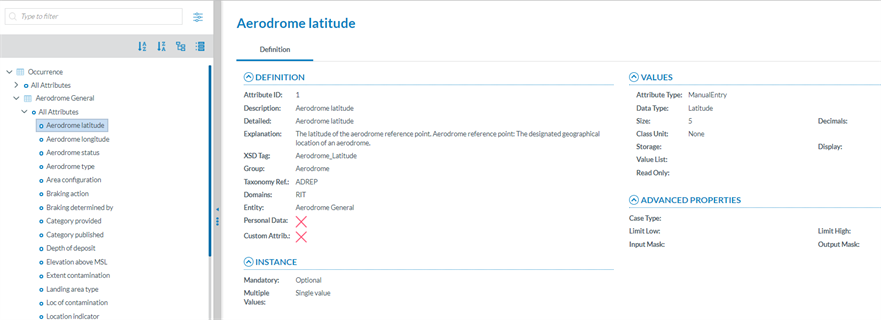
<span lang="EN-GB">The Attributes are marked with </span>[![image.png](https://help.ci-aviationreporting.eu/uploads/images/gallery/2025-11/scaled-1680-/tMLimage.png) ](https://help.ci-aviationreporting.eu/uploads/images/gallery/2025-11/tMLimage.png)<span lang="EN-GB">icon in the Taxonomy tree.</span>

<span lang="EN-GB">The National Security Administrator can view the information of an Attribute from two places in the Taxonomy Browser:</span>

<span lang="EN-GB" style="font-family: Symbol; mso-fareast-font-family: Symbol; mso-bidi-font-family: Symbol; color: #1b3891; mso-themecolor: text1;"><span style="mso-list: Ignore;">·<span style="font: 7.0pt 'Times New Roman';"> </span></span></span><span lang="EN-GB">Finding it on the Taxonomy tree and clicking on it.</span>

[![image.png](https://help.ci-aviationreporting.eu/uploads/images/gallery/2025-11/scaled-1680-/CvXimage.png)](https://help.ci-aviationreporting.eu/uploads/images/gallery/2025-11/CvXimage.png)

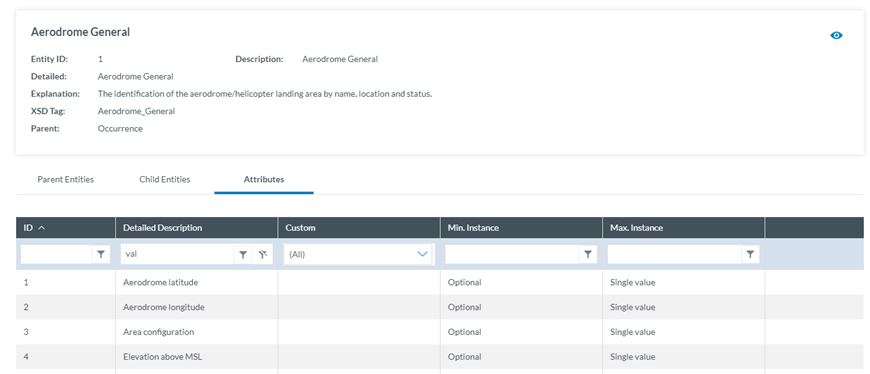
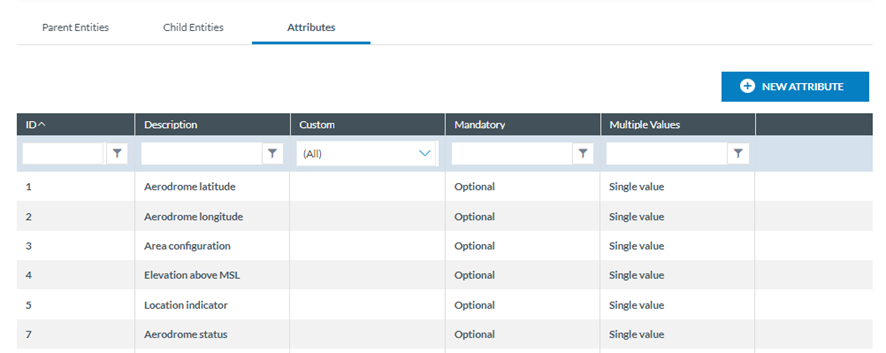
<span lang="EN-GB" style="font-family: Symbol; mso-fareast-font-family: Symbol; mso-bidi-font-family: Symbol; color: #1b3891; mso-themecolor: text1;"><span>·<span style="font: 7.0pt 'Times New Roman';"> </span></span></span><span lang="EN-GB">Selecting the Entity the Attribute belongs to and clicking on the 'Attribute' tab. The National Security Administrator will see all the Attributes of the selected Entity.</span>

[![image.png](https://help.ci-aviationreporting.eu/uploads/images/gallery/2025-11/scaled-1680-/l85image.png)](https://help.ci-aviationreporting.eu/uploads/images/gallery/2025-11/l85image.png)

<span lang="EN-GB" style="mso-ansi-language: EN-GB; mso-fareast-language: EN-GB;"> </span>

<span lang="EN-GB">Click on the 'Eye' icon to view the detailed information.</span>

<span lang="EN-GB" style="font-family: Symbol; mso-fareast-font-family: Symbol; mso-bidi-font-family: Symbol; color: #1b3891; mso-themecolor: text1;"><span style="mso-list: Ignore;">·<span style="font: 7.0pt 'Times New Roman';"> </span></span></span><span lang="EN-GB">Definition tab:</span>

[![image.png](https://help.ci-aviationreporting.eu/uploads/images/gallery/2025-11/scaled-1680-/YLVimage.png)](https://help.ci-aviationreporting.eu/uploads/images/gallery/2025-11/YLVimage.png)

<span lang="EN-GB" style="mso-ansi-language: EN-GB; mso-fareast-language: EN-GB;"> </span>

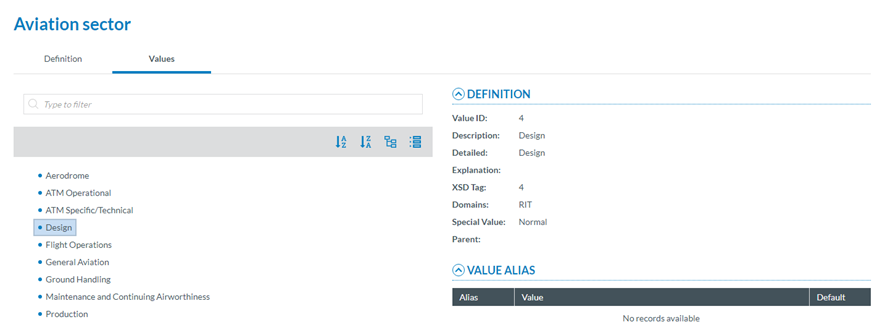
<span lang="EN-GB" style="font-family: Symbol; mso-fareast-font-family: Symbol; mso-bidi-font-family: Symbol; color: #1b3891; mso-themecolor: text1;"><span style="mso-list: Ignore;">·<span style="font: 7.0pt 'Times New Roman';"> </span></span></span><span lang="EN-GB">Values tab: </span>

<span lang="EN-GB">If the Attribute has a predefined value List. In the Values tree, the National Security Administrator can navigate through the values by clicking on each element. The selected Value will display its definition and the Values can be searched by Taxonomy code or Description and ordered alphabetically.</span>

[![image.png](https://help.ci-aviationreporting.eu/uploads/images/gallery/2025-11/scaled-1680-/zbjimage.png)](https://help.ci-aviationreporting.eu/uploads/images/gallery/2025-11/zbjimage.png)

### <span style="mso-bookmark: _Toc170415816;"><span style="mso-bookmark: _Toc183708156;"><span style="mso-fareast-font-family: Calibri; mso-bidi-font-family: Calibri;"><span style="mso-list: Ignore;">4.2.4.<span style="font-family: Times New Roman; font-size: xx-small;"> </span></span></span></span></span><span style="mso-bookmark: _Toc170415816;"><span style="mso-bookmark: _Toc183708156;">Taxonomy Values Lists</span></span>

<span lang="EN-GB">The list of predefined values an Attribute can have is defined in a Value List. The Value List can have multiple level where values are organized in a tree mode. Value list can have Alias.</span>

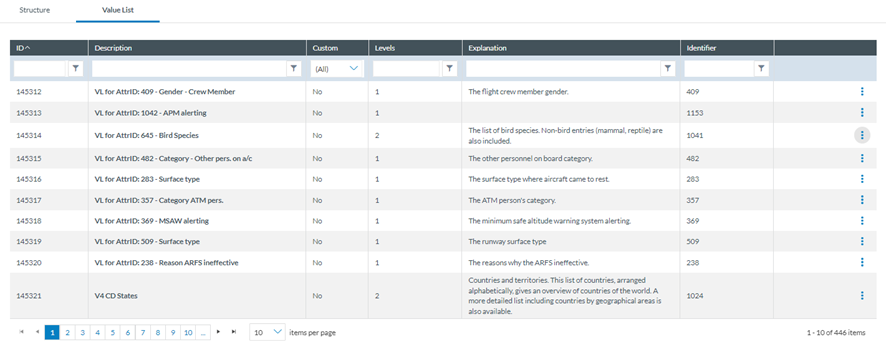
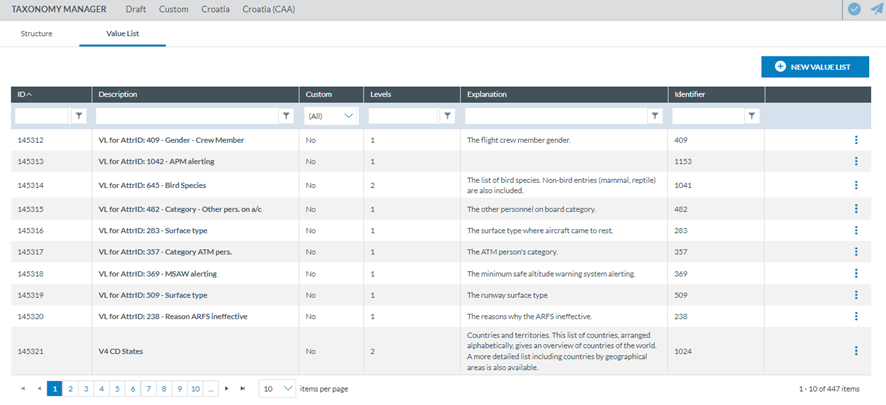
<span lang="EN-GB">The National Security Administrator have to click on the Taxonomy Value Lists tab to obtain the list of Value Lists of the Taxonomy:</span>

[![image.png](https://help.ci-aviationreporting.eu/uploads/images/gallery/2025-11/scaled-1680-/xfFimage.png)](https://help.ci-aviationreporting.eu/uploads/images/gallery/2025-11/xfFimage.png)

<span lang="EN-GB" style="mso-ansi-language: EN-GB; mso-fareast-language: EN-GB;"> </span>

<span lang="EN-GB">The table of Value Lists provides the following columns that also work as filters:</span>

<span lang="EN-GB" style="font-family: Symbol; mso-fareast-font-family: Symbol; mso-bidi-font-family: Symbol; color: #1b3891; mso-themecolor: text1;"><span style="mso-list: Ignore;">·<span style="font: 7.0pt 'Times New Roman';"> </span></span></span><span lang="EN-GB">ID: it is the internal id automatically generated and unique for each Value List</span>

<span lang="EN-GB" style="font-family: Symbol; mso-fareast-font-family: Symbol; mso-bidi-font-family: Symbol; color: #1b3891; mso-themecolor: text1;"><span style="mso-list: Ignore;">·<span style="font: 7.0pt 'Times New Roman';"> </span></span></span><span lang="EN-GB">Description: unique for each Value List and mandatory</span>

<span lang="EN-GB" style="font-family: Symbol; mso-fareast-font-family: Symbol; mso-bidi-font-family: Symbol; color: #1b3891; mso-themecolor: text1;"><span style="mso-list: Ignore;">·<span style="font: 7.0pt 'Times New Roman';"> </span></span></span><span lang="EN-GB">Custom: for National Security Administrators it is always ’No’. Only Authorities can manage Custom Value Lists</span>

<span lang="EN-GB" style="font-family: Symbol; mso-fareast-font-family: Symbol; mso-bidi-font-family: Symbol; color: #1b3891; mso-themecolor: text1;"><span style="mso-list: Ignore;">·<span style="font: 7.0pt 'Times New Roman';"> </span></span></span><span lang="EN-GB">Levels: number of levels of the Value List</span>

<span lang="EN-GB" style="font-family: Symbol; mso-fareast-font-family: Symbol; mso-bidi-font-family: Symbol; color: #1b3891; mso-themecolor: text1;"><span style="mso-list: Ignore;">·<span style="font: 7.0pt 'Times New Roman';"> </span></span></span><span lang="EN-GB">Explanation: optional</span>

<span lang="EN-GB" style="font-family: Symbol; mso-fareast-font-family: Symbol; mso-bidi-font-family: Symbol; color: #1b3891; mso-themecolor: text1;"><span style="mso-list: Ignore;">·<span style="font: 7.0pt 'Times New Roman';"> </span></span></span><span lang="EN-GB">Identifier: unique for each Value List which does not change with Taxonomy releases</span>

<span lang="EN-GB">The last section of each row provides a 3-dots menu with the options to be explained.</span>

[![image.png](https://help.ci-aviationreporting.eu/uploads/images/gallery/2025-11/scaled-1680-/FPfimage.png)](https://help.ci-aviationreporting.eu/uploads/images/gallery/2025-11/FPfimage.png)

<span lang="EN-GB" style="mso-ansi-language: EN-GB; mso-fareast-language: EN-GB;"> </span>

#### <span style="mso-fareast-font-family: Calibri; mso-bidi-font-family: Calibri;"><span style="mso-list: Ignore;">4.2.4.1. </span></span>View a Value List

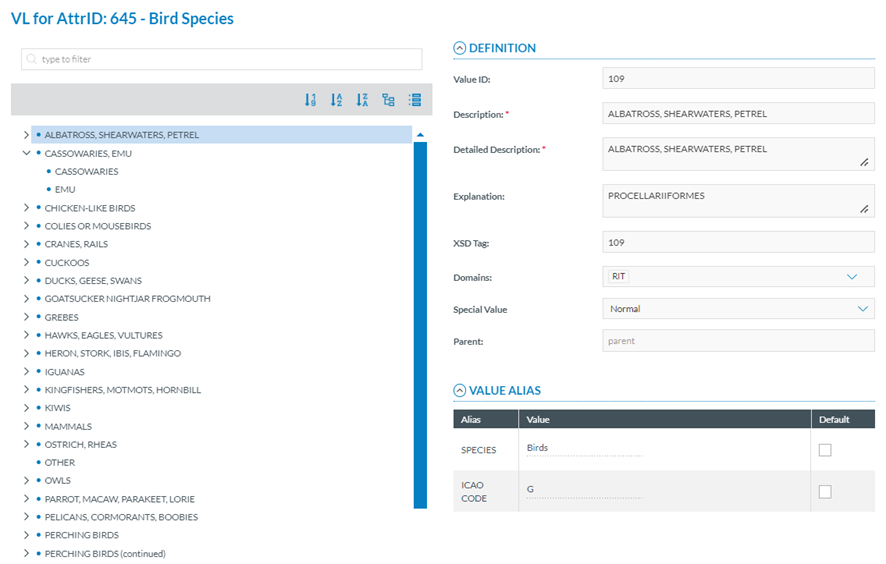
<span lang="EN-GB">National Security Administrators have to click on ‘View Value List’ option of the 3-dots menu of the specific Value List and the system will display the View page:</span>

[![image.png](https://help.ci-aviationreporting.eu/uploads/images/gallery/2025-11/scaled-1680-/eeGimage.png)](https://help.ci-aviationreporting.eu/uploads/images/gallery/2025-11/eeGimage.png)

<span lang="EN-GB" style="mso-ansi-language: EN-GB;"><span style="mso-spacerun: yes;"> </span></span>It displays the Value tree in the left panel according to the Value List levels.

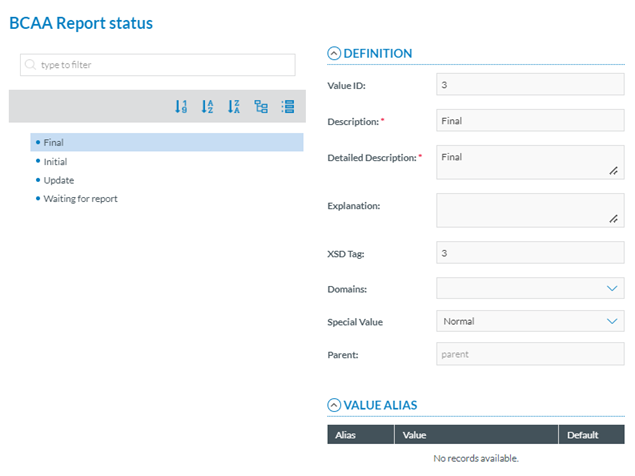
<span lang="EN-GB">National Security Administrators have to click on one of the Value of the Value tree and the system will show its details in the right panel:</span>

<span lang="EN-GB">Definition:</span>

<span lang="EN-GB" style="font-family: Symbol; mso-fareast-font-family: Symbol; mso-bidi-font-family: Symbol; color: #1b3891; mso-themecolor: text1;"><span style="mso-list: Ignore;">·<span style="font: 7.0pt 'Times New Roman';"> </span></span></span><span lang="EN-GB">Value ID: identifier of the Value in the Value List. unique for each Value in the Value List which does not change with Taxonomy releases</span>

<span lang="EN-GB" style="font-family: Symbol; mso-fareast-font-family: Symbol; mso-bidi-font-family: Symbol; color: #1b3891; mso-themecolor: text1;"><span style="mso-list: Ignore;">·<span style="font: 7.0pt 'Times New Roman';"> </span></span></span><span lang="EN-GB">Description: mandatory free text field</span>

<span lang="EN-GB" style="font-family: Symbol; mso-fareast-font-family: Symbol; mso-bidi-font-family: Symbol; color: #1b3891; mso-themecolor: text1;"><span style="mso-list: Ignore;">·<span style="font: 7.0pt 'Times New Roman';"> </span></span></span><span lang="EN-GB">Detailed Description: mandatory free text field</span>

<span lang="EN-GB" style="font-family: Symbol; mso-fareast-font-family: Symbol; mso-bidi-font-family: Symbol; color: #1b3891; mso-themecolor: text1;"><span style="mso-list: Ignore;">·<span style="font: 7.0pt 'Times New Roman';"> </span></span></span><span lang="EN-GB">XSD Tag: it reproduces the information of the Value ID</span>

<span lang="EN-GB" style="font-family: Symbol; mso-fareast-font-family: Symbol; mso-bidi-font-family: Symbol; color: #1b3891; mso-themecolor: text1;"><span style="mso-list: Ignore;">·<span style="font: 7.0pt 'Times New Roman';"> </span></span></span><span lang="EN-GB">Domains: optional drop-down menu with the Domains to be selected</span>

<span lang="EN-GB" style="font-family: Symbol; mso-fareast-font-family: Symbol; mso-bidi-font-family: Symbol; color: #1b3891; mso-themecolor: text1;"><span style="mso-list: Ignore;">·<span style="font: 7.0pt 'Times New Roman';"> </span></span></span><span lang="EN-GB">Special Value: drop-down menu with the following options:</span>

<span lang="EN-GB" style="font-family: Symbol; mso-fareast-font-family: Symbol; mso-bidi-font-family: Symbol; color: #1b3891; mso-themecolor: text1;"><span style="mso-list: Ignore;">·<span style="font: 7.0pt 'Times New Roman';"> </span></span></span><span lang="EN-GB">Normal: Selected by default</span>

<span lang="EN-GB" style="font-family: Symbol; mso-fareast-font-family: Symbol; mso-bidi-font-family: Symbol; color: #1b3891; mso-themecolor: text1;"><span style="mso-list: Ignore;">·<span style="font: 7.0pt 'Times New Roman';"> </span></span></span><span lang="EN-GB">None</span>

<span lang="EN-GB" style="font-family: Symbol; mso-fareast-font-family: Symbol; mso-bidi-font-family: Symbol; color: #1b3891; mso-themecolor: text1;"><span style="mso-list: Ignore;">·<span style="font: 7.0pt 'Times New Roman';"> </span></span></span><span lang="EN-GB">Other</span>

<span lang="EN-GB" style="font-family: Symbol; mso-fareast-font-family: Symbol; mso-bidi-font-family: Symbol; color: #1b3891; mso-themecolor: text1;"><span style="mso-list: Ignore;">·<span style="font: 7.0pt 'Times New Roman';"> </span></span></span><span lang="EN-GB">Unknown</span>

<span lang="EN-GB" style="font-family: Symbol; mso-fareast-font-family: Symbol; mso-bidi-font-family: Symbol; color: #1b3891; mso-themecolor: text1;"><span style="mso-list: Ignore;">·<span style="font: 7.0pt 'Times New Roman';"> </span></span></span><span lang="EN-GB">Parent: it is not editable</span>

<span lang="EN-GB">Value Alias:</span>

<span lang="EN-GB" style="font-family: Symbol; mso-fareast-font-family: Symbol; mso-bidi-font-family: Symbol; color: #1b3891; mso-themecolor: text1;"><span style="mso-list: Ignore;">·<span style="font: 7.0pt 'Times New Roman';"> </span></span></span><span lang="EN-GB">Alias: name of the Alias</span>

<span lang="EN-GB" style="font-family: Symbol; mso-fareast-font-family: Symbol; mso-bidi-font-family: Symbol; color: #1b3891; mso-themecolor: text1;"><span style="mso-list: Ignore;">·<span style="font: 7.0pt 'Times New Roman';"> </span></span></span><span lang="EN-GB">Value: Alias value for the given Value</span>

<span lang="EN-GB" style="font-family: Symbol; mso-fareast-font-family: Symbol; mso-bidi-font-family: Symbol; color: #1b3891; mso-themecolor: text1;"><span style="mso-list: Ignore;">·<span style="font: 7.0pt 'Times New Roman';"> </span></span></span><span lang="EN-GB">Default: Yes/No</span>

#### <span style="mso-fareast-font-family: Calibri; mso-bidi-font-family: Calibri;"><span style="mso-list: Ignore;">4.2.4.2. V</span></span>iew Value List Properties

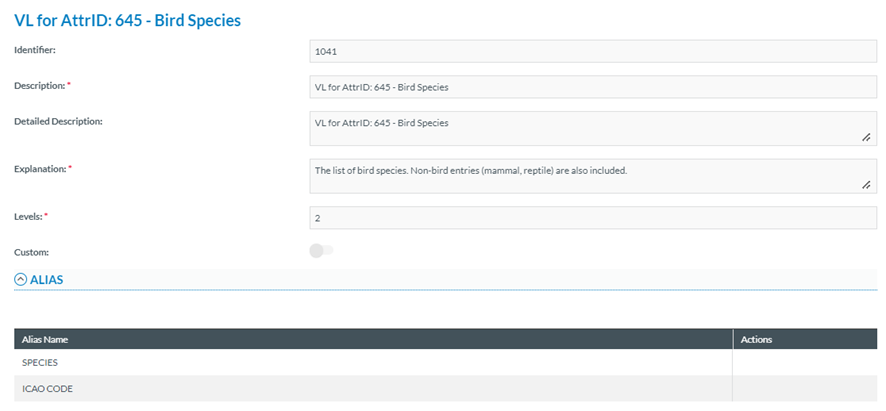
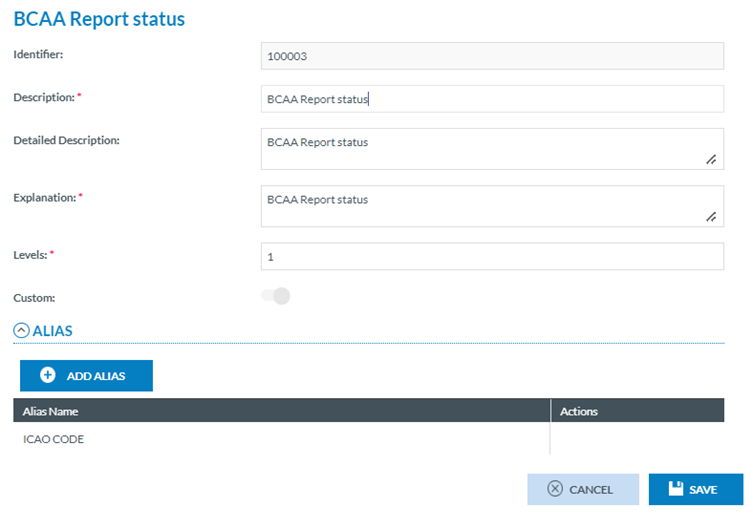
<span lang="EN-GB">National Security Administrators have to click on ‘View Value List Properties’ option of the 3-dots menu of the specific Value List and the system will display the View Value List Properties page:</span>

[![image.png](https://help.ci-aviationreporting.eu/uploads/images/gallery/2025-11/scaled-1680-/kR9image.png)](https://help.ci-aviationreporting.eu/uploads/images/gallery/2025-11/kR9image.png)

<span lang="EN-GB" style="mso-ansi-language: EN-GB; mso-fareast-language: EN-GB;"> </span>

<span lang="EN-GB">It provides the following fields:</span>

<span lang="EN-GB" style="font-family: Symbol; mso-fareast-font-family: Symbol; mso-bidi-font-family: Symbol; color: #1b3891; mso-themecolor: text1;"><span style="mso-list: Ignore;">·<span style="font: 7.0pt 'Times New Roman';"> </span></span></span><span lang="EN-GB">Identifier: unique for each Value List which does not change with Taxonomy releases</span>

<span lang="EN-GB" style="font-family: Symbol; mso-fareast-font-family: Symbol; mso-bidi-font-family: Symbol; color: #1b3891; mso-themecolor: text1;"><span style="mso-list: Ignore;">·<span style="font: 7.0pt 'Times New Roman';"> </span></span></span><span lang="EN-GB">Description: name of the Value List</span>

<span lang="EN-GB" style="font-family: Symbol; mso-fareast-font-family: Symbol; mso-bidi-font-family: Symbol; color: #1b3891; mso-themecolor: text1;"><span style="mso-list: Ignore;">·<span style="font: 7.0pt 'Times New Roman';"> </span></span></span><span lang="EN-GB">Detailed Description: optional free text field</span>

<span lang="EN-GB" style="font-family: Symbol; mso-fareast-font-family: Symbol; mso-bidi-font-family: Symbol; color: #1b3891; mso-themecolor: text1;"><span style="mso-list: Ignore;">·<span style="font: 7.0pt 'Times New Roman';"> </span></span></span><span lang="EN-GB">Explanation: mandatory free text field</span>

<span lang="EN-GB" style="font-family: Symbol; mso-fareast-font-family: Symbol; mso-bidi-font-family: Symbol; color: #1b3891; mso-themecolor: text1;"><span style="mso-list: Ignore;">·<span style="font: 7.0pt 'Times New Roman';"> </span></span></span><span lang="EN-GB">Levels: number of levels</span>

<span lang="EN-GB" style="font-family: Symbol; mso-fareast-font-family: Symbol; mso-bidi-font-family: Symbol; color: #1b3891; mso-themecolor: text1;"><span style="mso-list: Ignore;">·<span style="font: 7.0pt 'Times New Roman';"> </span></span></span><span lang="EN-GB">Custom toggle: not applicable for Central Taxonomies Value Lists</span>

<span lang="EN-GB">Below the fields there is the Alias information with the structure for the table of Alias (Alias Name and Actions columns).</span>

# 4.3. View Release Notes

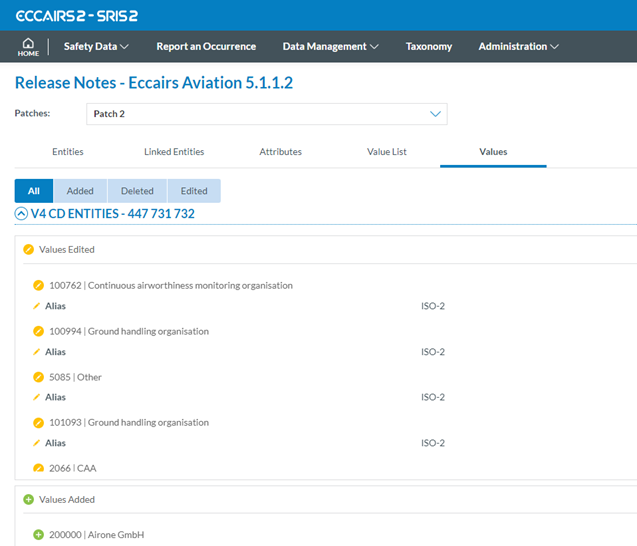
<span lang="EN-GB">It opens the Release Notes of the specific Taxonomy:</span><span lang="EN-GB" style="mso-ansi-language: EN-GB;"><span style="mso-spacerun: yes;"> </span></span><span lang="EN-GB" style="mso-ansi-language: EN-GB; mso-fareast-language: EN-GB;"> </span><span lang="EN-GB" style="mso-ansi-language: EN-GB;"><span style="mso-spacerun: yes;"> </span></span>

[![image.png](https://help.ci-aviationreporting.eu/uploads/images/gallery/2025-11/scaled-1680-/HuLimage.png)](https://help.ci-aviationreporting.eu/uploads/images/gallery/2025-11/HuLimage.png)

<span lang="EN-GB">The page provides the following tabs with the corresponding release notes:</span>

<span lang="EN-GB" style="font-family: Symbol; mso-fareast-font-family: Symbol; mso-bidi-font-family: Symbol; color: #1b3891; mso-themecolor: text1;"><span style="mso-list: Ignore;">·<span style="font: 7.0pt 'Times New Roman';"> </span></span></span><span lang="EN-GB">Entities: added, changed and delete entities</span>

<span style="mso-bookmark: _Hlk170400256;"><span lang="EN-GB" style="font-family: Symbol; mso-fareast-font-family: Symbol; mso-bidi-font-family: Symbol; color: #1b3891; mso-themecolor: text1;"><span style="mso-list: Ignore;">·<span style="font: 7.0pt 'Times New Roman';"> </span></span></span><span lang="EN-GB">Linked entities: added or delete links between entities</span></span>

<span style="mso-bookmark: _Hlk170400256;"><span lang="EN-GB" style="font-family: Symbol; mso-fareast-font-family: Symbol; mso-bidi-font-family: Symbol; color: #1b3891; mso-themecolor: text1;"><span style="mso-list: Ignore;">·<span style="font: 7.0pt 'Times New Roman';"> </span></span></span><span lang="EN-GB">Attributes: added, changed and deleted Attributes</span></span>

<span style="mso-bookmark: _Hlk170400256;"><span lang="EN-GB" style="font-family: Symbol; mso-fareast-font-family: Symbol; mso-bidi-font-family: Symbol; color: #1b3891; mso-themecolor: text1;"><span style="mso-list: Ignore;">·<span style="font: 7.0pt 'Times New Roman';"> </span></span></span><span lang="EN-GB">Value List: added, changed and deleted Value Lists</span></span>

<span style="mso-bookmark: _Hlk170400256;"><span lang="EN-GB" style="font-family: Symbol; mso-fareast-font-family: Symbol; mso-bidi-font-family: Symbol; color: #1b3891; mso-themecolor: text1;"><span style="mso-list: Ignore;">·<span style="font: 7.0pt 'Times New Roman';"> </span></span></span><span lang="EN-GB">Values: added, changed and deleted values in Value Lists</span></span>

# 4.4. Download XML

<span lang="EN-GB">It downloads the Taxonomy in XML format.</span>

[![image.png](https://help.ci-aviationreporting.eu/uploads/images/gallery/2025-11/scaled-1680-/50ximage.png)](https://help.ci-aviationreporting.eu/uploads/images/gallery/2025-11/50ximage.png)

<span lang="EN-GB"> </span>

# 4.5. Download CSV and XSD files

<span lang="EN-GB">It downloads a zip of the Taxonomy in the selected formats.</span>

[![image.png](https://help.ci-aviationreporting.eu/uploads/images/gallery/2025-11/scaled-1680-/INHimage.png)](https://help.ci-aviationreporting.eu/uploads/images/gallery/2025-11/INHimage.png)

<span lang="EN-GB"> </span>

# 4.6. Taxonomy Management

<span lang="EN-GB">As mentioned, National Aviation Authorities and Safety Investigation Authorities can maintain their own Custom Taxonomy, which allows them to adapt their usage of E2 to their own processes.</span>

### <span style="mso-fareast-font-family: Calibri; mso-bidi-font-family: Calibri;"><span style="mso-list: Ignore;">4.6.1.<span style="font-family: Times New Roman; font-size: xx-small;"> </span></span></span>Create a Custom Taxonomy

<span lang="EN-GB">National Security Administrators have to click on ‘Custom Project’ option of the 3-dots menu of the specific Central released Taxonomy of the list, if a Custom released Taxonomy does not exist yet.</span>

<span lang="EN-GB">If a Custom released Taxonomy exists for the Authority, the 'Custom Project' option of the 3-dots menu will be available on it and the system will create a Draft version of that Custom Taxonomy where the changes can be done. </span>

<span lang="EN-GB"> </span>[![image.png](https://help.ci-aviationreporting.eu/uploads/images/gallery/2025-11/scaled-1680-/pjYimage.png)](https://help.ci-aviationreporting.eu/uploads/images/gallery/2025-11/pjYimage.png)

<span lang="EN-GB" style="mso-fareast-language: EN-GB; mso-no-proof: yes;"> </span>

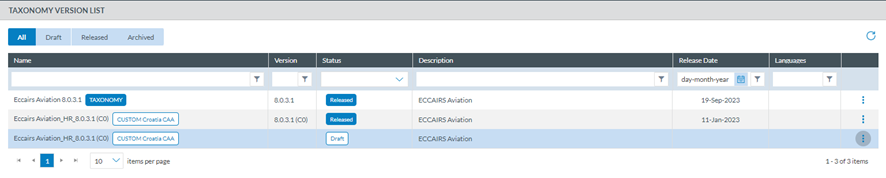
<span lang="EN-GB">Once created, the Draft version of the Custom Taxonomy will be displayed in the list of Taxonomies:</span>

[![image.png](https://help.ci-aviationreporting.eu/uploads/images/gallery/2025-11/scaled-1680-/83Iimage.png)](https://help.ci-aviationreporting.eu/uploads/images/gallery/2025-11/83Iimage.png)

<span lang="EN-GB" style="mso-fareast-language: EN-GB; mso-no-proof: yes;"> </span>

### <span style="mso-fareast-font-family: Calibri; mso-bidi-font-family: Calibri;"><span style="mso-list: Ignore;">4.6.2.</span></span>Taxonomy management - Structure

<span lang="EN-GB">National Security Administrators have to click on ‘Edit Project’ option of the 3-dots menu of the specific Draft Custom Taxonomy of the list. The system will display the editing page:</span>

[![image.png](https://help.ci-aviationreporting.eu/uploads/images/gallery/2025-11/scaled-1680-/H8simage.png)](https://help.ci-aviationreporting.eu/uploads/images/gallery/2025-11/H8simage.png)

<span lang="EN-GB" style="mso-ansi-language: EN-GB; mso-fareast-language: EN-GB;"> </span>

<span lang="EN-GB">At Authority level, only Custom Attributes and Custom Value Lists can be updated.</span>

### <span style="mso-bookmark: _Toc170415822;"><span style="mso-fareast-font-family: Calibri; mso-bidi-font-family: Calibri;"><span style="mso-list: Ignore;">4.6.3. </span></span>Attributes Management</span>

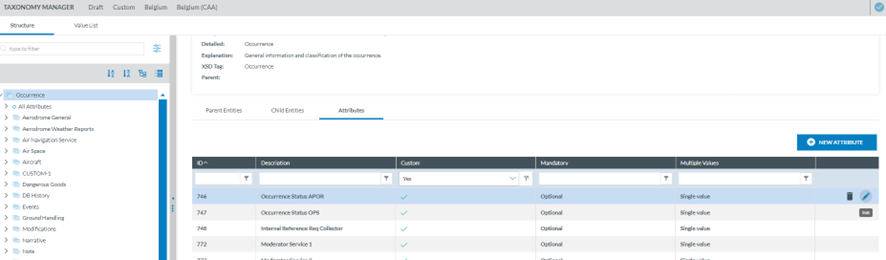
<span lang="EN-GB">National Security Administrators have to click on the Attributes tab of the specific Entity at the Entities information page, and the system will display the table of Central and Custom Attributes defined for that Entity:</span>

[![image.png](https://help.ci-aviationreporting.eu/uploads/images/gallery/2025-11/scaled-1680-/1rcimage.png)](https://help.ci-aviationreporting.eu/uploads/images/gallery/2025-11/1rcimage.png)

<span lang="EN-GB" style="mso-ansi-language: EN-GB; mso-fareast-language: EN-GB;"> </span>

<span lang="EN-GB">Above the table, there is a ‘New Attribute’ button for the Authority to create new Custom Attributes.</span>

<span lang="EN-GB">The table of Attributes provides the following columns that also work as filters:</span>

<span lang="EN-GB" style="font-family: Symbol; mso-fareast-font-family: Symbol; mso-bidi-font-family: Symbol; color: #1b3891; mso-themecolor: text1;"><span style="mso-list: Ignore;">·<span style="font: 7.0pt 'Times New Roman';"> </span></span></span><span lang="EN-GB">ID: automatically generated, mandatory and unique for each Attribute (Taxonomy code)</span>

<span lang="EN-GB" style="font-family: Symbol; mso-fareast-font-family: Symbol; mso-bidi-font-family: Symbol; color: #1b3891; mso-themecolor: text1;"><span style="mso-list: Ignore;">·<span style="font: 7.0pt 'Times New Roman';"> </span></span></span><span lang="EN-GB">Description: unique for each Attribute and mandatory</span>

<span lang="EN-GB" style="font-family: Symbol; mso-fareast-font-family: Symbol; mso-bidi-font-family: Symbol; color: #1b3891; mso-themecolor: text1;"><span style="mso-list: Ignore;">·<span style="font: 7.0pt 'Times New Roman';"> </span></span></span><span lang="EN-GB">Custom: if it is Custom Attribute, it will provide a green tick</span>

<span lang="EN-GB" style="font-family: Symbol; mso-fareast-font-family: Symbol; mso-bidi-font-family: Symbol; color: #1b3891; mso-themecolor: text1;"><span style="mso-list: Ignore;">·<span style="font: 7.0pt 'Times New Roman';"> </span></span></span><span lang="EN-GB">Mandatory: it sets if the Attribute is Mandatory or Optional</span>

<span lang="EN-GB" style="font-family: Symbol; mso-fareast-font-family: Symbol; mso-bidi-font-family: Symbol; color: #1b3891; mso-themecolor: text1;"><span style="mso-list: Ignore;">·<span style="font: 7.0pt 'Times New Roman';"> </span></span></span><span lang="EN-GB">Multiple Values: it sets if the Attribute is singled value, limited or multiple values</span>

<span lang="EN-GB">The last section of each row provides an Edit and a Delete icon.</span>

#### <span style="mso-fareast-font-family: Calibri; mso-bidi-font-family: Calibri;"><span style="mso-list: Ignore;">4.6.3.1.<span style="font-family: Times New Roman; font-size: xx-small;"> </span></span></span>Create a Custom Attribute:

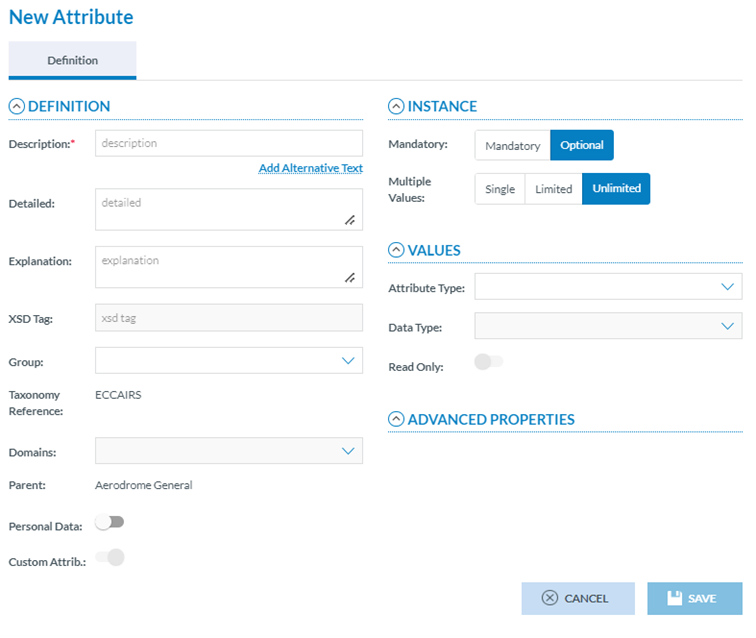
<span lang="EN-GB">National Security Administrators have to click on ‘New Attribute’ button above the table of Attributes and the system will display the New Attribute page:</span>

[![image.png](https://help.ci-aviationreporting.eu/uploads/images/gallery/2025-11/scaled-1680-/darimage.png)](https://help.ci-aviationreporting.eu/uploads/images/gallery/2025-11/darimage.png)

<span lang="EN-GB" style="mso-ansi-language: EN-GB; mso-fareast-language: EN-GB;"> </span>

<span lang="EN-GB">National Security Administrators have to fill in at least the Description which is the only mandatory field.</span>

<span lang="EN-GB">XSD Tag and Type are empty and not editable.</span>

<span lang="EN-GB">The Taxonomy Reference, Domain and the Parent are automatically set and not editable.</span>

<span lang="EN-GB">The Custom Attribute field is not editable and is set to on by default.</span>

<span lang="EN-GB">The rest are optional or editable.</span>

<span lang="EN-GB">Definition Information:</span>

<span lang="EN-GB" style="font-family: Symbol; mso-fareast-font-family: Symbol; mso-bidi-font-family: Symbol; color: #1b3891; mso-themecolor: text1;"><span style="mso-list: Ignore;">·<span style="font: 7.0pt 'Times New Roman';"> </span></span></span><span lang="EN-GB">Detailed: free text field</span>

<span lang="EN-GB" style="font-family: Symbol; mso-fareast-font-family: Symbol; mso-bidi-font-family: Symbol; color: #1b3891; mso-themecolor: text1;"><span style="mso-list: Ignore;">·<span style="font: 7.0pt 'Times New Roman';"> </span></span></span><span lang="EN-GB">Explanation: free text field</span>

<span lang="EN-GB" style="font-family: Symbol; mso-fareast-font-family: Symbol; mso-bidi-font-family: Symbol; color: #1b3891; mso-themecolor: text1;"><span style="mso-list: Ignore;">·<span style="font: 7.0pt 'Times New Roman';"> </span></span></span><span lang="EN-GB">Group: drop-down menu to select among the available groups</span>

<span lang="EN-GB" style="font-family: Symbol; mso-fareast-font-family: Symbol; mso-bidi-font-family: Symbol; color: #1b3891; mso-themecolor: text1;"><span style="mso-list: Ignore;">·<span style="font: 7.0pt 'Times New Roman';"> </span></span></span><span lang="EN-GB">Personal Data toggle: deactivated by default. If activated, the Attribute corresponds to personal data</span>

<span lang="EN-GB">Instance information:</span>

<span lang="EN-GB" style="font-family: Symbol; mso-fareast-font-family: Symbol; mso-bidi-font-family: Symbol; color: #1b3891; mso-themecolor: text1;"><span style="mso-list: Ignore;">·<span style="font: 7.0pt 'Times New Roman';"> </span></span></span><span lang="EN-GB">By default, Optional is set. National Security Administrators can update it to Mandatory.</span>

<span lang="EN-GB" style="font-family: Symbol; mso-fareast-font-family: Symbol; mso-bidi-font-family: Symbol; color: #1b3891; mso-themecolor: text1;"><span style="mso-list: Ignore;">·<span style="font: 7.0pt 'Times New Roman';"> </span></span></span><span lang="EN-GB">Multiple Values: by default, Unlimited Values is set. National Security Administrators can update it to Single or Limited</span>

<span lang="EN-GB">Values Information:</span>

<span lang="EN-GB" style="font-family: Symbol; mso-fareast-font-family: Symbol; mso-bidi-font-family: Symbol; color: #1b3891; mso-themecolor: text1;"><span style="mso-list: Ignore;">·<span style="font: 7.0pt 'Times New Roman';"> </span></span></span><span lang="EN-GB">Attribute Type: drop-down menu to select:</span>

<span lang="EN-GB" style="font-family: Wingdings; mso-fareast-font-family: Wingdings; mso-bidi-font-family: Wingdings; color: #1b3891; mso-themecolor: text1;"><span style="mso-list: Ignore;">ü<span style="font: 7.0pt 'Times New Roman';"> </span></span></span><span lang="EN-GB">Manual Entry</span>

<span lang="EN-GB" style="font-family: Wingdings; mso-fareast-font-family: Wingdings; mso-bidi-font-family: Wingdings; color: #1b3891; mso-themecolor: text1;"><span style="mso-list: Ignore;">ü<span style="font: 7.0pt 'Times New Roman';"> </span></span></span><span lang="EN-GB">Predefined Value List</span>

<span lang="EN-GB" style="font-family: Symbol; mso-fareast-font-family: Symbol; mso-bidi-font-family: Symbol; color: #1b3891; mso-themecolor: text1;"><span style="mso-list: Ignore;">·<span style="font: 7.0pt 'Times New Roman';"> </span></span></span><span lang="EN-GB">Data Type: drop-down menu depending on the Attribute Type to select:</span>

<span style="mso-bookmark: _Hlk170564024;"><span lang="EN-GB" style="font-family: Wingdings; mso-fareast-font-family: Wingdings; mso-bidi-font-family: Wingdings; color: #1b3891; mso-themecolor: text1;"><span style="mso-list: Ignore;">ü<span style="font: 7.0pt 'Times New Roman';"> </span></span></span><span lang="EN-GB">Manual Entry</span></span>

<span style="mso-bookmark: _Hlk170564024;"><span lang="EN-GB" style="mso-bidi-font-family: Calibri; color: #1b3891; mso-themecolor: text1;"><span style="mso-list: Ignore;">o<span style="font: 7.0pt 'Times New Roman';"> </span></span></span><span lang="EN-GB">Alphanumeric</span></span>

<span style="mso-bookmark: _Hlk170564024;"><span lang="EN-GB" style="mso-bidi-font-family: Calibri; color: #1b3891; mso-themecolor: text1;"><span style="mso-list: Ignore;">o<span style="font: 7.0pt 'Times New Roman';"> </span></span></span><span lang="EN-GB">Date</span></span>

<span style="mso-bookmark: _Hlk170564024;"><span lang="EN-GB" style="mso-bidi-font-family: Calibri; color: #1b3891; mso-themecolor: text1;"><span style="mso-list: Ignore;">o<span style="font: 7.0pt 'Times New Roman';"> </span></span></span><span lang="EN-GB">DateTime</span></span>

<span style="mso-bookmark: _Hlk170564024;"><span lang="EN-GB" style="mso-bidi-font-family: Calibri; color: #1b3891; mso-themecolor: text1;"><span style="mso-list: Ignore;">o<span style="font: 7.0pt 'Times New Roman';"> </span></span></span><span lang="EN-GB">Decimals</span></span>

<span style="mso-bookmark: _Hlk170564024;"><span lang="EN-GB" style="mso-bidi-font-family: Calibri; color: #1b3891; mso-themecolor: text1;"><span style="mso-list: Ignore;">o<span style="font: 7.0pt 'Times New Roman';"> </span></span></span><span lang="EN-GB">Eccairs Data Link</span></span>

<span style="mso-bookmark: _Hlk170564024;"><span lang="EN-GB" style="mso-bidi-font-family: Calibri; color: #1b3891; mso-themecolor: text1;"><span style="mso-list: Ignore;">o<span style="font: 7.0pt 'Times New Roman';"> </span></span></span><span lang="EN-GB">Eccairs Embedded Data</span></span>

<span style="mso-bookmark: _Hlk170564024;"><span lang="EN-GB" style="mso-bidi-font-family: Calibri; color: #1b3891; mso-themecolor: text1;"><span style="mso-list: Ignore;">o<span style="font: 7.0pt 'Times New Roman';"> </span></span></span><span lang="EN-GB">Eccairs Reource Locator</span></span>

<span style="mso-bookmark: _Hlk170564024;"><span lang="EN-GB" style="mso-bidi-font-family: Calibri; color: #1b3891; mso-themecolor: text1;"><span style="mso-list: Ignore;">o<span style="font: 7.0pt 'Times New Roman';"> </span></span></span><span lang="EN-GB">Latitude</span></span>

<span style="mso-bookmark: _Hlk170564024;"><span lang="EN-GB" style="mso-bidi-font-family: Calibri; color: #1b3891; mso-themecolor: text1;"><span style="mso-list: Ignore;">o<span style="font: 7.0pt 'Times New Roman';"> </span></span></span><span lang="EN-GB">Longitude</span></span>

<span style="mso-bookmark: _Hlk170564024;"><span lang="EN-GB" style="mso-bidi-font-family: Calibri; color: #1b3891; mso-themecolor: text1;"><span style="mso-list: Ignore;">o<span style="font: 7.0pt 'Times New Roman';"> </span></span></span><span lang="EN-GB">Number</span></span>

<span style="mso-bookmark: _Hlk170564024;"><span lang="EN-GB" style="mso-bidi-font-family: Calibri; color: #1b3891; mso-themecolor: text1;"><span style="mso-list: Ignore;">o<span style="font: 7.0pt 'Times New Roman';"> </span></span></span><span lang="EN-GB">Text</span></span>

<span style="mso-bookmark: _Hlk170564024;"><span lang="EN-GB" style="mso-bidi-font-family: Calibri; color: #1b3891; mso-themecolor: text1;"><span style="mso-list: Ignore;">o<span style="font: 7.0pt 'Times New Roman';"> </span></span></span><span lang="EN-GB">Time</span></span>

<span style="mso-bookmark: _Hlk170564024;"><span lang="EN-GB" style="font-family: Wingdings; mso-fareast-font-family: Wingdings; mso-bidi-font-family: Wingdings; color: #1b3891; mso-themecolor: text1;"><span style="mso-list: Ignore;">ü<span style="font: 7.0pt 'Times New Roman';"> </span></span></span><span lang="EN-GB">Predefined Value List</span></span>

<span style="mso-bookmark: _Hlk170564024;"><span lang="EN-GB" style="mso-bidi-font-family: Calibri; color: #1b3891; mso-themecolor: text1;"><span style="mso-list: Ignore;">o<span style="font: 7.0pt 'Times New Roman';"> </span></span></span><span lang="EN-GB">Code</span></span>

<span style="mso-bookmark: _Hlk170564024;"><span lang="EN-GB" style="mso-bidi-font-family: Calibri; color: #1b3891; mso-themecolor: text1;"><span style="mso-list: Ignore;">o<span style="font: 7.0pt 'Times New Roman';"> </span></span></span><span lang="EN-GB">Code and Additional Text</span></span>

<span style="mso-bookmark: _Hlk170564024;"><span lang="EN-GB" style="mso-bidi-font-family: Calibri; color: #1b3891; mso-themecolor: text1;"><span style="mso-list: Ignore;">o<span style="font: 7.0pt 'Times New Roman';"> </span></span></span><span lang="EN-GB">Code or Alternative Text</span></span>

<span style="mso-bookmark: _Hlk170564024;"><span lang="EN-GB" style="font-family: Symbol; mso-fareast-font-family: Symbol; mso-bidi-font-family: Symbol; color: #1b3891; mso-themecolor: text1;"><span style="mso-list: Ignore;">·<span style="font: 7.0pt 'Times New Roman';"> </span></span></span><span lang="EN-GB">Value List: name of the Value List to associate to Predefined Value List Custom Attributes. It can be a Value List of the Central Taxonomy or a Value List of the Custom Taxonomy</span></span>

<span lang="EN-GB">Advanced Properties Information:</span>

<span lang="EN-GB" style="font-family: Symbol; mso-fareast-font-family: Symbol; mso-bidi-font-family: Symbol; color: #1b3891; mso-themecolor: text1;"><span style="mso-list: Ignore;">·<span style="font: 7.0pt 'Times New Roman';"> </span></span></span><span lang="EN-GB">For Manual Entry Attributes (depending on the data type):</span>

<span lang="EN-GB" style="font-family: Wingdings; mso-fareast-font-family: Wingdings; mso-bidi-font-family: Wingdings; color: #1b3891; mso-themecolor: text1;"><span style="mso-list: Ignore;">ü<span style="font: 7.0pt 'Times New Roman';"> </span></span></span><span lang="EN-GB">Case type:</span>

<span lang="EN-GB" style="mso-bidi-font-family: Calibri; color: #1b3891; mso-themecolor: text1;"><span style="mso-list: Ignore;">o<span style="font: 7.0pt 'Times New Roman';"> </span></span></span><span lang="EN-GB">None</span>

<span lang="EN-GB" style="mso-bidi-font-family: Calibri; color: #1b3891; mso-themecolor: text1;"><span style="mso-list: Ignore;">o<span style="font: 7.0pt 'Times New Roman';"> </span></span></span><span lang="EN-GB">Uppercase</span>

<span lang="EN-GB" style="mso-bidi-font-family: Calibri; color: #1b3891; mso-themecolor: text1;"><span style="mso-list: Ignore;">o<span style="font: 7.0pt 'Times New Roman';"> </span></span></span><span lang="EN-GB">Lowercase</span>

<span lang="EN-GB" style="mso-bidi-font-family: Calibri; color: #1b3891; mso-themecolor: text1;"><span style="mso-list: Ignore;">o<span style="font: 7.0pt 'Times New Roman';"> </span></span></span><span lang="EN-GB">ProperCase</span>

<span lang="EN-GB" style="mso-bidi-font-family: Calibri; color: #1b3891; mso-themecolor: text1;"><span style="mso-list: Ignore;">o<span style="font: 7.0pt 'Times New Roman';"> </span></span></span><span lang="EN-GB">FirstLetter</span>

<span lang="EN-GB" style="font-family: Wingdings; mso-fareast-font-family: Wingdings; mso-bidi-font-family: Wingdings; color: #1b3891; mso-themecolor: text1;"><span style="mso-list: Ignore;">ü<span style="font: 7.0pt 'Times New Roman';"> </span></span></span><span lang="EN-GB">Limit Low</span>

<span lang="EN-GB" style="font-family: Wingdings; mso-fareast-font-family: Wingdings; mso-bidi-font-family: Wingdings; color: #1b3891; mso-themecolor: text1;"><span style="mso-list: Ignore;">ü<span style="font: 7.0pt 'Times New Roman';"> </span></span></span><span lang="EN-GB">Limit High</span>

<span lang="EN-GB" style="font-family: Wingdings; mso-fareast-font-family: Wingdings; mso-bidi-font-family: Wingdings; color: #1b3891; mso-themecolor: text1;"><span style="mso-list: Ignore;">ü<span style="font: 7.0pt 'Times New Roman';"> </span></span></span><span lang="EN-GB">Input Mask</span>

<span lang="EN-GB" style="font-family: Wingdings; mso-fareast-font-family: Wingdings; mso-bidi-font-family: Wingdings; color: #1b3891; mso-themecolor: text1;"><span style="mso-list: Ignore;">ü<span style="font: 7.0pt 'Times New Roman';"> </span></span></span><span lang="EN-GB">Output Mask.</span>

<span lang="EN-GB" style="font-family: Symbol; mso-fareast-font-family: Symbol; mso-bidi-font-family: Symbol; color: #1b3891; mso-themecolor: text1;"><span style="mso-list: Ignore;">·<span style="font: 7.0pt 'Times New Roman';"> </span></span></span><span lang="EN-GB">For Predefined Value List Attributes:</span>

<span lang="EN-GB" style="font-family: Wingdings; mso-fareast-font-family: Wingdings; mso-bidi-font-family: Wingdings; color: #1b3891; mso-themecolor: text1;"><span style="mso-list: Ignore;">ü<span style="font: 7.0pt 'Times New Roman';"> </span></span></span><span lang="EN-GB">Case type:</span>

<span lang="EN-GB" style="mso-bidi-font-family: Calibri; color: #1b3891; mso-themecolor: text1;"><span style="mso-list: Ignore;">o<span style="font: 7.0pt 'Times New Roman';"> </span></span></span><span lang="EN-GB">None</span>

<span lang="EN-GB" style="mso-bidi-font-family: Calibri; color: #1b3891; mso-themecolor: text1;"><span style="mso-list: Ignore;">o<span style="font: 7.0pt 'Times New Roman';"> </span></span></span><span lang="EN-GB">Uppercase</span>

<span lang="EN-GB" style="mso-bidi-font-family: Calibri; color: #1b3891; mso-themecolor: text1;"><span style="mso-list: Ignore;">o<span style="font: 7.0pt 'Times New Roman';"> </span></span></span><span lang="EN-GB">Lowercase</span>

<span lang="EN-GB" style="mso-bidi-font-family: Calibri; color: #1b3891; mso-themecolor: text1;"><span style="mso-list: Ignore;">o<span style="font: 7.0pt 'Times New Roman';"> </span></span></span><span lang="EN-GB">ProperCase</span>

<span lang="EN-GB" style="mso-bidi-font-family: Calibri; color: #1b3891; mso-themecolor: text1;"><span style="mso-list: Ignore;">o<span style="font: 7.0pt 'Times New Roman';"> </span></span></span><span lang="EN-GB">FirstLetter</span>

<span lang="EN-GB">National Security Administrators have to fill in the mandatory information and the needed optional information and click on ‘Save’ button. The system will save the Custom Attribute in the database and will add it to the Taxonomy browser of the Custom Taxonomy and to the table of Attributes of the specific Entity.</span>

#### <span style="mso-fareast-font-family: Calibri; mso-bidi-font-family: Calibri;"><span style="mso-list: Ignore;">4.6.3.2.<span style="font-family: Times New Roman; font-size: xx-small;"> </span></span></span>Edit a custom Attribute

<span lang="EN-GB">National Security Administrators have to click on the Edit icon of the specific Custom Attribute of the table of Attributes of the Entity and the system will display the Edit Attribute page:</span><span lang="EN-GB" style="mso-ansi-language: EN-GB; mso-fareast-language: EN-GB;"> </span>

<span lang="EN-GB"> </span>[![image.png](https://help.ci-aviationreporting.eu/uploads/images/gallery/2025-11/scaled-1680-/whLimage.png)](https://help.ci-aviationreporting.eu/uploads/images/gallery/2025-11/whLimage.png)

<span lang="EN-GB">It is like the previously explained New Attribute page with the addition of the ID, automatically generated and with the XSD Tag Generator button if the Attribute was created in the current Draft version of the Custom Taxonomy for the first time.</span>

<span lang="EN-GB">This button opens the following radio buttons:</span>

[![image.png](https://help.ci-aviationreporting.eu/uploads/images/gallery/2025-11/scaled-1680-/fSBimage.png)](https://help.ci-aviationreporting.eu/uploads/images/gallery/2025-11/fSBimage.png)

<span lang="EN-GB" style="mso-ansi-language: EN-GB; mso-fareast-language: EN-GB;"> </span>

<span lang="EN-GB" style="font-family: Symbol; mso-fareast-font-family: Symbol; mso-bidi-font-family: Symbol; color: #1b3891; mso-themecolor: text1;"><span style="mso-list: Ignore;">·<span style="font: 7.0pt 'Times New Roman';"> </span></span></span><span lang="EN-GB">Use Description: selected by default. It makes use the Description set for the Attribute to generate the XSD Tag.</span>

<span lang="EN-GB" style="font-family: Symbol; mso-fareast-font-family: Symbol; mso-bidi-font-family: Symbol; color: #1b3891; mso-themecolor: text1;"><span style="mso-list: Ignore;">·<span style="font: 7.0pt 'Times New Roman';"> </span></span></span><span lang="EN-GB">Use Identifier: if selected, the XSD Tag is generated through a Taxonomy Code.</span>

<span lang="EN-GB">National Security Administrators can update the needed fields always leaving the mandatory information filled. Then, they have to click on the ‘Save’ button and the system will update the information in the database and in the table of Attributes.</span>

<span lang="EN-GB">National Security Administrators can edit Central Attributes only to provide an Alternative Text to its description which can be shown in the Views where it is indicated. For example, to translate the Attribute Description to the Authority's preferred language. </span>

#### <span style="mso-fareast-font-family: Calibri; mso-bidi-font-family: Calibri;"><span style="mso-list: Ignore;">4.6.3.3.<span style="font-family: Times New Roman; font-size: xx-small;"> </span></span></span>Delete a Custom Attribute:

<span lang="EN-GB">National Security Administrators have to click on Delete icon of the specific Custom Attribute at the table of Attributes and the system will display a warning message, if National Security Administrators confirm the action the Custom Attribute will be deleted from the database, from the table of Attributes and from the Taxonomy browser of the specific Custom Taxonomy.</span>

<span lang="EN-GB">Only Custom Attributes created in the Draft version of the Taxonomy can be completely deleted. If an Attribute already exists in a Custom Taxonomy that has been released or a Custom Taxonomy that is archived, it cannot be deleted but inactivated.</span>

### <span style="mso-bookmark: _Toc170415823;"><span style="mso-bookmark: _Ref160643446;"><span style="mso-fareast-font-family: Calibri; mso-bidi-font-family: Calibri;"><span style="mso-list: Ignore;">4.6.4.<span style="font-family: Times New Roman; font-size: xx-small;"> </span></span></span>Taxonomy management – Value List</span></span>

<span lang="EN-GB">Once in the Draft version of the Custom Taxonomy, National Security Administrators can click on the Value List tab:</span>

[![image.png](https://help.ci-aviationreporting.eu/uploads/images/gallery/2025-11/scaled-1680-/sIOimage.png)](https://help.ci-aviationreporting.eu/uploads/images/gallery/2025-11/sIOimage.png)

<span lang="EN-GB" style="mso-ansi-language: EN-GB; mso-fareast-language: EN-GB;"> </span>

<span lang="EN-GB">and the system will display the Value List tab with the table of Value lists:</span>

[![image.png](https://help.ci-aviationreporting.eu/uploads/images/gallery/2025-11/scaled-1680-/1rfimage.png)](https://help.ci-aviationreporting.eu/uploads/images/gallery/2025-11/1rfimage.png)

<span lang="EN-GB" style="mso-ansi-language: EN-GB; mso-fareast-language: EN-GB;"> </span>

<span lang="EN-GB">Above the table there is a ‘New Value List’ button for the Authority to create new Custom Value Lists.</span>

<span lang="EN-GB">The table of Value Lists provides the following columns that also work as filters:</span>

<span lang="EN-GB" style="font-family: Symbol; mso-fareast-font-family: Symbol; mso-bidi-font-family: Symbol; color: #1b3891; mso-themecolor: text1;"><span style="mso-list: Ignore;">·<span style="font: 7.0pt 'Times New Roman';"> </span></span></span><span lang="EN-GB">ID: it is the internal id automatically generated and unique for each Value List</span>

<span lang="EN-GB" style="font-family: Symbol; mso-fareast-font-family: Symbol; mso-bidi-font-family: Symbol; color: #1b3891; mso-themecolor: text1;"><span style="mso-list: Ignore;">·<span style="font: 7.0pt 'Times New Roman';"> </span></span></span><span lang="EN-GB">Description: unique for each Value List and mandatory</span>

<span lang="EN-GB" style="font-family: Symbol; mso-fareast-font-family: Symbol; mso-bidi-font-family: Symbol; color: #1b3891; mso-themecolor: text1;"><span style="mso-list: Ignore;">·<span style="font: 7.0pt 'Times New Roman';"> </span></span></span><span lang="EN-GB">Custom: (Yes) if it is a Custom Value List belonging to the Authority's Custom Taxonomy or (No) it the Value List belongs to the Central Taxonomy</span>

<span lang="EN-GB" style="font-family: Symbol; mso-fareast-font-family: Symbol; mso-bidi-font-family: Symbol; color: #1b3891; mso-themecolor: text1;"><span style="mso-list: Ignore;">·<span style="font: 7.0pt 'Times New Roman';"> </span></span></span><span lang="EN-GB">Levels: number of levels of the Value List</span>

<span lang="EN-GB" style="font-family: Symbol; mso-fareast-font-family: Symbol; mso-bidi-font-family: Symbol; color: #1b3891; mso-themecolor: text1;"><span style="mso-list: Ignore;">·<span style="font: 7.0pt 'Times New Roman';"> </span></span></span><span lang="EN-GB">Explanation: optional</span>

<span lang="EN-GB" style="font-family: Symbol; mso-fareast-font-family: Symbol; mso-bidi-font-family: Symbol; color: #1b3891; mso-themecolor: text1;"><span style="mso-list: Ignore;">·<span style="font: 7.0pt 'Times New Roman';"> </span></span></span><span lang="EN-GB">Identifier: unique for each Value List which does not change with Taxonomy releases</span>

<span lang="EN-GB">The last section of each row provides a 3-dots menu with the options to be explained.</span>

<span lang="EN-GB">This section can provide a locker meaning the Value List is locked to an export process, it will not be unlocked unless a new version of the Value List is imported to the system or it is unlocked by the user who exported it and there is not an import process running.</span>

#### <span style="mso-fareast-font-family: Calibri; mso-bidi-font-family: Calibri;"><span style="mso-list: Ignore;">4.6.4.1. </span></span>Create a Custom Value List<span style="mso-tab-count: 1;"> </span>

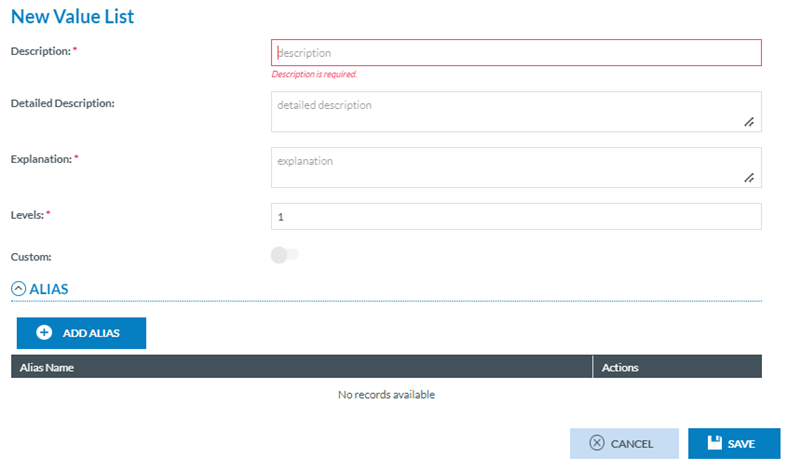
<span lang="EN-GB">National Security Administrators have to click on ‘New Value List’ above the table of Value Lists (See image above) and the system will provide the New Value List page:</span>

[![image.png](https://help.ci-aviationreporting.eu/uploads/images/gallery/2025-11/scaled-1680-/avhimage.png)](https://help.ci-aviationreporting.eu/uploads/images/gallery/2025-11/avhimage.png)

<span lang="EN-GB" style="mso-ansi-language: EN-GB; mso-fareast-language: EN-GB;"> </span>

<span lang="EN-GB">It provides the following fields:</span>

<span lang="EN-GB" style="font-family: Symbol; mso-fareast-font-family: Symbol; mso-bidi-font-family: Symbol; color: #1b3891; mso-themecolor: text1;"><span style="mso-list: Ignore;">·<span style="font: 7.0pt 'Times New Roman';"> </span></span></span><span lang="EN-GB">Description: it is mandatory and has to be unique</span>

<span lang="EN-GB" style="font-family: Symbol; mso-fareast-font-family: Symbol; mso-bidi-font-family: Symbol; color: #1b3891; mso-themecolor: text1;"><span style="mso-list: Ignore;">·<span style="font: 7.0pt 'Times New Roman';"> </span></span></span><span lang="EN-GB">Detailed Description: optional free text field</span>

<span lang="EN-GB" style="font-family: Symbol; mso-fareast-font-family: Symbol; mso-bidi-font-family: Symbol; color: #1b3891; mso-themecolor: text1;"><span style="mso-list: Ignore;">·<span style="font: 7.0pt 'Times New Roman';"> </span></span></span><span lang="EN-GB">Explanation: mandatory free text field</span>

<span lang="EN-GB" style="font-family: Symbol; mso-fareast-font-family: Symbol; mso-bidi-font-family: Symbol; color: #1b3891; mso-themecolor: text1;"><span style="mso-list: Ignore;">·<span style="font: 7.0pt 'Times New Roman';"> </span></span></span><span lang="EN-GB">Levels: number of levels. By default, the system sets 1 but it is editable to a max of 10 levels</span>

<span lang="EN-GB" style="font-family: Symbol; mso-fareast-font-family: Symbol; mso-bidi-font-family: Symbol; color: #1b3891; mso-themecolor: text1;"><span style="mso-list: Ignore;">·<span style="font: 7.0pt 'Times New Roman';"> </span></span></span><span lang="EN-GB">Custom toggle: not editable for National Security Administrators and enabled</span>

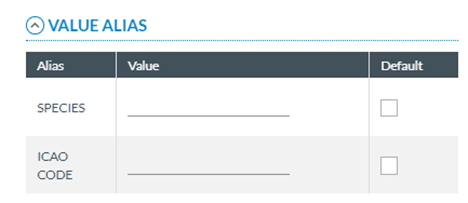
<span lang="EN-GB">Below the fields there is the Alias information with the ‘Add Alias’ button and below the structure for the table of Alias (Alias Name and Actions columns).</span>

<span lang="EN-GB">National Security Administrators have to fill in the mandatory and the needed information, including the Aliases, if required. To add Aliases, National Security Administrators have to click on ‘Add Alias’ and the system will open the Alias drop-down menu:</span>

[![image.png](https://help.ci-aviationreporting.eu/uploads/images/gallery/2025-11/scaled-1680-/j0bimage.png)](https://help.ci-aviationreporting.eu/uploads/images/gallery/2025-11/j0bimage.png)

<span lang="EN-GB" style="mso-ansi-language: EN-GB; mso-fareast-language: EN-GB;"> </span>

<span lang="EN-GB">It provides the Alias Support Table of the Administration menu. See section Support Tables for more details. National Security Administrator has to select an Alias and click on the Disk icon that will be enabled. The X icon is to discard the selection.</span>

<span lang="EN-GB">Once the Alias is selected, the Disk Save icon turns into a Delete icon:</span>

[![image.png](https://help.ci-aviationreporting.eu/uploads/images/gallery/2025-11/scaled-1680-/HErPpuimage.png)](https://help.ci-aviationreporting.eu/uploads/images/gallery/2025-11/HErPpuimage.png)

<span lang="EN-GB" style="mso-ansi-language: EN-GB; mso-fareast-language: EN-GB;"> </span>

<span lang="EN-GB">National Security Administrators can repeat the operation as many times as needed. Then they have to click on ‘Save’ button and the system will save the Custom Value List in the database and will add it to the table of Value Lists.</span>

#### <span style="mso-fareast-font-family: Calibri; mso-bidi-font-family: Calibri;"><span style="mso-list: Ignore;">4.6.4.2.<span style="font-family: Times New Roman; font-size: xx-small;"> </span></span></span>Edit a Custom Value List

<span lang="EN-GB">Only not locked Custom Value Lists can be edited. National Security Administrators have to click on ‘Edit Value List’ option of the 3-dots menu of the specific Custom Value List and the system will display the Edit Value List page:</span>

[![image.png](https://help.ci-aviationreporting.eu/uploads/images/gallery/2025-11/scaled-1680-/UBCimage.png)](https://help.ci-aviationreporting.eu/uploads/images/gallery/2025-11/UBCimage.png)

<span lang="EN-GB" style="mso-ansi-language: EN-GB; mso-fareast-language: EN-GB;"> </span>

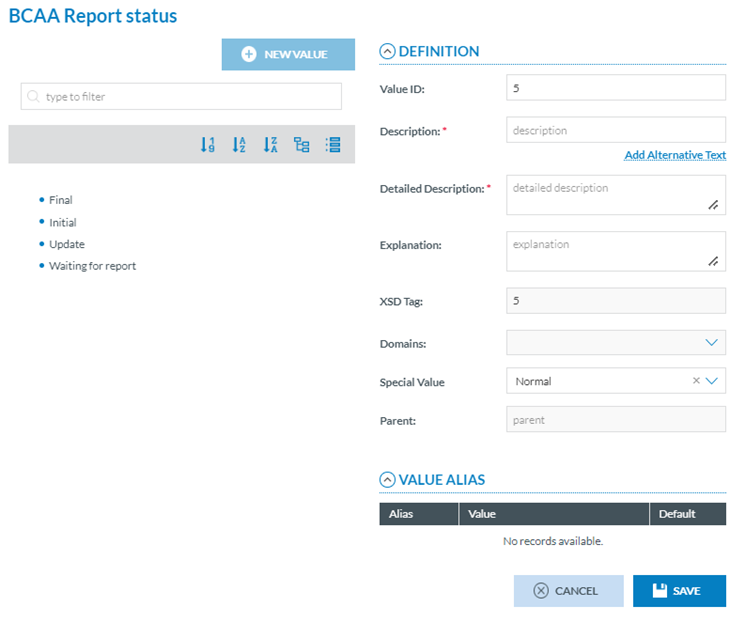
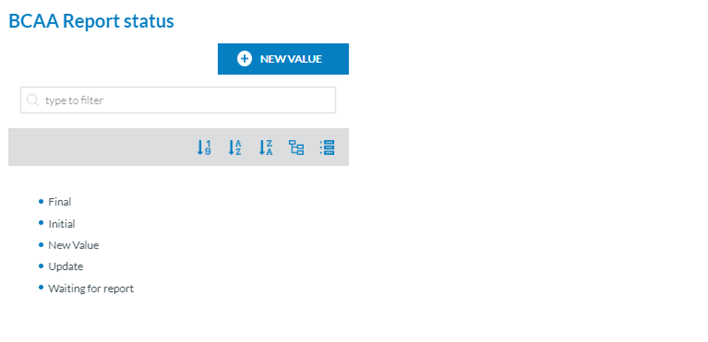
<span lang="EN-GB">National Security Administrators have to add Values to it through the New Value button. This button opens the Value information of the Custom Value List page:</span>

[![image.png](https://help.ci-aviationreporting.eu/uploads/images/gallery/2025-11/scaled-1680-/Umnimage.png)](https://help.ci-aviationreporting.eu/uploads/images/gallery/2025-11/Umnimage.png)

<span lang="EN-GB" style="mso-ansi-language: EN-GB; mso-fareast-language: EN-GB;"> </span>

<span lang="EN-GB">It provides a Definition area with the following fields:</span>

<span lang="EN-GB" style="font-family: Symbol; mso-fareast-font-family: Symbol; mso-bidi-font-family: Symbol; color: #1b3891; mso-themecolor: text1;"><span style="mso-list: Ignore;">·<span style="font: 7.0pt 'Times New Roman';"> </span></span></span><span lang="EN-GB">Value ID: numeric field and automatically generated but editable. If edited, XSD tag field, which is not editable and is based on the Value ID, will be updated with the same value</span>

<span lang="EN-GB" style="font-family: Symbol; mso-fareast-font-family: Symbol; mso-bidi-font-family: Symbol; color: #1b3891; mso-themecolor: text1;"><span style="mso-list: Ignore;">·<span style="font: 7.0pt 'Times New Roman';"> </span></span></span><span lang="EN-GB">Description: mandatory free text field</span>

<span lang="EN-GB" style="font-family: Symbol; mso-fareast-font-family: Symbol; mso-bidi-font-family: Symbol; color: #1b3891; mso-themecolor: text1;"><span style="mso-list: Ignore;">·<span style="font: 7.0pt 'Times New Roman';"> </span></span></span><span lang="EN-GB">Alternative description: which will be shown in the Views where it is indicated. Authorities can use this filed to translate the description of the value to another language.</span>

<span lang="EN-GB" style="font-family: Symbol; mso-fareast-font-family: Symbol; mso-bidi-font-family: Symbol; color: #1b3891; mso-themecolor: text1;"><span style="mso-list: Ignore;">·<span style="font: 7.0pt 'Times New Roman';"> </span></span></span><span lang="EN-GB">Detailed Description: mandatory free text field</span>

<span lang="EN-GB" style="font-family: Symbol; mso-fareast-font-family: Symbol; mso-bidi-font-family: Symbol; color: #1b3891; mso-themecolor: text1;"><span style="mso-list: Ignore;">·<span style="font: 7.0pt 'Times New Roman';"> </span></span></span><span lang="EN-GB">XSD Tag: not editable. It reproduces the information of the Value ID</span>

<span lang="EN-GB" style="font-family: Symbol; mso-fareast-font-family: Symbol; mso-bidi-font-family: Symbol; color: #1b3891; mso-themecolor: text1;"><span style="mso-list: Ignore;">·<span style="font: 7.0pt 'Times New Roman';"> </span></span></span><span lang="EN-GB">Domains: not editable for Custom Value Lists</span>

<span lang="EN-GB" style="font-family: Symbol; mso-fareast-font-family: Symbol; mso-bidi-font-family: Symbol; color: #1b3891; mso-themecolor: text1;"><span style="mso-list: Ignore;">·<span style="font: 7.0pt 'Times New Roman';"> </span></span></span><span lang="EN-GB">Special Value: drop-down menu with the following options:</span>

<span lang="EN-GB" style="font-family: Wingdings; mso-fareast-font-family: Wingdings; mso-bidi-font-family: Wingdings; color: #1b3891; mso-themecolor: text1;"><span style="mso-list: Ignore;">ü<span style="font: 7.0pt 'Times New Roman';"> </span></span></span><span lang="EN-GB">Normal: Selected by default</span>

<span lang="EN-GB" style="font-family: Wingdings; mso-fareast-font-family: Wingdings; mso-bidi-font-family: Wingdings; color: #1b3891; mso-themecolor: text1;"><span style="mso-list: Ignore;">ü<span style="font: 7.0pt 'Times New Roman';"> </span></span></span><span lang="EN-GB">None</span>

<span lang="EN-GB" style="font-family: Wingdings; mso-fareast-font-family: Wingdings; mso-bidi-font-family: Wingdings; color: #1b3891; mso-themecolor: text1;"><span style="mso-list: Ignore;">ü<span style="font: 7.0pt 'Times New Roman';"> </span></span></span><span lang="EN-GB">Other</span>

<span lang="EN-GB" style="font-family: Wingdings; mso-fareast-font-family: Wingdings; mso-bidi-font-family: Wingdings; color: #1b3891; mso-themecolor: text1;"><span style="mso-list: Ignore;">ü<span style="font: 7.0pt 'Times New Roman';"> </span></span></span><span lang="EN-GB">Unknown</span>

<span lang="EN-GB" style="font-family: Symbol; mso-fareast-font-family: Symbol; mso-bidi-font-family: Symbol; color: #1b3891; mso-themecolor: text1;"><span style="mso-list: Ignore;">·<span style="font: 7.0pt 'Times New Roman';"> </span></span></span><span lang="EN-GB">Parent: it is not editable</span>

<span lang="EN-GB">It also provides a Value Alias area with the list of Aliases of the Value List, if exist:</span>

[![image.png](https://help.ci-aviationreporting.eu/uploads/images/gallery/2025-11/scaled-1680-/Sayimage.png)](https://help.ci-aviationreporting.eu/uploads/images/gallery/2025-11/Sayimage.png)

<span lang="EN-GB" style="mso-ansi-language: EN-GB; mso-fareast-language: EN-GB;"> </span>

<span lang="EN-GB">National Security Administrators have to fill in the Value and check the ‘Default’ check box if needed.</span>

<span lang="EN-GB">If no Alias had been added to this Custom Value List, to add it, National Security Administrators have to do it through the ‘Set Value List Properties’ option of the 3-dots menu of the Custom Value List at the table of Value Lists. To be explained in later sections.</span>

<span lang="EN-GB">Once National Security Administrators have filled in the mandatory information and the needed information, the system saves the information in the database and updates the information of the Custom Value List and the table of Value Lists.</span>

[![image.png](https://help.ci-aviationreporting.eu/uploads/images/gallery/2025-11/scaled-1680-/eQ0image.png)](https://help.ci-aviationreporting.eu/uploads/images/gallery/2025-11/eQ0image.png)

<span lang="EN-GB" style="mso-ansi-language: EN-GB; mso-fareast-language: EN-GB;"> </span>

<span lang="EN-GB">To Add more values, National Security Administrators have to click on the specific Value of the left pane and the ‘New Value’ button will be activated and the right panel will disappear.</span>

[![image.png](https://help.ci-aviationreporting.eu/uploads/images/gallery/2025-11/scaled-1680-/jfaimage.png)](https://help.ci-aviationreporting.eu/uploads/images/gallery/2025-11/jfaimage.png)

<span lang="EN-GB" style="mso-ansi-language: EN-GB; mso-fareast-language: EN-GB;"> </span>

<span lang="EN-GB">Then National Security Administrators can click on ‘New Value’ to add another value.</span>

<span lang="EN-GB">National Security Administrators can update the editable information always keeping the mandatory information filled in and click on ‘Save’. The system will save the information in the database and will return to the table of Value Lists with the updated information.</span>

<span lang="EN-GB">National Security Administrators can edit Central Value Lists only to provide an Alternative Text to its values which can be shown in the Views where it is indicated. For example, to translate the Value Description to the Authority's preferred language. </span>

#### <span style="mso-fareast-font-family: Calibri; mso-bidi-font-family: Calibri;"><span style="mso-list: Ignore;">4.6.4.3. V</span></span>iew a Value List

<span lang="EN-GB">This option is only available in the 3-dots menu of the specific Custom Value List if it is locked or in the 3-dots menu of the specific Central Value List. National Security Administrators have to click on ‘View Value List’ option of the 3-dots menu and the system will display the View Value List page:</span>

[![image.png](https://help.ci-aviationreporting.eu/uploads/images/gallery/2025-11/scaled-1680-/Vm5image.png)](https://help.ci-aviationreporting.eu/uploads/images/gallery/2025-11/Vm5image.png)

<span lang="EN-GB" style="mso-ansi-language: EN-GB; mso-fareast-language: EN-GB;"> </span>

<span lang="EN-GB">It is like the previously explained editing page but it is not editable.</span>

#### <span style="mso-fareast-font-family: Calibri; mso-bidi-font-family: Calibri;"><span style="mso-list: Ignore;">4.6.4.4.<span style="font-family: Times New Roman; font-size: xx-small;"> </span></span></span>Set Custom Value List Properties

<span lang="EN-GB">National Security Administrators have to click on the Set Value List Properties option of the 3-dots menu of the table of Custom Value Lists and the system will display the Set Value List Properties page:</span>

[![image.png](https://help.ci-aviationreporting.eu/uploads/images/gallery/2025-11/scaled-1680-/o7limage.png)](https://help.ci-aviationreporting.eu/uploads/images/gallery/2025-11/o7limage.png)

<span lang="EN-GB" style="mso-ansi-language: EN-GB; mso-fareast-language: EN-GB;"> </span>

<span lang="EN-GB">The page provides the same information as the New page plus an automatically generated Identifier. The functionality works in the same terms of the creation page previously explained. </span>

<span lang="EN-GB">Note that if an Alias is removed from the list, the related values, if existing, will also be deleted.</span>

<span lang="EN-GB">National Security Administrators can update the needed fields always keeping the mandatory information field. Then they have to click on ‘Save’ button and the system will save the updates in the database and will update the table of Value Lists accordingly.</span>

#### <span style="mso-fareast-font-family: Calibri; mso-bidi-font-family: Calibri;"><span style="mso-list: Ignore;">4.6.4.5.<span style="font-family: Times New Roman; font-size: xx-small;"> </span></span></span>View Value List Properties

<span lang="EN-GB">This option is only available in the 3-dots menu of the specific Custom Value List if the Value List is locked or in the 3-dots menu of the specific Central Value List. National Security Administrators have to click on ‘View Value List Properties’ option of the 3-dots menu and the system will display the View Value List Properties page.</span>

<span lang="EN-GB">It is like the Set Value List Properties page of the previous section but it is not editable.</span>

#### <span style="mso-fareast-font-family: Calibri; mso-bidi-font-family: Calibri;"><span style="mso-list: Ignore;">4.6.4.6. </span></span>Copy Value List

<span lang="EN-GB">National Security Administrators have to click on the Copy Value List option of the 3-dots menu of the table of Value Lists and the system will display the Copy Value List page:</span>

[![image.png](https://help.ci-aviationreporting.eu/uploads/images/gallery/2025-11/scaled-1680-/osZimage.png)](https://help.ci-aviationreporting.eu/uploads/images/gallery/2025-11/osZimage.png)

<span lang="EN-GB" style="mso-ansi-language: EN-GB; mso-fareast-language: EN-GB;"> </span>

<span lang="EN-GB">It reproduces the content of the specific Custom or Central Value List properties page and adds ‘COPY’ to the Description of the Custom Value List. National Security Administrators can update the needed fields always keeping the mandatory information filled and then they have to click on ‘Save’ button. The system will save the copied Custom Value List in the database and will add it to the table of Value Lists.</span>

#### <span style="mso-fareast-font-family: Calibri; mso-bidi-font-family: Calibri;"><span style="mso-list: Ignore;">4.6.4.7. <span style="font: 7.0pt 'Times New Roman';"> </span></span></span>Delete a Custom Value List

<span lang="EN-GB">National Security Administrators have to click on the Delete Value List option of the 3-dots menu of the table of Value Lists and the system will display a warning message, National Security Administrators have to confirm the action and the system will delete the Custom Value List from the database.</span>

<span lang="EN-GB">A Value List cannot be deleted if it is being referenced in an Attribute.</span>

<span lang="EN-GB">National Security Administrator cannot delete Central Value Lists.</span>

#### <span style="mso-fareast-font-family: Calibri; mso-bidi-font-family: Calibri;"><span style="mso-list: Ignore;">4.6.4.8. </span></span>Export a Value List to Excel

<span lang="EN-GB">National Security Administrators have to click on the Export Value List option of the 3-dots menu of the table of Value Lists and the system will display the following warning disclaimer:</span>

[![image.png](https://help.ci-aviationreporting.eu/uploads/images/gallery/2025-11/scaled-1680-/jZaimage.png)](https://help.ci-aviationreporting.eu/uploads/images/gallery/2025-11/jZaimage.png)

<span lang="EN-GB" style="mso-ansi-language: EN-GB; mso-fareast-language: EN-GB;"> </span>

<span lang="EN-GB">If National Security Administrators accept, the system will download an Excel with the Value List information; at the same time, the Value List will be locked and the system will display a locker on this Value List at the table of Value Lists.</span>

#### <span style="mso-fareast-font-family: Calibri; mso-bidi-font-family: Calibri;"><span style="mso-list: Ignore;">4.6.4.9.<span style="font-family: Times New Roman; font-size: xx-small;"> </span></span></span>Import a Value List from Excel

<span lang="EN-GB">National Security Administrators have to update the needed fields in the excel file of the previous section. When the file is ready, National Security Administrators have to click on the ‘Import from Excel’ option of the 3-dots menu of the specific Custom Value List at the table of Value Lists and the system will display a Select File window:</span>

[![image.png](https://help.ci-aviationreporting.eu/uploads/images/gallery/2025-11/scaled-1680-/d1yimage.png)](https://help.ci-aviationreporting.eu/uploads/images/gallery/2025-11/d1yimage.png)

<span lang="EN-GB" style="mso-ansi-language: EN-GB; mso-fareast-language: EN-GB;"> </span>

<span lang="EN-GB">National Security Administrators have to upload the file to the window through the Select Files button or by dragging and dropping it. Then, they have to click on ‘Yes’ button. The system will display a warning message:</span>

[![image.png](https://help.ci-aviationreporting.eu/uploads/images/gallery/2025-11/scaled-1680-/PIeimage.png)](https://help.ci-aviationreporting.eu/uploads/images/gallery/2025-11/PIeimage.png)

<span lang="EN-GB" style="mso-ansi-language: EN-GB; mso-fareast-language: EN-GB;"> </span>

<span lang="EN-GB">National Security Administrators have to confirm the action and the system will update the information of the Custom Value List in the database. This process can take some time so the system will send an email to the National Security Administrator when the process is finished.</span>

<span lang="EN-GB">National Security Administrators can use the export and import Value List options for Central Value List to update the Alternative Texts of the Values Description.</span>

### <span style="mso-bookmark: _Toc170415824;">4.6.5. Review and correct inconsistencies and Release a Custom Taxonomy</span>

<span lang="EN-GB">National Security Administrators can check the inconsistencies of a Draft Custom Taxonomy through the Check inconsistencies icon placed on top of the Taxonomy manager:</span>

[![image.png](https://help.ci-aviationreporting.eu/uploads/images/gallery/2025-11/scaled-1680-/XaEimage.png)](https://help.ci-aviationreporting.eu/uploads/images/gallery/2025-11/XaEimage.png)

<span lang="EN-GB" style="mso-ansi-language: EN-GB; mso-fareast-language: EN-GB;"> </span>

<span lang="EN-GB">This icon </span>[![image.png](https://help.ci-aviationreporting.eu/uploads/images/gallery/2025-11/scaled-1680-/97qimage.png)](https://help.ci-aviationreporting.eu/uploads/images/gallery/2025-11/97qimage.png) <span lang="EN-GB" style="mso-fareast-language: EN-GB; mso-no-proof: yes;"> </span><span lang="EN-GB"><span style="mso-spacerun: yes;"> </span>reviews the inconsistencies, and the system will highlight in red in the Structure tab the items providing the inconsistencies, i.e.:</span>

[![image.png](https://help.ci-aviationreporting.eu/uploads/images/gallery/2025-11/scaled-1680-/FSRimage.png)](https://help.ci-aviationreporting.eu/uploads/images/gallery/2025-11/FSRimage.png)

<span lang="EN-GB" style="mso-ansi-language: EN-GB; mso-fareast-language: EN-GB;"> </span>

<span lang="EN-GB">If there are inconsistencies in the Value List tab, it is also highlighted in red.</span>

<span lang="EN-GB">Once National Security Administrators find the inconsistencies and fix them, National Security Administrators can click on the Release icon:</span>

[![image.png](https://help.ci-aviationreporting.eu/uploads/images/gallery/2025-11/scaled-1680-/wAJimage.png)](https://help.ci-aviationreporting.eu/uploads/images/gallery/2025-11/wAJimage.png)

<span lang="EN-GB" style="mso-ansi-language: EN-GB; mso-fareast-language: EN-GB;"> </span>

<span lang="EN-GB">This icon </span>[![image.png](https://help.ci-aviationreporting.eu/uploads/images/gallery/2025-11/scaled-1680-/JXZimage.png)](https://help.ci-aviationreporting.eu/uploads/images/gallery/2025-11/JXZimage.png)<span lang="EN-GB" style="mso-fareast-language: EN-GB; mso-no-proof: yes;"> </span><span lang="EN-GB">publishes the Custom Taxonomy unless there are still inconsistencies, in that case, the system will display a message warning it.</span>

<span lang="EN-GB">Instead of through this icon, National Security Administrators can click on ‘Release’ option of the 3-dots menu of the Draft Custom Taxonomy of the list. This option publishes the Custom Taxonomy unless there are still inconsistencies, in that case, the system will display a message warning it.</span>

# 4.7. Set Custom Taxonomy properties

<span lang="EN-GB">National Security Administrators have to click on ‘Set Properties’ option of the 3-dots menu of the specific Not Archived Custom Taxonomy of the list. The system will display the specific Taxonomy Properties page:</span>

[![image.png](https://help.ci-aviationreporting.eu/uploads/images/gallery/2025-11/scaled-1680-/pX7image.png)](https://help.ci-aviationreporting.eu/uploads/images/gallery/2025-11/pX7image.png)

<span lang="EN-GB" style="mso-ansi-language: EN-GB; mso-fareast-language: EN-GB;"> </span>

<span lang="EN-GB">The only editable fields are the following:</span>

<span lang="EN-GB" style="font-family: Symbol; mso-fareast-font-family: Symbol; mso-bidi-font-family: Symbol; color: #1b3891; mso-themecolor: text1;"><span style="mso-list: Ignore;">·<span style="font: 7.0pt 'Times New Roman';"> </span></span></span><span lang="EN-GB">Name: it is mandatory and unique for each Taxonomy</span>

<span lang="EN-GB" style="font-family: Symbol; mso-fareast-font-family: Symbol; mso-bidi-font-family: Symbol; color: #1b3891; mso-themecolor: text1;"><span style="mso-list: Ignore;">·<span style="font: 7.0pt 'Times New Roman';"> </span></span></span><span lang="EN-GB">Description: optional</span>

<span lang="EN-GB">National Security Administrators can update the fields and click on ‘Save’, the system will save the information in the database and the table of Taxonomies will be updated accordingly.</span>

# 4.8.

<span lang="EN-GB">Only Draft Custom Taxonomies can be deleted at Authority level. National Security Administrators have to click on ‘Delete’ option of the 3-dots menu of the specific Custom Taxonomy of the list and the system will display a warning message. National Security Administrators have to confirm the action and the system will delete the Custom Taxonomy from the database and from the table of Taxonomies.</span>

# 4.9. Taxonomy version number and name

<span lang="EN-GB">The Custom Taxonomy version and name is built as follows: </span>

<span lang="EN-GB" style="font-family: Symbol; mso-fareast-font-family: Symbol; mso-bidi-font-family: Symbol; color: #1b3891; mso-themecolor: text1; mso-fareast-language: ES;"><span style="mso-list: Ignore;">·<span style="font: 7.0pt 'Times New Roman';"> </span></span></span><span lang="EN-GB" style="mso-fareast-language: ES;">‘ECCAIRS Aviation’ string concatenated with:</span>

<span lang="EN-GB" style="font-family: Symbol; mso-fareast-font-family: Symbol; mso-bidi-font-family: Symbol; color: #1b3891; mso-themecolor: text1; mso-fareast-language: ES;"><span style="mso-list: Ignore;">·<span style="font: 7.0pt 'Times New Roman';"> </span></span></span><span lang="EN-GB" style="mso-fareast-language: ES;">Authority code - taken from the </span><span lang="EN-GB">A</span><span lang="EN-GB" style="mso-fareast-language: ES;">uthority details, followed by an underscore. </span><span lang="EN-GB">i</span><span lang="EN-GB" style="mso-fareast-language: ES;">.</span><span lang="EN-GB">e</span><span lang="EN-GB" style="mso-fareast-language: ES;">. </span><span lang="EN-GB">BE</span><span lang="EN-GB" style="mso-fareast-language: ES;">\_</span>

<span lang="EN-GB" style="font-family: Symbol; mso-fareast-font-family: Symbol; mso-bidi-font-family: Symbol; color: #1b3891; mso-themecolor: text1; mso-fareast-language: ES;"><span style="mso-list: Ignore;">·<span style="font: 7.0pt 'Times New Roman';"> </span></span></span><span lang="EN-GB" style="mso-fareast-language: ES;">Four-digit version code, which shows the </span><span lang="EN-GB">Central Taxonom</span><span lang="EN-GB" style="mso-fareast-language: ES;">y version on which the </span><span lang="EN-GB">C</span><span lang="EN-GB" style="mso-fareast-language: ES;">ustom is based. </span><span lang="EN-GB">i</span><span lang="EN-GB" style="mso-fareast-language: ES;">.</span><span lang="EN-GB">e</span><span lang="EN-GB" style="mso-fareast-language: ES;">. </span><span lang="EN-GB">8</span><span lang="EN-GB" style="mso-fareast-language: ES;">.</span><span lang="EN-GB">0</span><span lang="EN-GB" style="mso-fareast-language: ES;">.3.</span><span lang="EN-GB">1</span>

<span lang="EN-GB" style="font-family: Symbol; mso-fareast-font-family: Symbol; mso-bidi-font-family: Symbol; color: #1b3891; mso-themecolor: text1; mso-fareast-language: ES;"><span style="mso-list: Ignore;">·<span style="font: 7.0pt 'Times New Roman';"> </span></span></span><span lang="EN-GB" style="mso-fareast-language: ES;">Custom version number, in parenthesis. E.g. (C1)</span>

[![image.png](https://help.ci-aviationreporting.eu/uploads/images/gallery/2025-11/scaled-1680-/OJqimage.png)](https://help.ci-aviationreporting.eu/uploads/images/gallery/2025-11/OJqimage.png)