1.1. Introduction
This section sets the definition of terms and terminology used in the documentation explaining the functioning of the entire ECCAIRS 2 - SRIS 2 through the perspective of different roles.
1.1.1. About ECCAIRS 2 - SRIS 2
ECCAIRS 2 (European Coordination Centre for Accident and Incident Reporting Systems) is the second version of an IT system designed to support a collaborative network of National Aviation Authorities (NAAs) and Safety Investigation Authorities (SIAs) from EU Member States, along with the European Union Aviation Safety Agency (EASA). Its core mission is to facilitate the collection, sharing, and analysis of safety-related information to enhance the safety of public transportation.
Key Objectives:
- Integration of original reports from disparate, currently incompatible sources.
- Providing an occurrence reporting solution for Member States without an automated system.
ECCAIRS 2 (E2 hereafter) implements collection and dissemination requirements for:
- Reports and Occurrences, as well as,
- Safety recommendations from the Safety Investigation Authorities,
Member States' safety data is consolidated in two central databases:
- ECR-ECCAIRS – The European Central Repository for Occurrences (required by Regulation (EU) 376/2014), which aggregates national and European-level reports.
- ECR-SRIS – The European Central Repository for Safety Recommendations (required by Regulation (EU) 996/2010).
System Architecture & Functionality
E2 is an integrated system supported by two distinct but interconnected taxonomies:
- ECCAIRS Taxonomy (previously linked to ADREP) – Facilitates the collection and processing of original occurrence reports.
- SRIS Taxonomy – Enables the recording, tracking, and public dissemination of safety recommendations, including responses.
Occurrence Reporting Process
- Based on the ECCAIRS Taxonomy, which standardizes definitions and classifications.
- Reports are submitted via the E2 Web Application, validated, and converted into occurrences.
- Data can be shared at the European level (ECR) or optionally with other authorized entities within the E2 system.
There are three types of reports in the process:
-
- Original Report (OR): It is a description of the safety event submitted by a Reporter through the E2 Reporting Portal.
- Validated Report (VR): It is a copy of the OR validated by an Occurrence Officer through the E2 Web Application. It is editable, allowing enrichment. The Officer can also create a VR from scratch.
- Occurrence (OC): It is the main enriched report, representing the complete occurrence after integrating all related VRs. It consolidates all relevant information and is finally shared with the European Central Repository (ECR) for further analysis and safety oversight. The Officer can also create and OC from scratch.
In broad terms the reports lifecycle includes receiving an OR, validating it into VR, integrating the VR into an OC, and finally sharing the Occurrences with the European Central Repository (ECR):

In some cases, managing an occurrence can be more complex, as a single event (such as an accident or incident) may generate multiple OR from different reporters. Each OR is validated into a VR, and all VRs are eventually merged into a single OC to be shared with the ECR or forwarded to another authority. Furthermore, if changes are made to an OR or VR after processing has begun, they may conflict with existing data—therefore, the process includes mechanisms to identify and resolve such conflicts:
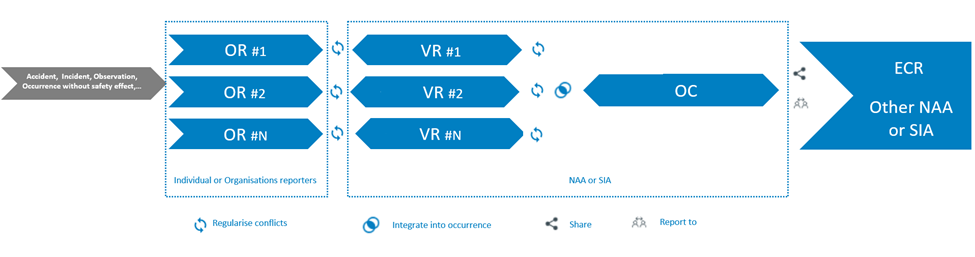
If an OR is sent to a non-competent authority, it may be transferred to the appropriate one.

The following picture shows the status workflow of the Original Reports, Validated Reports, Occurrences; and how they are related to each other.
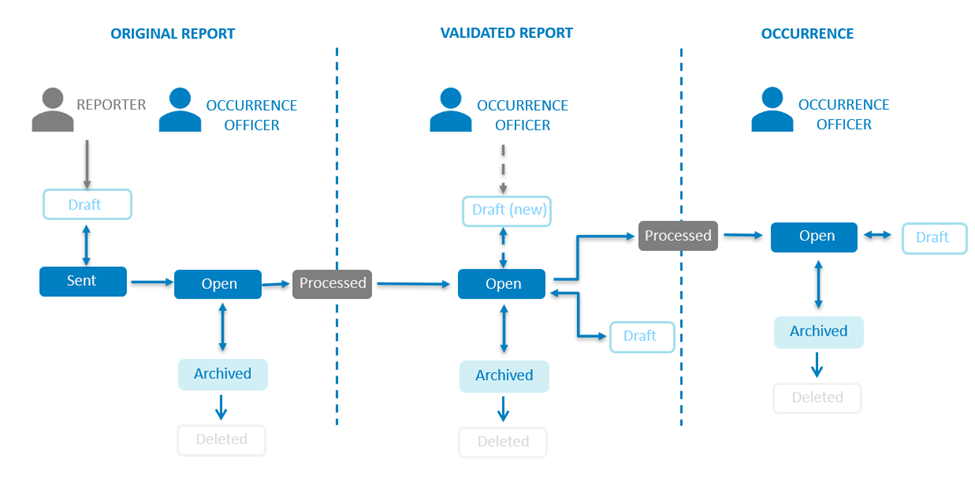
The roles involved are ‘Reporters’ and ‘Occurrence Officers’:
- Reporters, include individual and organisation Reporters, as well as those users that choose to report an Occurrence without registration.
- Occurrence Officers, include all the users that are part of an Authority, and have permissions to view, create and edit documents.
Safety Recommendations Process
- Powered by the SRIS Taxonomy to support Safety Investigation Authorities (SIAs).
- Enables the recording, tracking, and publication of safety recommendations, along with response monitoring, on a dedicated public portal.
The system process:
-
- Safety Recommendation (SR): It is the proposal of a Safety Investigation Authority based on information derived from an investigation made with the intention of preventing accidents or incidents and which in no case has the purpose of creating a presumption of blame or liability for an Occurrence. In addition to Safety Recommendations arising from Occurrence investigations, Safety Recommendations may result from diverse sources, including safety studies. It is finally shared with the European Central Repository of Safety Recommendations (ECR-SRIS) for further analysis and dissemination.

The following picture describes the lifecycle of the SR’s life from its creation to its publication, or archive and deletion.
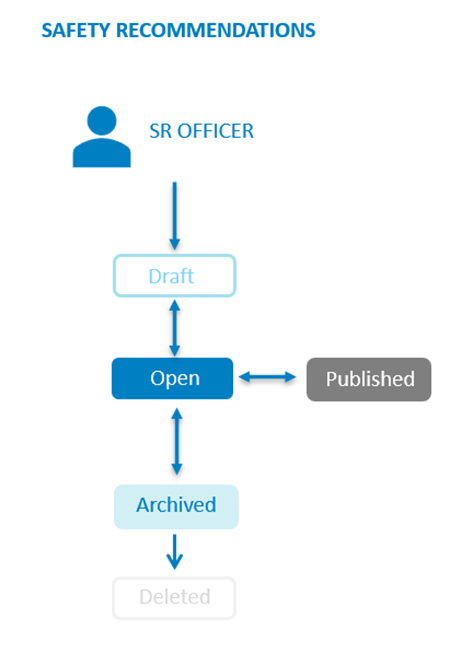
SR Officers, include all the users that are part of the accident investigation Authority, and have permissions to view, create and edit Safety Recommendations.
Original Reports, Validated Reports, Occurrences and Safety Recommendations Records exist in two type of versions: major versions that are shared and minor versions that only available for the Authority. There are also draft versions that are visible to the user only.
1.1.2. ERCS
Regulation (EU) 376/2014 on Occurrence Reporting, requires that member states risk classify all Occurrences using the European Risk Classification Scheme (ERCS). The goal of this risk classification is to enable a harmonised assessment of aviation safety risks across Europe and across the different technical domains, such as commercial air transport operations, leisure flying, ATM/ANS, or aerodromes and ground handling.
The European Risk Classification Service (ERCS) wizard is a tool to help users fill in the information. It is based on what is captured in the Support Master Tables. Each table defines the restrictions and dependencies between the Value List values of the Attributes involved in the ERCS calculation.
There exist 3 Support Master Tables:
· ERCS KRALevel1/Severity
· ERCS Barriers
· ERCS Matrix
1.1.3. Taxonomy
Background:
The E2 portal collects information on incidents concerning civil aviation. This information comes from people from different origin, technical and not technical. Bringing together data that has used different definitions makes it very difficult to analyse and draw meaningful conclusions. That is why a specific classification to unify the terms concerning the aviation reporting was needed and introduced in the portal. First a group of forward-thinking people got together at global level under the guidance of ICAO to develop a common aviation Taxonomy. This was called the Accident/ Incident Data Reporting System (or ADREP). After some time, the management of this Taxonomy at a detailed level has passed to EASA forming the basis of the ECCAIRS system. Today, it is known as the ECCAIRS Taxonomy and it is a vital building block for sharing data at European Level and beyond.
Definition:
The Taxonomy of ECCAIRS is the catalogue of structured and hierarchised information describing what information can be stored in the ECCAIRS Repository and how this information is (possibly) encoded in the data fields of the aviation Reports. There is an ECCAIRS Taxonomy for ORs, VRs and OCs and a SRIS Taxonomy for SRs. Each Authority can create custom Taxonomies based on the standard ECCAIRS or SRIS Taxonomy.
The Taxonomy is organised in Parent Entities, Entities and Attributes.
- Entity: It is an item to which a set of Attributes can be associated. Entities are used to represent items to which a set of Attributes can be associated. An Entity can be, for instance, the "aircraft", "ship", etc. involved in the Occurrence, or the related "events" description. There may be multiple instances of Entities since more than one of these items can be involved. Entities can have Parent Entities and Child Entities.
- Attribute: It is the smallest item that gives information about an aviation incident or an accident or safety event. A safety event can be described through a list of Attributes.
- Value Lists: The list of values an Attribute can have is defined in a Value List. The Value List can have multiple level where values are organised in a tree mode. Value Lists can have Alias.
- Support Tables: They contain information that helps other processes of the ECCAIRS 2 platform. Support Tables are used at Taxonomy level to amplify the Attributes information. The Support Tables are:
· Alias
· Attribute Groups
· Conversion Factors
· Domains
· Measurement Units
· Measurement Unit Classes
1.1.4. View and Sections
Sections: A section is a cohesive set of Attributes of the ECCAIRS2 or SRIS central or custom Taxonomy depicting a sub-domain of a safety event that is registered in an E2 Report.
Topics: A topic is a specific group of Attributes, linked to an Occurrence that can be viewed by a user role. For navigation purposes, Sections can be grouped together in Topics.
Views: A View is a visual representation of ordered data (Attributes) concerning a safety event (accident or incident) to facilitate human analysis and its collection and introduction in a Report. Views are grouping of Topics placed in a particular sequence (hierarchical tree).
Webforms: The Webforms are used by the Reporters when using the E2 Reporting Portal to report an Occurrence (Original Report). A Webform is associated to a released View available at Authority level.
1.1.5. Batch Operations
Batch Operations (BO): With Batch Operations it is possible to execute actions over Original Reports, Validated Reports or Occurrences that meet the conditions expressed in the Query on which they are based on.
Manual Batch Operations: are executed by an administrator with the proper permissions and the action defined in the Batch Operation will be applied over the documents that meet the conditions expressed in the Query of that manual Batch Operation.
Continuous Batch Operations: are executed automatically every time a document is saved and meets the conditions expressed in the Query of the continuous Batch Operation. One or more continuous Batch Operations can be triggered when the document being saved meets the conditions of each of the Queries of these Batch Operations. In that case, they are executed in alphabetic order.
1.1.6. Queries
The Query Builder allows Authority users build Queries to search Original Reports, Validated Reports, Occurrences and Safety Recommendations with Attributes or metadata fields that meet the given conditions.
The Queries are executed against the documents indexed in Elastic Search.
1.1.7. Data Viewer Officer
The following sections describe all the functionalities and tasks that Data Viewer Officers can perform using the E2 Web Application. They can only access information—such as reports, queries, and views—that is owned by their respective Authority.
Occurrence Officers can find essential information in the following sections:
- Safety Data – outlines all tools for viewing reports.
- Data Management – includes Queries to filter and export reports (OR, VR, OC), plus Word Templates.
- Taxonomy Browser – helps locate entities and attributes with clear definitions.